We remain fully operational. Our teams are working around the clock to ensure your deliveries continue safely.

قم بتنزيل التطبيق


معلومات عنا
حقوق الطبع والنشر © 2024 Desertcart Holdings Limited
قم بتنزيل التطبيق
Buy anything from 5,000+ international stores. One checkout price. No surprise fees. Join 2M+ shoppers on Desertcart.
Desertcart purchases this item on your behalf and handles shipping, customs, and support to KUWAIT.
🖥️ Elevate your Mac mini game—cool, sleek, and effortlessly controlled.
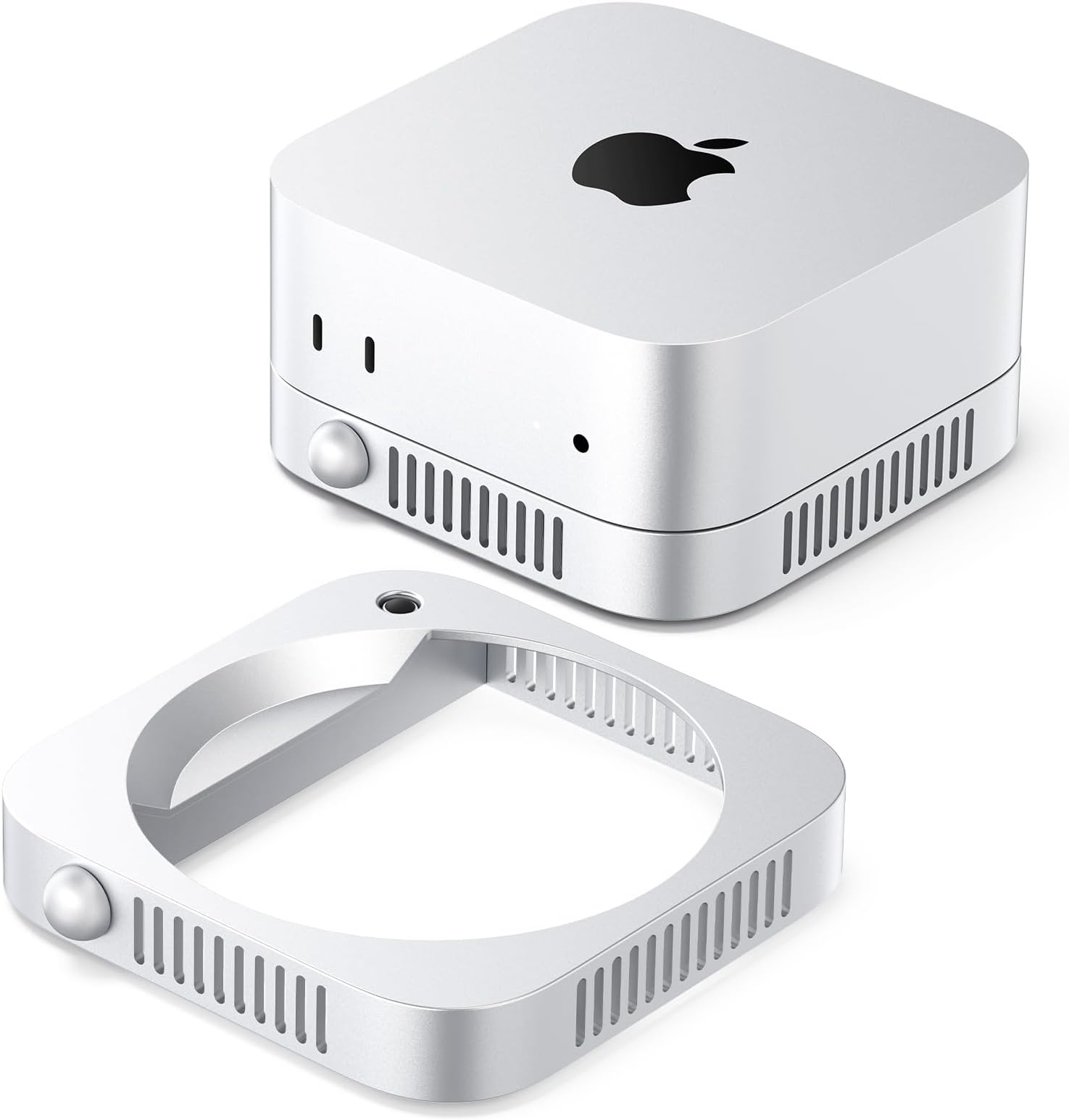
The ORICO Mac mini Stand is a premium ABS silver riser designed specifically for all Mac mini models, featuring a patented 360° airflow system to prevent overheating, a built-in power switch for easy on/off control without lifting, and a sleek metallic finish with a silk-screened logo that complements any Apple-centric workspace. Its compact, sturdy design declutters your desk while enhancing device accessibility and cooling efficiency, making it an essential upgrade for remote workers, creatives, and Apple enthusiasts.
| ASIN | B0FP93SS46 |
| Best Sellers Rank | #90,467 in Electronics ( See Top 100 in Electronics ) #1,006 in Laptop Docking Stations |
| Brand | ORICO |
| Color | Silver |
| Compatible Devices | Desktops |
| Customer Reviews | 4.2 out of 5 stars 36 Reviews |
| Hardware Interface | USB |
| Manufacturer | SHENZHEN ORICO TECHNOLOGIES CO.,LTD |
| Model Number | ORICO-ST01 |
| Number of Ports | 2 |
| Smart Home Compatibility | Not Smart Home Compatible |
| Total USB Ports | 2 |
| Total Usb Ports | 2 |
| Unit Count | 1.0 Count |
| Warranty Description | 2 Year Manufacturer |
B**O
Great stand and it works!
I finally got a stand that also lets me turn off and on my Mac mini M4!
R**L
It works
It’s functional. It doesn’t hold the Mac Mini in place, it isn’t like a snug fit, it’s just a platform where it rests so it can move and look skewed if accidentally bumped. But it does work great to turn on the computer without having to lift it. And the color matches the computer perfectly. I like it.
W**Y
Makes the power button accessible without picking up the Mac Mini
I never liked that the M4 Mac Mini had its power button put on the bottom. This stand raises the computer up, allowing more ventilation, more air circulation, and it provides a button to push that turns on the computer without having to lift the computer. A great idea. It also makes the Mac Mini stackable. It is designed specifically for this Mac Mini. The stand looks identical in color and texture. It matches well, giving a seamless look to stackable devices. It is made from a lightweight material. ABS plastic with a metallic painted finish. I ordered the "portable switch" version. This version has no connectivity. The main feature of this version is the access to the power button, which works very well. It's easy to use, just stack the Mac Mini on top the correct way, and the power button is now accessible, and it has additional air flow. It's a good stand, and a good value.
E**T
Clean, Space-Saving Mac mini Riser with Airflow-Friendly Design
If you keep a Mac mini tucked under a monitor or on a crowded desk, a dedicated stand like this can be a simple way to make the setup feel cleaner and a little more purposeful. The silver finish is designed to visually blend with a Mac-centric workspace, and the raised platform approach helps keep the unit off the desk surface while still looking minimal. In a typical desk setup, the standout idea here is the built-in power switch on the stand itself. For people who position their Mac mini in a tight spot (behind a display, under a shelf, or pushed back for cable management), having a more accessible on/off control could be a nice quality-of-life improvement. The “open airflow” concept is also practical—elevating the device and keeping the underside unobstructed can help avoid trapping heat, especially during longer work sessions. Pros • Makes a Mac mini setup look cleaner by lifting it slightly and reducing visual clutter • Built-in power switch concept is convenient when the Mac mini is placed in a hard-to-reach spot • Open ventilation-style design keeps the underside from being blocked by the desk surface • Lightweight ABS build is easy to reposition and should be gentle on desks and shelves Cons • ABS construction is durable for daily use, but it won’t feel as premium as a fully metal stand • The added power-switch feature is most useful only if your Mac mini is truly awkward to access Final Thoughts This stand is best for Mac mini users who want a tidier footprint and easier day-to-day access—especially if the computer lives under a monitor, on a shelf, or anywhere the built-in button is annoying to reach. On storage capacity, it doesn’t add any storage expansion (it’s a stand/control accessory, not a drive or enclosure), so its value is purely in ergonomics and desk organization. On functionality, the combination of the raised, ventilation-friendly design and the built-in power switch is the real win—it makes the Mac mini easier to manage without having to lift or reposition it. On USB ports, the two built-in ports are a nice convenience for quick plug-ins (like a dongle, flash drive, keyboard/mouse receiver, etc.) so you’re not constantly reaching around the back of the Mac mini. If you want a simple workspace upgrade that improves access and keeps your setup feeling streamlined, it’s a solid value for the price.
G**T
Clean Design, Smart Power Access, and Great Desk Upgrade for Mac Mini
I’ve been using this Mac mini stand for a few weeks now, and it’s turned out to be a genuinely useful upgrade rather than just a cosmetic one. If your Mac mini lives under a monitor, on a shelf, or tucked into a tight space, this stand makes the whole setup feel cleaner, more intentional, and much easier to manage. The standout feature is the built-in power button. Anyone who’s had to awkwardly lift the corner of a Mac mini just to turn it on will immediately appreciate how convenient this is. Being able to power it on from the side of the stand is a small change that makes a big difference day to day. Design-wise, it looks like it was made by Apple. The silver finish matches the Mac mini perfectly, and once it’s in place, it honestly feels like part of the computer rather than an add-on. The raised, open design improves airflow, helps reduce heat buildup, and keeps dust from collecting underneath. Setup couldn’t be simpler—no tools, no assembly. I just set it on the desk and placed my Mac mini on top without even shutting it down. The ABS material isn’t metal, but it feels solid, lightweight, and premium enough that it doesn’t detract from the overall look. Another nice bonus is the modular stacking design. If you’re running multiple Mac minis, this stand makes it easy to stack them while still maintaining airflow, which is a huge space saver on a crowded desk. The extra USB ports are also handy for quick-access devices like dongles or flash drives. If you only use one Mac mini and don’t mind reaching around to hit the power button, this might feel like a “nice-to-have.” But if desk organization, airflow, stacking, or power button access matter to you, this stand is absolutely worth it. Clean look, smart design, and very practical—I’m really glad I picked it up.
R**D
Simple, Smart Stand That Makes the Mac mini Easier to Use and Stack
Why I Got This: I wanted a cleaner way to organize my desk and make the Mac mini’s power button easier to reach. I also liked the idea of being able to stack multiple Mac minis neatly instead of spreading them out. What I Liked: The stacking design works exactly as advertised. The interlocking system feels secure and makes it easy to stack multiple Mac minis without worrying about slipping. It noticeably improves access to the Mac mini’s on/off button. Lifting it slightly off the desk makes a bigger difference than I expected. The silver ABS finish looks very “Apple-like” and blends in nicely with the Mac mini—clean, minimal, and not cheap-looking. Ventilation is well thought out. Raising the Mac mini helps airflow and keeps it from sitting directly on the desk where heat and dust can build up. Tool-free setup is a win. You literally just place it down and you’re done—no screws, no adjustments. For the price, it feels sturdy and well-made, not flimsy. What Could Be Better: It’s plastic rather than metal, which might matter to people who want a heavier, more premium feel (though it still feels solid). If you’re only using one Mac mini and don’t care about stacking or button access, it may feel more like a “nice-to-have” than a necessity. Bottom Line: This is a thoughtfully designed stand that solves a few small but real Mac mini annoyances—especially power button access and stacking multiple units. If you run more than one Mac mini or want a cleaner, more modular setup, this is an easy, affordable upgrade that looks good and works well.
G**E
Perfect stand for single or multi-Mac Mini Setups
This stand is such a good fit for the Mac Mini - it looks like an actual part of the computer because it matches the design so well. It’s perfect for lifting the computer off the desk for better airflow and makes the power button much easier to press - I don’t have to lift the Mini’s corner just to turn it on. It’s also a great way to add a 2nd Mac Mini to my desk because the stand’s modular design allows me stack 2 or more Mac Minis while maintaining air flow to keep everything running cool. Such a smart design that will give me more desk space with multiple computers. Setup couldn’t have been easier. There’s no assembly - I just placed it on my desk and set my Mac Mini on top. I didn’t even have to turn it off. The stand is made from a solid metallic‑style plastic that matches the Mac Mini’s finish, and the Mini slots perfectly into it like it’s part of the original design. Overall, this stand is a great way to raise the Mini off my desk to prevent dust buildup, and reduce heat. It’s got a clean look and looks great on my desk. I’m really glad I found it.
S**S
Resolves the irritating need to reach underneath your M4 to turn it on and off.:) Recommended
For the Mac M4 mini user, this simple accessory ( I received the 02 version) is actually something worth having. Put aside for a moment, Apple's apparently intentional, inconvenient placement of their power on/or button to dissuade you from ever turning your M4 off :/, this Orico stand not only resolves THAT issue in a 'satisfying' way:) but also lets you stack additional M4's if you need to, without drama, increase of desktop foot print, while helping a bit with cooling fan ventilation and probably a bit of dust exposure as well. It also doesn't hurt the M4's 'aesthetics' any:) However, in the true spirit of the Apple universe, the price seems a bit over the top (this coming from a former UNIX/linux weenie heheheh). However since price seems to have never been a matter of primary concern in the Apple environ, as I said, this ORICO Stand does turn out to be quite useful:) Note that there are other versions which differing features:) I give it 4 stars, taking one for being a bit overpriced. Recommended if you're as irritated over the M4's power button placement as much as I am.
ترست بايلوت
منذ شهر
منذ شهرين