Buy anything from 5,000+ international stores. One checkout price. No surprise fees. Join 2M+ shoppers on Desertcart.
Desertcart purchases this item on your behalf and handles shipping, customs, and support to KUWAIT.
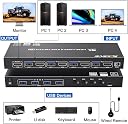
HDMI KVM Switch 4 Computers 1 Monitors, Simulation EDID, 4K@60Hz, 4 Port KVM Switch HDMI Share 1 Monitor and Keyboard Mouse Printer, with Desktop Controller, 4 USB 3.0 Cables and 12V Power Adapter : desertcart.co.uk: Computers & Accessories Review: Working flawlessly - Working flawlessly with my setup of three machines (Ubuntu and 2x Windows 11), each connected via USB, one displayport and one HDMI. I have two Dell 2560x1440 60Hz monitors, one connected via Displayport and one HDMI, can switch between machines in seconds. Review: Magic - Magic, you plug things in and it switches between them. The remote is a bit small, but works. The additional USB inputs are very handy.


| ASIN | B0GHDYS8WT |
| Best Sellers Rank | 27,148 in Computers & Accessories ( See Top 100 in Computers & Accessories ) 84 in KVM Switches |
| Brand | camgeet |
| Circuit Type | 4-way |
| Colour | black |
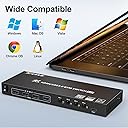
| Compatible Devices | Windows 11/10/8/7/Vista/XP, Mac OS, Linux, Chrome OS |
| Connector Type | Plug In |
| Contact Material | Metal |
| Contact Type | Normally Open |
| Control Method | Push Button, Remote |
| Control Type | Manual |
| Country Of Origin | China |
| Current Rating | 1 Amps |
| Customer Reviews | 4.1 4.1 out of 5 stars (216) |
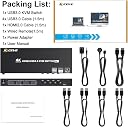
| Included Components | KVM Switch,HDMI Cable,USB3.0 Cables,Wired Remote ,Power adapt |
| International Protection Rating | IP44 |
| Item Dimensions | 20.3 x 7.8 x 2.8 centimetres |
| Lower Temperature Rating | 10 Degrees Celsius |
| Manufacturer | camgeet |
| Manufacturer Part Number | 4 port kvm switch hdmi |
| Material | Metal |
| Model Number | hdmi kvm switch 4 computers |
| Mounting Type | Panel Mount |
| Number of Items | 1 |
| Number of Positions | 1 |
| Operating Voltage | 12 Volts (DC) |
| Operation Mode | ON-OFF |
| Specification Met | CE |
| Switch Type | Push Button |
| Terminal | Through Hole |
| UPC | 686585115447 |
| Unit Count | 1.0 count |
| Upper Temperature Rating | 60 Degrees Celsius |
I**H
Working flawlessly
Working flawlessly with my setup of three machines (Ubuntu and 2x Windows 11), each connected via USB, one displayport and one HDMI. I have two Dell 2560x1440 60Hz monitors, one connected via Displayport and one HDMI, can switch between machines in seconds.
A**R
Magic
Magic, you plug things in and it switches between them. The remote is a bit small, but works. The additional USB inputs are very handy.
M**V
Very convenient slight lag but not disturbingly so
Nearly perfect, but well worth the expense. I have set this up between my MACBPro and my work PC and 2 screens. My keyboard is plugged into the unit alongside a wired mouse. Everytime I switch I move from 2 screens on my work laptop to right screen work and left screen MBP. The control of the mouse and keyboard (in this mode moves from work PC to MBP. I switch it again and I am back to both screens work and no mac with full mouse and keys to work laptop. Why? My work laptop is strictly work, i do not google / research or download anything non corporate on this machine - pure work work work. My MBP? Everything else. So, when i want / need a break I flick - still browsing emails on my work machine, whilst catching up on whatever on my left hand side. It works really well with 2 caveats. My MBP needs to be woken up when i flick, i think this is a setting - but slightly annoying regardless. 2nd it takes 5 secs to flick between as the displays catchup. I think this is my two lareg displays rather than the switch, but not sure. Last but not least. the wiring (supplied) requires a USB into each machine. This is the old type on type C so I have to use an adapter for my MBP. There is a mini switch with the unit which makes flicking back and forth very easy and a little bit cute. Other than that this is a great solution for my needs - work and play in the same view and flicking play off when I need to focus.
S**L
Excellent product
This thing is good, it makes me forget I have KVM switch.
C**W
Does not work with portable/low power monitors
Edit: After a long discussion with the seller, it was determined that the fault could not be resolved with different cables or toggling the emulated EDID feature. So my conclusion stands - this KVM appears to cause distorted red pixelation when used with a low power portable monitor. I have since found a different KVM that does not show this fault, which again adds to my conclusion that this KVM is not fit for use with portable monitors. Original: I'm trying to be fair by giving this 3/5 stars. It is a sleek design, and I wanted to keep this, but it simply does not work with the portable monitor I have. I tried a different monitors, and yes, this did work then, but with the monitor I want to use it with, no. If I bypass the KVM and plug each of the source devices into the portable monitor, they all work fine. The KVM in between is causing a red distortion in the output. It's worth noting, that I have a 2-way KVM that does not have this problem and works with the portable monitor without any distortion to the output. I'm not entirely sure why it isn't happy with the portable monitor, but given there appears to be no way to update the KVM's firmware, and having tried every combination of cable, source, power supply etc and nothing working, this simply isn't capable of doing what I need. If you're using a normal, mains powered monitor, this may work well, but if you're using it with a low power portable monitor, look elsewhere.
M**T
Won't work for me
I have a 2 in 1 out version KVM switcher and it works brilliantly so I know how to set them up - This is a 4 in 1 out, sometimes it works but 9 times out of 10 it doesn't, the monitor stays blank ... so no good to me, I have tried everything to get it to work .......So it's going In the bin.
T**M
Makes my computing life so much easier
I have 2 GNU/Linux boxes, a M$ windows desktop and laptop. This KVM switch is ideal. Feeds a 4K monitor perfectly. I'll likely need to go bigger in a month or two, 4 USB device ports is not enough: keyboard, mouse, webcam and USB stick fill all 4, have to play swapsies with USB audio interface and Raspberry Pi from time to time.
B**R
Very good 4x hdmi/usb3 switch
Compact hdmi/usb3 switch for 4 computers and 1 monitor. It just works. Very impressed with its simplicity.
N**N
Até agora parece muito bom! Super estável e rápido.
S**K
Funktioniert, zumindest mit 2 ein einfachen HD Monitoren. Auch USB Memory Sticks und und Funk Maus/Tastatur funktionieren.
T**B
Funktioniert wirklich gut. Keine Probleme. Es ist alles dabei. Bis auf die HDMI-Kabel, die muss man extra kaufen. Die USB 3.0 Kabel sind mit 1,5 m nicht besonders lang. Die PCs müssen also relativ nahe beieinander stehen.
J**.
Tengo un problema, tengo 7 ordenadores y ellos tienes diferentes tipos de grafica y resoluciones, estoy teniendo problema con eso, hay uno de ellos que no da video por medio del KVM y otros dos la pantalla parpadea de forma intermitente, hay ocasiones que si y otras que no, no se si es el producto o no, vi un comentario de este que no va muy bien, alguien le pasa, alguien tendría la solución, o si me recomiendan otro de mejor calidad o estabilidad, gracias.
R**N
I haven't used a KVM switch since they were all ps2 and vga ports. This works great and does allow you to share usb devices between machines, assuming you have the appropriate driver installed for that device on each computer.
Trustpilot
2 weeks ago
3 weeks ago