




SmartiPi Touch - Case for Official Raspberry Pi 7 inch Screen - Lego® Compatible Front
Product ID: 81226566
Details
- BrandSmarticase
- Case TypeRaspberry Pi
- Hard Disk Form Factor3.5 Inches
- Item Weight0.55 Pounds
- ManufacturerSmarticase
- UPC630125953006
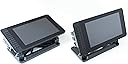
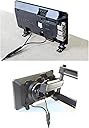
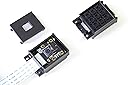
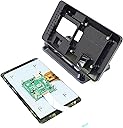
Please note that the HDMI port on the Raspberry Pi is not accessible with this case. The SmartiPi Touch is a recent Kickstarter success. The super slim design allows you the ultimate versatility in mounting the case almost anywhere. The case can easily be adjusted to any angle. Small metal mounts are also included that allow you to create a minimal footprint and attach to walls or any surface. The case also works with Raspberry Pi HAT boards. This case version has LEGO compatible studs on the front. We also offer another version that does not have LEGO compatible studs on the front of the case. The included LEGO compatible camera case works with Pi camera versions 1 and 2. The case also includes a micro usb splitter cable that you can use to power the display and Raspberry Pi at the same time. The case is made out of strong ABS plastic. Disclaimer: LEGO is a registered trademark of the LEGO Group of companies. This product is not endorsed or licensed from the LEGO Group of companies.Raspberry Pi and Official Raspberry Pi display not included. Review: Nice case, works well with LEGO, HDMI port not necessary. - I purchased this case to protect my Raspberry Pi touch screen. The official screen has no back case and the edges are very thin so I imagine it would be easy to damage. I'll admit that I liked this case because of the Lego compatible features. Everything just fits. No fiddling, no adjustments. The plastic is solid and the base doesn't flex. It comes with base shown as well as two metal brackets that you can attach in place of the base then screw down to a surface. No instructions, but there is a video on their website. It comes with a Y-power cable. One micro USB female in, two cords with micro USB male connectors coming out. So you don't have to install the patch cables that comes with the screen between the Raspberry Pi and the screen's driver board. Minor issue, but one less set of wires to worry about. I might install the patch cables anyway so I don't have to rely on the Y-power cable. However I don't plan on removed the Y-power cable so it shouldn't be an issue. One niggling issue for me is that you can screw the Raspberry Pi board into the case, or use the snap in cover to hold it down. But you cannot do both. The snap in cover has pegs that fit through the mounting holes of the board then into the case. If you put a screw in the hole, then the peg cannot fit. Although if you screw it down, then you cannot remove the microSD card. Because the USB/Ethernet ports face out toward the side, that puts the card slot facing inward. Having the cover hold in the board means you don't need tools to access the card. I would like to have used a screw to prevent someone from easily removing the board since I plan on using this as an unattended display. I supposed I could cut one peg off and use a single security screw. Some reviews have been critical about not being able to access the HDMI port. It is true. The HDMI port of the Raspberry Pi is blocked by the snap clip of the cover. However it should be noted that you can only use the touchscreen OR the HDMI port. You cannot use both. This is not a fault with the case, it just is the way the Raspberry Pi works with the Raspberry Pi 7" touch screen. You also cannot switch between the two like a laptop. You would have to remove the screen's video ribbon cable from the Raspberry Pi. Currently, people are looking into a way to be able to use both or be able to software switch. However as of right now, dual monitor setup is not implemented in the operating system. It comes with the camera case as well as a 2x8 plate that can be used to connect the camera to the top of the case as shown in the product image. This is not shown in the photo of all the parts. I am happy with my purchase and would definitely recommend it for people looking for a case for the Raspberry Pi and the official screen. Review: Ok - Las sujeciones son como las de cámaras deportivas: go pro, etc Por otro lado no tiene sujeción de lego a un lateral de la carcasa
| ASIN | B01HKWAJ6K |
| Brand | Smarticase |
| Brand Name | Smarticase |
| Case Type | Raspberry Pi |
| Case type | Raspberry Pi |
| Colour | Or |
| Compatible Devices | Raspberry Pi HAT boards, Official Pi display, Raspberry Pi A+, B+, 2, 3 |
| Customer Reviews | 4.3 out of 5 stars 142 Reviews |
| Enclosure Material | Acrylonitrile Butadiene Styrene (ABS), Metal, Plastic |
| Item Weight | 249 g |
| Item weight | 249 g |
| Manufacturer | Smarticase |
| Manufacturer Part Number | smt2yl |
| Material | Acrylonitrile Butadiene Styrene (ABS) , Metal, Plastic |
| Model Number | SM T2YL |
| Other Special Features of the Product | Wall Mountable, Adjustable Angle, Works with Raspberry Pi HAT boards, Includes LEGO compatible camera case |
| Special feature | Wall Mountable, Adjustable Angle, Works with Raspberry Pi HAT boards, Includes LEGO compatible camera case Special feature Wall Mountable, Adjustable Angle, Works with Raspberry Pi HAT boards, Includes LEGO compatible camera case See more |
| UPC | 630125953006 |
L**I
Nice case, works well with LEGO, HDMI port not necessary.
I purchased this case to protect my Raspberry Pi touch screen. The official screen has no back case and the edges are very thin so I imagine it would be easy to damage. I'll admit that I liked this case because of the Lego compatible features. Everything just fits. No fiddling, no adjustments. The plastic is solid and the base doesn't flex. It comes with base shown as well as two metal brackets that you can attach in place of the base then screw down to a surface. No instructions, but there is a video on their website. It comes with a Y-power cable. One micro USB female in, two cords with micro USB male connectors coming out. So you don't have to install the patch cables that comes with the screen between the Raspberry Pi and the screen's driver board. Minor issue, but one less set of wires to worry about. I might install the patch cables anyway so I don't have to rely on the Y-power cable. However I don't plan on removed the Y-power cable so it shouldn't be an issue. One niggling issue for me is that you can screw the Raspberry Pi board into the case, or use the snap in cover to hold it down. But you cannot do both. The snap in cover has pegs that fit through the mounting holes of the board then into the case. If you put a screw in the hole, then the peg cannot fit. Although if you screw it down, then you cannot remove the microSD card. Because the USB/Ethernet ports face out toward the side, that puts the card slot facing inward. Having the cover hold in the board means you don't need tools to access the card. I would like to have used a screw to prevent someone from easily removing the board since I plan on using this as an unattended display. I supposed I could cut one peg off and use a single security screw. Some reviews have been critical about not being able to access the HDMI port. It is true. The HDMI port of the Raspberry Pi is blocked by the snap clip of the cover. However it should be noted that you can only use the touchscreen OR the HDMI port. You cannot use both. This is not a fault with the case, it just is the way the Raspberry Pi works with the Raspberry Pi 7" touch screen. You also cannot switch between the two like a laptop. You would have to remove the screen's video ribbon cable from the Raspberry Pi. Currently, people are looking into a way to be able to use both or be able to software switch. However as of right now, dual monitor setup is not implemented in the operating system. It comes with the camera case as well as a 2x8 plate that can be used to connect the camera to the top of the case as shown in the product image. This is not shown in the photo of all the parts. I am happy with my purchase and would definitely recommend it for people looking for a case for the Raspberry Pi and the official screen.
N**U
Ok
Las sujeciones son como las de cámaras deportivas: go pro, etc Por otro lado no tiene sujeción de lego a un lateral de la carcasa
S**K
簡単インストール
常時稼働のサブマシン(なんらかのサーバー的な)には最適。タッチスクリーンをつなぐとHDMIは使えないが、どうせ使わないから最善の選択肢。作りも良い。
J**A
Amazing case with extras
This is an amazing case, that comes with more than expected. When I originally order this I expected just the case, with some screws to mount the raspberry pi and screen into it. I was pleasantly surprised. In the package I received: -The case -A Lego compatible case for the Official Raspberry Pi Camera -A Stand for the Case -Two Wall mounts for the Case -A longer ribbon cable (to connect the display to the Pi) -A Y-splitter (To power the screen and the Pi off of one micro USB cable) -All the necessary screws, nuts and bolts to mount everything. The case itself is one of the best cases available for the touch screen and pi. One huge advantage this case has over other cases it that this case allows the use of hats with the pi (such as the official SenseHAT). This is one of the few cases that has this ability, which helped in making my decision. The other huge advantage this case has over other cases is the large amount of mounting options. As mentioned above, it comes with wall mounts, as well as a stand, and you can also just leave it without a stand if you preferred. This is not seen in a lot of other cases. This case also comes with lego studs, which are very useful with the lego compatible camera case, which allows you to mount the camera on the case. The few downsides to this case are that it is rather large and slightly bulky in comparison to other cases, but given that it is a small screen and the Raspberry Pi is notorious for its small size, it really is not that large. The other downside is that there is no access to the HDMI port with this case, although there shouldn't be much need to use it with the attached touch screen. Overall, this case was exactly what I wanted and then some. I would recommend this case, and its seller to anyone looking for a raspberry pi and touch screen compatible case!
A**様
取説がないけど
取説が何も無いです。まぁ、ちょっと考えれば組み立てられるんですが。ラズパイ,LCDの固定にネジは使わないです。ケース背面のみねじ止め。ラズパイの背面ケースを閉める前にケースのねじ止めを。そうそう、まずはラズパイとLCDとのリボンは付属の長いものに変更しましょう。あと、公式スタンドと違って上下反転が無いので、設定に注意です。あと、カメラのケーブルは横に出す位置で、支柱のブロックもセンタじゃなくて左右にずらして取り付け。ケーブルは後からでも付けられますが、平面ではなく横に出すようにした方がストレスが少なさそうです。スタンドのねじとアーム用の部品のねじがごっちゃになってるかもしれませんが同じ部品なので。と、一通り組み終わりましたが、ゴムパッド,スペーサとねじが各2個余っています。さてこれは何に使うのやら...二股電源ケーブルも便利ですが、P3でも今のところ問題ないです。実験向きの構造なので、電源SW付きだったらさらに良かった。値段は、正直、高いなぁと思ってましたが、作りが丈夫なのと、保守性も悪くないので、長く付き合える製品だと思います。
Trustpilot
1 month ago
3 weeks ago