We remain fully operational. Our teams are working around the clock to ensure your deliveries continue safely.

قم بتنزيل التطبيق


معلومات عنا
حقوق الطبع والنشر © 2024 Desertcart Holdings Limited
قم بتنزيل التطبيق
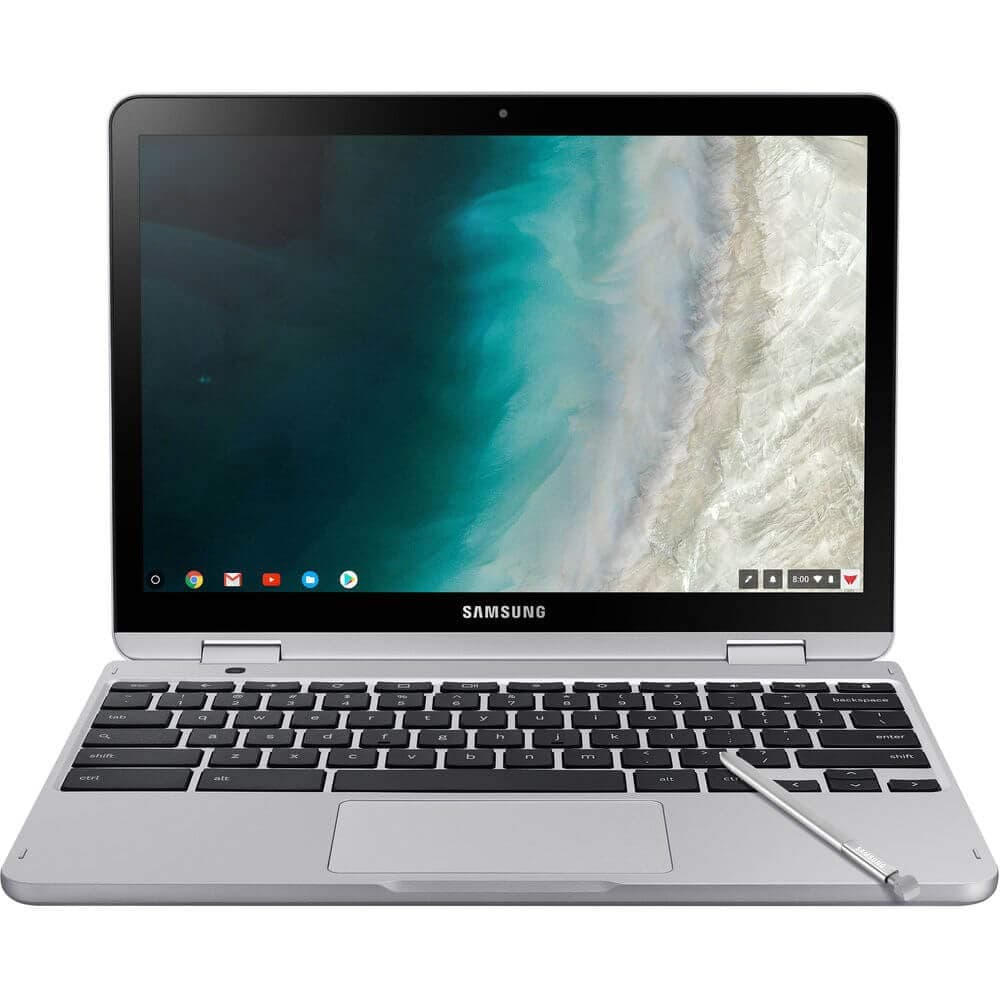
🚀 Power meets portability — your ultimate 2-in-1 productivity sidekick!
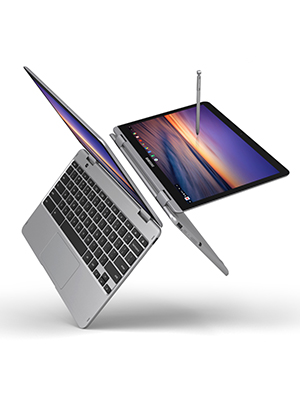
The Samsung XE520QAB-K02US Chromebook Plus V2 is a premium 12.2-inch 2-in-1 device powered by an energy-efficient Intel Core m3 processor. Weighing under 3 pounds, it features a vibrant 16:10 display, a built-in stylus that never needs charging, and a 13MP world-facing camera with autofocus. Running Chrome OS, it offers seamless access to Google Play apps and Linux programs, making it a versatile, secure, and fast machine ideal for professionals seeking a stylish, convertible laptop with long battery life and robust multitasking capabilities.





| ASIN | B07J1WTLQZ |
| Audio Output Type | Speakers |
| Audio Recording | Yes |
| Automatic Backup Software Included | Google Play |
| Battery Average Life Standby | 10 Hours |
| Battery Cell Type | Lithium Ion |
| Battery Life | 10 Hours |
| Best Sellers Rank | #125,238 in Computers & Accessories ( See Top 100 in Computers & Accessories ) #22,204 in Traditional Laptop Computers |
| Bluetooth Version | 4.0 |
| Bluetooth support? | Yes |
| Brand | Samsung |
| Built-In Media | Adapter, Pen Tip/Tweezer, Paper Sheets - Quick Strart, Warranty Card |
| CPU Codename | Kaby Lake |
| CPU L3 Cache | 4 MB |
| CPU Model | core_m |
| CPU Model Generation | 7 |
| CPU Model Number | Intel® Core™ m3 Processor 7Y30 |
| Cache Memory Installed Size | 4 |
| Camera Description | 13MP world-facing camera with autofocus |
| Chipset Type | Intel chipset for core_m series processors |
| Color | Light Titan |
| Compatible Devices | Compatible for Chromebook Plus is lightweight. Easily fold it into tablet mode for comfortable viewing and browsing |
| Connectivity Technology | USB |
| Control Method | Touch |
| Customer Reviews | 4.3 out of 5 stars 776 Reviews |
| Display Resolution Maximum | 1900x1200 Pixels |
| Display Technology | LED |
| Display Type | LED |
| Form Factor | Netbook |
| Global Trade Identification Number | 00887276296296 |
| Graphics Card Ram | 2 MB |
| Graphics Coprocessor | Intel HD Graphics 615 |
| Graphics Description | Integrated |
| Graphics Ram Type | DDR3 SDRAM |
| Hard Disk Description | Emmc, SSD |
| Hard Disk Interface | Solid State |
| Hard Disk Size | 64 GB |
| Hard-Drive Size | 64 GB |
| Hardware Interface | Bluetooth, MicroSD |
| Human-Interface Input | Touch Pad |
| Item Dimensions L x W x Thickness | 11.35"L x 8.2"W x 0.67"Th |
| Item Type Name | Samsung Chromebook Plus, 12.2", 2-in-1, Intel® Core™ m3, 4GB RAM, 64GB eMMC, 13MP Camera, Chrome OS (XE520QAB-K02US) |
| Item Weight | 3 Pounds |
| Keyboard Description | Island-type keyboard |
| Lithium-Battery Energy Content | 39 Watt Hours |
| Manufacturer | Samsung IT |
| Memory Clock Speed | 2400 MHz |
| Memory Slots Available | 1 |
| Memory Speed | 2400 MHz |
| Microphone Form Factor | Built-In |
| Model Name | Samsung Chromebook |
| Model Number | XE520QAB-K02US |
| Model Year | 2018 |
| Native Resolution | 1366 x 768 pixels |
| Number of Ports | 2 |
| Operating System | Chrome OS |
| Other Special Features of the Product | Spill Resistant |
| Power Device | USB Power Delivery |
| Processor Brand | Samsung |
| Processor Count | 1 |
| Processor Series | core_m |
| Processor Speed | 1 GHz |
| RAM Memory Installed | 4 GB |
| RAM Memory Slot Total Count | 1 |
| RAM Memory Technology | LPDDR3 |
| RAM Type | Unknown |
| Ram Memory Maximum Size | 4 GB |
| Rear Facing Camera Photo Sensor Resolution | 13 MP |
| Refresh Rate | 60 Hz |
| Resolution | 1080p |
| Screen Size | 12.2 Inches |
| Speaker Description | Integrated |
| Specific Uses For Product | Business |
| Total Usb Ports | 3 |
| Touch Screen Type | capacitive |
| UPC | 887276296296 |
| Unit Count | 1.0 Count |
| Video Output | USB-C |
| Video Processor | Intel |
| Voltage | 120240 Volts |
| Warranty Description | 1 Year |
| Warranty Type | Limited |
| Webcam Capability | Yes |
| Wi-Fi Generation | 802.11ac |
| Wireless Compability | Bluetooth |
| Wireless Technology | Bluetooth |
T**M
Awesome Chromebook; Inconsistent Models
I've been using a chromebook as my primary computer for well over 5 years. The last one I used was an Acer c720 with an i3 processor, I loved that thing.... I replaced the battery and it still works great but this deal was too good to pass up. $450 for a 7th generation m3 processor convertible chromebook with a dedicated stylus is a great deal. Considering google is offering free note taking apps on the offers page also sweetens the deal. In my opinion, this computer is a significantly better value than anything you'd get from a windows computer in this price range. I initially ordered this when it was priced $495 and a 3rd party retailer sent me an xe521qab (dark grey) instead of the listed xe520qab (light grey). I'm going to compare both units at the end. I'm starting with reviewing the specs and hardware since I think mentioning overall build quality is important and why I chose this unit over others. I'm also going to compare both models since everyone needs to know what they're buying before they actually buy it. I'm also going to touch briefly on the capabilities of Chrome OS and its limitations so first time buyers have an idea what they're getting. Pros: - Convertible, able to run Android apps - Included stylus built into the computer - Fast, low power CPU (fanless computer) - Full HD screen (1920 x 1200 resolution) - Great battery life - Audio is great, just quiet - Linux apps available from within ChromeOS - Keyboard has good travel, very comfortable to type - Trackpad is a good size and is responsive Cons: - No backlit keyboard (some chromebooks in this price range have them) - Can't install any kind of Windows or Mac programs - Will not be able to play computer games, but it can play mobile games from android Processor: The processor in this unit is an intel core m3-7y30. To me, this is one of the best processors you can ask for in a Chromebook, but can be underpowered in a Windows laptop. The two specs I feel are most important are 4.5 W TDP and 1.0 ghz - 2.6 ghz clock speed. In layman's terms, this processor has extremely low power requirements which sips power and is able to increase its clock speed high enough to get tasks done. This chip can also hyperthread, basically making it more efficient per core and increasing speed as well. Because of this low power state, the processor doesn't heat up too much and the computer doesn't need a fan. The computer makes no noise. I've noticed zero lag at all, even using the stylus. This thing is overpowered for most tasks Chrome OS needs. It's a great balance between power needed vs maximizing battery life. To give you an idea on price, this processor's MSRP is $280. Kind of already covers half of the price of the computer already. Screen: Incredible considering the wide viewing angles, I can see the screen from every angle possible. My old Acer c720 has the worst screen imaginable with a very narrow, low resolution display. This thing is just as nice as a "retina" display in any macbook. Battery: As stated earlier, the M3 processor doesn't use much power compared to other processors, the lack of a fan also saves a lot of power. running a crosh battery test, the rate of decline without running anything is about 1% in 300 seconds, or about 12% an hour. So I would say best case scenario, 8 - 8.3 hours of battery life. This is good, not the best, but certainly good enough for me. I got 3 days of solid use before I needed a new charge. In comparison, my acer c720 sipped about 1.25% every 300 seconds, or had around 6.7 hours of battery life. It is older and the CPU's are different, but overall it's significantly better. Audio: Great for a laptop. Audio has good dynamic range, just no bass. These are solid speakers and it feels premium, just not nearly as premium as a macbook for instance. Chrome OS: When you buy a Chromebook, you should primarily be using it for web browsing and simple tasks. If you're tied into google's ecosystem it can do much more. On the other hand, if you're tied into Apple's ecosystem it can be a challenge to use. Chrome OS can't run computer programs built for Windows or Mac, such as microsoft office and photoshop. You can use an online suite of office or the android apps, but they aren’t the same. Setting up a wired printer can be confusing. Downloading word documents may change the way they look when opened with google docs. Conversely, saving things from google docs to word format may also mess up the formatting, issues I wish would get polished out in the future. Overall, I think chromebooks are absolutely ready for widespread use. Chrome OS is much more secure than both Windows and Mac's, the fact that you hardly ever download anything keeps the computer fast and secure. The lightweight OS absolutely flies, for everyday tasks it's much faster than Windows or OS X and you'll notice a difference right away. Linux Programs: Back in the day (6 years ago), you had to sideload a linux OS in order to use linux apps. It worked but was clunky and made it much harder to keep linux up to date. Plus it took up valuable space on the chromebook and you had to switch OS' completely in order to use them. Today, ChromeOS has a linux virtual machine built into it, and you're able to pull apps from the linux database directly into ChromeOS and run apps. This is absolutely amazing to me, and I'm not sure when google decided to do this, but it basically makes ChromeOS a near complete machine with much lower limitations. This gives you access to good program alternatives to photoshop and microsoft office, especially if you need something that does a little bit more than what google apps can do. This is by no means as nice or complete as Windows or Mac as it still requires knowledge to do it properly and keep it up to date, but it's free and open source, and I think it's important to support that idea. Linux and Android are the two most popular open source platforms, there's a lot of things you can do with both of them and it's great having both available within Chrome OS. Tablet: This is where ChromeOS is heading towards, so I wouldn't recommend getting a chromebook that isn't convertible at this point. It's nice to have and makes it able to run android apps. Apps that would be useful on a chromebook would be anything that can take notes and take advantage of a stylus. It's good for annotating powerpoints, drawing, or taking school notes if you enjoy writing over typing. Everything else is just gimmicky, but It's still amazing to have an ability to flip the thing around and have a high resolution tablet available. xe520qab vs xe521qab: When I purchased this chromebook, a manufacturer sent me the 521 by mistake, so to get the lower price I had to return it and get the 520. Amazon unfortunately wasn't able to price match. I took pictures so everyone can see the difference. The 521 is simply nicer. It has a darker body, metal keyboard deck, smooth edges; it just feels much better and more expensive. It's rounder in most places, tablet mode feels smoother and better when holding it. The only two thing I like about the 520 is how it looks when it's closed and it feels better when opening it. The sharp edges are nice and clean, but the plastic keyboard deck just isn’t as comfortable. If you can find the xe521qab for the same price as the xe520qab, I'd pick the 521 in a heartbeat. Other than that you're getting the exact same thing. Both are fantastic computers and I'm sure anybody would be happier with either pick. $450 is an absolute steal for either of these computers.
A**S
Can't ask for more
I've been a happy Android user for a long and I always wanted to try Chrome OS, but I was too afraid to leave the Windows ecosystem because of my job (I sometimes needed certain software that was only available for Windows). After I switched job, I finally decided to give it a try. I bought this Chromebook for around $400 (Dec 2019). It was my first Chrome OS experience. I decided to go with this one because it matched my needs (12 inch display, metal body, good looking, at least 4 GB of ram, and a price below $500). I also liked the aspect ratio when using tablet mode. So I made the purchase and 5 months later I am very happy with it. The build quality is great, it feels like a premium device. It is indeed a little heavy, which doesn't bothers me but it may to others. I got the M3 after reading some reviews which recommended it over the Celeron version. It handles everything I put on, which is basically browsing on Chrome with several tabs while playing a Youtube video on the background. I do not use it to play that much, but I've played Asphalt 9 a couple of times and it works fine, no lag whatsoever. I have experienced certain issues with Zoom when I'm on a 8+ people call, but I am not quite sure if it's an app matter or the device. The pen is a great tool, although I roughly use it. I guess that the only times I've used it is to show someone else how it works. It's still there and it's a plus for anyone that may take advantage of it. I would definitely recommend this Chromebook (for the price I got it).
S**T
Great purchase for my wife who does all her work on a Chromebook
This is really a high quality machine. The price I paid almost reflected that quality, but I snagged it when an incredible deal was running. The m3 processor is more than enough power to do regular tasks that anyone does online plus all the productivity work that is needed in a workplace. My wife is a teacher and this was purchased for her, so most of this feedback is from what she's said as she's used it. First, let's talk about the display. It really is a beautiful display with accurate-enough colors. It gets a little over-saturated in some situations and under-saturated in others, creating some awkward hue on backgrounds of darker movies or webpages. But those are only noticeable while objects are moving (or when you're scrolling) and there's a lot of action on the screen. It gets bright enough for most situations and in the previous Pro model I wondered why it got as bright as it did. Watching reviews it seemed like you almost don't need to use a lamp to lighten a room, just turn the display face up and turn it up; that should be plenty to light an entire bedroom. Second is the quality of the material. The device feels like a brushed aluminum or other metal material with some plastic in some places. This is about right for the price, considering an even better quality of material would get you easily spending $900+. The keyboard feels fantastic and the touchscreen hasn't had a single hiccup yet after about 2 months of use. Third, let's talk about functionality. And, before we begin, let's remember this is a Chromebook. This wasn't purchased to play the latest games or sync with Microsoft or Apple services. It's a Samsung product running a Google operating system, meaning that it's meant to work with Google services. That said, it works wonderfully for Google Drive (word processing, spreadsheets, etc.). This item is used almost exclusively to do lesson planning, grading, research, and other tasks that a teacher would do. For that, it's perfect. The only real issues we've had entail poor web design and a lack of websites switching to HTML5 instead of Flash. All in all, if you're wanting the performance of a Google Pixelbook and similar functionality then you won't be disappointed. If you want to get a loved one a computer that will really allow them to use the Internet without too much worry about viruses, then you're making a good purchase. If you're intending to get a laptop that can run Android apps without too much of a "herky jerky" experience, then you're making a good purchase. If you're wanting a computer that can run Photoshop, render 4K videos, or anything like that, then you're better off with other products.
L**B
Awesome PC travel replacement!
The Samsung XE520QAB is not my first Chromebook household purchase (purchased one for my son who is in elementary school three years ago), and I'm a teacher who utilizes Chromebooks during classroom instruction often; thus, I'm not new to Chromebooks. I hope this review helps buyers who are new to Chromebooks or who were skeptical about replacing (or in my case partially replacing) their primary computer (in my case, a PC laptop) with a Chromebook. The skinny (summary): This Chromebook is fantastic! It is fast, has excellent battery life, and can handle the majority of my daily work and personal computing tasks. Another great feature/function is that it communicates seamlessly with my Samsung Galaxy Note 10+. If you are looking for a mid-grade (most tech vloggers consider this a mid-level machine, but I don't know why because it has all of the bells and whistles of most top-level machines for a much lower price), then this is the machine for you. I would suggest you purchase a case and a micro SD card (I bought a 128 Gb card). However, the 64 Gb onboard storage combined with 100 Gb Google One drive cloud space (free for one year with purchase) should be more than enough space, I like having the peace of mind of having extra offline space available if necessary. I have watched movies and screencast with no problems from this Chromebook. If watching movies or listening to music directly on this device, I suggest using headphones or Bluetooth speakers since the audio from this device does not have a dynamic range. Playing games on this Chromebook in TABLET MODE is great! Games function exactly as they do on my Note 10+. Since I have a Note 10+ and have owned previous phones from the Samsung Galaxy Note line, writing with the stylus/S pen on this Chromebook is no different. I will warn it is very small/slim and will take some getting used to, but it writes extremely well on this device. If you pair this device with web-based apps and apps from the Google Play Store, you should be able to complete the majority of computing tasks you complete on PCs/Macs. **The remainder of this review is just more personal insight into how this Chromebooks completes tasks compared to my current PC.** This Chromebook will probably NOT FULLY replace your PC/Mac... just yet. I use Adobe products for photo/video editing. While there are Adobe apps you can purchase/download from the Google Play store, they do not have the full range of functions/capability of their full-version counterparts available on PCs/Macs. Chromebooks, while this one, in particular, has a powerful processor for its OS, do not have graphics/audio cards that support full range photo, audio, and video editing. Now, if you don't require a computer for advanced functions such as media editing, then this Chromebook is definitely for you! As a teacher, I can complete all work-related tasks such as email, document editing (both Microsoft and Google). I primarily use Microsoft, since the majority of the faculty and staff in my district have not fully jumped on board the Google bandwagon. Both office suites allow offline usage after initial sign-in. I have experienced only minor formatting problems when using Microsoft office on my Chromebook, but its nothing that renders a document completely unreadable or warrants complaints from readers on the receiving end of the documents. If I could wish for one app that would complete my work cycle on a Chromebook, that would be an app to edit my Smart Notebook instructional files (if you're a teacher who uses smart whiteboards, this could pose a problem). Other than that, I can manage since I don't need to edit/create those types of files often. Personally, I use my computer a lot for paper crafting, sewing (embroidery). I own a Cricut Maker, and a Cricut Explore Air 2, Brother Scan n Cut DX, and will purchase a Silhouette Cameo 4 shortly. I have only used this Chromebook while operating my Cricut Maker (you can assume the same functionality for a Cricut Explore Air 2 as both machines use the same app). I will update this post once I thoroughly test the Brother Scan n Cut DX and the Silhouette Cameo 4 (no promises for the Cameo as I don't think Silhouette has an android app for its machines; the Scan n Cut is a mostly stand-alone machine with a web-based app client, so it should work just fine assumingly). Using the Cricut Design Studio Android app from the Google Play store, I was able to complete projects. You can slightly see the vinyl cutouts I made to customize the front panel of this Chromebook in a picture above. I did run into an issue of connecting to my Cricut Maker. I prematurely tried to connect to the Maker using the Bluetooth settings menu of the Chromebook instead of initially connecting within the Design Studio app, which may have led to connection problems. The devices connected eventually, and I have not experienced any further issues with the Chromebook relating to my Cricut Maker.
K**R
This Chromebook has far exceeded my expectations!
I really love this Chromebook! It's super fast. No comparison to a Windows laptop. I love that it is a Samsung, because it is a quality item. Sturdy construction, yet very light weight. Not only is it WAY faster than my old Windows laptop, but it doesn't get hot! The keyboard is comfortable and allows me to type at top speed. The touch screen is a must have feature for me and one is sensitive and works perfectly. Also, you can run Android apps on it! You just need to go into settings and turn on the feature that allows you to run Android apps. It comes with a stylus that pops out of a right-side compartment under the keyboard. I charged it 3 days ago and it's still has 55% left after several hours use. I'm very happy with my choice to purchase this Chromebook. It is worth every penny.
K**M
CRASHES ALL THE TIME
I REALLY REALLY wanted to like it. I was REALLY hoping for a good experience with transitioning from Macbook PRO to chromebook since most of my workflow would be on the internet but 400 bucks down a hole and full of regrets that I hoped the chromebook could "handle" more than web browsing. LIKES: light weight, decent battery life and snappy with chrome browser. Also reboots fast with the reliable and regular multiple-times-a-day crashes. DISLIKES: anything more than web-browsing is sluggish (not surprised, sure but I had high hopes) but really the only reliable aspect of it is how it unfailingly crashes multiple times a day, reliably crashes and reboots. At least reboots fast. - Has done the chromebook wash multiple times - Got rid of all the extensions one at a time - Has deleted then re-installed Apps (only a few) Gotten to the point where multiple crashes a day is now just part of the workflow until the new laptop comes after a period of denial and disappointment.
E**W
Fantastic
I've used Chromebooks for years as my everyday laptop. This 2nd generation Plus with an M3 satisfies all my normal needs and wants. I use multiple windows/tabs and this machine handles that without a problem. I pushed it to about 30 open tabs running multiple videos and audio before it bogged down. The display is beautiful at all angles. The keyboard travel feels l great and only lacks backlight. The track pad and touchscreen are flawless. Though I considered the pen a gimmick I have found it useful for some situations. Google has solved some of the problems Android apps had on Intel. The UI for switching between Chrome & Android apps has vastly improved, making a Chromebook more useful and productive. The pen is great for the Android photo editing apps and the Chrome app Polar. The 2in1 form works well. The hinges seem built to last, but I would say the Samsung is a bit too heavy to use as a tablet for more than 10 minutes. Google has improved the UI to the point where Chrome works well as a tablet. But, if you want a tablet first there are better options like the HP or Google Slate. This is an excellent laptop with only a few compromises. The plastic bottom creeks a bit, the only indication this is not a solid all metal body. I paid around $500 and that is an amazing value for a laptop that performs this well.
J**O
My favorite device by far
So i had this computer chromebook for a year now, and i got to say. This is a very good device! I been using it a lot and the keyboard is easy to use and the touch screen is amazing! The battery life can be work on a bit, but it does perfom very well with heavy usage. I don't like the touch pad very much, maybe it's just me but i feel like it lags just barely. I bough a logitech mouse so its not a big deal for me, but even when i'm not home, i simply navigate using the touch screen so it doesnt effect me. I'm hook with chromebooks, if one day i ever need another one, i know what i will be looking for.
ترست بايلوت
منذ أسبوع
منذ أسبوعين