Buy anything from 5,000+ international stores. One checkout price. No surprise fees. Join 2M+ shoppers on Desertcart.
Desertcart purchases this item on your behalf and handles shipping, customs, and support to KUWAIT.
🔥 Elevate your game with precision and style 🎮
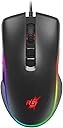
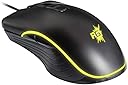
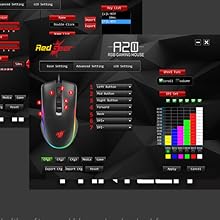
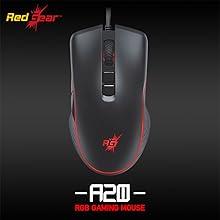
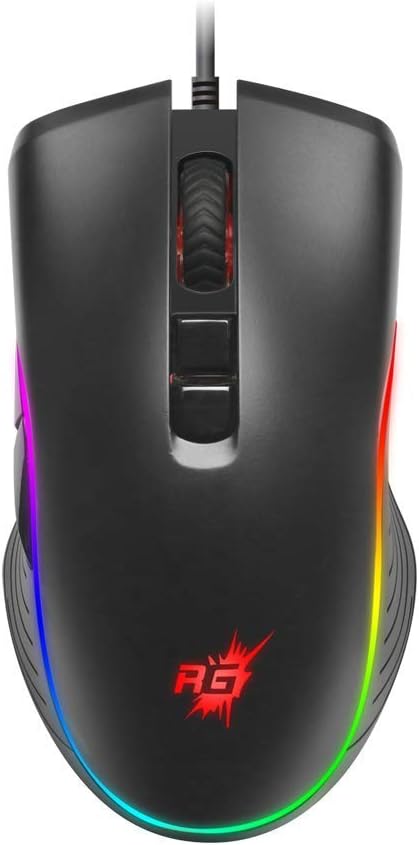
The Redgear A-20 Wired Gaming Mouse is engineered for Windows PC gamers seeking high responsiveness and customization. Featuring a 4800 DPI optical sensor, 7 programmable buttons, and 16.8 million RGB lighting options, it combines durability with style through a braided cable and robust switches. Designed for seamless plug-and-play use, it’s the ultimate wired gaming companion for professionals and enthusiasts alike.


| ASIN | B07N6LN57W |
| Antenna Location | Gaming |
| Are Batteries Included? | No |
| Are Batteries Required | No |
| Best Sellers Rank | #132,893 in Electronics ( See Top 100 in Electronics ) #233 in Gaming Mice |
| Box Contents | Mouse, Sticker, Manual and CD Driver |
| Brand | Redgear |
| Brand Name | Redgear |
| Button Quantity | 7 |
| Colour | Black |
| Compatible Devices | Laptop, Personal Computer |
| Connectivity Technology | Wired |
| Customer Reviews | 4.3 out of 5 stars 4,515 Reviews |
| Embellishment Feature | Logo |
| Enclosure Material | Plastic |
| Hand Orientation | Right |
| Hardware Platform | PC |
| Importer Contact Information | Imagine Marketing Limited Unit no. 204 & 205, 2nd floor, D-wing & E-wing, Corporate Avenue, Andheri Ghatkopar Link Road, Mumbai, Maharashtra-400093, India |
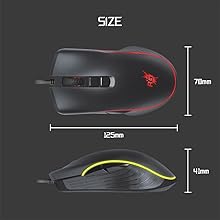
| Item Dimensions L x W | 15.6L x 10.3W Centimeters |
| Item Type Name | gaming mouse |
| Item Weight Unit of Measure | 225 Grams |
| Manufacturer | Imagine Marketing Ltd, Redwood Interactive 131, Guru Gobind Singh Industrial Estate, Next to Jay Coach, Off W.E.Highway, Goregaon (E), Mumbai - 400 063. Maharashtra |
| Manufacturer Contact Information | Redwood Interactive 131, Guru Gobind Singh Industrial Estate, Next to Jay Coach, Off W.E.Highway, Goregaon (E), Mumbai - 400 063. Maharashtra |
| Manufacturer Part Number | 8904130847028 |
| Model Name | Series A |
| Model Number | A-20 |
| Mouse Maximum Sensitivity | 4800 Dots per Inch |
| Movement Detection | Optical |
| Movement Detection Technology | Optical |
| Network Connectivity Technology | Wired |
| Number of Buttons | 7 |
| Operating System | windows pc gamers |
| Packer Contact Information | Imagine Marketing Ltd |
| Pattern | Mouse |
| Power Source | Corded Electric |
| Product Features | wired |
| Range | 1.8 |
| Special Feature | wired |
| Style Name | Only Mouse |
| Theme | Rainbow |
| Unit Count | 1 Count |
| Warranty Description | 1 year warranty provided by the manufacturer from date of purchase |
O**R
Quality vs price..?
I didn't not expect that much. Because my friend already got the redgear A-15 that was too heavy and very large to my hand I can't comfort with my hand. But i like the redgear brand . Bought joystick,headset in redgear but the mouse is disappointing to me and I can't use the side buttons anymore in a-15 but . I can't believe that change that much in a-20 it's heavy but very comfortable and smooth. I can use the side buttons for changing weapon and build fortnite blocks . Quality is good. I not gonna lie . And i think they just add weight inside the mouse. If want to loss weight then chick it out . My old non banded gaming mouse have Weight inside. Redgear A-20 handling is prefect
S**Y
Surprisingly delicious, for this price.
My Logitech G300s conked off few months before the pandemic started. It was also a few months beyond it's warranty period of two years. I had been using a regular mouse since then. I'm a designer and an artist. I need a mouse with good dpi settings and features, because I work with a lot of controlled and precise mouse movements. Gaming mice are easier to avail for this purpose because most productivity mice like MX Master and all, aren't either available here or cheap. There's a broader price range with gaming mice. I was about to buy another gaming mouse this year. The cheapest Logitech ones I could find were around 1.5k-2k. The only concern was if it conks off again in two years, then what's the point. That's when, very impulsively I just decided to buy this mouse. Because on paper, it's giving me as much quality and features as I need from a professional mouse. Plus I can buy a large RedGear control mousepad within the same budget. So what the hell. And I must say, I'm quite surprised. The mouse is beautiful. To be fair, it's just been four days. I don't know how long it will survive. I'll update here, if anything relevant. But for now, it's a lovely experience. Not very different from the first time I used a professional mouse. It has a lovely ergonomic body. I have medium sized palms so it fits snugly and also leaves some room to rest on it. It's sturdy and has decent height so your palm is not self-concious of resting the entire weight. My slight irritation is the side buttons on the left are a bit too directly under where my thumb lands, and they are also sensitive. I keep clicking them accidentaly. I set them to volume control. The wheel is quite sexy. It's feels like a bike tyre under your finger. The actual mousework is a piece of art. Apart from design, I play Hearthstone. It's not a game with as great a demand from mouse control as FPS games. But it also requires some pretty rapid mouse movements some times when playing online. It's been a joy to do that with this one. It registers your every move very precisely. No doubt, the mousepad is also pretty good. I think both of them work quite well together. Sometimes I feel it registers even my sub-conscious movements (which I consciously don't intend). So I have to be more aware of what I'm doing. Which is good. The only problem I have with this, like other reviewers too is the software and LED settings. I had already read them. The mouse has a memory that only stays if it's constantly connected to a source of power. My desktop is connected to a UPS, so most times it stays on even when it's shut down. So if I start-up my computer then, all the settings stay intact. But if I cut the power, the memory is wiped and the mouse resets to default which on this one is Color Cycling. The LED colors keep changing pointlessly. Which is annoying. The default should be Fixed. Because that allows you to know what DPI setting you're on, when you click the extra buttons on the top. Every setting has a different color, which is very useful. When you go up and down from how fast or slow your mouse should move, the colors are easier to memorize. Everytime it resets, I have to change it back to fixed, Every. Time. The other catch is when the mouse is constantly connected to a source of power, it can activate anytime even if the computer is shut down. Like an accidental click. It will turn completely on. You can even click on the extra buttons to change through colors. But the creepy part is the LED blinking. Even at night it will keep quietly and slowly blinking in a dark room. Like something sinister is breathing and watching quietly in a dark corner of your room... Update: So I figured the workaround to the start-up settings reset issue. Just add a shortcut to the application, inside the start-up folder and it will automatically start everytime your comp starts, and it will restore the last settings on it.
E**Z
Best mouse according to budget
Best mouse for gaming especially for minecraft, I love it this mouse's quality is good good for medium - large hand espicially for bedwars
J**L
Great product
Excellent product I am using past 3 years still using 2026
A**.
Not really Best for Competitive Gaming...
Hello guys, I am reviewing this product after 3-4 months of buying this... Let me tell you about myself... I play competitive games like CS:GO and DOTA2, so this review will be from a competitive point of view... Guys I will honestly tell the verdict in one sentence that this mouse is not good for competitive gaming... And why its not good, let use see... When I bought this mouse I just went on with its low price without thinking much, but slowly I started realizing the cons... And realized my big mistake... So lets start with Things I don't like about this mouse: 1) Weight: Guys this mouse is massive 200gms in weight, which at the time of buying I didn't notice, and its honestly my largest regret with the purchase... Handling that heavy mouse is really painful and inconvinient... You may know that in esports light or medium weight mouse are best, but this mouse entirely contradicts it and hence is useless in fast paced accuracy based games like CS:GO... And even if you play casual games, you hand will get tired very soon... 2) Low Grade Sensor: This mouse has a low grade sensor, not a gaming grade sensor... Which is a bad thing coz gaming grade sensors are more accurate and responsive... So its basically just another office mouse with rgb and customizable dpi... While this may feel not like a problem its not even an advantage over your normal office mouse... 3) Low quality side buttons: The side buttons feel flimsy and dont give feedback of click... They feel really pathetic... Final verdict: DONT BUY THIS MOUSE... Guys even if you are into casual gaming, or if you want just a mouse in budget of under 1000, don't buy this mouse this still is not suitable... It is just an RGB mouse, not a gaming mouse... And those who play csgo or any game in ranked and wanna gain a competitive advantage, I request them to afford in quality gear... Coz that will payoff...
I**A
Mouse
Value for money
V**G
Affordable precision for gamers
As a gamer myself I been using this mouse for a quite a few months now. One of the standout features is its comfortable ergonomic design, which fits snugly in my hand during extended gaming sessions. The RGB lighting adds a touch of flair, customizable through Redgear's software to match my setup's aesthetics. Despite its affordability, the A20 doesn't compromise on responsiveness. The optical sensor tracks smoothly across different surfaces, providing accurate cursor control for both gaming and designing . However, it's worth noting that some users might find this mouse slightly heavy, especially for prolonged use in fast-paced games requiring swift maneuvers. Overall, It's a solid choice for gamers looking to elevate their gaming experience without breaking the bank
S**N
Stop Here If U want this for minecraft
I have used this mouse for 3 years (Im not a bot reviewer).So first of all let's talk about the negative point of this mouse. According to me there is only one negative point of this mouse. -The Weight It's really heavy for gamers comes over more than 200 grams which is very bad tho later u can get a habit of this. Positive points: -Software Pretty easy to use (If u have brain). -Sensor Didn't changed at all in these 3 years still solid. -Build quality : the plastic do not feels good but trust me it's one of the best plastic I have seen on a mouse. Its still working perfectly even after 3 years of intense butterfly clicking dragon clicking. -Scroll wheel It's working really good even after 3 years no issues or delay nor bugs. Now let's come to the biggest part of minecraft community. Clicking Methods: -normal clicking Just use an office mouse bru -jitterclicking Personally I wouldn't recommend this for jitter clicking I just feel the clicks aren't really made for jitter clicking. (I'm not a jitter clicker so I might be wrong) -Butterfly clicking Best budget butterfly clicking mouse. I hit 20-22 cps consistently (I'm an A-tier butterfly clicker so don't expect clicking 20 cps right after getting the mouse) -short drag If u need this for drag clicking I wouldn't recommend it I would prefer to increase your budget or smth. It can short drag click around 12-17 cps. (It can God bridge if u know the timing and short drag) -long drag Wouldn't recommend this for long drag (Means u can't telly or long extension with long drag). It can get 11 cps long drag ONLY IF U KNOW HOW TO LONG DRAG PROPERLY. Because of the small left and right buttons. Overall for clicking it's the best mouse for butterfly clicking if u want a budget friendly mouse.
Trustpilot
1 month ago
2 weeks ago