⚡ Capture Every Frame, Own Every Moment
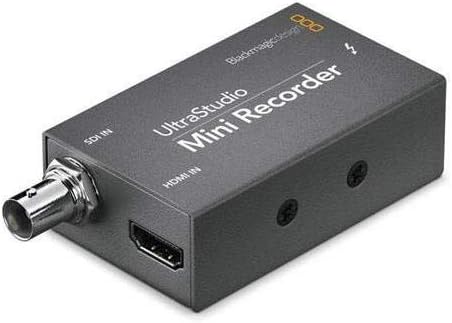
The Blackmagic Design UltraStudio MINI Recorder is a professional-grade Thunderbolt video capture device delivering ultra-fast 10 Gb/s connectivity. It supports both compressed and uncompressed video formats, ensuring top-tier quality for everything from TV commercials to feature films. Compatible with all major video editing software via open DPX and QuickTime standards, it offers a compact, reliable solution for multi-channel live feed capture and editing workflows favored by creative pros worldwide.
| ASIN | B009D91314 |
| Best Sellers Rank | #813 in Video Converters |
| Brand | Blackmagic Design |
| Brand Name | Blackmagic Design |
| Customer Reviews | 4.3 out of 5 stars 931 Reviews |
| Global Trade Identification Number | 00531479667215, 09338716001846 |
| Interface | Thunderbolt |
| Interface Type | Thunderbolt |
| Item Weight | 0.53 Pounds |
| Manufacturer | Blackmagic Design |
| Mounting Type | Cable Mount |
| Number of Channels | 8 |
| Number of Pins | 54 |
| UPC | 780746824015 531479667215 695637340744 |
F**N
Download the current Desktop Studio software from Blackmagic Support page.
So I bought this on Amazon in 2015, I really never used it. I bought for a specific job and didn't need it I didn't have the time to learn it - until now June 2020. My company had a huge live streaming show to make. We had up to 40 different phones from all over the world feeding into a switching truck. My boss asked me to get a device that we can capture the live feed that was going to YouTube. The truck gave me a feed with all the graphics just like the stream. Previously I downloaded the latest Desktop Studio (11.5.1) and installed it. Blackmagic uses this software for many of its capture devices. I was using an older Mac Pro "the trashcan" it was great for this because it has the Thunderbolt 2 connections which are the same as the Mini Recorder. Install the software before you hook up the Mini Recorder so when you connect it can find it. When you plug in the T-Bolt cable you will see a little light on the box. That is the power indicator. I had to give the Mac permission to install as the Sys settings were set semi tight. The drive I was using for capture is a small 2 - 2.5" SSD drive enclosure that has a hardware RAID. I opened the utility and change the setting from HDMI to SDI as that was my feed. I left that window open just to always confirm it hadn't changed. Connected the box, added the SDI cable, and the drive. There is a simple piece of software in the install that you can use, Blackmagic Media Express, this will allow you to do a capture of the feed. In BM Media Express preferences, pick the Capture Video format you want, and the destination disk the files go to. That is about it, I had a couple of days to practice because the tech team did rehearsals. It is tricky in this program to name the files but I finally found the answer buried in BM support forum. The name is a combination of the Description, Reel all the things below name. You hit the little plus sign to the right of these choices and it populates the name. You can't just type the name, I kept it simple. It was frustrating and took me a while to find the answer. You are welcome. There isn't much documentation on this software. But it works really well, it did for me. Our 2 day program was divided into 6 events 3 a day. So I just made sure I hit capture before the show started and then stopped it by hitting capture again to stop it recording. Practice with it so you know it works before showtime. One annoying thing is you cannot monitor the audio while recording (if somebody can do this - post it please). But I did so many tests that I knew the embedded audio was there on the recording. Make sure to check your Mac audio input System Preferences to make sure the BM box is selected. I wasn't fed timecode but if I was it was supposed to be in the feed as well. So the 2 day show was streamed live and I found out after the first event my recordings were the source of the posted videos. Our editor took the files and trimmed stuff they didn't need and prepped them for YouTube upload. So these event recordings have been watched by over 100K of people. It worked really well. Only other thing is after I got familiar with the capture utility, I started using the box with - BM Davinci Resolve 16. It is more complicated than the included app, but that is what I used. I like the naming workflow better. The picture looked the same after I dialed in Resolve, but Resolve has way too many settings for someone starting out. Oh yes one of the captures was over 2.5 hours long and the Mini Recorder never overheated. Not super simple but it worked really well.
M**H
Works excellent, use quality equipment and cables always.
This is an update after my review below. Customer support evaluated the unit, it was working fine all along. Sometimes you test cables and other equipment and it stuff stops working, that's what happened, it worked well and support confirmed it wasn't their product at fault. So it's back and does work with new equipment. Also, support did excellent and was very helpful throughout the process, which was quick. Good job Blackmagic! OLD REVIEW: Very disappointing, only lasted 6 months of weekend use. So that's like 30 days of use. It does get hot. We tested the cables and other macs and determined this unit just flat out died. Will be working on returning for refund or exchange. Only gets a star because it worked very well. But not cost effective, maybe we got a bad unit. I hope Black Magic can restore faith in this product. OLD REVIEW, SEE UPDATE ABOVE.
K**N
Works well for me!
Item seems to do exactly what it is advertised to do, which is to pass along a pretty raw stream of audio/video data from a PTZ camera I have with SDI output to my Apple computer. If you're using it in a non-professional / consumer environment like I am, just be aware that your computer needs to have a fast hard drive (SSD recommended) to capture the HD footage. If you're planning to use an external drive, USB 2.0 or Firewire 800 ARE NOT fast enough for reliable 720 or 1080 captures in most cases, you'll need USB 3.0 or an extra Thunderbolt interface. BlackMagic makes another product that will compress the streams for you in real-time but it's quite a bit more expensive. I'm knocking a star off, because I can't figure out how to check if there are any software updates to the BlackMagic Media Express software that came bundled with it. It seems a little flakey and I'd like to stay up to date on any updates there are for it, but it appears I may have to call their support line to check on this type of thing.
R**B
Flawless video streaming
I bought a refurbed macbook pro ($650) to live stream high school football games on facebook live. The blackmagic mini recorder and mac thunderbolt cable is the perfect combination for streaming. In the past we used windows based laptops, ustream, and other devices but it was always iffy whether or not we could have a flawless broadcast. Three games into our season and we have had no issues what so ever. No drop outs, no buffering etc. On away games we use a Verizon hot spot and to my surprise, no difference in quality from our direct Ethernet connection when we are shooting home games. Facebook live is the only way to go for streaming. Our broadcast has never looked so good. We use the audio from our local radio station broadcast mixer direct to our audio board and the audio is wall to wall. Don't skimp on your streaming equipment if you want to produce a good broadcast.
M**O
Does what it's supposed to do
I purchased this in the hope that I could connect my Canon VIXIA HF M500 Full HD 10x Image Stabilized Camcorder with One SDXC Card Slot and 3.0 Touch LCD to my computer and be able to live stream and use it as my webcam for Skype and Google+ Hangouts. I had originally looked at the Blackmagic Design Intensity Shuttle Thunderbolt . But all I really needed was a box to convert my HDMI signal to Thunderbolt. I didn't need the pass thru ports, nor all the other inputs on the Shuttle. Once I saw the Mini Recorder I was convinced I found what I needed. If you expect it to work straight out of the box, then you'll be disappointed. There is software to download to get you to the latest version. I tested it with Skype, Quicktime Broadcast, Adobe FMLE, justin.tv (using QT and FMLE), CamTwist, and Google+ Hangout. They all worked. I do have to say that using QT Broadcaster wasn't ideal. The frame rate was very slow. All the software except Skype worked on first try. OK, not exactly first try, which I'll get to later. Skype, as of this writing, only works with version 6.0.0.2946. It won't work with the 6.3 version of Skype, so be careful about upgrading. The key to all of this is to make sure you have the latest and greatest computer software from the website. Next, make sure you set the frame rate coming in to match the camera's native rate. Google the video about this to see. Use the search phrase BlackMagic Ultra studio Mini Recorder to see how someone got it to work. It WILL work if you follow his instructions.
M**Y
HDMI/Thunderbolt ingestion was easy and smooth
I am preparing to do a weekly live-streaming event for my organization. We're on a shoestring budget (who isn't in the NPO world?), and we're still evaluating streaming providers. The only hardware encoder under $500 is tied to a specific provider, which would simplify our setup but would tie us to that provider. (No, thanks.) The Blackmagic UltraStudio Mini Recorder was an intriguing, low-cost solution for interfacing our HDMI camera with a MacBook Pro we already own. This device allows us to put more of the encoding chain into software, giving us a choice of encoders and providers. I purchased it along with an Apple MD861ZM/A Thunderbolt Cable - 2.0 M (NEWEST VERSION) . Thanks to the experiences many other reviewers have shared here, I knew to download the software directly from BMD, and installed it before plugging in any devices. The version current at this writing (Blackmagic Desktop Video 10.3.7) also installs four applications: * Blackmagic Disk Speed Test * Blackmagic LiveKey * Blackmagic Media Express * Blackmagic Multibridge Utility LiveKey and Multibridge Utility don't seem to apply to this device at all. Disk Speed Test is what it sounds like, performing a "stress test" of write and read speeds to evaluate which video formats your current setup is likely to support. Media Express can capture, log, and play back video from the Mini Recorder and other devices. My experience with the Mini Recorder (interfacing a Canon HDMI camera to my MBP, and feeding it to Wirestream for a test YouTube live video event) was almost painless. I did not have a huge bundle of choices, but rather the format being ingested from HDMI. So, from my perspective, it really WAS "plug and play" with video and audio feeding from the camera into Wirestream. The box itself is both improbably small and unbelievably heavy. The outer shell seems to be 1/32-inch steel, and acts as a heat sink in operation--it does get uncomfortably warm. A single white LED next to the Thunderbolt port indicates output. The input ports are BNC and full-size HDMI (a good match for the HDMI/mini HDMI cable supplied with my camera). There is no power cable or adapter. I am quite impressed with the BMD Mini Recorder, and can say it has already earned a place in my setup.
J**L
Glitched Up Every Day. Can't Write Video. Livestream OBS Worked Sometimes.
EDIT: I moved to the Thunderbolt Intensity Shuttle. MiniRecorder did not work for me. I also tried the Magewell. I felt the video quality, build, price, and lag on Magewell to be inferior to Black Magic products. Black Magic has more professional support, more software, and an OBS driver that stays synced. I had a bunch of odd errors on an i5 2011 Mac Mini w/ Radeon 6630M with the MiniRecorder. I could not use it. This device got hot connected to this machine. Device and video froze completely. Had to unplug it a lot. I had to restart the mac (had a total system crash). The Disk speed test says I should be able to capture ProRes 422HQ in Black Magic Media Express, but it won't. I can capture video with QuickTime compressed. I can't use the supplied software. The quality button in the program is greyed out. Video blinks to black and I had to restart Media Express program sometimes. My monitor video (HDMI) started getting interrupted hours after live monitoring in their software, maybe due to thunderbolt heat or noise. This could be Apple's fault. I'm using brand new cables from Apple and monoprice. Video resolutions are correct and my software is up to date and set properly. I was able to do some live streaming with OBS for a few hours. I suspect this device or Thunderbolt getting hot causes everything its connected to glitch after some period. The product page doesn't seem to list what macs it can work with. I assumed it would work because I have a thunderbolt port and an i5 and my software is updated. I wouldn't get this. It let me live stream (sometimes) but I get DIFFERENT glitches every day I've used it. I don't want to have a problem with my system so I've going to stop using it and return it. I have to find a completely different system and brand of capture device.
J**R
Great device but you need to be patient with setup.
First, this will not work with Apple Catalina beta. So don’t upgrade to use BlackMagic. Also, you are going to need a minimum of 8 gig ram but look for more if possible (16 gig). Your processor needs to be a Intel I7 however, I5 will work buy you will need to downgrade to 720p. Don’t worry about this as I can’t tell the difference in quality. You will notice that the device runs hot. This is normal and when I use mine I place it on a frozen gel pack. It stays dry and much cooler. Definitely do your homework on what software (Drivers) to have for sound and video. OBS works fine and it’s free. Look on YouTube for videos to show what you will need for your computer. Lighting is very important as well unless you are outside.
Trustpilot
2 weeks ago
1 day ago