Buy anything from 5,000+ international stores. One checkout price. No surprise fees. Join 2M+ shoppers on Desertcart.
Desertcart purchases this item on your behalf and handles shipping, customs, and support to KUWAIT.
🚗 See More, Stress Less — Your Ultimate Backup Vision Upgrade!
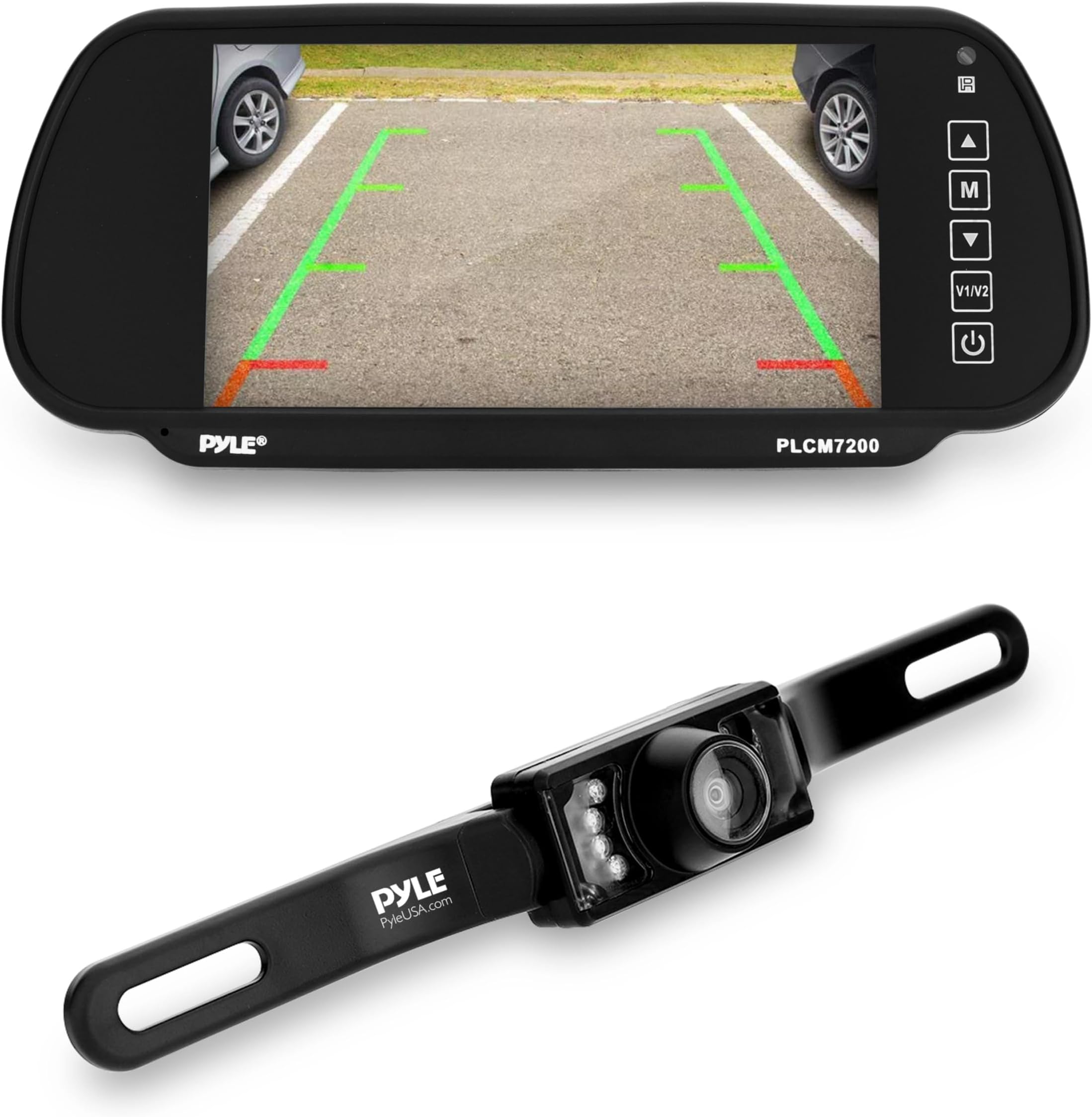
The PYLE Backup Car Camera system features a 7-inch high-resolution TFT LCD display with dual video inputs, IP68 waterproof license plate mount camera, and advanced night vision capabilities. Designed for easy installation and enhanced safety, it includes distance scale lines for precise parking assistance and a durable, weather-resistant build. Backed by a 2-year USA-based warranty, this wired system ensures reliable, clear rear visibility day or night.


| ASIN | B000E1PXES |
| Best Sellers Rank | #113,069 in Electronics ( See Top 100 in Electronics ) #1,779 in Vehicle Backup Cameras |
| Brand | Pyle |
| Built-In Media | 1 Pyle Branded Product |
| Compatible Devices | Monitor |
| Connector Type | RCA |
| Customer Reviews | 3.8 out of 5 stars 1,055 Reviews |
| Display Technology | LCD |
| Field Of View | 170 Degrees |
| Global Trade Identification Number | 00068888893725 |
| Installation Type | Butterfly Mount |
| Item Dimensions L x W x H | 10.25"L x 4.25"W x 1"H |
| Item Type Name | Accessory |
| Item Weight | 0.4 Kilograms |
| Lens | wide viewing angle |
| Lux rating | 0.1 Lux |
| Manufacturer | Sound Around |
| Mfr Part Number | PLCM7200 |
| Model Number | PLCM7200 |
| Optical Sensor Size | 10.3 inches |
| Optical Sensor Technology | Infrared |
| Product Dimensions | 10.25"L x 4.25"W x 1"H |
| Real Angle of View | 120 Degrees |
| Screen Size | 7 Inches |
| UPC | 068888893725 |
| Unit Count | 1.0 Count |
| Video Capture Resolution | 480p |
| Voltage | 12 Volts |
| Warranty Description | Manufacturer Warranty |
B**I
A Very Good System
I wanted a camera system for my travel trailer so I could see what's behind me while going down the highway. I considered going wireless, but after reading many reviews, decided to get a wired system. I found this one, and it's pretty much perfect for the price. The best feature is the really nice and large 7" display screen. The installation instructions are very limited, but this is a very easy system to understand and set up. I fabricated a camera mount out of aluminum angle and attached it on the inside of the trailer's rear window. This protects it from the weather and vandalism, but really reduces the infrared night effectiveness. This isn't a major issue to me, as I rarely tow at night. I hooked up the camera power directly off the trailer's power panel, and mounted an illuminated rocker switch near the panel so I could turn it off when not towing. The video line provided was too short for the trailer - I used it for the tow vehicle - so I fabricated a 30' video line out of coax cable and RCA fittings. The coax would protect against weather and interference better than the normally used thin shielded wire. I wire tied both the cable and power lines to the chassis of the trailer. In my Jeep, I wanted the video display to be removable, so I made a power lead with a 12v cigarette adapter on it. It was easy to run the video cable and tuck it under the door moldings to the back tailgate. Since the camera was going to be kept on while traveling, I didn't need to hook up the green backup lead. The whole set up took most of a day, but it looks and works great. The 7" display screen is easy to view. I'm glad I went with a large display. I have a friend who has a system with a 3.5" display and, compared to this one, his stinks. When I go camping, I simply mount the video display and plug it in, hook up the trailer's coax to the Jeep's video line, and switch on the camera power. The picture is stable and very good. The resolution isn't super, but it's more than adequate for my needs. The added safety factor by having this system is comforting, and really helps when I have to back into a tight spot.
P**A
The mystery of the blue wire is finally solved.
The mystery of the blue wire is finally solved. The monitor comes with three wires sticking out. The red and the black are the positive and negative respectively. The blue wire is a trigger. This is how it works : For the monitor to work as a mirror when you are not backing up it should be turned OFF. If it were turned ON then all you would see is a blue screen. With the red and the black connected to a 12V source ( I tapped the front cabin lights ), and the monitor turned OFF from the front panel ( default setup ), connecting the blue wire to a +12V hot line ( hot lead of any one of the two rear backup light) will trigger the monitor ON and connect it to the channel that has the camera. When the blue wire loses its +12V signal the monitor will turn OFF and revert back to being a mirror. If the monitor is already turned ON to begin with, then applying a trigger signal to the blue wire will cause the monitor to switch between its two camera inputs. You could probably use the monitor without the blue wire by just hooking up the red and the black to the backup light. However, if you do that I think you may need to put your car in reverse ( so that the monitor gets its power ) and then push the ON button in the monitor so that it turns ON. Also remember that the monitor comes with two camera/video inputs. If the monitor gets power only when the car is in reverse then you will not be able to use the second video input - except for a second rear view camera. Hope that solves the mystery. I installed this in my Honda Civic myself a couple of weeks back. It is working great till now. If it works for a couple of years ( fingers crossed ) it will be the best 50 bucks I ever spent on my car. There is a little bit of work to do on the installation but it was a fun afternoon with my 10 year old son helping me and learning how to put things together. The camera as you may have figured out has to be hardwired to the monitor. There is a little bit of extra work running the wires to the front but the clarity and reliability that comes with a hardwired connection is worth it. The mirror is "soft" ie it feels like you are looking through heavily tinted glass but you will get used to it. I am actually beginning to like it this way. The camera view is sharp and amazing when there is no glare, but glare is almost always present. Again I am used to it now and don't mind it as the glare actually gives you the camera/mirror in the same screen. The screen is large and light enough that it does not move around much when driving on rough roads. A couple of tips - use T-tap connectors ( google it ) to make quick and easy connections to the existing wires without having to disconnect them. If you have a sedan, run the camera wires and the famous blue wire to the front along the top driver/passenger side roof edge. For power tap into the front cabin lights. This product is not the easiest to install or even understand - but for 50 bucks it would be totally unfair to give it anything less than 5 stars.
C**3
For the price, it does the trick
I installed this on a 2003 Dodge Ram. When backing up, you cannot see anything behind the bed, and with the side mirrors, you still have to guess at anything within10 ft of the rear bumper. The first one I bought had dead pixels on the monitor and the camera failed 2 days after installation (of course I had discarded all the packaging). I contacted the manufacturer and they told me to send it to them with postage so they could send me a replacement, or they told me to take it back to the retailer. I ended up buying a second and returning the first using the second ones packaging so I didn’t have to cut out all the wires. The second unit does not have dead pixels, and the camera has worked for a month. however, I fully expect it to fail within the year. As others have commented, when not on, the monitor is dark and a good mirror replacement ad claimed by the manufacturer. At some point, I will probably mount it above the mirror so I can use the mirror to monitor the bed of the pickup when carrying a load. I’d give the manufacturer a D for their warranty policy.
P**Y
Worth the money, but not magic!
I'll just mention things that are not already mentioned many times over. * Electrical connection: I can't pin down why the electrical connection is such a mystery, but it is confusing. I think it's that the instruction sheet only shows one power connection; there should be two - one for the camera, one for the monitor. Once you "get" this, things make sense if you've got basic electric-circuit smarts. * Camera placement: I tried the camera inside on the rear shelf, and the high-mount stop light, but the trunk lid blocks the view. * Camera wiring placement: On my 2005 SAAB 9-3, the main problem was running the cables from the license plate to the inside of the car without cutting metal. I found parts diagrams on the 'Net that I used with the user's manual, to remove the trunk lining and then remove the license-plate lighting assembly. The hole that's could be a direct connection is too small for the cable's plugs, so found an alternate hole and padded the edges of the assembly, and the cable where it passes under the edge, with closed-cell insulation foam. When tightened, the assembly won't leak. I didn't want to cut metal, so the car would remain "mint." * Running the wires: I studied online parts diagrams and talked with the dealer's body shop mechanic. His best tip was that the headliner and side trims are all removable with care, and where to find the removable caps that expose nuts. This let me find places to run the wires. * Electrical power connections: I didn't want to splice into existing wires, so as others have suggested, I used a cigarette-lighter socket adapter connected to both the camera and monitor. * Monitor placement: This is the most frustrating part, for me. There's almost no place other than the rear-view mirror to mount the monitor. Although it works, I didn't like it because the monitor as well as the factory mirror give a narrow view. The thick safety pillars, high back-window shelf, and bulky headrests all contribute blind spots. I've used a wide convex rear-view mirror for years, and, after trying the monitor as mirror, I reverted to the old mirror. The monitor works well-enough down near the shifter console, but it blocks the CD player slot, plus it would need a way to fasten it. The preservative treatments on the plastic surfaces make it impossible to attach sticky-back Velcro. Hanging it over the air vents blocks the vents and the entertainment controls. I decided on wedging it between the left corner of the dashboard and the windshield, where it doesn't block forward vision. For safety, I'll lock it in soon. The only negative is that it's exposed when parked, and is tempting to thieves. I left slack in the cable so I can easily stash it in the door pocket, or disconnect the cable and put it in the trunk. After using it a while, it occurred to me that a great place for the monitor might be on the rear window shelf, so I could see it in the front rear-view mirror. A passenger in the middle of the back seat would block it, though. * Parking: I still have to look out the windows to judge parallel parking, because of the camera's somewhat narrow angle of view. Also, it takes a lot of getting-used-to to understand how close things are. * Picture quality: OK enough, but as another reviewer mentioned, bright lights, especially headlights at night, mess up the image. I plan to fit a gray filter over the lens that darkens the top half of the image, like those popular with cameras. My first try was rough, but proved the concept. * Disappointments: It's not the fault of the product, but the camera doesn't show side blind spots. For me, the wide convex rear-view mirror helps. * Second thought: If I had known that mounting the monitor on the rear-view mirror wasn't my best solution, I might have bought the smaller monitor model, hoping it would be easier to place.
D**A
Great system with bad install directions.
It took me a couple hours to install this in my 2004 F150. The quality is great for the price. Crystal clear picture as good as the factory installed system in my 2015 Toyota. And the night vision is actualy better than my factory unit. The picture is bright an clear with only the light provided by the reverse lights. The directions provided with the unit are useless and they could of done a better job as the wiring is really quite simple simple if you've ever done any after market installs in a vehicle or boat before. This is how i installed it: Tools needed are a wire cutter, crimping tool, an assortment of soldelerless wire connectors, electrical tape, and some 16 Guage low voltage wire (you can usually get an inexpensive starter kit from any auto parts store). Find a power source inside the vehicle for the lcd screen. It can be either be something with power all the time like a 12v accessory outlet (cigarette lighter) or something that is powered on with the ignition. Hook up the power and the ground wire accordingly. Then turn on the screen to make sure it works and that you have it connected properly. It should come on instantly and show a blue screen without an image. Next find a path to run the video cable with the signal lead (mine was red) back to where you are going to mount the camera. You are probably going to have to remove some interior parts to do it properly. In my truck it was easy as there were removable panels under the passenger door that had a wire raceway underneath. After you get that wire run and the camera where you intend to mount it , then run the remaining cable to one of your tail lights along with one extra piece of 16 Guage wire to the camera. Connect the red wire and the extra wire you ran to the positive of your reverse light and the black wire to your ground on the reverse light. Connect the other end to your camera power leads. Now connect that extra wire you ran from the reverse light to the red signal wire that is on the video cable running to the front of the vehicle . That wire will turn on the lcd when you put the vehicle in reverse. Connect red signal lead to the green wire going to the lcd and connect then video cable from the camera to the lcd cable. Now turn on your vehicle and put it in reverse. The lcd should come on immediately and show and image. If it does not check to make sure all your connections are correct and tight. The rest should be simple. I hope this helps someone.
L**N
Liked it at first...
I have a car that has very bad visibility and huge blind spots to the rear. When I started installing this system, I first attached the camera to the license plate, and temporarily hooked everything up to test. It was just after the sun had set, but it was very bright still. At first the view was blanked out because the angle pointed at the bright part of the sky, when I adjusted it downward, I got an excellent view of the driveway. I was pleased, so I went forward with the install. Of course it was dark when I finished. So the camera was in low-light mode. The view had a large amount of bright blue dots every where a pixel was not getting enough light. Turning the color adjustment to the point that it was completely black and white improved this. The nighttime image is dark and grainy, and any cars behind you with their lights on will flood the screen to the point of uselessness. So essentially the nighttime performance was poor. With no brights lights, the nighttime image is generally good enough to use to back up, but the original mirror is much better, even with the limited visibility. This was very inexpensive, and some people may find that this serves their needs, so for those people this may be good enough. The monitor is reasonable quality (I have a large number of monitors designed for cars, so I have some basis for comparison) and it has the ability to flip the video around in case you mounted the camera in a manner different than designed, and it also supports both aspect ratios. So I generally like the monitor. The only downside is it has very little reflectivity, so it does not work as a standard mirror, its reflectivity is comparable to a mirror that has been tilted to the "dimmed" position. My wife doesn't like the mirror, or the camera, and I don't like the camera. So the monitor will end up in my pickup truck, my car will get a new monitor, and both will get better cameras. The money spent was not wasted, but had it cost any more I would have regretted it. I purchased a second camera just like this one, should not have done that.
C**N
Works great. not anymore
I just purchased a 2010 F250 short bed. Did not get the reverse camera option and realized I should have. Looked around Amazom and found the Pyle PLCM 7200 monitor and camera for under $100. The reviews where mid range but it seemed to be only due to the complaint that the instructions are not adequate. Well it is true that they are very very limited but considering all the variations in vehicles it is expected. Basically you need power to the camera, cable run connecting the camera in the exterior back with the monitor in the cab, and power to the monitor. So this is what I had to do. Camera I did not want to hook it up to the license plate holder so some fool could rip it off easily. So a placed it just behind it. There is a panel with two holes. The holes are not in a perfect location but with a metal strip from Home Depot and some bolts, it sits secured and nicely hides between the gate and the license plate. I took a meter and checked continuity between the cables to the trailer connection and the pin out on the connector. On the F250 orange is power (+) and the big white one is return (-). The video cable they give is a little short. I had an additional 4 foot single RCA cable. With an adapter to connect them both to each other, I ran the cable along the non exhaust side to the cabin. So how to get the video into the cab? Well it so happens that on the back of the cab there are two vent openings. Pretty sweet. The cable easily fits through the vent, then you just run it along the trim to the front drivers side. Monitor Attaches right over the existing rear view mirror. Cable slides into where the cabin cealing meets the trim. Down to the drivers side, squeezing into trim. On the side of the dash the panel comes right off, no screws. The cable just makes it into a cavity under the dash. I have a few car power adapters from various flashlights that have died through the years so, I cut the end off of one, metered it to see which side was +, and then wired it to the power wires from the monitor. There are alot of screws to land the ground wire to in the area where the panel came off from. Plug in the adapter, turn the Key to ACC, turn the monitor on and on Video 1 I get a nice clear picture. I used the adapter instead of hardwiring it because it was easy. I do not have a schematic of what all the wires under the dash do. As far as night vision, well with no lights it is dark, imagine that. With break lights and even more with reverse lights I get a descent picture. Definitely good enough to hook up a trailer at night. The remote works nice. There are options to modify brightness, contrast, tint and even if you initialy installed the camera upside down, you can flip the view. Update 5 16 2012. The monitor stop working..trouble shooted....purchased new camera...works sometimes but not when needed...seems to be the display unit....maybe gets to hot in the cab.??
I**H
Exactly what it says and expected to be.
Just got this system in the last week. So far I have had no problems. I ordered the product on Friday and received it on Sunday (thanks to Prime shipping.) I want to start out by saying that installation of this device is more than basic. If you have no experience with wiring/ripping your car apart, please seek professional or experienced help. I installed this into my 2006 Scion Tc. Delivery: Like I said it was perfect. It came quickly and was nicely packaged. Hardware Quality: Everything seems pretty high quality. It came with most of what I needed. The screen fits nicely on my mirror and has adjustable clips if needed. The weight of the screen causes the my mirror to sag down a little. I don't blame the system, but the mirror. Looking to fix this. Installation: Not for a novice is wiring. I am no expert in wiring, but I have done a bit with stereos and such. You will definitely want some electrical wire, cuttings, strippers, soldering iron/butts, ground tips, add a circuit heat shrink/electrical tape, and wire taps. I'll break down my process. 1. My Scion Tc is a hatchback. The license plate lifts with the hatch. I first installed the camera onto the license plate. 2. I removed the paneling from my hatch interior. This allowed me to feed the camera wire into the interior. 3. I soldered better wire to the end of the hot end and the ground end of the Camera. I used a large amount of extra wire on the hot wire. I will explain why. 4. I installed a ground tip to the ground wire and found a pre-installed ground post on the hatch. 5. I used a wire tap and ran the hot wire into my reverse light hot wire. 6. I plugged the yellow video cable into the camera. 7. I fed the video cable and the extra slack of the hot wire into the ceiling. This was pretty easy in my Tc, since most of it is a sun roof. I ran it just above the driver. 8. I installed the screen onto my mirror. 9. I removed my driver side visor. This allowed me to access the roofing above me. \ 10. I fed the video cable of the camera and the monitor towards each other until I was able to connect them. 11. I fed the hot wire (blue) of the screen towards the back until I reached the extra slack of the camera hot wire. I used a wire tap to connect them. This allowed me to create a hot wire connection on both ends without having to find two access points. 12. I installed the screen ground wire into the visor screw. 13. I used an add a circuit kit to install the screen power cable.I used the accessory panel fuse port. You can use just about any port as long as it turns on with the key and doesn't have a switch (like the defrost.) 14. I tested. It worked! 15.I cleaned up all my wiring and made sure none were exposed. 16. I sealed up all my paneling. Camera Quality: I have no issue with the quality. I installed the camera because my windows were very tinted when I purchased my car. Backing up at night is a struggle. The camera helps a lot. The quality is helpful at night and extremely helpful during the day. I live in Washington state so I am a little worried about it being water proof or not. We will see. I need to find a solution to the mirror sagging down with the weight of the screen, but that my only problem. I will update in a few months or so.
J**Z
Excelente opción al mejor precio
Ha sido una de las compras mejor hechas en Amazon. Garantiza lo que promete y sin ningun problema su instalación
ا**ي
الجودة زفت
المنتج مو جيد الجودة غير جيدة و في شهر واحد خربت الشاشه اذا تبي تشتريها ما انصحك مراح تستفيد منها شي
G**S
Wrong screen and camera
Not a Pyle screen (which arrived with cracked screen) and not the camera as advertised. Will be returning the item
C**I
deuxieme camera de recul
bonjour,je voudrait installer une deuxieme camera de recul sur se produit,pourriez vous me dite le quelle type de camera qu'ils serrai compatible avec l'ecran tft7-pouce merci d'avance.
A**E
Exelente producto lo recomiendo mucho
Muy buen producto... Lastima que subió tanto el precio... Muy contento con mi compra. Espero regrese el precio para hacerme de uno mas
Trustpilot
2 months ago
1 week ago