Buy anything from 5,000+ international stores. One checkout price. No surprise fees. Join 2M+ shoppers on Desertcart.
Desertcart purchases this item on your behalf and handles shipping, customs, and support to KUWAIT.
🚀 Elevate your home network — because buffering is so last decade!
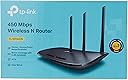
The TP-Link N450 WiFi Router (TL-WR940N) delivers up to 450Mbps wireless speed using 802.11n technology, enhanced by three fixed antennas for superior range and stability. Designed for home and small office use, it supports bandwidth control, parental controls, and one-touch WPS security. Compatible with multiple operating systems, it offers easy setup and reliable performance backed by a 2-year warranty and 24/7 technical support.


| ASIN | B003Y5RYNY |
| Antenna Location | Security |
| Antenna Type | Fixed |
| Best Sellers Rank | #24,607 in Electronics ( See Top 100 in Electronics ) #172 in Computer Routers |
| Brand | TP-Link |
| Built-In Media | Installation Instructions, Tp-Link Tl-Wr940N V3 Wireless N450 Home Router |
| Color | black |
| Compatible Devices | Mobile, Personal Computer, Tablet |
| Connectivity Protocol | Wi-Fi |
| Connectivity Technology | Wi-Fi |
| Control Method | Touch |
| Coverage | 2-bedroom house |
| Customer Reviews | 4.2 out of 5 stars 22,527 Reviews |
| Data Transfer Rate | 450 Megabits Per Second |
| Frequency | 2.4 GHz |
| Frequency Band Class | Single-Band |
| Global Trade Identification Number | 00755263230564, 00845973051464, 06935364051464, 06935364092887 |
| Has Internet Connectivity | Yes |
| Has Security Updates | No |
| Is Modem Compatible | No |
| Item Dimensions L x W x H | 9.1"L x 5.7"W x 1.4"H |
| Item Part Number | TL-WR940N |
| Item Weight | 0.66 Pounds |
| LAN Port Bandwidth | 10/100 megabits_per_second |
| Manufacturer | TP-Link |
| Maximum Upstream Data Transfer Rate | 100 Megabits Per Second |
| Mfr Part Number | TL-WR940N |
| Model Name | Wi-Fi Router |
| Model Number | TL-WR940N |
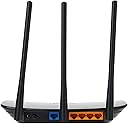
| Number of Antennas | 3 |
| Number of Ports | 7 |
| Operating System | Microsoft Windows 98SE, NT, 2000, XP, Vista or Windows 7, Windows8/ 8.1/10, MAC OS, NetWare, UNIX or Linux |
| Other Special Features of the Product | Parental Control, QoS, Wps |
| Router Firewall Security Level | High |
| Router Network Type | Wi-Fi |
| Security Protocol | WPS |
| Special Feature | Parental Control, QoS , Wps |
| UPC | 845973051464 |
| Unit Count | 1.0 Count |
| Voltage | 9 Volts |
| Warranty Description | 2-year warranty |
| Wi-Fi Generation | Wi-Fi 4 |
| Wireless Communication Standard | 802.11n |
| Wireless Compability | 802.11n |
B**E
Great router
I purchased this router a week ago, so I cannot comment about the longevity of it. I'm out of my element when it comes to IT since I don't really know what I'm doing or what to look for when it comes to IT-related devices, network, etc., but I took a chance on this since the reviews were pretty good overall. I was worried about the many poor reviews and the chance that I'd get one that didn't work, but I haven't been disappointed. I had a Cisco Linksys router that needed to be replaced which is why I bought this one. My connection is SO much better with this router. I would constantly get buffering and connection problems with Netflix and Plex, and my wifi status on both my laptop and Surface would switch to "Limited" pretty often. Even browsing on my phone was a pain and often I'd have to turn off the wifi. It got much, much worse over the last month. For now, though only a week old, this router has been great. The set up was quick and easy. I did it myself (and I'm not super tech savvy) within five minutes or so. The only problem I had with the set up was the cable that came with it; it didn't work. I swapped it with one I had lying around and it worked just fine. I was able to easily log into to the router using the internet and set up a static IP for my NAS (with A LOT of help from Google searches!) and that's worked well so far. I had no problem connecting all my devices and I have not experienced any problems with my connection. I have been able to watch things on Netflix with no buffering, no stopping for "internet connection" issues, no problems whatsoever. My download speed is also much faster. My phone can say connected to my wifi and I can browse quickly with no issues. It is seriously night and day with my connection. I understand it seems like this router is fantastic when it was actually the old one was just poor from the start, but for the money this router seems to be pretty great. I'm assuming this router acts like a router is supposed to so I have no complaints thus far. Once I've had it for a few months, I'll post an edit to this review stating whether it still works well or not at all as some people have claimed.
F**A
This is a dependable router, easy to set up, at a bargain price.
NEWSFLASH: An average computer user does NOT need to spend $200 on a wireless router! We do computer service and sales, and we constantly are asked what we recommend in wireless routers. Back in the day, almost all routers were under $100. Today, things have gone completely crazy! This unit, like most other routers, can handle up to 100 devices with ease, no drops, and little interference right out of the box. I set this one up in our busy store to test it in less than two minutes. Between wired and wireless devices, all sharing 100 MBPS cable internet service, I had 73 devices simultaneously connected and all doing something online with no noticeable drops in performance. Even our network specialist was impressed with the TL-WR940N performance. The range is admirable but not crazy. We connected wirelessly to devices up to 40 feet away through two walls with metal studs. If you have a large 3,000 square foot home with multiple stories (like ours), chances you're going to need a repeater even with that overpriced super range router. The FCC regulates the amount of power routers are allowed to transmit, so don't believe the hype. Yes, some produce a little stronger signal, but it's negligible at best. Bandwidth-wise, gamers are always complaining about lag (although it's usually a lame excuse for poor performance), so gamers should be hardwired. Your Smart TVs should also be hardwired if you intend to run the tiny bit of 4K content currently available. Honestly, I can't see the difference in 1080 and 4K, and we have Samsung's SUHD 4K Quantum Dot TV. A good wireless signal is enough to run 1080p Netflix streams, and this router does that just fine, transmitting about 30 feet with no drops through a complete episode of Better Call Saul while simultaneously streaming Pandora, Spotify, and lord knows whatever else those crazy techs were doing at the time. For under $30, this is a terrific deal. If you're concerned about reliability as poorly described in some of the negative reviews, buy two, and you'll still be well ahead of the game. We're a week into hours with occasionally heavy 24x7 usage, and it's performing flawlessly. Just bought a second WR940N that I will use at home - this will be our third router (the cable modem itself is a router that connects the first floor, a Linksys runs the kid's rooms upstairs with the gamer hard-wired, and this TP-Link will supply wireless to our outside patio, which is very important to the boss. Happy wife, happy life.
M**Z
Solid Performance with Room for Improvement
The TP-Link Festa FR205 is a solid router that impresses with its ease of installation and overall performance. Setting it up was straightforward: I connected it to my network, logged in to create a user and password, and enabled the "Managed by Cloud" option. The whole process was seamless and user-friendly. With a 950Mb/950Mb internet connection, I’m able to achieve those speeds reliably with this router, which is a huge plus. However, one of the biggest drawbacks is the reboot time—it takes up to three minutes to reboot, which is quite lengthy for a router in this category. The cloud interface is another strong point. It’s easy to manage, and I have two access points (APs) along with this router configured within it. However, the cloud app isn’t without its limitations. It lacks some advanced options, which may be a drawback for more tech-savvy users. Additionally, I’ve encountered an issue where I’m unable to see wired devices connected to the router, even though they receive an IP address from the DHCP server. A major downside, and a reason why I’m considering giving this router a four—maybe even a three-star rating—is the lack of an easy way to contact support through the cloud interface. You would expect a simple option for sending issues or feedback, but it’s noticeably absent. Despite these issues, the TP-Link Festa FR205 is still a good router, especially given its price point. I’m yet to explore the VPN options and other advanced features, but so far, with over 50 devices connected, I haven’t experienced any major issues. I would love to see TP-Link enhance the support options and add more advanced features in the cloud interface (even with the "Advanced Menu" enabled, it’s still somewhat limited). In summary, if you're looking for a router with strong performance and ease of use at a reasonable price, the TP-Link Festa FR205 is a solid choice. Just be prepared for some minor inconveniences and limitations in the cloud interface.
R**K
Great Wi-Fi Router even at double the cost!
This is a GREAT Wi-Fi router especially for its price of $30! I've had at least a half a dozen different Wi-Fi routers in the past. About 6 months ago I upgrade my cable modem and Wi-Fi router to a combo modem/Wi-Fi router - a $149 Motorola SBG6580 DOCSIS 3.0 so I could upgrade my Comcast speed to 57MB. This worked very well but on the other side of my house the Wi-Fi signal would degrade a little, I'd lose a bar or two, some speed and it would be noticeable on occasion streaming HD videos. This was further complicated by numerous Wi-Fi routers across all 2.4Ghz channels in my neighborhood. I tried a pair of TRENDnet Powerline adapters for a direct connection but they were worse. Since this was cheap and had good reviews I gave it a try. I plugged it in to a port on my existing router, downloaded the latest firmware/updated it and just sat it a few feet away from my Wi-Fi router. I tested it on two smart Wi-Fi enabled TV's, one with a Chromecast, a tablet and my notebook. In all cases there was visible improvement, one or two extra bars and faster internet speed tests on my tablet and notebook at far distances. I have a free program named inSSIDer that I got off the web. It will show you all visible Wi-Fi signals in your area, their strength, what channels they are broadcasting on, rank them and assorted information. I left this router set at all of the default auto selections and did not choose a channel. Most Wi-Fi routers broadcast on a single channel that overlap the frequencies on either side (1.5 channels each way) of the channel for a spectrum of 20. Some router can broadcast on two channels for a spectrum of 40. BUT in the US routers are supposed to automatically kick down to 20 when they encounter competing signals (like I have in my neighborhood). This router does not kick down and broadcasts on channel 3 & 7 for a very wide and stable signal.
H**L
It is 5 stars, definitely with severe power outage test
Update: I was away, we had a severe thunderstorm in the area, power was out. I monitor my house remotely and thought unless I was physically there, everything would be off. The TP-Link went back online, the Netgear didn't even respond. All the cameras, Z-wave house controls went back on with the TP-Link. I never had such luck with the previous Netgear. I strongly recommend this inexpensive and work great router. It is a bit early for rating since I tested only for 1 day. I may come back and give 1 star if it is dead after 1 week. However, for the time being, if you are looking for basic, low-price (the emphasis is low-price), this one is hard to beat. I used to be a tad leery of second tier network equipment makers like TP Link, but the it improves and the product is getting to be quite decent. There are two features that aren't great, but one shouldn't complain for this price: 1- it is not very responsive to admin access. oo many times it gives a page to tp-link website because the http server part doesn't work. A bit frustrating that one has to turn on, off, or reset. Also, it doesn't allow more than 1 admin log in at a times. The problem is that it doesn't detect the admin log in is broken, hence should allow open another log in to reboot. 2- It doesn't have DHCP list for wired connection. This is a real problem for me as I use both wifi and Ethernet. I have to use other network software to find out the IP's of wired devices. Other than those two, for a minimum typical user, this one is perhaps as good as any in terms of bang for the buck. I purchased it only as a backup and an aggregate access point, but it impresses me enough to let it be the main wifi router and relegate the other router to be the access point. One last thing about speed: I tested it side-by-side with a Netgear and a Linksys. As the other two are older models (1 year or more), I expected TP-link to be better with the newer 450 Mbs protocol. It is indeed proven better from 20% to 35% depending on location of my laptop within the house. So, again, it is a decent one.
E**O
DO NOT BUY
I can't stress this enough. This is by far the worst experience I have ever had with a router. I'm a sysadmin with 8+ years of experience and this box drove me nuts. When you try to access the box locally to set it up, you have absolutely no control whatsoever. The only thing you can do is set up your AP name and that's it. Port forwarding? VLANs? VPN server? All the things they claim they support? They are ONLY AVAILABLE in the cloud version. "It's just the way it is, they're trying to copy Ubiquity" was my first thought. But NO. This is not Omada, their corporate solution... this is Festa, effectively an outdated and unmaintained fork of Omada that targets prosumer users but simply fails miserably. The setup looks fine in the UI but then you realize nothing works. You configure a network and then onboard devices to this network, but there's no effective way to send the settings to the device you're 2 feet away from. Wanna forward a port? You can do it through the UI, but you can't make the router actually do it. I had to wait literally 1 day until magically the port was being forwarded. I can't change my WiFi SSID or password because it doesn't sync it automatically! It's simply unacceptable. Last but not least: wanna configure static IP reservations for your wired devices? YOU CAN'T BECAUSE THEY DON'T SHOW UP IN YOUR DEVICES LIST. Their response: "to be able to view wired devices, please BUY A FESTA SWITCH" even though this device has 5 ports. It's simply the worst user experience I have EVER had with a router. You're better of with a 30 buck router or even your ISP's. I'm telling you, please DO NOT buy this.
V**.
Reliable and High-Performance Router for Home Use!
I recently upgraded to the TP-Link N450 WiFi Router (TL-WR940N), and it has been a fantastic addition to my home network. This router offers reliable performance and excellent coverage throughout my house. The setup process was straightforward and quick, thanks to the user-friendly interface and detailed instructions. The N450 speed ensures that my internet connection is fast and stable, whether I'm streaming videos, playing games, or working from home. The router's range is impressive, reaching every corner of my home without any significant drop in signal strength. It’s also equipped with robust security features, providing peace of mind with network protection. The build quality is solid, and the router operates quietly, which is a nice touch. Overall, the TP-Link N450 WiFi Router delivers outstanding performance and value for its price. I highly recommend it for anyone in need of a reliable and efficient home router.
N**O
Capable hardware, frustrating software ecosystem
The hardware itself is fine and performs as expected, but the user experience around configuration is where this product falls down for me. TP-Link currently splits its ecosystem across multiple apps and platforms (Festa, Deco, Tether), and the lack of cohesion is genuinely frustrating. Some settings live in one interface, others in another, and the logic of how they “mesh” together is inconsistent. It feels like several good ideas that were never fully unified. If you’re looking for a set-and-forget router and don’t plan to do much customization, this will likely work well enough. Performance is acceptable and basic setup is straightforward. However, if you want deeper control over your home network such as custom configurations, tighter management, or a more coherent administrative experience, than this may not be the right choice. I ultimately found the interface limitations and fragmentation too restrictive for what I was trying to accomplish. I really wish TP-Link would focus on consolidating and perfecting a single management platform rather than spreading functionality across multiple partially overlapping systems.
B**T
Works great! Good, strong wifi signal
I picked this up to use as an access point in a bedroom somewhat removed from the main wifi source in the house, but wired with ethernet. I have several devices, like a VOIP phone and Roku plugged into it, and via wifi an Amazon firestick, a smart TV in the room below, and our cellphones to it, and it provides a really good strong signal and throughput. I have not had to restart it at any time due to problems -- it just keeps going, and going, and going. It was my first TP-Link device, but I have since bought other items from them.
M**M
منتج مميز ورائع
ممتاز يوفى بالغرض المطلوب منه
J**H
Perfect for small home use
Its a good basic router. Decent security and routing options. Good for small home/office use. Works with up to 7 devices streaming Netflix simultaneously. Starts struggling after more than 7 devices.
C**S
Tp link goede vervanger
De tp link w 940 en is een simpele router/ accesspoint die simpel is te installeren. Werkt perfect, goede zend sterkte. Ik gebruik hem als accesspoint. Ook mogelijk om verschillende apparaten bekabeld aan te sluiten ( 3 poorten) enige nadeel wat verouderde beveiliging. Updaten via tp link site goed.
A**A
Bonne expérience
Je l'ai acheté pour compléter ma box (trop souvent échangée !) pour avoir des adresses fixe pour mon Jeedom. Rien à reprocher.
Trustpilot
3 weeks ago
3 days ago