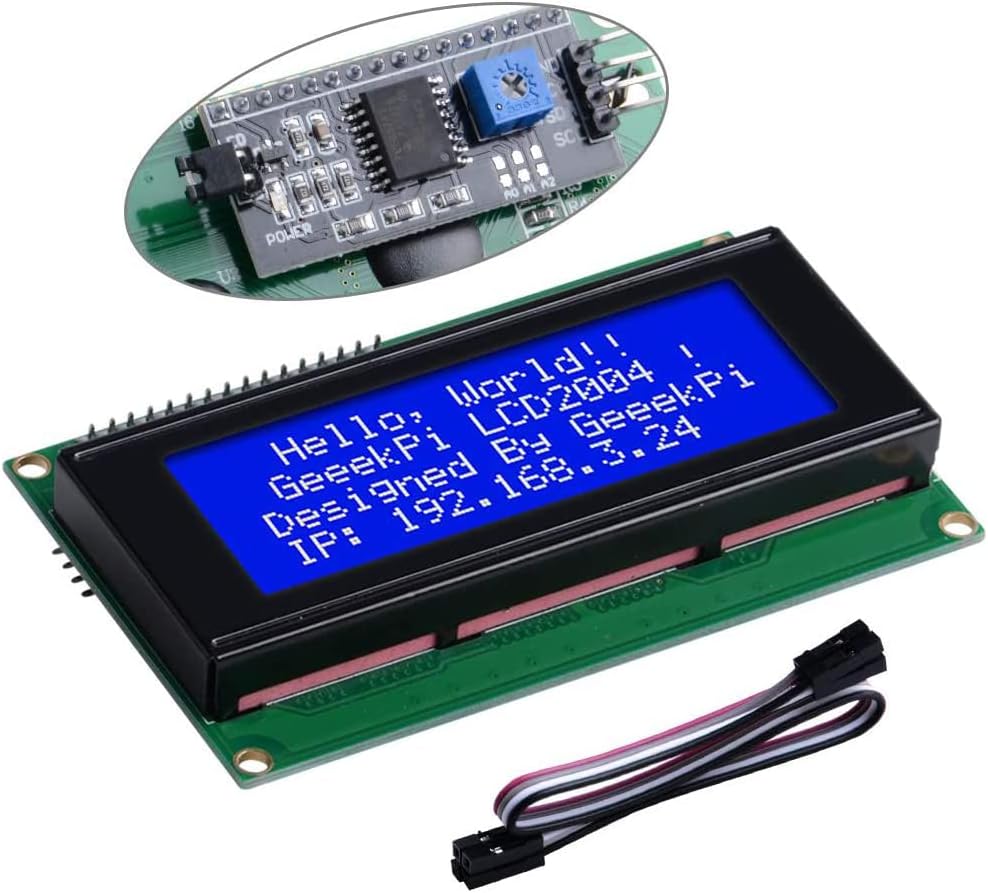
LCD 2004 Module
Product ID: 122483689
Details
- BrandGeeekPi
- Screen Size20 Inches
- Resolution400 pixels
- Aspect Ratio16:9
- Screen Surface DescriptionGlossy
💡Blue Backlight
📏20x4 Display
🔌I2C Interface
Desertcart purchases this item on your behalf and handles shipping, customs, and support to KUWAIT.
💻 Elevate Your Projects with Clarity and Style!
The GeeekPi IIC I2C TWI Serial LCD 2004 is a versatile 20x4 display module designed for seamless integration with various platforms like Raspberry Pi and Arduino. Featuring a user-friendly I2C interface and a vibrant blue backlight, this LCD is perfect for DIY makers and IoT enthusiasts looking to enhance their projects with clear, real-time data visualization.


| ASIN | B07QLRD3TM |
| Additional Features | I2C Serial Bus & High Speed Communication |
| Aspect Ratio | 16:9 |
| Best Sellers Rank | #3,257 in Computer Monitors #3,584 in Single Board Computers (Computers & Accessories) |
| Brand | GeeekPi |
| Color | Blue |
| Compatible Devices | Raspberry Pi, banana Pi, Tinker Board, STM32, ESP32 |
| Connectivity Technology | I2C |
| Customer Reviews | 4.5 out of 5 stars 140 Reviews |
| Display Resolution Maximum | 20x4 |
| Display Technology | LCD |
| Display Type | LCD |
| Has Color Screen | Yes |
| Manufacturer | GeeekPi |
| Model Name | DFR0154 |
| Model Number | DFR0154 |
| Native Resolution | 1920x1080 |
| Pixel Pitch | 0.6 |
| Processor Count | 1 |
| Resolution | 400 pixels |
| Screen Finish | Glossy |
| Screen Size | 20 Inches |
| Screen Surface Description | Glossy |
| Shape | rectangular prism |
| Specific Uses For Product | Business, Education, Gaming, Photo Editing, Programming, Video Editing |
| Total Number of HDMI Ports | 1 |
| UPC | 703501205959 |
| Viewing Angle | 160 Degrees |
| Voltage | 5 Volts |
| Warranty Description | 6 months |
| Warranty Type | Limited Warranty |
K**A
Just Works
A good 4x20 LCD with attached I2C controller. Although the picture implies that the controller can be removed, it cannot without unsoldering all the connections to the display itself. Functionally fine, but be aware that I2C LCD controllers are "slow" compared to the standard, multi connection (many wires) method. One may want to try various libraries if refresh speed is an issue.
D**L
Use a resistor if screen isn't clear
I had to buy this for a college project, and the screen worked. At first, the screen was too bright and reading the text was kind of tough, but using a resistor made it crystal clear.
A**N
Display Functionality
Only problem was the lcd itself was moving around internally so the backlight cannot really show what is happening. Would definitely recommend this product though.
X**Z
Great display
I originally gave this a bad review because it would not work, but it turned out that the references for sample code were for a different Arduino. Once I realized those instructions were old, outdated, etc., I found a page with the correct instructions for my board and it works perfectly. There are two things to look at - the first is the hardware, it just works, four lines, 20 columns, bright and readable. The other is the interface software that your code will use. Like most things these days, the documentation is spotty, many times it is only the ramblings of somebody writing click bait. Once you have the library installed (and it most likely will be installed with a general update if not already there) and looked at the provided example, it is insanely easy to code. There are nuances with the library and hardware that need to be learned, and some techniques, but for 10 bucks or so, it is a great buy.
J**N
Works great!
Arrive on time and worked right out of the box. This is my second 2004-LCD I2C, from Geeekpi and it works well.
M**N
Love it.
Good quality and a bigger screen then my original 16 pin LCD.
S**K
Easy to Use
Easy to use display with my Arduino UNO. Just activate the appropriate LCD library with in the Arduino IDE and add the correct code and I2C address of the GENIO expander on the display (0x27) for the one I received. It might have been a little more fun and challenging to figure out how to write the code to control the IO expander to the display, but using the Arduino library makes it easier and quicker to implement into your project.
D**R
Decent little LCD screen, make sure you know what platform you’re using it for!
Overall a pretty standard LCD screen and works well for my applications. Beware though, the way they show this connecting directly to a Raspberry Pi is false. For an Arduino, connect directly to the screen is acceptable, but for the Pi it isn’t. This screen, and essentially all like it, work with 5V logic. Arduinos natively use 5V logic, which is OK. The Raspberry Pi, on the other hand, has 3.3V logic on the GPIO pins. DO NOT PLUG THIS DIRECTLY INTO YOUR PI! You risk damaging the Pi. You need a bidirectional level shifter between the Pi and the device to bring the voltage down from 5V logic on the LCD side to 3.3V on the Pi side! Other than that, this thing is great!
J**E
module lcd
très bon produit
Trustpilot
1 month ago
5 days ago