Buy anything from 5,000+ international stores. One checkout price. No surprise fees. Join 2M+ shoppers on Desertcart.
Desertcart purchases this item on your behalf and handles shipping, customs, and support to KUWAIT.
🚀 Upgrade your Wi-Fi game—speed, power, and portability in one sleek dongle!
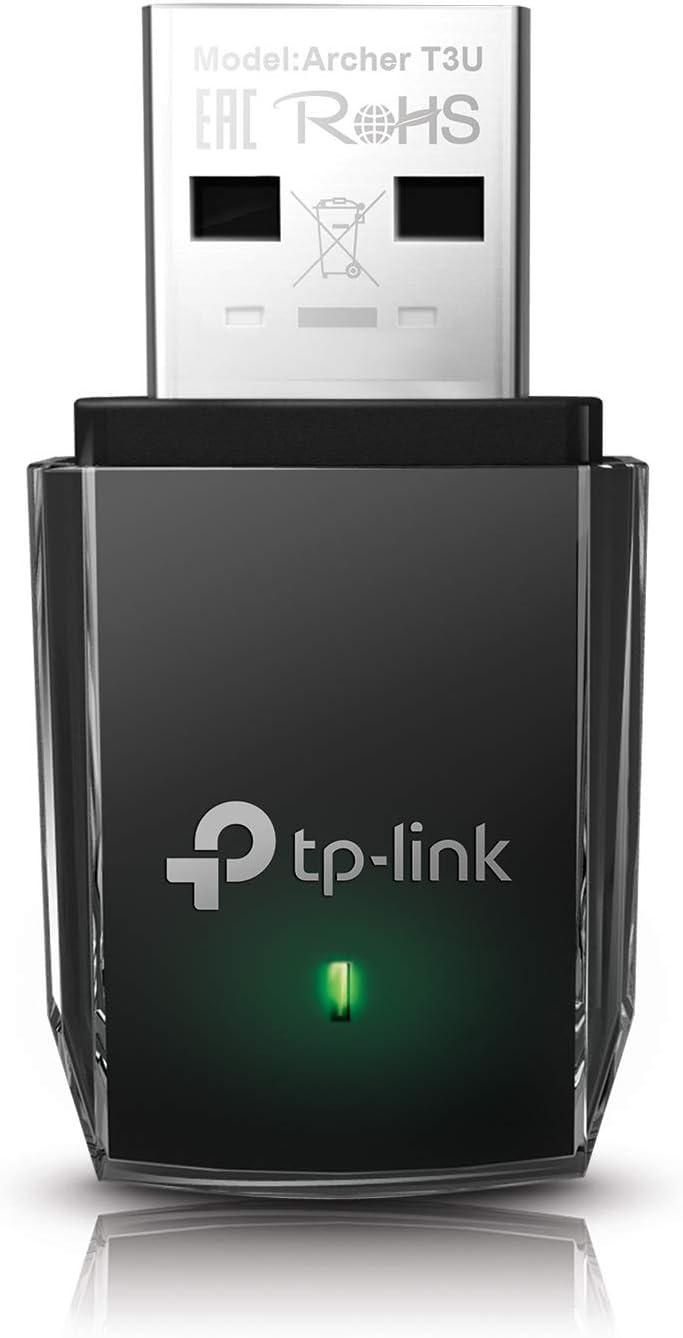
The TP-Link AC1300 Archer T3U is a compact USB 3.0 Wi-Fi adapter delivering dual-band 2.4G/5G connectivity with MU-MIMO beamforming technology. Compatible across Windows and Mac OS, it offers up to 1300 Mbps speed, ensuring fast, reliable wireless performance for desktops and laptops. Perfect for professionals seeking seamless, lag-free internet on the go.













| ASIN | B07P6N2TZH |
| Best Sellers Rank | #3 in USB Computer Network Adapters |
| Brand | TP-Link |
| Built-In Media | Archer T3U |
| Color | Black |
| Compatible Devices | Computers (desktops, laptops), running Windows 11, 10, 8.1, 8, 7, XP, and Mac OS X 10.9 to 10.14 |
| Compatible Operating System Family | MacOS, Windows |
| Customer Reviews | 4.5 4.5 out of 5 stars (17,683) |
| Data Link Protocol | USB |
| Data Transfer Rate | 1300 Megabits Per Second |
| Global Trade Identification Number | 00840030700026 |
| Hardware Interface | Micro USB 3.0 Type B |
| Item Dimensions L x W x H | 0.78"L x 0.41"W x 1.59"H |
| Item Weight | 0.02 Pounds |
| Manufacturer | TP-Link |
| Mfr Part Number | Archer T3U |
| Minimum Required Operating System Version | Windows 11 |
| Model Number | Archer T3U |
| UPC | 840030700026 |
| Unit Count | 1.0 Count |
| Warranty Description | 2 year manufacturer |
W**D
Works great
Words great. Came with a CD with the drivers on it. Installed in 15 minutes including going upstairs and getting my old DVD drive. Good speed even on USB 2.0. Good value.
W**.
affordable replacement for Wi-Fi
First part of this is to trash Asus. Bought a vivobook i5 new in the box on clearance (not from Amazon). Figured Asus makes a good motherboard, laptop should be good too. NOPE. First couple of days it was fine, then the touchpad went wonky. started opening windows, magnifying windows, closing them, just all kinds of crazy stuff. So to use it, I bought a cheap wireless mouse. Few weeks later wireless stopped working. Did a bunch of troubleshooting, yep, internal wireless out. Tossed the thing a side and didn't use it. What isn't Asus fault is me being lazy and not sending it in. Life happened and decided to pull it out again to get some use out of the lemon laptop. I purchased the TP-Link AC 1300 usb just to see if I could get it to work. Lets get the stupid out of the way first. Win 11 doesn't have a driver for it, TP-L sends a CD. Guess what doesn't have a CD drive, like most new laptops do. No way to get the driver on unless I cable up and download it. Once I ran a cable across the floor, went to the site and downloaded the driver, the rest was easy. It installed, went right on my network and works fine. Speed is good and haven't had a problem with it. Now I'm just waiting for the USB system in this poorly constructed laptop to fail next and turns this laptop into a boat anchor. Buy this work around for a bad wireless, Do not buy a Asus Vivobook. Did I mention the vivobook has a really weak battery? No, well it stinks too.
J**S
Nice Adapter!
Bought this inexpensive WiFi booster to boost the power to my downstairs PC.After plugging it in,found the device worked well and powered the unit sufficiently.Though it,was among the least expensive adapters listed,it worked and continues to work well for the price.Thumbs up on this one!!!
N**H
EASY, CHEAP, & RELIABLE
I got this WiFi adapter back in 2022, and it has worked amazingly! It is super cheap, gets the job done, and kept my ping between 7-16. It is so easy to use and it is super tiny, very surprised how well it has worked over that past few years. Although it seems like it is slowly starting to have some problems. Sometimes I need to unplug and replug it in for it to work now, and it takes a second to connect. For 15 bucks, it was definitely worth every penny! I really like the brand, I’ll definitely will be getting an upgrade sooner than later.
B**A
works great but you need to deactivate the onboard adapter with Device Manager.
After I changed my internet from 2.4G to 5G (Verizon), my poor old HP laptop with its 2.4G Realtek adapter struggled to get 12 Mbps in the rear of my apartment. I needed to upgrade the wifi adapter to 5G so I bought this USB plug-in adapter. But, it didn’t work at first - my laptop recognized the TP-link but kept using the Realtek adapter. So (thanks to you-tube!) I learned that you go to Device Manager and deactivate the Realtek adapter. My internet speed immediately went up to 160Mbps! I’m very satisfied!
C**T
Simple Replacement Adapter for PC
My previous adapter had run its course. Internet connectivity was intermittent and the outages burned time before subsiding; leaving me with returning connectivity that was poor quality. This was the cycle until I purchased this product as a replacement. I uninstalled the problem adapter and followed the simple instructions to install this product. My connectivity issues went away instantly. Tech entropies, and getting a replacement is well worth the hassle. This is an easy-to-install product. My internet speed is much faster!
B**B
Great USB WiFi Adapter
Great USB WiFi Adapter. Glad I found where I need to enable it. Did not see that on the instructions. After I found that, it worked great. I keep testing speed and it is now fast again. My old one died. Came with a CD which my laptop does not have a CD. Windows found the driver automatically, so the only thing I needed was to enable the device through my Device Manager. Very happy to have speed again.
D**B
DOA... TP-LINK Warranty consumer runs through endless hoops
I have lots of computers, on the order of 30 or so and USE Mac, PC, and Linux. I tested this DOA device on 4 different computers: One mac and three win 10 PC. I am the first to admit that Win 10 with its endless updates and driver updates is an accident waiting to happen. But this TP-Link device was right out of the box. Sold as a Plug and Play adapter, the green led should have signalled an appropriate driver. It did not. So then next step is to apply the disk drivers that come with the adapter. First removing any prior drivers that attempted to load automatically then apply the CD disk drivers. Again the Yellow triangle with the exclamation point. Next step in the wash and repeat cycle is to download the driver from TP-Link. Load it manually after deleting the prior drivers that may have loaded off the failed CD attempt.. and Surprise... The Yellow traingle with the exclamation point remains. So what do we have here? We have a device that is recognized as a USB adapter but CAN'T use any drivers to function. I did a total of 7 installs on four different computers, one mac, and three different Win 10 computers. I had no alternative but to contact TP-Link and their phone help clowns that read from a script but don't actually know the product or the customer. So they tell me they will send me instructions to trouble shoot. They don't tell me what this is but it to download driver from their website and apply them manually. So What do these geniuses send me? They send we Windows 7 screen shots and Window 7 instructions to load Windows 10 computers. The first instruction calls for right-clicking on the computer icon and going to manage. THERE IS NO SUCH INSTRUCTION that applies to Win 10. So TP LINK doesn't know the difference between windows 7 and 10 but it does tell me something...They have been having issues with this adapter since windows 7! After the internet search, I was floored at how many of these TP-Link adapters were causing Win 10 and Linux users so much grief. One online blogger had the solution.. just toss it and buy a $8 AC600 adapter. What else are they complaining about... A lack of speed. This device is supposed to be 1300. Mine is ZERO. Gamers said they could not use it for games. So all around they have this defective junky product with drivers that don't work or work poorly and they send out manual driver loading instructions with windows 7 screenshots. Then we get to the 2 year warranty and the many hoops for RMA service. In my case they asked a half dozen questions about power failures etc. Even though I had told them I just opened the box the same day. They just walk the script. Next them want the serial number. They don't tell me where to look of course. I inform them I can't find any serial number on the product so they say to look a the box. So I send photos of the box and there are no serial numbers, just a UPC code and QR code on the back. I ask them, are you warranting the box or the adapters? The box is not defective, the adapter is defective. This garbage goes on day and night with these Asian-based firms. They intentionally waste your time or hope you threw the box away... That is now how warranty law works. That is how TP Link works. I strongly advise you look for online blogs before buying any TP-link products. TP-Link is out of Singapore and this junk adapter was made in Vietnam...
M**L
Vi que había algunas quejas del adaptador nano en cuanto al alcance de la señal así que me decidí por la versión ac1300, el adaptador soporta las redes 2.4 y 5 ghz del internet de fibra óptica de telmex, en windows 10 solo se conecta y empieza a funcionar, no es necesario instalar controladores, excelente alcance de señal, hay una pared de concreto entre el modem y la pc y haciendo pruebas de rendimiento descargo mis archivos a toda velocidad, hasta el momento ninguna queja del producto, recomendado.
M**M
Very nice item works smoothly! And the seller very approachable! salute to you sir!
C**E
Excelente produto. Salvou a possibilidade de conexão à rede wifi do meu computador
A**R
The item arrived promptly. It lived up to its review as a plug and play!
A**R
great range
Trustpilot
1 month ago
1 month ago