We remain fully operational. Our teams are working around the clock to ensure your deliveries continue safely.

DOWNLOAD THE APP


Copyright © 2025 Desertcart Holdings Limited
DOWNLOAD THE APP


Buy anything from 5,000+ international stores. One checkout price. No surprise fees. Join 2M+ shoppers on Desertcart.
Desertcart purchases this item on your behalf and handles shipping, customs, and support to KUWAIT.
💡 Blink and you’ll never miss a beat — your smart desktop sidekick!
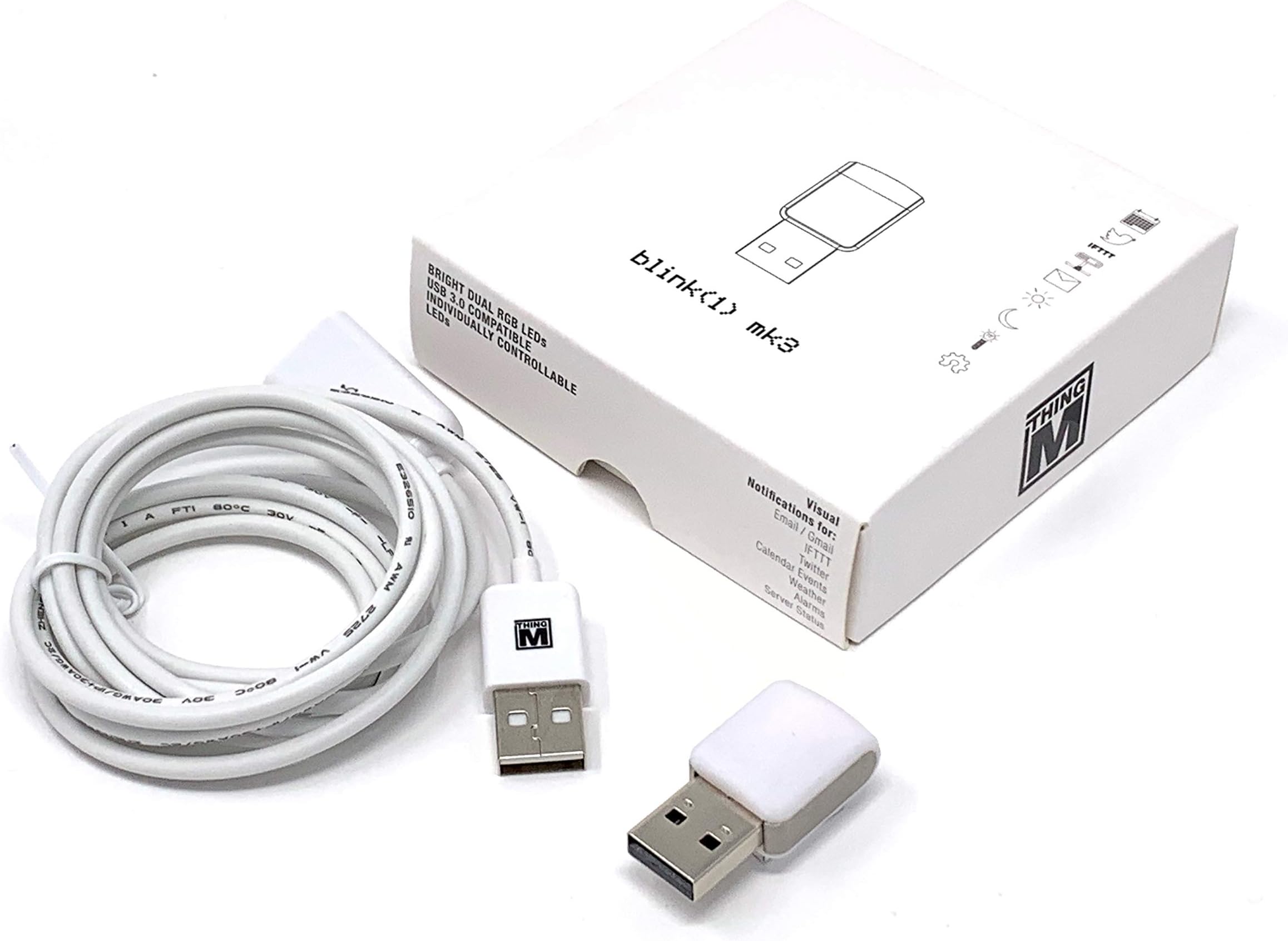
The ThingM Blink(1) USB RGB LED BLINK1MK3 is a compact, customizable USB status light that delivers real-time, color-coded notifications from your computer or cloud services. Featuring full RGB LED control, open-source software compatibility, and a handy USB extension cable, it integrates seamlessly with Windows, Mac, Linux, and IoT devices. Perfect for professionals who want to stay informed at a glance without interrupting workflow.
| ASIN | B07Q8944QK |
| Best Sellers Rank | #579 in USB Flash Drives |
| Brand Name | ThingM |
| Cable Type | USB |
| Color | rgb |
| Compatible Devices | kompatibel mit Windows XP / Vista / 7 / 8, Mac OS X, Linux (Ubuntu, Debian, etc.; läuft auch auf Chromebooks mit Linux-Betriebssystem), Raspberry Pi / Beagle Bone / DD-WRT Router, FreeBSD |
| Connectivity Technology | USB |
| Connector Gender | Male-to-Male |
| Connector Type | Usb |
| Customer Package Type | FFP |
| Customer Reviews | 4.2 4.2 out of 5 stars (65) |
| Global Trade Identification Number | 00758524799640 |
| Included Components | Blink, USB-Verlängerungskabel (ca. 150 cm) |
| Indoor Outdoor Usage | Indoor |
| Item Shape | Stick |
| Item Weight | 0.07 Kilograms |
| Manufacturer | ThingM |
| Maximum Current | 500 Milliamps |
| Maximum Voltage | 525 Millivolts |
| Model | BLINK1MK3 |
| Number of Pins | 4 |
| Other Special Features of the Product | OSHW, RGB, USB-controllable, open source |
| Recommended Uses For Product | Extend USB connection range |
| Specification Met | Open Source, Compatible With Various Standards |
| UPC | 758524799640 |
| Unit Count | 1.0 Count |
S**H
Niche Use Case
So, Apple, in their infinite wisdom, have decided that the small white LED in front of the Mac Studio computer should not fade in and out when the Mac Studio is in sleep. Incredibly it stays on all the time. So you have no idea if the computer is sleeping or awake. How crazy is that? Mac mini’s have had that feature forever. Well this little device can be plugged into one of the USB ports of the Mac studio. I have mine plugged in the front, and with a little bit of software magic it will stay green while the computer is awake and active and then it will turn Amber and then eventually turn off when the computer is sleeping so you can tell at a glance what your computer is doing. Obviously the colors are controllable. The states are controllable and you can use this device for other things like flashing in different colors when you get an email or when something happens so it acts as a visual indicator for a lot of things, but for my purpose I got it specifically so I can tell when my Mac studio is sleeping and when it’s awake.
B**H
Easy to Use, Powerful Software
Blink(1)s have been around since the early days of the Maker Movement and have been great fun to configure and use. The software also makes it trivial to spin up an API if you want to write your own code to send it messages that change the colors, brightness, and blinking patterns, and I suspect you could figure out how to leverage a connection service like IFTTT or Zapier for that purpose if you’re knowledgeable about networking as well. If you want a light that automatically signals events, this is a terrific solution.
D**P
A neat gizmo, nicely made, useful
My Blink(1) mk3 is well-made and nicely finished. The lights are bright, and pleasantly diffused by the cover. I downloaded the Windows command-line program and the Windows UI program, and they worked well. The two internal LED's Independently set color, brightness, flashing and fading. I like the included USB cable. I would like to find better descriptions of the storable pattern and "serverTickle" features. Where? After a brief bit of searching, I was able to find the NodeJS API at Github (todbot/node-blink1). I was able to recompile it for electron (electronjs.org), updating the native-based API from NodeJS version 72 -> 73. This works wonderfully, and will add a sweet WOW! factor to my next project. I expect this little $30 gem will pay for itself, in short time.
B**R
Degree in computer programming not included with purchase
Nowhere on the Blink(1) website or reddit does it say you will NEED a degree in computer programming in order to get these things to work. These are made for the hardcore enthusiast and not the casual user. Blink(1)'s tech support is downright awful. The Blink1Control2 program, that is needed in order to interface with the Blink(1), is an unsigned, poorly written, barely functional, constantly crashing piece of junkware that will drive you crazy. If you connect this thing to IFTTT you have to update the IFTTT Key on a daily basis (or at least every time the Blink1Control2 program crashes, which will be daily). You cannot connect two Blink(1)'s to IFTTT. Their "online community" is an un-managed sub-reddit that barely sees traffic so good luck getting help there. I am MASSIVELY disappointed in this purchase. Overwhelmingly, unimaginatively, unparalleled, unbelievably the ABSOLUTE worst purchasing decision I have ever made in my entire life. Do not under any circumstances give these people money.
N**K
Lots of options for developers- an API for pretty much every platform
Personally I just run the Blink1 control software with HTTP server enabled, which allows you to control RGB color, create patterns, start/stop patterns, etc. with simple GET requests. However if you use one of the many blink1 libraries (they have one for node, python, obj-c, and many more), it's simple to control the device directly without any software running in the background. I use my Blink1 for indicating unit test status: solid red for fail, solid green for success, and pulsing blue when tests are in progress (they get launched by a watcher so tests are being run all the time as I'm writing code). This indicator is much nicer than having to spare screen real estate for terminal output.
R**E
Supports cmd calling executable, and custom integrations
I use these leds as "tally lights" on my studio cameras to indicate if they are live or on standby or what camera is about to go live.
S**S
Fun!
This is a fun tool/toy. Very configurable with many very accessible API's - can control with a graphical tool, command line, or libraries for a wide variety programming of languages. I use as a mute and screen share indicator light for Zoom meetings (using Hammerspoon on Mac).
M**E
Nice… when it worked.
Picked up two of these to alert us when email came in to our store. They worked for a short time… then just stopped. Sometimes getting them to work again meant rebooting the computers, or reinstalling their funky software. We’ve finally run out of patience. And apparently their tech support person did too, because they won’t return our emails any more. Now, here I am, writing this lousy review and having to shop around for something else… challenge being that there (oddly) few email alert products out there.
N**N
I program in Python primarily, and it's really nice to have a simple, ready-made, programmable light I can control with my own code. If you don't want to write any code, it also comes with some reasonably powerful software to control the light and tie it to events.
G**S
El diseño y la calidad de la Luz están geniales, pero lo mejor qué tiene SDKs en diferentes lenguajes de programación, entonces tienes completa libertad para hacer lo que quieras
Trustpilot
2 days ago
1 week ago