We remain fully operational. Our teams are working around the clock to ensure your deliveries continue safely.

DOWNLOAD THE APP


Copyright © 2025 Desertcart Holdings Limited
DOWNLOAD THE APP






Buy anything from 5,000+ international stores. One checkout price. No surprise fees. Join 2M+ shoppers on Desertcart.
Desertcart purchases this item on your behalf and handles shipping, customs, and support to KUWAIT.
🚀 Elevate every meeting with pro-grade video and sound—wherever work takes you!
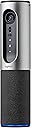
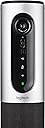
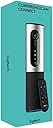
The Logitech ConferenceCam Connect is a portable all-in-one video collaboration device designed for small groups of 1-6 people. It features Full HD 1080p video with autofocus and digital pan/tilt/zoom, a 360-degree omni-directional speakerphone with noise cancellation, and versatile connectivity options including USB, Bluetooth, and NFC. Its compact, lightweight design and built-in battery enable easy transport and quick setup, making it ideal for dynamic workspaces and on-the-go professionals.


| ASIN | B00SQG16MG |
| Antenna Location | Camera |
| Are Batteries Included | Yes |
| Battery Average Life | 3 Hours |
| Best Sellers Rank | #169,770 in Office Products ( See Top 100 in Office Products ) #78 in Telephone Audio Conferencing Products |
| Brand | Logitech |
| Built-In Media | Webcams |
| Camcorder Type | Video Camera |
| Color | Silver |
| Compatible Devices | Most UC and web conferencing applications, including Cisco Jabber and WebEx, Zoom, Skype for Business and Microsoft Teams, Google Meet, and others. |
| Connectivity Technology | Bluetooth, NFC, USB |
| Customer Reviews | 3.6 out of 5 stars 200 Reviews |
| Digital Zoom | 4 x |
| Display Resolution Maximum | FHD |
| Effective Still Resolution | 2.07 MP |
| Exposure Control Type | Automatic |
| Features | Portable,Wireless |
| File Format | MP4, AVI, MOV |
| Flash Memory Speed Class | C10 |
| Flash Memory Type | SD |
| Flash Memory Video Speed Class | V30 |
| Focus Type | Auto Focus |
| Form Factor | Handheld |
| Global Trade Identification Number | 00097855111265 |
| Has Image Stabilization | No |
| Image Aspect Ratio | 16:9 |
| Image Capture Speed | 30 fps |
| Image stabilization | Digital |
| Item Dimensions D x W x H | 2.95"D x 2.95"W x 11.98"H |
| Item Weight | 1.7 Pounds |
| Lens Type | Zoom |
| Manufacturer | Logitech |
| Maximum Aperture | 2.8 f |
| Maximum Focal Length | 105 Millimeters |
| Minimum Aperture | 2.8 Millimeters |
| Minimum Focal Length | 35 Millimeters |
| Model Name | Conferencecam Connect |
| Model Number | 960-001013 |
| Number of Batteries | 1 Lithium Polymer batteries required. (included) |
| Number of Speakers | 1 |
| Optical Zoom | 100 x |
| Screen Size | 75 Inches |
| Shooting Modes | Automatic, Manual |
| Style Name | ConferenceCam |
| Supported Audio Format | MP3, AAC, WAV |
| Supported Image Format | JPEG, PNG |
| UPC | 097855111265 |
| Unit Count | 1.0 Count |
| Video Capture Format | MP4 |
| Video Capture Resolution | 1080p |
| Video Resolution | 1080p |
| Water Resistance Level | Not Water Resistant |
| White Balance Settings | Auto |
| Wireless Compability | Bluetooth |
| Zoom | Digital |
F**R
Great equipment, more capable than advertised! Outstanding value for the money.
This is an outstanding product! We've been using it for a few weeks and have been very pleasantly surprised. We thought this device would do a good job in a huddle/small conference arrangement. We've been able to use it in a larger (10 people) conference room with great success. We didn't expect that, because audio is a real challenge in larger spaces. The ConferenceCam Connect's microphones and speakers cover more territory than the specifications state. Video is sharp and the onboard compression processor really takes the strain off the laptop we use as a hub. We've noticed better performance on our Zoom videoconferences and the computer is able to produce a better image on our large screen because of the hardware support built into this Logitech device. Don't be scared off by the small size and low price, this is a very capable piece of equipment and a real value. One other item of note, it's very lightweight. We did buy a case for it, but the first two weeks we carried in the same messenger bag we keep the laptop in. All our conferences are less than two hours, so we've done everything on the built in battery so we only have to use one cable to hook up to the laptop. This one is a winner, highly recommended.
M**S
The bluetooth and webcam NEVER WORK when you need it!
This is the worst thing I have ever wasted money on. I wouldnt send it back because I wouldnt put someone else through that. !: Bluetooth works sporadically like an angsty teenager it connects when it wants. 2: Webcam is best buddies with the Bluetooth and they both do drugs all day long and dont have real jobs. 3: The interface things you press don't work very well not intuitive you can never really tell when you turn it off on or put into pairing. Like a cold distant lover. 3a: It blinks red in the middle of the night if a constant source of power isnt applied, this thing has slept on the couch more than a troublesome spouse see 3 (cant ever tell if its off). 4: Its BIG like a foot tall why? 5: Its expensive for all of these flaws.
S**D
Good camera and audio; good, well integrated software; confusing communication on warranty service
Original version of my review: The device itself is pretty good. Camera is sharp, easy to focus, zoom, and tilt.Wide field of view is good for including a few participants. Mic and speakers are good. Settings software is OK on Windows, absent on Mac. Much as I liked the device the few times I used it, it failed in less than a year; apparently a problem with the rechargeable battery or charging system. Even when plugged into power, it is just dead. Logitech warranty service leaves a lot to be desired. After the replacement arrives, I will review again. Here is the promised revision, now that the replacement has arrived: The hardware remains good; still high quality video and audio. I like the device. The software for Mac is now available, and works well. I am pleased overall with the software/hardware integration. Altogether, the ConferenceCam Connect is a good solution for small multi-user groups conferencing together. The warranty service seems to be run by a committee of people who don't cooperate among themselves. It took a few days more than the claimed 24 - 48 hours to send email with a warranty return label. They said that they would ship the replacement unit to me after receiving the defective one. After I sent back the defective item, I got a very nice email saying they would ship the new unit without waiting for the defective one to arrive. Today, I got the new unit, and yet another email stating that they would ship the new unit once they receive the defective one...how odd. But, all's well that ends well, and with a little patience, the warranty exchange was handled.
P**S
Our Go To Conference Cam for years
With 10 remote offices and hundreds of remote workers we looked for a device that is easy to use, intuitive, stable, and supportable, as well as a high or nearly high performer. The Logitech Conference Cam Connect meets all the criteria. We use dozens of these with relatively little support or technical issues. We have been buying this WebCam since 2016 and plan to continue into 2020 because they meet our remote worker, small conference (up to 4 or 5 people) and standardization needs. Currently we use the Conference Cam with WebEx, Jabber, Microsoft Teams, GoToMeeting, Citrix, and Zoom platforms with no issues. Operating issues, just a heads up. The buttons on top of the Conference Cam are sensitive which means you can go into Casting mode instead of WebCam mode without intending to. The fix is fast, just touch the right button, but it can be annoying. Once other thing, some of the start-up Web Browser only video services can be flaky with this device. Its an issue with the services not the camera.
T**S
Good Camera and Speakerphone for a Small Group
I'm part of a full remote team so we have a lot of cameras and technology. This is a solid product. It has a built in battery that lasts an hour or two for quick meetings. But, the field of view isn't great for more than three people or so unless you can place it at the end of a long table. If you want to use as a personal webcam, it works really good if you have a place to put it. My boss has it on his shelf by his standing desk and it gives a great view of him and the room. You can also tilt the camera up and down. I will say that this is better than some of the other Logitech cams, specifically the Logitech Conference Cam BCC950 with the long neck, though again, works great as a speakerphone. All that said, if I were to make a recommendation for a spectacular camera for large or even small groups and rooms of pretty much any size it would be The Meeting Owl by Owl Labs. We LOVE that thing. 360 degree camera that shows the whole room and also automatically zooms and focuses on one more multiple speakers automatically and works with every conferencing software I've used. It truly gives an experience like you're in the room as a remote attendee. All that said, this isn't a bad product. Good picture quality and speaker/mics. Just wish FOV was larger, that's all. If you can shell for this and can spend slightly more money, you can't go wrong with The Meeting Owl for groups. I'd recommend looking it up and decide what's best for you and your budget.
M**I
Bluetooth is Confusing and the remote is limited, Camera is Great
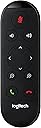
Not worth $400. The make call and hang up buttons do not work with REGULAR Skype or my remote is broken. Documentation is confusing. The only Skype plugin is for Far End. Bluetooth description is confusing, Bluetooth appears to only work with "Screen Mirroring" and Android/Surface Devices. My intention was to connect this to an Intel NUC via bluetooth to handle conferencing with Skype. I did not want to add another cable and I wanted to give my client mobility in the conference room. It doesn't work that way, to get video via Skype you have to use the supplied USB cable which is only 6' long. In a conference room this means it's anchored to your display. The bluetooth connection is ONLY useful for someone in the same room to connect with the device and display the contents of their phone on to a larger screen. It's worth $275 not $400 "Plug-and-play USB or wireless connectivity to computers and mobile devices" Not really... Caveats above. Here's a link to the official screen mirror pdf: http://www.logitech.com/assets/53417/screen-mirroring-brochure-confcam-connect.pdf On the Upside, the camera and zoom works well as does the speaker.
C**E
Excellent v/c ROI in a highly portable/professional form factor.
Excellent product; compact, contained, high quality sound and video, effortless set-up, works well for groups up to 15 people, wide-angle lens is effective and digital pan is useful from the remote. Excellent ROI for on-demand, no hassle v/c and speakerphone with professional design and appearance.
C**S
Item did not work properly with us
We had issues with the Conference Cam Holding a charge when unplugged and would not connect to computer via USB Port. When we returned it before our 30 days the seller told us because they could not find the issues we are having we could not receive a full refund. We are still fighting for our refund, our IT department as well as the Logitech team could not get this item to work. Buy at your own risk!
Trustpilot
2 weeks ago
1 month ago