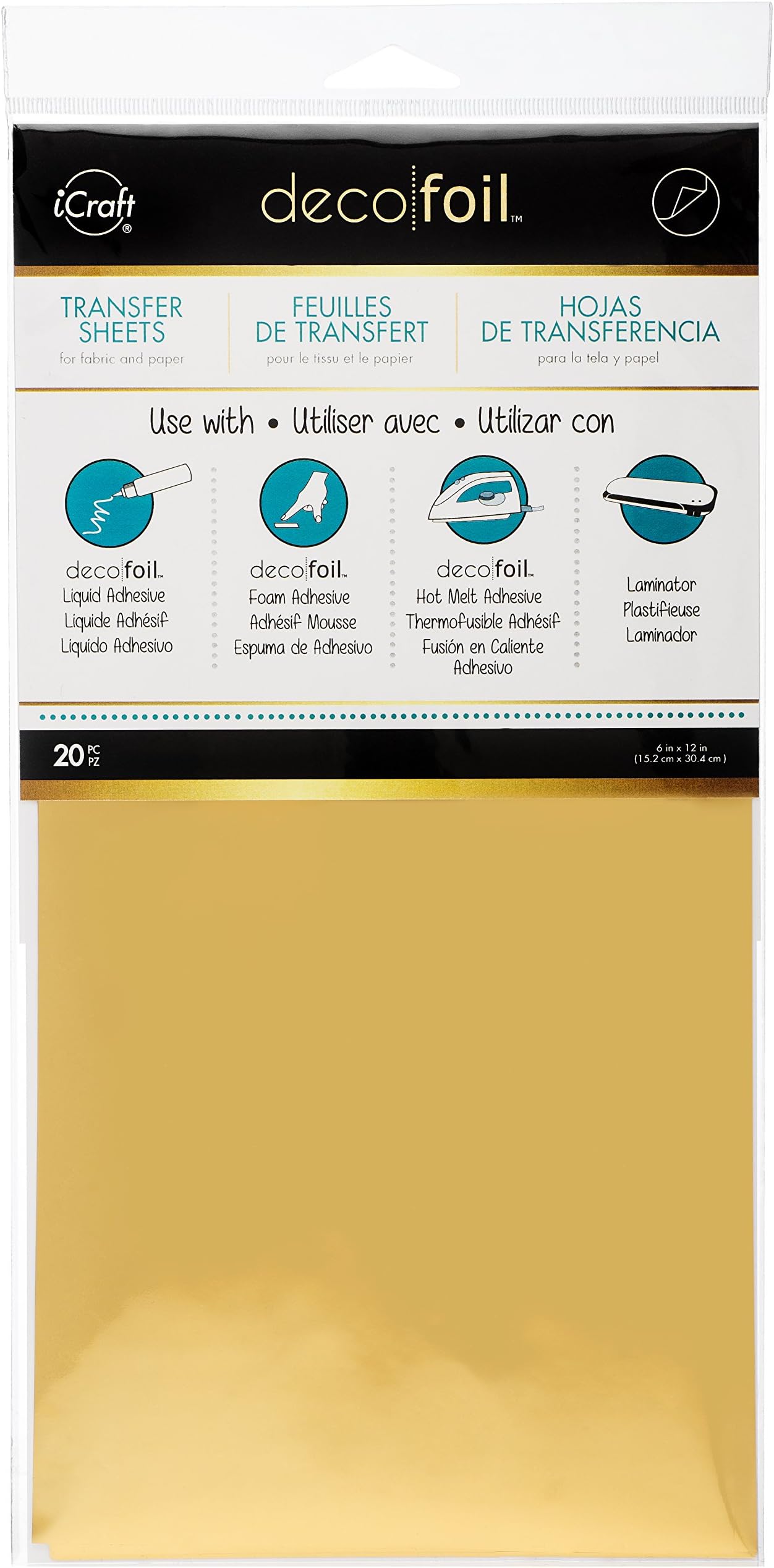
iCraft - 418561 Deco Foil Transfer Sheets, 6" x 12", Gold, 20 Piece
Product ID: 14863670
Details
- BrandiCraft
- ColorGold
- Item FormSolid
- MaterialFoil
- PatternSolid
✨20 vibrant gold sheets
📏6" x 12" perfect craft size
🧼Washable on fabric
Buy anything from 5,000+ international stores. One checkout price. No surprise fees. Join 2M+ shoppers on Desertcart.
Desertcart purchases this item on your behalf and handles shipping, customs, and support to KUWAIT.
✨ Elevate your DIY game with gold that glows and lasts!
iCraft Deco Foil Transfer Sheets deliver 20 acid-free, 6" x 12" gold foil sheets designed to add vibrant metallic shine to paper, fabric, wood, and other porous surfaces. Compatible with iCraft Deco Foil adhesives and toner sheets (sold separately), these washable foils create stunning, durable accents perfect for professional-quality crafts and personalized projects.
| ASIN | B00UY14KT2 |
| Additional Features | Washable |
| Best Sellers Rank | #38,098 in Arts, Crafts & Sewing ( See Top 100 in Arts, Crafts & Sewing ) #168 in Transfer Paper |
| Brand Name | iCraft |
| Color | Gold |
| Customer Reviews | 4.4 4.4 out of 5 stars (1,630) |
| Global Trade Identification Number | 00000943251026 |
| Included Components | Toner Transfer Craft Foil Sheets |
| Item Dimensions L x W | 6"L x 12"W |
| Item Form | Solid |
| Item Type Name | Transfer Sheets |
| Item Weight | 9.07 g |
| Manufacturer | Therm O Web |
| Material Type | Foil |
| Pattern | Solid |
| UPC | 000943251026 |
| Unit Count | 20.0 Count |
M**E
Worked great with my Amazon Basics laminator and Minc foil transfer folders
I used this with my Amazon Basics laminator to gold foil several signs for our wedding reception. My printer is an HP Color LaserJet Pro MFP M477fdw. I purchased several Minc Transfer Folders to use with this foil. Although the foil DID NOT stick 100% to my laser print, it produced a kind of speckled appearance which I found quite pretty. [Difficult to see in photo since it was taken at an angle.] The text was more foiled than it was black, which made me happy. The foil that did adhere to my signs was firmly stuck and did not flake off. It really produced a glamorous element to our reception, and I was happy with the quality given that I was not using the "recommended"/"required" laminator. If I had been able to get more toner to lay down on the paper, it's possible that my results would've been better. NOTE: I did try initially to print and foil my messages on a textured, metallic navy paper. It did NOT work AT ALL. I assume this is because the paper was textured and all the toner had sunk into the paper rather than sitting on top for the foil to adhere to. Since the paper was thicker, my laminator also may not have been strong enough to heat through it and cause the foil to adhere. LESSON: Use perfectly smooth paper!
H**E
Great for your DIY projects
This product allows you to get very beautiful gold text on almost any type of paper. One method is to print the desired text on the paper (even dark colored paper). The foil easily adheres to the toner without messing up the rest of the paper when passed through a laminator. If there's no toner, mod podge is just as effective.
A**J
Beautiful Gold Finish, Easy to Use
This gold foil delivers stunning gold text on almost any paper. I printed my design—even on dark paper—and the foil adhered perfectly to the toner after passing through a laminator, leaving the rest of the paper untouched. The foil is thin yet durable, giving a professional, polished look every time. It’s perfect for invitations, cards, or any project that needs a touch of elegance. Highly recommend!
E**A
Decent Foils, but not for Professional Works
I love the color and the deal of getting so many sheets of foil in one package (and not having to buy multiple rolls of foil). However, if you're looking to use this with a laminator, I'd suggest laminating a design that isn't very intricate. This foil tends to be a bit stiff and small details tend not to show up as defined when you lift the foil off. Also, I noticed that there may be some foil flaking off if the foiled piece is handled a lot. I made some personal cards and foiled them all in Deco Gold and Deco Rose Gold, and for some reason, both colors now flake onto my hands when I handle the cards. However, they are decent foil and somewhat inexpensive for the amount of fun you have foiling art pieces with many different colors. I'd still buy these if I'm working on low-stress, for-fun projects.
N**Y
Really adds a high value look for all my artwork/ jewelry pendants
Easy to use and goes a long way as you use quite a little bit for a huge look. (I have already made over 450 Jewelry Art Pendants with this product used as an accent and I have only used about 1/2 of one page) ! It really gives a HIGH QUALITY look to what would have been a regular art piece and allows you to charge more for the finished piece of art. The ONLY thing I wish was better was that you did not have to use a glue that will dry in a certain period of time so the foil will stick where ever all the glue is rather than only in certain areas the glue seems to be ready if that makes sense. ... I also find this product WAY EASIER to use than gold leaf as it does NOT crumble and fly away in the air.
J**M
Amazing product IF YOU USE IT PROPERLY!
The product works fantastically well ***under the right circumstances***. I can't stress this enough. You cannot cut corners if you want a professional result. After 10+ hours of printing wedding invitations, here's what you need to know: First, you must use a laser printer. That laser printer must lay down enough toner for the foil to stick. We borrowed 3 different laser printers, all with new toner cartridges, from an office. Out of those three, two did not lay down enough toner for the foil to fully adhere. The third printer was successful. You probably won't know if your printer is good or bad until you test it! Second, you must use a laminator. I tried using an iron but the results were terrible. You're not going to get the right temperature or pressure out of anything but a laminator. Third, the paper needs to be smooth. If you're using recycled paper, rough paper, velvety paper, or paper with any texture at all, this isn't going to work. With all that said, when you use it the right way and with the right equipment, this stuff is magical. Have fun with it!
B**E
Does not work
Do not buy Do not buy Do not buy It does not work for the cricut Explorer,Cricut maker nor the cricut venture. I bought it because the sheets were bigger than the cricut sheets. The cricut sheets work but for some reason these don't even if you set the default as more. It may work for something else but not for a foil project using these machines
M**W
Much better than MINC.
So much better than the MINC, no comparison. This prints thicker and is easier to work with as the paper is sturdier. I've had the best results consistently with this brand, and mediocre results every other time with the MINC brand - wish I had only purchased the Therm O deco foil. Works really well with a laminator. If you're not getting great results, putting a thin sheet of clear plastic to cover over the foil makes it perfect and smooth every time. I use a cut sheet of transparency film, like the kind they use in projectors - its just a sheet of acetate and it smoothes the foil over the paper giving better results.
M**O
Only 6 sheets in the pack not 20!
V**O
GOSTEI
S**N
Did what it said on the can, easy peasy
C**E
In der Packung sind 20 Folien. Das Format ist leider etwas ungünstig, da schmal, aber lang. Aber wir haben das Motiv entsprechend angepasst. Nach ein paar Tipps aus YouTube-Videos habe ich mich dran gewagt. Ich habe mit einem Laserdrucker (Tintenstrahldrucker funktioniert nicht) in schwarz mein Motiv (Einhorn und Adresse in der Schriftgröße 24) ausgedruckt. Dann habe ich die Folie zurecht geschnitten und mit der bunten Seite nach oben auf den Druck gelegt. Dies habe ich dann in eine Hülle aus Backpapier gelegt. Mein Laminiergerät habe ich auf 125mic aufgewärmt. Es handelt sich um ein Gerät von Aldi. Ich habe das Ganze dann 4mal durch das Laminiergerät laufen lassen und habe dann mit der Kante einer WC-Karten nochmal darüber gestrichen. Dann habe ich die Folie vom Papier gezogen. Ich habe sowohl den Druck auf normalen Druckerpapier, als auch auf weißen Briefumschlägen probiert. Das Ergebnis war dasselbe. Die Folie klebt gut auf dem gedruckten Schwarz. An den Druckrändern hält es sehr gut. An den weißen Papierstellen blieb auch alles weiß. Im schwarzen Bereich gibt es allerdings viele winzige schwarze Pünktchen, wo keine Folie ist. Aufgrund der Reflexionen ist es aber nicht schlimm. Vermutlich fällt es nur mir auf. Diese Folie ist in Kombination mit Laserdrucker und Laminiergerät wirklich eine sehr einfache Sachen einen tollen Effekt zu erzielen. Das bunt glänzende Einhorn auf der Einladung war der Renner. 😁
C**E
Per gli appassionati del fai da te è un articolo che non può mancare nello scaffale bricolage. Premetto che è la prima volta che lo uso non saprei dare giudizi su qualità e prezzo. Ha fatto ciò che mi aspettavo.
Trustpilot
5 days ago
2 weeks ago