✏️ Elevate your digital artistry—where precision meets portability!
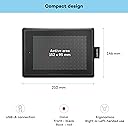
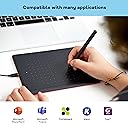
The One by Wacom Pen Tablet is a compact, high-precision drawing tablet featuring a 6x4 inch active area and a battery-free stylus with 2048 pressure sensitivity levels. Compatible with Windows, Mac, and Chromebook via USB plug-and-play, it’s designed for professionals and creatives seeking a sleek, reliable tool for sketching, photo editing, and remote work. Backed by a 2-year warranty and trusted by thousands, it’s the perfect upgrade for your digital workspace.


| ASIN | B07N525974 |
| Active Surface Area | 6.0 x 3.7 inches |
| Best Sellers Rank | 1,035 in Computers & Accessories ( See Top 100 in Computers & Accessories ) 2 in Graphic Tablets |
| Box Contents | Ergonomic 2048 pressure sensitive battery-free pen |
| Brand | Wacom |
| Brand Name | Wacom |
| Colour | Black |
| Compatible Devices | Desktop, Laptop, Tablet |
| Connectivity technology | USB |
| Country of Origin | China |
| Customer Reviews | 4.4 out of 5 stars 6,758 Reviews |
| Display Type | LCD |
| EU Spare Part Availability Duration | 5 Years |
| Global Trade Identification Number | 04949268621052 |
| Item Dimensions L x W | 14.6L x 21W centimetres |
| Item Weight | 250 Grams |
| Manufacturer | WACOM |
| Model Name | Wacom One |
| Model Number | CTL-472-N |
| Model name | Wacom One |
| Native Resolution | 1920x1080 |
| Network Connectivity Technology | USB |
| Operating System | Windows, macOS |
| Operating system | Windows, macOS |
| Pressure Sensitivity | 2048 Levels |
| Pressure sensitivity | 2048 Levels |
| Product Features | Shortcut Key |
| Product Warranty | 2 years |
| Screen Size | 21 Centimetres |
| Special feature | Shortcut Key |
| Specific Uses For Product | Designing, Drawing, Editing, Painting, Teaching |
| Target Audience | Teacher |
M**N
Great pen tablet
This pen tablet surprised me with its great functionality, it has a sleek design and the accuracy on it with the pen isn’t bad either. You just plug it into your device and you’re good to go.
D**I
I bought this as an upgrade and I'm super impressed!
I've been using a Wacom Bamboo tablet for about 7 to 8 years now for digital art and photo editing, unfortunately it died about a week ago, I highly recommend getting this tablet if you're looking for a reasonably priced upgrade. It's really simple and easy to use, it feels amazing when you're using it and the drawing window is the whole tablet which I was surprised at due to my old tablet being much larger than this one and only having a small window size. I would also like to add that this tablet could also be very good for playing games like osu. If I was to think of a downside to this tablet the one thing I could say is the pen feels like it could easily break if you put force on it, feels a little bit cheap but that's nothing to worry about unless you throw your pen across your room because you can't draw a straight line c
D**H
Great little tablet - worth the money. Drivers the weak point
I wanted a little tablet for photo editing on my Mac. Neither mice not trackpads are great for pixel-perfect image manipulation. I thought I'd try the small One and return it if I needed something bigger. Actually the size is a real bonus - it's large enough for very accurate pen control, but small enough that you're not waving your arm around like an orchestra conductor. I thought I was going to want a larger tablet than this, but actually the size is perfect. I've used many tablets over the years and use huge ones at work daily. For the low price this doesn't seem to have any drawbacks compared to the larger ones, for anybody who isn't a professional graphic designer. My only negative comments are: there's no upright pen holder, the device uses Micro USB rather than USB-C, and the drivers took a bit of installing, with two reboots before everything was happy. Also, the Wacom Mac drivers require permanent keyboard logging access, which I presume is so that they can monitor modifier keys when the app isn't in the foreground - but actually I don't want any app having full keyboard access for security reasons, so there should absolutely be an option for the drivers to work without full keyboard access for those who care about security rather than unwanted functionality.
V**N
pretty good for low price
good tablet as for osu and for drawing
A**A
Simple yet extremely useful - even compared to £300 tablets!
Literally plug in, download drivers and draw! So easy to use and reliable. I had a kamvas pro 13 and it wasn't nearly as accurate as this one! Not to mention this one u can bring Literally anywhere. It even works on a duel monitor set up! (2 screen set up) which my pro 13 couldn't. Even my sister who had a wakom tablet that had a screen and everything said this was more reliable.
B**E
Won't suit everyone or certain applications
Firstly, it did what it claimed and seemed well made but didn't do what I wanted and I returned it. The software, which has to be downloaded and installed, worked. The options were limited though - eg there was no way to adjust the scroll rate and I found it unintuitive that you moved the pen up to scroll down. Obviously, when we say 'scroll down' we are expecting the page to move up but the action is to move the scrubber down. There is no option to reverse this movement. I was expecting that it would take some getting used to absolute positioning after a mouse but that didn't cause much difficulty. I did find it difficult to co-ordinate tip presses and button clicks, and the hover height but that would probably improve with practice. The big problem was that I wanted to use this with CAD software which, on a mouse, required simultaneously depressing scroll wheel and right button to do 3D rotations. The pen on this tablet has only two buttons. One defaults to 'scroll' and the other to 'right mouse button'. It would be difficult to consistently depress both anyway because of their position but when you do it wasn't registered or recognized. There was no option in the software to define simultaneous button actions. So it didn't work for me.
J**K
Good quality
Excellent
H**H
Good budget drawing tablet.
I didn't want to spend too much to get some light PDF annotation done on my laptop. I was looking through my options when I found this little powerhouse. Built out of solid matte plastic, I don't think any drops can harm it. The pen included is battery free, meaning seamless connection and no time wasted charging batteries. The pen glides well across the surface, whilst the slight matte texture means you can still write neatly. Pretty premium aesthetic, definitely good for office use for signing digitally. Tracks well even when I lift up the pen a good distance, so I can always see the cursor onscreen showing where my pen is. I regret not buying the bigger version, but no doubt this is so much more than I needed to begin with.
Trustpilot
1 month ago
2 weeks ago