We remain fully operational. Our teams are working around the clock to ensure your deliveries continue safely.

DOWNLOAD THE APP


Copyright © 2025 Desertcart Holdings Limited
DOWNLOAD THE APP


Buy anything from 5,000+ international stores. One checkout price. No surprise fees. Join 2M+ shoppers on Desertcart.
Desertcart purchases this item on your behalf and handles shipping, customs, and support to KUWAIT.
🎯 Compact power, wireless freedom—your ultimate control hub.
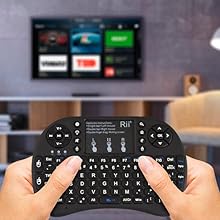
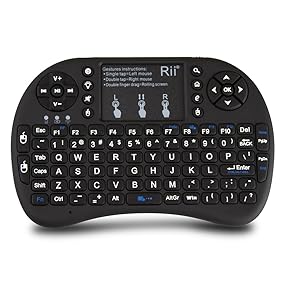
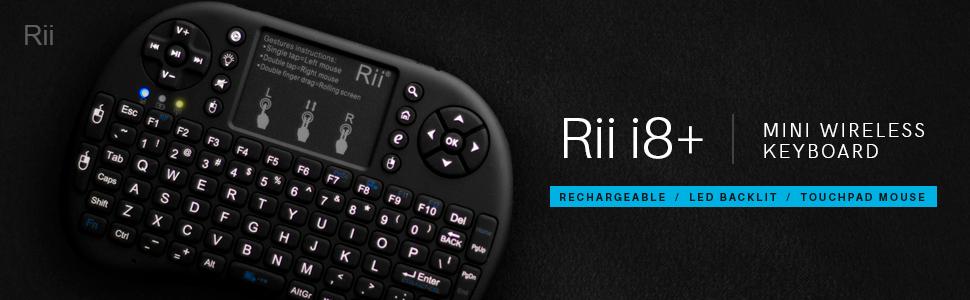
The Rii i8+ is a compact 2.4GHz wireless mini keyboard featuring a rechargeable lithium-ion battery, LED backlit QWERTY keys, and a multi-touch touchpad with gesture support. Designed with an ergonomic game-handle shape, it offers up to 25 meters of reliable wireless range and plug-and-play compatibility across PCs, Macs, smart TVs, gaming consoles, and Raspberry Pi devices—perfect for professionals and gamers seeking portable, versatile control.




| ASIN | B00Z81U3YY |
| Additional Features | Backlit, Ergonomic, Rechargeable |
| Antenna Location | Gaming |
| Best Sellers Rank | #411 in Computer Keyboard & Mouse Combos |
| Brand | Rii |
| Built-In Media | Computer Keyboards, Inputs, Keyboards |
| Button Quantity | 92 |
| Color | Black |
| Compatible Devices | Tablet |
| Connectivity Technology | wireless |
| Customer Reviews | 4.2 4.2 out of 5 stars (7,113) |
| Enclosure Material | Plastic |
| Hand Orientation | Ambidextrous |
| Item Dimensions L x W x H | 5"L x 3.5"W x 0.5"H |
| Item Type Name | Rii i8+ 2.4GHz Mini Wireless Keyboard with Touchpad Mouse, LED Backlit, Rechargable Li-ion Battery, Black (CART-MWK08+BUS) |
| Item Weight | 3.2 Ounces |
| Keyboard Backlighting Color Support | Single Color |
| Keyboard Description | Backlit |
| Keyboard Layout | QWERTY |
| Manufacturer | OEM Computer Keyboards |
| Model Name | FMKRFL1-IV2 |
| Model Number | Rii I8+ |
| Number of Keys | 92 |
| Power Source | Battery Powered |
| Style Name | 2.4G RF |
| Switch Type | Membrane |
| UPC | 602716813006 703546912454 739027528951 |
| Unit Count | 1.0 Count |
| Warranty Description | 1 year |
A**R
Wonderful little device, and cheap too
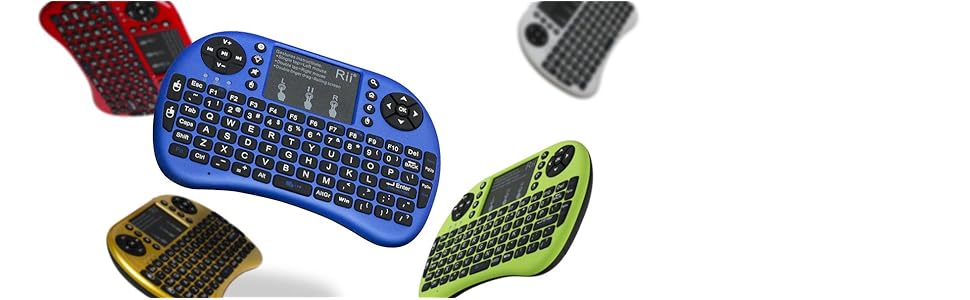
I'm reviewing the Rii i8+ 2.4GHz version of this keyboard. I'll start with the "bad" (not really bad -- just something I've seen other people mention): I have seen other reviews saying that the mouse is "twitchy." To be fair, I had this experience briefly also... until I switched fingers. It does not seem to work well with my thumb. Using my thumb, the mouse moves erratically, and sometimes doesn't register my movements at all. However, if I use my index finger, it works like a dream. Not exactly "my" dream, per se, since I'm not a big touchpad fan in the first place, but it works as well as any other touchpad. I think it's related to surface area. If I use my thumb, or jam some other finger onto the pad, it stops working well, but if I use a light touch with the tip of anything but my thumb, then it works flawlessly. The keyboard works as you'd expect it to. i.e., there are no technical problems whatsoever. As others have mentioned, it does go into a power-saving mode if you don't use it for a few minutes, and you do need to "wake it up" by pressing a key before you can use the touchpad again. You can't wake it up by moving your finger on the touchpad. If you're like me, you may have looked at the pictures and expected it to be somewhat bigger than it actually is. In reality, it's about the width and height of a game controller (I think -- I once had an Xbox, so that's my reference), or maybe a little smaller, and it's much thinner. It's very light (much lighter than my phone, for example), and that may affect your perception of its build quality. Personally, I found the fit and finish to be very professional, though I would have preferred the instructions and branding on the touchpad to be removable. To me, the lack of weight mostly lends to the impression that if I threw it against the wall, my primary concern would be what it hits on the ricochet. I'd expect the device itself to be fine. No, I haven't actually tried that, and no, I don't ever expect to. But for some reason, that's my mental standard for "how sturdy does this feel". Overall, I find myself to be very satisfied with this little device. I have a bunch of computers, phones, and other devices that could all benefit from a keyboard, but which don't need one all the time. The Rii keyboard is the kind of thing where I could buy one for each device, and it would neither cost too much nor take up too much room. It even comes in several colors, which makes it easy to tell which keyboard goes with with device. I wouldn't want to use it as the primary input device for anything like a computer, as there's no substitute for touch typing, but for occasional use, it's a whole lot better than an on-screen keyboard, and it doesn't take nearly as much physical space as a real full-size keyboard. Addendum: I see that Rii now sells a similar keyboard where they've replaced the pad on the upper right with a scroll wheel. This seems like a fantastic idea, as I use the scroll wheel quite a lot. Mind you, the two-fingered scrolling gesture on the touchpad does work just fine, but an actual wheel would certainly be welcome, and I've already ordered one of those new devices. Too bad they don't seem to have multiple colors for that one yet.
S**6
Great after 5 years.
It is hard to believe that I have had this for 5 years now and it works great! I love that it is small and portable, the battery life is still decent after all this time and it works great on any device from TVs to PCs to gaming consoles etc. I would buy this again.
J**N
An Honest Review from a Broke college student .
wow a lot of negative reviews maybe they got a defective unit , here is a my experience so far pair it with the NVIDIA SHIELD TV (2017) here is a list of Pros and Cons. Pros *Fantastic finish on the black version the texture is very silky like and feels great on your hands it doesn't get dirty easily *Connection was quick and painless *fast typing when I need to search for movies and what not *Responsive mouse , double-click works as expected *It automatically turns on the console with a press of a button *Black light is great it has 3 rotating settings , 1 is off , 2 medium brightness , 3 high brightness *For some people this is a Con for me its a pro the tiny constant Blue light cannot be turned off , it's always on reason I like it helps me find the remote when the lights are off , guess what . if it bothers you that much try this neat little trick turn it around or put some dark tape and voilà ! *Inexpensive , great for college students/barrack rats . okay here is why it doesn't get a full 5 stars Cons : *I don't like the instructions in the middle I would like to remove them maybe i can i haven't tried yet , make it look cleaner * That amber light every time you press a button it comes on i would like to turn it on/off but no worries with some tape i was able to fix it *No gaming use whatsoever if you are looking for a do it all this is not for you is great as a look search and navigate the web but for games is a different stories thankfully i have the shield remote so that is my go to gaming remote . so there you have it for me the Pros outweighs the cons if you are looking for an easy to use remote , cheap , reliable and a great complement to your gaming remote look no further , if you looking for a do it all gaming include it keep looking , remember is only 20 bucks give it a try if you don't like it you can always send them to me , I always recommend it to my friends .
O**I
السلام عليكم ورحمه الله وبركاته، اشتريت لوحة مفاتيح لاسلكية صغيرة 2.4 جيجا هرتز من ري تعمل باللمس (النسخه المحسّنه) محتويات المنتج كالتالي: - لوحه المفاتيح - كيبل ميني USB للشحن - USB رسيفر - دليل المستخدم باللغه الانجليزية •لوحه مفاتيح مصغرة مع لوحه اللمس تتميز بالأبعاد التالية: - 145 مم (14.5 سم) للعرض - 100 مم (10 سم) للطول -18 مم للسمك - الوزن 200 جرام تقريباً • يوجد 3 لمبات رئيسيه بالكيبورد من المهم تعرف معناها: ازرق : يعبر عن حاله البطاريه، اذا كانت شغاله معناته الجهاز بطاريته ممتلئه. اذا كانت تومض معناته الجهاز بحاجه لإعادة شحن احمر: يعبر عن حاله الشحن، اذا كانت شغاله معناته الجهاز باقي يشحن. اذا انطفئت معناته الجهاز فلل ومعد يحتاج يشحن أصفر: يعبر عن حاله الاقتران، بعد تشغيل الكيبورد اذا ما اشتغلت معناته أن الجهاز تم توصيله بنجاح، برضو اللمبه الصفراء تشتغل عند ضغط اي زر أو لوحه اللمس • طريقه ربط الكيبورد بجهازك: في خلف الكيبورد موجود الرسيفر قم بتركيبه في الجهاز المراد التحكم فيه وشغل الكيبورد من السويتش في الاعلى على جهه اليمين، اذا اللمبه الصفراء طفت، معناته أن جهازك اقترن خلاص وتقدر تستخدمه ملاحظة: في حال استمر اللمبه الصفراء بالوميض، معناته لازم تربط الكيبورد بجهازك يدوياً، بالنسبه لطريقه الربط اليدويه تابع الخطوات التاليه: الخطوة 1 تأكد من الكيبورد أنه شغال بشكل طبيعي، اللمبه الزرقاء لازم تكون دايم شغاله وهذا يعني أن البطاريه مشحونه، في حال كانت اللمبه الزرقاء تومض حاول تشحن الكيبورد الخطوة 2 تأكد أن البي سي او تلفزيونك شغال، اضغط وعلق على زر F1 بالكيبورد وثم شغل الكيبورد وانت مستمر بالضغط، اللمبه الصفراء رح تستمر بالوميض بسرعه في هذا الوقت ركب الرسيفر بالجهاز المراد ربطه والمفترض أن اللمبه الصفراء تطفى وبكذا تم ربط الجهاز بنجاح • تم تصميم لوحه المفاتيح للتتوافق مع اغلب الأجهزة (بي سي/لاب توب/ماك/لينكس/اي بي تي في/جوجل اندرويد/ويندوز 7، 8، 10) انا شخصيا جربتها على ويندوز ١٠ وتلفزيون TCL بنظام اندرويد وكانت شغاله تمام التمام • لوحه اللمس تتميز بالابعاد التاليه : 48 مم (4.8 سم) للعرض 34 مم (3.4 سم) للطول • طريقه التحكم في لوحه اللمس: نقرة باصبعين = الزر الايمن بالفارة نقرة وحدة = الزر الايسر بالفارة السحب باصبعين = تحريك الشاشه لأعلى وأسفل • يحتوي الكيبورد على 93 زر تحكم تتميز بالاضائه ويمديك تتحكم في قوتها عن طريق الضغط على زر المصباح • جميع الاختصارات بالكيبورد موضحه باللون الاحمر كل اللي عليك تستمر بالضغط على زر Fn وتضغط عالاختصار • هذي بعض الاختصارات: FN+F7: طباعه الشاشة FN+F8: تفعيل/تعطيل لوحه اللمس FN+F9: F11 FN+F10: F12 FN+Enter: CTRL+ALT+DEL FN+Space: تعديل سرعه لوحه اللمس ميزة السكون والنشاط التلقائية : • يوجد خيارين بالنسبه للسكون (الخيار الاول يدخل وضع السكون بعد 3 دقائق, الخيار الثاني يدخل وضع السكون بعد ساعتين) • اذا ضغطت اي زر رح يتنشط الجهاز، للاسف ما يتنشط من لوحه اللمس • يمديك تتحكم في خيارات وضع السكون عن طريق الضغط على FN + Esc سواء 3 دقائق أو ساعتين ككل الكيبورد جودة مقابل سعر (42 ريال) صحيح في بعض الاشياء كان من الممكن تكون افضل لكن أنا سعيد جدا بالمنتج الحالي تحديث: الكيبورد يتأخر في الكتابه خصوصا لو كنت سريع بالكتابه ويكرر حروف احياناً وهذا سبب كافي آني اطلب له إرجاع
B**B
arrivata entro il tempo prestabilito possibilità di tracciamento del pacco. Funziona perfettamente retroilluminata adatta se si usa al buio. funziona su pc e ps4
D**.
Ahora sí le doy 5 estrellas. Cuando recién llegó el teclado, lo conecté a mi Smart TV Samsung y NO funcionó en ninguna de las apps. Con el explorador sí, pero solamente. Pensé que era el teclado y le dí una calificación mas baja. Sin embargo, lo conecté a otro smart tv (LG) y funcionó PERFECTAMENTE, en todas las apps, con todos los botones, luz, y demás atributos que tiene el teclado Rii Mini I8+. Cabe mencionar que primero lo califiqué bajo porque pensé que hacía falta que tuviera drives que se pudieran descargar por internet, pero ahora me doy cuenta que es el TV Samsung que no funciona bien y no el teclado. Conecté otro teclado con cable al puerto USB y lo mismo, no funciona con las apps. El mismo teclado alambrico funciona en todos lados menos en la Samsung tv. Por lo que llegué a la conclusion de que es la tv y NO el Rii Mini I8+. Ahora estoy feliz con el teclado ergonómico y ligero. Disculpas para los de RiiTek, he corregido esta reseña. **I first gave it a lower evaluation. When it arrived I connected the keyboard right away to my Smart tv Samsung, and it did not work properly, it worked with the internet but not with any of the apps. I was disappointed and came right away and expressed my frustration evaluating the product poorly. The next day I connect the Rii Mini I8+ to my other smart tv LG, and voila! it worked PERFECTLY, in all of its functions and with all apps and menus. The range was incredible I was able to use the keyboard even at 15 meters from the tv (and around the wall).. I then went back to my Samsung and plugged a cable USB keyboard, and that's when I noticed IT IS NOT The Rii Mini I8+ keyboard it is the TV that simply does not allow you to add a keyboard for certain functions. I know give this compact and functional keyboard a 5 star and a "10" (and apologies) to the RiiTek group... :D
S**S
I am using it to run a Mac mini that powers a display in my board game table. I just plugged in the provided usb receiver into the mac, turned on the keyboard and it worked without doing a thing, which was perfect for me because the Mac is 2nd hand and ive never owned or used one before and would be lost if it didn't work straight out the box no fuss.
B**N
I recently bought a non-smart LED TV ( Sanyo 108.2 cm (43 inches) XT-43S7100F Full HD LED IPS TV (Black) ) and decided to pair it up with my old laptop (Partial working keyboard & non-working trackpad) to serve it as an HTPC. The research thus begins for a good compact keyboard/remote and searched on youtube, various reviews on websites including Amazon.in / com etc. Initially inclined towards an air mouse keyboard but later decided against it mainly due to the RII & the popularity. Have been using it for a month and my observations as below Likes: - Original RII Product - Completely awed by the touchpad response. Very smooth like a real touchpad. The texture of touchpad is really nice. - Literally, we have the full keyboard in hand (except manufacturer customised functions) in a compact format - Backlit is an added bonus. It has 3 modes viz no backlit, medium & strong - Ergonomically designed to fit the palm of both hands. Matte finish is a welcome addition - Works readily with youtube (play/pause keys works) and other applications including Kodi / Windows Media center / Plex etc - Inbuilt battery and lasts long. Charger cable is bundled which also can be used as extension cable - Plug & play. The USB attachment nicely tucked inside the remote itself - Solid feedback on pressing the buttons - Works with almost all environments. Have tested with Linux (elementary, ubuntu, mint & Fedora), Android x86 (Phoenix & x86) and Windows (7 & 10) - Have played games like Asphalt 8 Nitro (in Windows) - Tested up to 7 meters distance and had no issues. - The remote goes to sleep mode automatically to save battery - Can wakeup the HTPC / Android box from sleep by pressing any button similar to normal keyboard Dislikes - By default, the backlit is set to medium and there is no way to change it. Though some may prefer it, I would have been happier with no backlit at all by default just for extra battery juice - Some functions don't seem to work viz locking the trackpad - Not a real keyboard replacement, only for light use. - Keys can't be customised. Maybe one can use a software to remap key in windows/android - Heard it won't work with Amazon Fire TV - Longevity needs to be tested - No capslock/tab indicator - One need to press any of the buttons to wake up the remote once sleep. Moving fingers over touchpad won't work Overall, a must-have product for HTPC & other Android boxes. Would strongly suggest to go ahead with RII product and not any other Chinese make.
Trustpilot
1 month ago
3 weeks ago