Buy anything from 5,000+ international stores. One checkout price. No surprise fees. Join 2M+ shoppers on Desertcart.
Desertcart purchases this item on your behalf and handles shipping, customs, and support to KUWAIT.
📸 Zoom, Flex, and Capture Like a Pro — Never Miss the Shot!
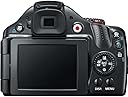
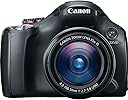
The Canon PowerShot SX40 HS is a powerhouse compact camera featuring a 12.1MP BSI CMOS sensor and DIGIC 5 processor for exceptional image quality and low-light performance. Its standout 35x optical zoom lens (24-840mm) combined with an advanced Optical Image Stabilizer lets you capture sharp photos and smooth Full HD 1080p videos from any distance. The 2.7-inch vari-angle LCD offers versatile shooting angles, while intelligent auto modes and creative filters empower both amateurs and pros to create stunning visuals effortlessly. Perfect for professionals seeking DSLR-like capabilities in a lightweight, travel-friendly package.
| ASIN | B005MTMFHU |
| Age Range Description | Kid |
| Aperture modes | Av |
| Are Batteries Included | Yes |
| Aspect Ratio | 4:3 |
| Auto Focus Technology | Continuous, Contrast Detection, Face Detection, Live View, Multi-area, Selective single-point, Single |
| Autofocus | Yes |
| Autofocus Points | 9 |
| Best Sellers Rank | #46,336 in Electronics ( See Top 100 in Electronics ) #441 in Digital Point & Shoot Cameras |
| Bit Depth | 8 Bit |
| Brand | Canon |
| Built-In Media | Battery, Battery Charger, HDMI Cable, Instruction Manual, Lens Cap, Neck Strap, Remote, Tripod |
| Camera Flash | Built-In |
| Camera Lens | Wide angle |
| Color | Black |
| Compatible Devices | Computers, Tablets, Smartphones (via USB) |
| Compatible Flash Memory Type | SD, SDHC, SDXC |
| Compatible Mountings | Canon EF |
| Connectivity Technology | HDMI, USB |
| Continuous Shooting | 10.3 |
| Customer Reviews | 4.4 out of 5 stars 811 Reviews |
| Digital Scene Transition | zoom |
| Digital Zoom | 4 |
| Digital-Still | Yes |
| Display Fixture Type | Articulating |
| Display Maximum Resolution | 480 x 270 |
| Display Resolution Maximum | 230,000 |
| Display Type | LCD |
| Effective Still Resolution | 12.1 |
| Expanded ISO Maximum | 3200 |
| Expanded ISO Minimum | 100 |
| Exposure Control | manual /automatic |
| File Format | JPEG |
| Flash Memory Bus Interface Type | SD |
| Flash Memory Speed Class | C10 |
| Flash Memory Type | SD/SDHC/SDXC |
| Flash Memory UHS Speed Class | U1 or U3 |
| Flash Modes | Auto, On, Off |
| Focal Length Description | 24-840 millimeters |
| Focus Features | AiAF TTL |
| Focus Mode | Single-Servo AF (AF-S) |
| Focus Type | Autofocus & Manual |
| Form Factor | SLR-like (bridge) |
| Generation | 4th Generation |
| Global Trade Identification Number | 00013803134551 |
| HDMI Type | Built-in |
| Hardware Interface | AV Port |
| Has Color Screen | Yes |
| Image Capture Type | Stills & Video |
| Image Stabilization | Optical |
| Image stabilization | Optical |
| Item Weight | 1.33 Pounds |
| JPEG Quality Level | Basic, Fine, Normal |
| Lens Type | Wide Angle, Zoom |
| Manufacturer | Canon Cameras US |
| Manufacturer Part Number | 5251B001 |
| Maximum Aperture | 5.8 f |
| Maximum Focal Length | 840 Millimeters |
| Maximum Image Size | 0.08 Inches |
| Maximum Shutter Speed | 1/3200 Seconds |
| Memory Storage Capacity | 4 GB |
| Metering Methods | Multi, Center-weighted, Spot |
| Minimum Focal Length | 24 Millimeters |
| Minimum Shutter Speed | 1/3200 seconds |
| Model Name | 5251B001 |
| Model Number | PowerShot S100 (BK) |
| Model Series | S |
| Movie Mode | Yes |
| Optical Zoom | 35 x |
| Photo Sensor Resolution | 12.1 MP |
| Photo Sensor Size | 1/2.3-inch |
| Photo Sensor Technology | BSI CMOS |
| Real Angle Of View | 52.5 Degrees |
| Remote Included | No |
| Screen Size | 2.7 Inches |
| Self Timer | 10 Seconds |
| Sensor Type | BSI CMOS |
| Shooting Modes | C2 C1 M Av Tv P Auto*1 Sports SCN*2 Creative Filters*3 Movie |
| Skill Level | Novice |
| Special Feature | Varied-angled LCD |
| Specific Uses For Product | personal |
| Supported File Format | JPEG |
| Supported Image Format | JPEG |
| Total Still Resolution | 12.1 MP |
| Total USB 2.0 Ports | 1 |
| Total USB Ports | 1 |
| Total Video Out Ports | 1 |
| UPC | 013803133059 013803134551 |
| Unit Count | 1.0 Count |
| Video Capture Format | MPEG-4, H.264 |
| Video Output | HDMI |
| Video Resolution | FHD 1080p |
| Viewfinder | Electronic |
| Warranty Description | 1 year limited |
| White Balance Settings | Auto, Custom |
| Wireless Technology | EyeFi |
| Write Speed | 10 fps or higher |
| Zoom | Optical Zoom |
A**O
The Canon SX40 HS outstanding camara!
I decided to upgrade finally from my Sony H2. I looked around to see what was out there available. I knew what I wanted on the next camara. High zoom, at least double more pixels, viewfinder, great macro, HD video, better than a point and shoot but not quite a DSLR. I don't want to mess with a bunch of to expensive to afford lenses. Started doing some research. Got very overwhelmed at first. It had been awhile since I really took a look at camaras. I wanted to make the right choice in one because this is a purchase that had to last for a time. I read alot of reviews and then got more overwhelmed because once I made a decision I would read a contradictory review on it. So then I became frustrated and wondered if there was a camara made that professionals could agree on and that consumers loved. After a couple of weeks I narrowed down to three. And after reading the feedbacks here and researching the web for those "professional" reviews I decided on the SX40 HS. So off to Sears to handle the item. Came home and ordered. Had it in a week. I have not been let down or dissapointed in this thing. It does as everyone says. One thing that I did have to let go in my "wants in a camara" was the AA's. I just ordered a two battery, charger kit here. It can charge them in the car so I can always have batteries ready. If it used the AA's the camara would be to heavy. As it is now it is about the same weight as my sisters DSLR was. Feels like it when handling it too. Zoom is awesome. Digital zoom is a bit grainy/fuzzy at times. But that's digital for you. When taking picture of the moon it doesn't do it. Why? Don't know. But I zoom in and the full moon can't all fit in the photo and I expect someone to wave back at me. Macro hasn't let me down. I do need to add here though that focus is a bit to get use to. But be patient and let it do it's thing. Hold shutter half down to focus. Let it focus then snap and you'll get a great photo everytime. The special effects are cool to have. The fisheye was a surprise to see. I love the black and white with your chosen color. And the toy camara I use often. This is loaded with a ton of features that you can't get bored with. Also this can splice photos together! Many people I see are looking for that feature. Along with bridging. Way to many things to get into here. But alot of camara for your money. The flip LCD was another surprise and I had only seen it come out on the higher end camaras. I usually use my viewfinder so it's turned in to protect the screen (I am getting screen protectors). But I find myself taking advantage of it's capability to turn out and twist up or down. I have been using that feature to get our baby robins pictures. There is a nest over our porch light. I simply open it, turn it down towards me as I am holding camara up. Zoom a little hold shutter to focus and snap away. You get a CD for you computer. Load it on it as you can't views photos without it. There is a small starter manual to get you going. But hey Canon, get real. It would be nice to get a whole book featuring all the functions of the camara. It least make one available to buy! Even though I found this SX easy to use right out of the box (easier than my Sony but still think it's an awesome camara). But to get to know all the functions it would be nice. Who wants to carry their computer around to look something up? All in all. You can't go wrong. You are getting a heck of a camara! BUT, learn to use it. Once you do that you'll not want anything but this fella. And for those that have DSLR's this would make a great back up to carry around. It doesn't dissapoint.
R**Y
Awesome Camera despite its shortcomings.
I purchased this camera because I wanted one that could zoom in on wildlife, birds, insects and so forth and give me good photos. A long time ago I had a Pentax SLR, the old film kind but have not done any photography since, until now. I did not want to have to mess with different lenses either so after some research online I decided on this camera, being the best mix of what I wanted in a camera and what I could afford. I am impressed!! I know it does not do RAW, and you cant really put filters on the front and it has some other issues with not being able to go manual for a few things and it could be a bit faster and better here and there, BUT it does take some kickin' nice photos!! and I LOVE the zoom. For me its fairly quick to pull out of the bag and start up if I see some critter I have to snap on the fly. It has been easy to work with and I have been really having fun and getting some great shots!!. I find that the battery charges pretty quick and lasts a fair while. I will probably get a second battery though, just to have a fresh one handy. I think for the money it is an excellent camera and unless you require RAW data, or have a lot more funds available for something more professional you cant go wrong with this camera. 10/7/2012 UPDATE Still enjoying the camera. I had taken awesome(for me) pictures of the "Blue" moon we had on August 31st. unfortunately positioning the camera in the grass and everything else took some patience and just rightness. There are some limitations on the selections in full manual, I could not select an F11(as recommended on a website 'how to photograph the moon"). I just had to pick the widest f-stop available and set the shutter speed to turtle, but not too slow since the moon is a moving object. Anyhow the photos are never the less very cool. My first celestial photos!! I am now trying to get a picture of my favorite constellation, Orion!! but I need a real tripod, so I'm searching around. One thing I will say is, if you put a filter on the front or an adapter ring to accommodate a larger filter, be careful when threading it on(others have mentioned this). I put my adapter ring on and it is slightly crooked and I cant seem to budge it with out using some force, so I have just left it for now. I plan to take to a camera shop to see if they can find a safe way to dislodge it. but it is not interfering with my photo taking just annoying knowing its not exactly straight. grrr.
L**G
Wonderful all around camera-
Bought this camera for use in wildlife photography. Using my Canon SLR was being more of a chore due to the excess weight I'd have to carry around for hours.Also the 35X zoom was a major point for my buying this camera. I'd be in preserves with my SLR and long zooms and after a few hours would be exhausted. When you're tired you become careless about your shots, and I'd sometimes be unhappy with my images. Being a Canon user for years piqued my interest. Well I couldn't be more satisfied. Its light in weight, easy to carry around and with the new processor takes pictures comparable to my SLR's.You can take superb pictures, handheld, with the 35X zoom. Still having the SX30 and comparing them, the SX40 appears to be faster, better in low light, and has clearer images. Moon shots come out clear with craters sharply shown. Videos are very clear. This is not a technical review. Its a review for the semi-professional telling about the simplicity of use. It doesn't come with a printed manual, however a local print shop can run that off for you with the disk supplied. The manual is very complete and large, and a user should thoroughly learn all aspects of this camera to adequately be able to take good pictures. Yes its easier to use the auto features, however using the special features makes the great shots. I've taken quite a few thousand pics since my purchase, and really found 10% that should be discarded, usually through a failing on my part. Its a great camera for amateur or professional alike. Just be ready to learn how to use it to its full capabilities. All in all, I'm very satisfied with my purchase, and it seems I take out my SLR, less. After using the camera for another month or two, the review still stands. I've finally started using the high speed action scene mode and it functions as indicated. Have taken up to 10 pics a sec. and almost all are fine. At long zoom you have to be careful to be steady for a sec. even with the IS on. The camera focuses with the 1st pic.and then holds that focus. Most of my high speed shots have been panning shots. Have not tried objects coming to or going away from the photographer.Will do that soon. Its very easy to go through your SD card quickly, so if you'll be out in the field for a while make sure you have extra SD cards or take a large one. 10 shots a second fills up a card fast, especially at fine setting with a 12 MP camera.
J**Y
Awesome Lens, Adequate Function, Macro Lousy
UPDATE 5/20/12: After using the SX40 for a few months, the macro mode and JPG quality aren't as good as I initially thought. I updated my review to reflect this. UPDATE 4/9/12: Added video to demonstrate macro glitch I mention in my review. Do all SX40's behave this way or just mine?... I'm an enthusiast who wants control, but doesn't want to lug around a system anymore. I have a Panasonic G2, but I still prefer the convenience of a "do-it-all" bridge camera for most situations. My last bridge camera was a Canon S3-IS. I've been tempted by newer models since then, but nothing seemed worth upgrading to until they started using CMOS sensors. My search boiled down to the Canon SX40HS & Panasonic FZ150. After pouring over the reviews, I chose the FZ150 because it was geared more to enthusiasts. But before I could buy it, I found a deal on the SX40, so here I am. (Note: The price of the SX40 & FZ150 were only about $20 apart before Christmas). The SX40 has many reviews (which are fairly accurate), so I'll try not to repeat too much. Here's a summary of what matters to me: PROS: 35x zoom lens w/ image stabilization. Image quality (12 MP CMOS) very good, but JPG compression needs improvement. Articulated LCD screen (a must-have for me now). Slow motion video. "Zoom Framing Assist" button. CONS: JPG quality rather low (details below). Macro virtually useless (details below). Button layout needs work; I often accidentally turn it on by pushing the play button when I grasp the camera. The rotating donut wheel is horrible - I'm always activating the cursor buttons when spinning it during manual focus. A thumb-wheel like the FZ150 & dSLRs is much better. That and the relatively low-res LCDs make manual focusing difficult at best. Camera feels a little cheap. IMAGE QUALITY: Better than my old S3-IS (6mp CCD); much closer to the M4/3 quality of the G2 (12mp CMOS). See my customer image posted 3/19/12. There's more noise and JPG artifacts & detail loss than the G2 when you zoom into pixel level, but it's still good for such a small sensor. However, there are some situations where the artifacts are fairly pronounced. I just shot some distant boats on a lake and I was less than happy with the JPG quality. See my customer image posted 5/20/12. MACRO: At first I thought it was defective because I kept getting green "focus locked" boxes when the image was obviously out of focus. I even got a Class 10 card as one review suggested. There are two problems when shooting close-ups: 1) I get lots of false positive (green) focus locked boxes, and 2) The macro range is virtually useless. However, you can still get some pretty decent close focus shots once you learn the limitations of the camera. The key is to be aware of the bar scale that appears in the upper left as you zoom - that shows the focusing limits through the zoom range. Make sure you are within the range before believing the green focus lock signal. Second, the actual "macro mode" is virtually useless. The only time setting it to macro mode gains you anything is when you are zoomed out to full wide angle and shooting closer than 1.9". All other minimum focusing distances (through the zoom range) are the same in or out of macro. Unfortunately, using a 24mm macro lens closer than 1.9" is awkward at best because shadows keep getting in the way and the front of the lens starts hitting things. NOTE: See my video review that tries to sum all of that up. SIZE: I'm pretty particular when it comes to size. I don't like too big or too small - it has to feel right (I still judge size by my old Nikon FM-2, and dSLRs feel too fat to me). Granted this is highly personal, but the SX40 "feels right". VIEWFINDER: It's a tad small and low-res (202k), but useable. Mine has a yellowish tinge. It's better than the S3-IS (115k), but nowhere near the quality of the G2 (1,440k). FLUFF: "Toy camera mode"? Do people really use that? I wouldn't miss it if they took "Creative Filters" off the dial. That's what Photoshop is for. WISH LIST: RAW format, screw on filters, better manual control, higher res LCD & Electronic ViewFinder, and make smaller & prettier (see FZ150 :-). Oh, and AA batteries instead of proprietary. NOTE ON RAW: I don't want RAW for all shots, but it's great to have when you want to squeeze every detail out of that special photo. I shoot at -2/3rds of a stop and blown-out highlights are still common. MY BIASES: I show my pictures on TVs & computers now and you don't need lots of resolution for that (even HD is only 2.1 megapixels). My old S3-IS still makes a great video slideshow and the SX40's zoom & resolution give me a LOT more detail to crop from. I'm also anti-dSLR - too much bulk for what you gain. I'll take a good LCD / EVF over a mirror & pentaprism any day (which is why I chose M4/3 over dSLR). I think LCD's strengths (in dim light, information, digital tools, etc.) outweigh their weaknesses (in bright light, refresh rate, etc.). That said, the SX40's LCDs need some improvement. SUMMARY: The SX40HS is an excellent bridge camera - automatic enough for beginners with adequate control for enthusiasts. The "killer app" is the 35x zoom lens w/ image stabilization; otherwise it's just OK. Image quality is much better than CCD and even reasonably close to 12mp larger sensor cameras, but the JPG compression needs improvement. I am very happy with my choice, but I still wish I had the FZ150 too.
K**E
review of Canon SX40 HS digital camerar with 35x zoom
I am an amature photography who loves to take photos of nature. I teach science, so I use some of my photos in the classroom. The most important aspect of any camera, in my opinion, is its ability to produce clear, sharply detailed images. I am not attracted by all the special effects and bells and whistles-----if the camera can't make a good photo, I don't want it. For quite a few years I have been using a couple of Fuji cameras and have been very happy with the results. Lately I have wanted a camera with a long zoom but could not afford to go to a DSLR. I tried one of the Fuji long zoom cameras but was not happy with the results (the photos were soft). Then I began to research the Canon SX40 HS and after months of consideration, and when the price became right, purchased the camera. It arrived in just a few days and after charging the included battery(it does not take long to charge the battery), I began taking photos. I was extremely happy from the beginning and after a month of taking photos I am still extremely happy. The photos, even at long zoom, are really clear and sharp. I am also pleased with the overall construction and weight of the camera. It feels well-made, not cheap and plasticky. And, yes, even though it isn't the most important thing to me, I have played with some of the special functions and they are pretty neat. I have not tried out the video yet. There are a few things to consider. It is important, really important, to take the time to read the instruction manual which is on a CD included with the camera, because you need to know how to change the settings and what the camera is capable of. If the camera doesn't do what you want it to, its your fault for not reading the instructions. Second, unless you are really steady-handed (which I am not) you will need a tripod for the long zoom. I used a tripod and took photos of the moon with full zoom and they turned out great----the detail of the craters was fantastic. You might want to get a different neck strap, the one that comes with the camera is kind of stiff and not user friendly. I think the camera is great and anyone taking the time to learn how to operate it correctly should have excellent results
D**R
SO EASY TO USE THE CANON POWER SHOT SX40 HS
I was a professional photographer ( as a civilian and for the military ), back in the days ( 70's & 80's ) when there was nothing but "true" SLR cameras. There were no such thing as "digital" SLR cameras, all my cameras were 100% "manual". You needed to rely on your own skill and creativity. Now days computer software can make anyone look like a "professional". To this day I still have all my 35mm and portrait cameras, as well as my darkroom equipment. In my time of doing photography, mistakes were costly when using film. Not like today's cameras were if you make a mistake you delete the the picture and start over. My darkroom equipment has given way to computer darkrooms. Today's camera's with their built in computers, ( both Point & shoot, and SLR ) have become great at forgiving the photographer of it's mistakes. With film cameras you had to live with the mistakes you made. An example with film cameras, is that you would have to do a lot of "bracketing" to make sure you got the right exposure. Nowadays its all done with computer software. Today's "SLR" cameras are not "true" SLR cameras. Even though your still looking through the lens they still rely on an on board computer. In the days of film SLR cameras they were strictly manual and 100% mechanical. In my days of photography it was the photographer who made the camera take "professional" photos, now its the computerized camera that's in control. Due to being paralyzed I cannot use an SLR camera anymore, although I would love to if i could. Now I have to use a "point and shoot" such as the Canon Power Shot SX40 HS. I guess I just miss the good ol' days of using the "true SLR" cameras. I agree that SLR cameras are the way to to go. Modern cameras, thanks to modern age of built in computers, turn out really great pictures that you could only dream of getting with using film. Even though I have to use a point and shoot camera I agree with most of the reviewers, I find that Canon Power Shot SX40 HS is a great camera for what it is designed for. I am not trying to be bias toward Canon because I have both Nikon and Canon professional "SLR Film" cameras. I also have a Hasselblad and Mamiya portrait cameras. Unfortunately they are now in my closet collecting dust. Over all the main reason I have the SX40 HS is not because its made by Canon, but because of what it can do and how easy it is to use even a paralyzed person can use it with great ease and results. Just one last thing, even though I am bias toward the "SLR's" in general ( mainly the true or "real" SLR film cameras ), I believe comparing "Point & Shoot" with "SLR" cameras is like comparing apples with oranges. They both have have there own nitch in the world of today's cameras. AS A "POINT AND SHOOT" CAMERA, I HIGHLY RECOMMEND THE SX40 HS. P.S. I really like the great zoom of the SX40 HS. The video was taken hand held in a wheelchair on a pier.
D**K
Fantastic Camera for Everything from Landscapes to Extreme Macro
I bought this camera exactly 1 year ago. I do a lot of amateur photography. I shoot everything from landscapes, astrophotos, to extreme macro. You'll be amazed at how this camera performs. The only things I would change about this camera: 1. The on button location is such that you could mistakenly turn the camera off when trying to take a picture. The new Canon SX50 corrects this. 2. The camera does not record in RAW mode. The new Canon SX50 corrects this. 3. My biggest pet peeve: When the camera is in manual mode, sometimes the camera will override my ISO setting. This is NOT corrected by the SX50. I briefly thought of upgrading to the SX50, however when the camera is used at 35x, holding the camera still enough without a tripod can be daunting, even with Canon's excellent image stabilization. 50X would surely require a tripod, which I'm not willing to schlep through the woods. My solution to the automatic ISO problem and RAW mode was to download and use the non-modifying firmware CHDK, a software hack that makes no changes to the built-in Canon programming. This is obtained online, free for the downloading. The camera is rather bulky since it houses the magnificent Canon telephoto lens. The lens uses fluorite glass, an exotic glass that has wonderful chromatic correction. As a rule, I don't use flash when photographing, preferring natural lighting, even at night. The CMOS chip is very sensitive, capturing great detail, and natural color, even with night scenes. I've never used the camera's preset scene modes, preferring to photograph in manual mode. I've found that the CMOS is so sensitive, that I generally set the white balance to the negative. Given the enormous telephoto lens, the camera is well balanced and light weight, but well built. The lens moves smoothly when adjusting for telephoto. The lens can be used in conjunction with 2.5x digital zoom, bring the total telephoto capability to 140x. As a purist, I keep the digital zoom off. As you increase the ISO values, there is increased noise at you approach ISO 3200; the CMOS sensitivity is such that I've never had to set the ISO this high, even in dark photography. The colors produced by the camera are very true to life; as a rule, I only adjust my photographs for light, never color. The camera's macro capability is from 0 cm; if you're doing very close macro photography with the camera, make sure the lens does not touch your subject! The lens will focus at 0 cm When taking action shots, (sports mode), it will record at ~2.5 frames per second, which is fast enough to catch most action. As they say, pictures are worth a 1000 words, so I've added pictures taken with the SX40. There is no magic here (other than the camera). I use Photoshop Elements to process the pictures, but other than cropping and correcting the lighting for highlights and shadows, these photographs are as taken. The colors are as photographed, NEVER adjusted. In the year I've owned the camera, I've taken almost 3000 photographs. Make sure you buy a class 10, high speed card for this camera to use it to it's maximum. The camera supports Eye Fi cards, but I haven't tried this feature. My recommendation: if you want to do photography that looks professional and comparable to a really good DSLR, don't hesitate to buy this camera, or the new SX50! To see some of what this camera is capable of please visit my photos on flicker: [...]
A**E
Great zoom range, nice image quality, designed for dummies
I bought this camera a month ago and I've passed the 2000 picture mark, so I guess I'll jump in and provide a review. I upgraded from the Canon PowerShot SX10 IS to this one and I've been thrilled with some of the new features and less than thrilled with others. The quick verdict: This is a great camera for anyone who wants lots of features and versatility but doesn't want to use manual settings and doesn't travel a lot. Pros: great zoom range, nice picture and video quality, improved low light performance Cons: ISO locked to 100 with >1 second exposures, proprietary Li-ion battery Handling: The camera is a bit bulky, as you would expect from a camera with a 35x zoom lens, but I quickly got the hang of handling it. I tend to accidentally hit the zoom framing assist button when shooting. It seems to be right where my thumb wants to be when holding the camera, especially when switching between landscape and portrait orientation. I had similar issues with the SX10. I'm not sure I like the memory card being slotted in with the battery on the bottom of the camera. Access to the battery/card slot is blocked when attaching the camera to a tripod quick release plate. Zoom capabilities: The zoom range is a nice feature. The size of the full moon is about 1/5th along the long side of the image at full optical zoom and close to 850 pixels across. On a clear night, you can get some nice detail. Clipping the Raynox DCR-250 macro conversion lens on at full zoom and using a light box for trans-illumination, I was also able to take pictures of microscope slides at 125x total magnification on a 150 dpi test print. They look better than the images I took with a scope and CCD camera at the lab. Very nice! Image quality and low light performance: The image quality under low light and high ISO conditions has improved compared to the SX10. I took some images of kittens at the shelter in rooms that were poorly lit. With the SX10, I would end up with a lot of motion blur and noise on high ISO (800) images. Comparable images look better with the SX40, but some processing artifacts are visible when looking at the full size of the high ISO (1600) images. The camera ultimately was not able to stop the motion of kittens at play without the use of flash though, but I was expecting that under the poor light conditions. External flash: Speaking of flash, the camera works well with the SpeedLite 270EX flash. The hot shoe can be covered with a plastic cap for protection when not in use. It took me a few tries to figure out the best way to take the cap off, but with a closer look at the design once you get it off it becomes obvious. Having long enough fingernails to get under and lift the front of the cap makes it easier. Filters and lens accessories: The lens can be fitted with the same 58 mm Lensmate filter adapter as the SX10. Thin filters will work fine at all zoom settings, but thicker filters like a circular polarizer or stacking several filters will cause vignetting at wide angle. A little bit of zoom or a 67 mm filter adapter may help avoid the vignetting issue. The lens cap that comes with the camera will no longer fit once you put the filter adapter on. And speaking of the lens cap - Canon put a tether on it, so it can be attached to the camera thus reducing the risk of losing it compared to the non-tethered cap of the SX10. While that is a plus, the SX40 does not come with a lens hood like the SX10 did. That would need to be purchased separately. Settings: One thing I miss on the SX40 is the "sunset" preset under the SCN options that the SX10 offered. Out of all the SCN options on the SX10, that one probably saw the most use when I wasn't in M or Av mode, so I'll have to figure out an equivalent setting on the SX40. The snow, beach, and foliage settings are all still there, so why did the sunset disappear? The new settings such as miniature seem intriguing, but I haven't really gotten into exploring that yet. Overall, the camera has a lot of good features. So why would I give it only three stars? There are at least two things that I would consider design flaws. Battery: Let's start with the battery. This is a so-so issue, some good news and some bad news. The good news is the battery weighs less than the SX10's AA batteries, lasts longer (for about 1000 pictures), and fully recharges in under 2 hours while I often have to let the AAs recharge over night. The bad news is it is much more expensive to get a spare and inconvenient for travel. With the SX10, I could fly overseas and use my mom's batteries and charger in Germany in case I forgot to bring mine. If needed, I could rely on AA batteries being available at a souvenir shop or gas station. With the proprietary battery pack, if I forget to take the charger and 220V adapter with me or don't have anywhere to plug it in, the camera is dead once its battery pack runs out of power. You can't just buy a spare one at a gas station. If you have a spare battery pack in your possession, you have to package it according to TSA safety restrictions on Lithium batteries if you take it on an airplane. So there's a lot more to consider when traveling with this camera. If Canon offered the same camera with the option of using AA batteries, I would probably opt for that instead of the battery pack just for the sake of convenience when traveling. "Manual" mode limitations: The bigger issue though is that the camera does not have a fully manual mode. Sure, there is the M mode setting, but it has limitations. I noticed it when I took some night shots and the camera changed my ISO setting from 400 to 100 as I increased exposure time in M mode. When I tried to reset the ISO, it told me "ISO speed is limited due to slow shutter speed." The camera manual explains under Tv mode that when shutter speeds of 1.3 seconds or slower are used, the ISO speed is fixed to ISO 100. However, there is no warning about it on the page detailing M mode and I did not expect to find any limits in manual setting as it wouldn't really be manual then. I emailed Canon support about it and they clearly did not get what I was asking about, so I called phone support. The guy I talked to was clearly not expecting this limitation either and at first told me I probably had a faulty camera and should send it in. However, he was then able to reproduce the effect on his camera much to his own surprise. He had to check with someone and finally came back with the information that the limitation is built into the firmware by design to "prevent overexposure and hot pixels on the sensor." No plans to upgrade the firmware to change that. He recommended cranking up the ISO to 3200 at 1 second exposure. That's not really what I wanted to do though. It's a bit of a joke really, or even insulting, to any photographer who knows what they're doing in M mode. It is possible to get around this limitation using a CHDK hack. However, at this time there is only a buggy alpha version of CHDK available for the SX40. I gave it a try and while the ISO override worked, it wasn't the ISO I had set it for. E.g. setting the override at ISO 400 gave me pictures with ISO 640, and setting it for ISO 800 gave me ISO 1250. Regardless of the option of using CHDK, this limitation is like putting a child lock on M mode and it's a farce to call the resulting feature "manual mode." So that is my main disappointment with this camera so far. Instructions: Last but not least, I was also disappointed that Canon does not provide a printed manual with the camera. All you get is a PDF on the accompanying CD. It is set to print in postcard size, which results in a lot of white space and waste of paper when printing it. The resulting binder weighs more than a pound in paper weight. Neither the PDF nor the print out are useful as a reference in the field, at least not for me. The tech support person I talked to quickly promised to get a printed manual sent to me at no charge when I mentioned it though, so a phone call might be all it takes to get one. I haven't received it yet, but when I do I shall report what it looks like. The verdict: Overall, the SX40 is a nice camera with some great features, but unfortunately it is prevented from performing to its full potential by restrictions that Canon designed into the firmware. Canon's "design" of locking ISO settings in manual mode is almost an insult to more advanced hobby photographers, and it is clearly misleading to still call it "manual" if the camera is allowed to override the photographer's choices in settings. I don't think any other camera model in this quality and price class does that. However, those who do not use M mode routinely will probably hardly notice this limitation.
Trustpilot
2 weeks ago
1 month ago