We remain fully operational. Our teams are working around the clock to ensure your deliveries continue safely.

DOWNLOAD THE APP


Copyright © 2025 Desertcart Holdings Limited
DOWNLOAD THE APP
Buy anything from 5,000+ international stores. One checkout price. No surprise fees. Join 2M+ shoppers on Desertcart.
Desertcart purchases this item on your behalf and handles shipping, customs, and support to KUWAIT.
📡 Elevate your antenna game with the NanoVNA-H4 — where precision meets portability!
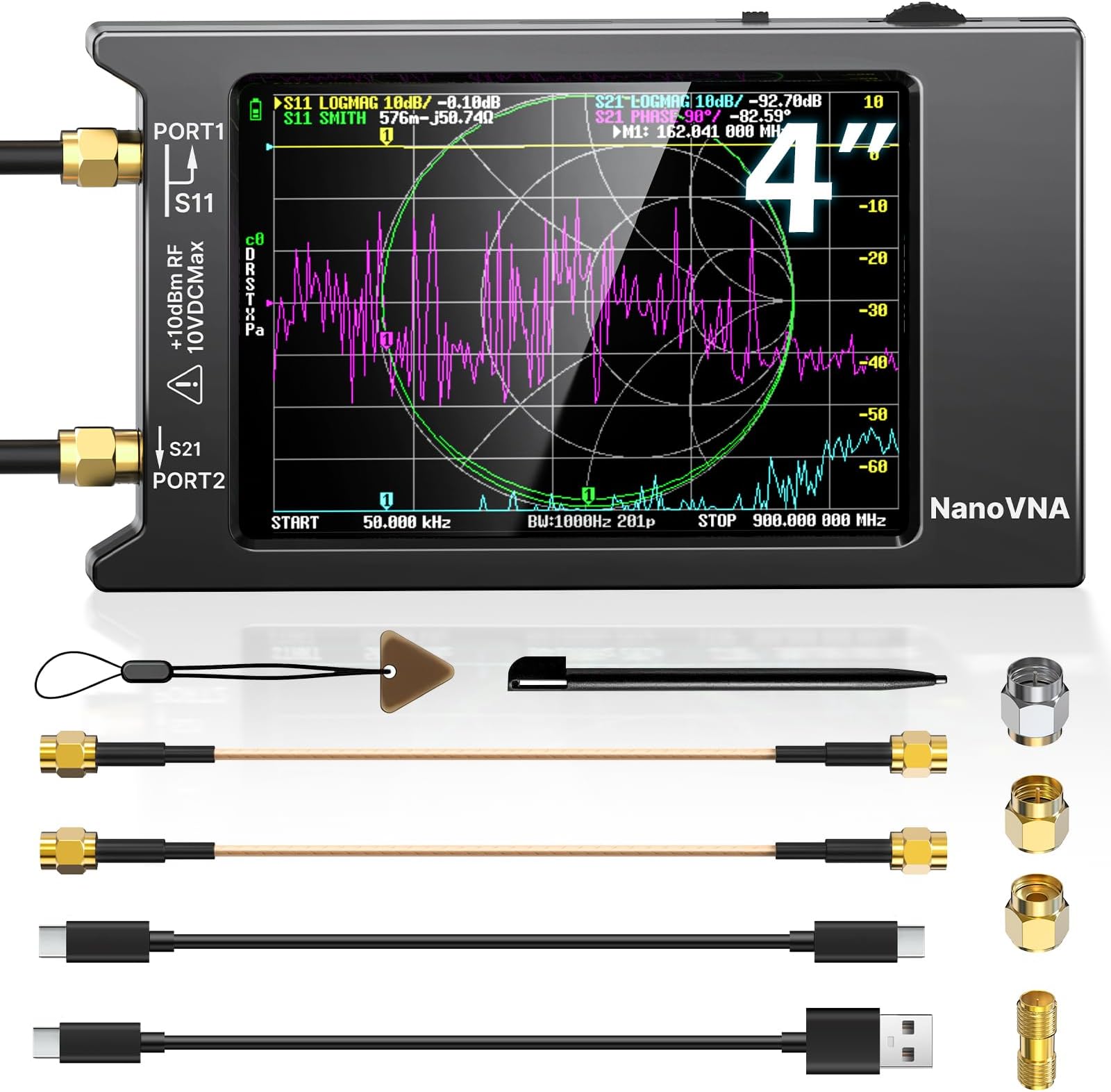
The AURSINC NanoVNA-H4 is a cutting-edge vector network analyzer featuring the latest V4.4 firmware, covering a broad 9kHz to 1.5GHz frequency range. It boasts a sharp 4-inch touchscreen, advanced frequency algorithms for superior dynamic range, and a built-in microSD slot supporting up to 32GB for data logging. Designed for ham radio operators, engineers, and antenna builders, it offers comprehensive S-parameter testing, SWR, Smith chart visualization, and TDR cable fault detection. Its portable form factor, long-lasting 1950mAh battery, and PC/Android connectivity make it an indispensable tool for precise RF measurements and antenna optimization.





| ASIN | B083PQ4RXZ |
| AntennaDescription | Radio |
| Best Sellers Rank | #22,044 in Industrial & Scientific ( See Top 100 in Industrial & Scientific ) #3 in Spectrum Analyzers |
| Brand | AURSINC |
| Built-In Media | NanoVNA-H4 antenna analyzer host (with 4inch touch screen and 1950mAh battery) |
| Color | Black |
| Customer Reviews | 4.6 4.6 out of 5 stars (1,201) |
| Impedance | 50 Ohms |
| Manufacturer | AURSINC |
| Number of Channels | 2 |
| Unit Count | 1.0 Count |
K**L
Finally coverage for 1296 band
I had been sitting on the fence to acquire one of these for a long time primarily because it did not cover 1296MHz where I have and will be spending more time on antennas. A few days ago I took another look and noticed V3.4 2.8 and 4” versions released on Alibaba and now here. Yesterday I received the 4” version NanoVNA-H4. It came nicely packaged as shown in the pictures. It had a Jan 1, 2020 build date using the hugen79 branch, one of the 3 main builds I spotted so far for NanoVNA, and the one specifically developed for this new version hardware. Jan 18th a new build of firmware was released. There is a known bug that if you use a center frequency above 1GHz it may lock up. If this happens you can power cycle to return to normal. Use start and stop rather than center to work around this for now. It is already fixed in another branch’s build as of Feb 2, I suspect it will be fixed soon enough and is an easy thing to avoid. One of the concerns is what device are you buying, a clone or the real thing. Being very recently released I do not think the clones of this model have had time to show up yet, and the photos and text seemed legit so I bit. Looking at the device packaging, paperwork, PCB and the one small case clearance issue existing on my unit, it appears to match the original overseas listing and Hugen79’s own description and seems like the real thing to me. It can be hard to tell sometimes. The firmware upgrade also worked as expected. There is another build of this running in parallel but uses a different BIOS and is more targeted to developers for now but promises to expand future capabilities. BTW the “-H” designation identifies the hugen79 hardware variation from the original edy555 hardware design. The H4 is a 4” version. I ran it through several tests on a commercial 116-174Mhz 75Watt Tx filter, the SG-Labs 1296 PCB 2 element yagi, some dummy loads, various length of cables and it seems to work as expected. I also downloaded and used the NanoVNA-Saver V2.2-1 PC program (I am on Windows 10). All works well there also. The NanoSaver has a lot more real estate so separates charts with configurable sweeps, trace widths, and colors so it can give you a cleaner results display. Additionally it can perform multiple sweeps and average the results. SWR, TDR, and all the usual parameters are shown for each marker. For the cables I tested the TDR function and it worked well also. I have a Samsung Galaxy S10 so has a USB C connector. I used the supplied short USB cable and ran the NanoVNA Web App on my phone and that worked well also. Again, more display real estate, clearer charts. As mentioned earlier there is a known issue with touch screen clearance on front case section (as of this date). You may experience random menu operation. It is due to the lack of clearance between the right edge of the display case cutout and the touch screen edge. This can happen due to variable air gap between the LCD base and the PCB and/or case flexing/warpage, or if you squeeze the case on the right side. I worked around this by slightly warping the case along the right side display edge outward a bit and then holding the unit by the edges while in use. Some put tape on the far right edge of the screen as a spacer. I also tend to use an old stylus pen from an Ancient pocketPC I still have as a museum piece. A suggested fix is small thin plastic washers on each case screw on the PCB between the 2 case halves. No doubt future case production will be adjusted. Was an easy fix once I figured out the problem. Hugen79 released a new build on Jan 18, 2020. I installed that and all works fine still. It is easy to do once you fine the right tool. I tried the most commonly suggested method using a command line tool called dfu-util.exe. It was able to see the VNA USB parameters but it claimed it was not in DFU mode (though it actually was). The latest build lets you go into DFU mode easily (a bootloader mode to update firmware). Just power off, press and hold the switch paddle in, turn the power on, and let go. The screen will be black but you will hear/see the USB device enable on your PC. You can see the device as the “STM Device in DFU Mode” in device manager under USB controllers. Some procedures suggest you run Zadig to install a Libusb driver which I did. I used the LibUSBk version. Not finding a way to make dfu-util work, I found DfuSe_Demo V3.06 from ST Microelectronics. It is a GUI based version of the tool and it worked no problem and easier as well. I have seen web posts were some folks are attempting to use the changes in hardware version 3.4 to update their pre 3.4 devices, particularly in the shielding area, some changing out resistor values and lowering noise by adding more caps inside. The NanoVNA-H4 arrived with the battery fully charged according to the on screen indicator. I plugged it in to ensure it was topped off. I used it for quite some time running on the battery and it still showed full. I believe the previous version batteries were 450-650mAH, at least for the 2.8 versions. This one at 1950mAH give a long operating time. Software mentioned: Zadig.exe Libusb driver NanoVNA-H firmware dated January 18, 2020 V4.0.4.5-12-gea578a2 NanoVNA-Saver.exe NanoVNA Web App for Android, maybe iOS also. Dfu-util.exe (did not work for me) Dfu_Se Demo V3.06.exe (worked well) In conclusion, for me this was worth hopping off the fence and is a great value covering the all the HF through 1296 bands. Well done to the project creators and contributors.
A**G
Excellent Vector Network Analyzer – Perfect for Antenna Testing
I purchased the AURSINC Upgraded NanoVNA-H4 (Latest V4.4) to test some antennas I was building, including EFHW, linked EFHW, and dipole designs. I’m very happy with this product. It’s accurate, easy to use, and the 4" touch screen makes navigating measurements a breeze. *Note* I did go back and forth with buying the smaller screen version or even the next version up, but the VNA-H4 screen size is nicer than the small and I really don't need the features of the next version up or the added cost. Having also used AURSINC’s TinySA Ultra, I can confidently say that AURSINC and SEESII are the only vendors I trust on Amazon for this kind of precision test equipment. The NanoVNA-H4 worked great for measuring SWR, S-parameters, phase, delay, and Smith charts on my antennas. It helped me verify and optimize my antenna setups with my Yaesu FT-891 radio. Overall, I’m very satisfied and would definitely buy more products from this vendor in the future. 📐 Key Features: Frequency range: 9 kHz – 1.5 GHz (HF, VHF, UHF) 4" color touch screen for intuitive control Measures S-parameters, SWR, phase, delay, and Smith charts Compact, portable, and reliable for field or bench use Ideal for ham radio antenna testing and tuning ⚠️ Disclaimer: This review reflects my personal experience and is provided for informational purposes only. I am not liable for how others use this product or interpret this review. Always follow manufacturer guidelines and safety practices when using electronic test equipment.
T**N
Inexpensive With Plenty of Capability
I am very happy with this after having used it extensively for the last couple of weeks. A perk of my profession is that I get to use really expensive and capable test equipment at work but I wanted some of that capability for my hobby projects. That said I went into this purchase not expecting professional quality gear. My expectation was for hobby equipment and I feel like this product fulfills that expectation quite well. There is plenty out on the web regarding what this does and does not do, so I won't rehash that here. I will say that there are many firmware available for this and some do different things, or do some of the same things differently. In any case, you will likely want to update the firmware on this or try one of the others. It is quite easy to do. This particular unit came in a plastic case with a couple of cables, an SMA F to F barrel, and the terminations for calibration. A USB cable is also included along with a nice stylus, something that is absolutely a must for the operation of the touchscreen. Everything you need to get started is here except documentation. That's reasonable because any documentation will be specific to firmware and firmware changes often. So you'll get that yourself electronically and you'll likely want to watch some videos as well to get up to speed on the operation of it. The included plastic case might be ok for some, but I recommend you put this into some more robust storage when not in use. At this price what you are getting is somewhat delicate and exposed. That's fine for a reasonably clean bench. I've even used it with care in the field. Just know that this isn't something you're going to casually throw in the tool bag, you're going to want to protect this. So far I have enjoyed using this for a number of tasks including: sweep antennas, tune filters, tune antenna traps, measure inductors, measure capacitors, and so much experimentation with tuned circuits. Not only has it increased my productivity on my hobby bench, it's really helped me to learn some concepts and reinforce others. What a pleasure to be able to do that without worry because if I harm this thing in the process that's a whole lot different than playing around with my professional test equipment at work that costs tens of thousands of dollars. In conclusion, this is a nice inexpensive bit of kit that produces reasonable results for the hobbyist. I am quite pleased with it.
R**O
Acaba de llegar. Aún no se bien como usarlo pero ya ví cuáles antenas si funcionan y cuáles no. Se requiere capacitación para entender los resultados pero es de mucha utilidad si vas a diseñar y contruir antenas de radio.
R**G
Using it to test antennas for use with Meshtastic, works great. So nice to know what's actually going on. Manufacturer didn't remove the screen protector before putting on the cover. Screen is still easy to read, so this isn't really a negative. Taking the cover off and peeling it also should be easy if I want to do that.
M**A
They are nice for testing, I love the price at $40+ CAD but they don't include adapters for bigger cables, not that important but many people use this for radio antenna and ham coax cable testing. The other big thing is there is no case all components are exposed to the elements that makes it for indoor use only. There are many tutorials online but they do not give factory settings so if you change things before you know what you are doing you have to spend a considerable amount of time figuring what these settings were... Anyway all in all a good value for the money, can't wait to use for DIY antenna's to see how precise it is... 73.
S**O
incompleto.
M**R
J'utilise ce produit pour la calibration de mes antennes, Ce que je n'aime pas du produit, il n'est pas dans un boitier fermé. Ce qui peu laisser entrer les poussières. etc. L'image est trompeuse car il n'est nullement mentionné que ce produit n'est pas dans un boitier.
Trustpilot
1 day ago
2 weeks ago