Buy anything from 5,000+ international stores. One checkout price. No surprise fees. Join 2M+ shoppers on Desertcart.
Desertcart purchases this item on your behalf and handles shipping, customs, and support to KUWAIT.
🖨️ Keep your classic gear printing in the fast lane!
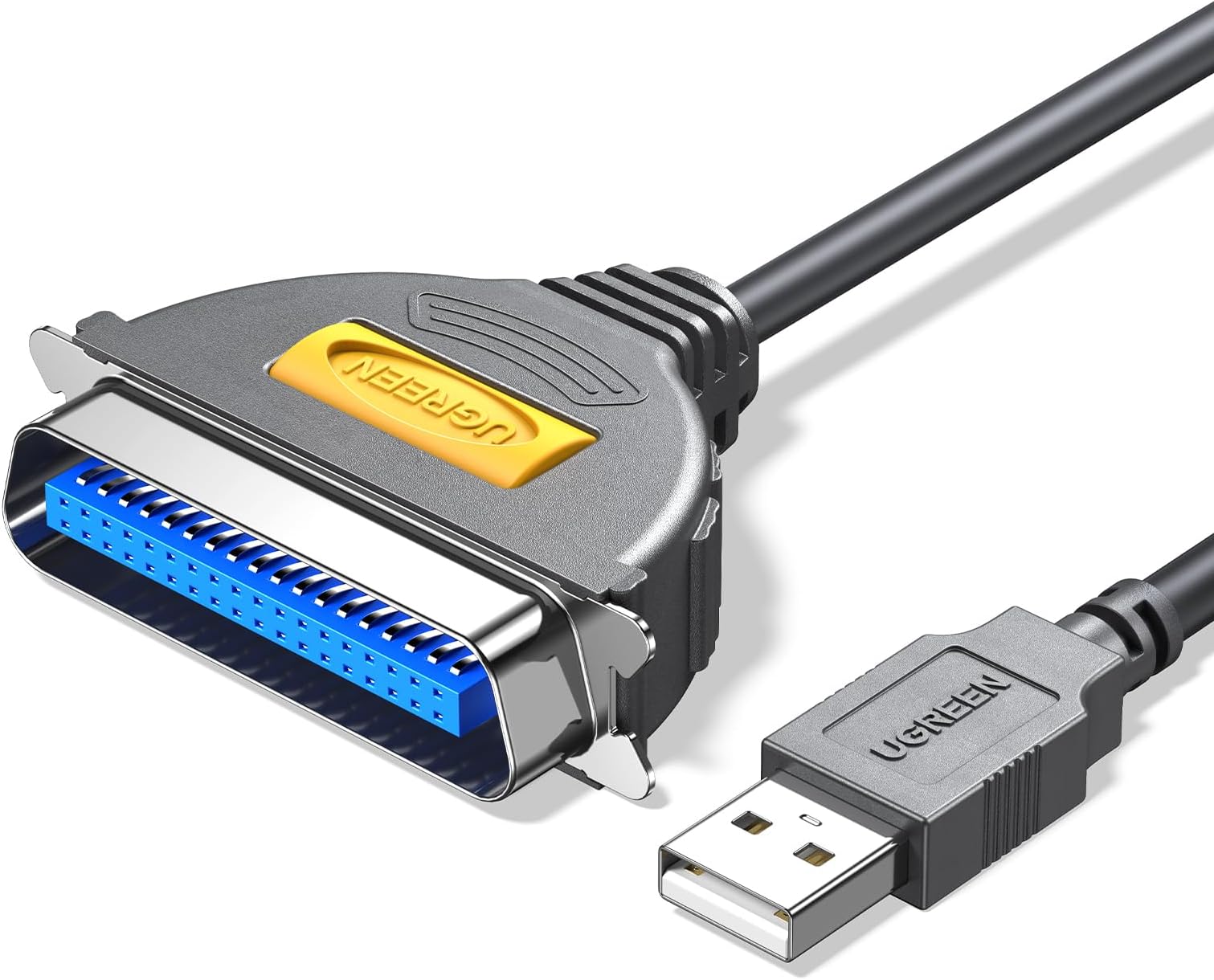
The UGREEN 10FT USB to Parallel Port Printer Cable is a high-speed, copper-core shielded adapter designed to connect legacy parallel port printers and devices to modern USB-enabled computers. Supporting up to 12Mbps data transfer and compatible with Windows, Mac, and Linux, it offers a reliable, plug-and-play solution for professionals needing to preserve vintage printing workflows without sacrificing speed or stability.


| ASIN | B01117NOYO |
| Best Sellers Rank | #3 in Parallel Cables |
| Brand | UGREEN |
| Brand Name | UGREEN |
| Cable Type | USB |
| Color | Grey |
| Compatible Devices | Inkjet printer, Laser printer, Laptop, PC, Printer, Scanner |
| Connectivity Technology | DB36 |
| Connector Gender | Male-to-Female |
| Connector Type | Usb to Parallel Port |
| Customer Reviews | 4.4 out of 5 stars 899 Reviews |
| Data Transfer Rate | 12 Megabytes Per Second |
| Indoor Outdoor Usage | Indoor, Outdoor |
| Item Shape | Round |
| Manufacturer | UGREEN GROUP LIMITED |
| Model | 30228 |
| Model Name | USB to Parallel Port Printer Cable |
| Number of Items | 1 |
| Number of Pins | 36 |
| Other Special Features of the Product | High Speed |
| Part Number | 30228 |
| Recommended Uses For Product | Indoor, Connect Printer with DB36 ports to Your PC |
| Special Feature | High Speed |
| Specification Met | IEEE |
| Unit Count | 1 Count |
I**Y
Works fine but....
The product worked perfectly, but it's not plug and play instant recognition by Windows of your printer. Yes it works, and Windows does recognize it's an IEEE-1284 device that was plugged in (after connecting both printer and USB to your computer). So Windows sees it and installs what the cord is. But you have two steps to manually configure the connection. You must tell your pc what port to look for, example, USB001 might be the name of the port that goes to the printer. And after choosing the port, such as USB001, then you must install the driver for your particular printer. After choosing your print driver then print a test page. If test page printed, then you're good to go. As a last step, in your display of available printers, right click the new printer you've just installed and select setting it as your default printer. So now you're finished. The adapter cord works perfectly, just remember you have to manually configure the port and manually choose (or install) a print driver.
S**R
I had hesitations...
I have a large 36" vinyl plotter that was connected to an old Windows 98 computer that has been chugging along for many (30+) years. Finally, the other day the hard drive failed. Rather than find a drive to replace it and rebuild it with my signmaking program and other utilities, I decided to see if I could connect it to my Windows 10 desktop since I have a newer version of the signmaking program on it. I designed on Windows 10 but sent files on the network to the Windows 98 computer. This worked well...until it didn't. The plotter has both serial and parallel ports. Either one works for input. So I checked out Parallel port-to-USB cables. UGreen is a brand of peripherals I've used for many years, so I chose this one. I asked a couple of questions about compatibility. No one could give me a definitive answer about using it with a plotter, though many people had great success with printers and scanners. Someone from UGreen got back to me that it should work. I took a chance, and it did! So, in my program, you have to select which port the plotter is connected to. There were probably about 30 different ports. After much trial and error, the port listed as "GCC USB" was the correct one. I was very pleasantly surprised. The point being, that many users confirmed printers and scanners worked with this. I can confirm that vinyl plotters do as well.
A**R
made an e-waste printer useful again.
Got given an old printer with only a Centronics connection. Nothing wrong with it, lots of memory, and features. It was headed to e-waste without this part. Showed up under Windows 11 without any issues, added as a standard local printer. Switching printers to it is just as fast as any other. Power save works on the printer too, no interference. Cable is a great length to work with, quality feeling plastic, and well put together.
R**H
Works great with Windows but MAC is not so good.
I am using my old Laserjet 4000 as it still has a lot of life in it. I have a Windows 7 machine, an iMac and a MacBook Air laptop. The cable works perfectly with Windows, even when running Windows using Parallels on the iMac. However, using Mac OS, it works once then the second print job does not work(printer goes offline). If you unplug then plug the usb cable in again, it prints. The problem is definitely confined to the Macs but it is still usable with the Mac, just a little flakey. I have tried other USB/Parallel cables and get similar results on the Mac.
J**D
Works with Dell Inspiron 660 Windows 10 to HP 4100TN printer
My HP 4100TN printer also connects to our local area network via the Ethernet cable. This UGREEN USB to Parallel Printer Adapter Cable connects my Dell Inspiron 660 running Windows 10 to my HP 4100TN directly via USB 2.0. I have to connect to the USB 2.0 at the front or to those USB 2.0 at the back. It appears not to work with USB 3.0. Setup took about 25 minutes, because I originally connected to the USB 3.0 at the back. The Windows 10 printer trouble shooter provided the hint regarding USB 2.0 and USB 3.0. I also have an HP 4050N. I use these old printers because toner is cheap, print quality is great, and my CCH tax software uses fonts that I must download from the CCH tax software to the printer in PCL 5 or PCL 6. A few years ago, I purchased the TRENDnet USB to Parallel 1284 Converter cable from Amazon for the HP4050N. The TRENDnet cable is a bit cheaper. I purchased the UGREEN cable because I needed an additional cable and I could not get the TRENDnet cable to work with the HP 4100TN. I might get the TRENDnet cable to work with the HP 4100 now that I am aware of the USB 2.0, USB 3.0 issue. I am happy with purchase and recommend both parallel to USB cables. Note that installation may be frustrating to the novice.
J**L
Great Value
Works Great for legacy printers
V**V
super delivery
excellent quality, super delivery
E**Y
Did not print out document
trying to get a epson LQ-1170 dot matrix printer to work from a Lenovo G780 laptop with win 11. using a usb to cn36 parallel printer adapter cable. printer self test worked properly. printed out self test page. They responded: "Sorry, we do not sell USB to CN36-pin parallel port printer data cable in overseas stores for the time being" I did not ask if they sold the item overseas or not. I was asking how to get the cable to work as advertised. Anyway why are they selling on Amazon if they are not selling overseas. dah.
D**R
Connect your legacy devices to your USB host: worked great for my old printers
I have two old, but still amazingly good laser printers that can crank out pages faster than my newer inkjets, and have holding trays for three reams of paper. Problem is, they need to be connected by the older parallel printer cable or Ethernet. While adding the printers to my Ethernet hub is not difficult, I really wanted them attached to my desktop for speedy queuing and printing. But no desktop of today has a parallel printer port, so a quick Amazon search found this cable. For the low cost of the cable, I figured what did I have to lose? Connecting one end of the cable to my desktop USB hub and the other fitting perfectly in the HP LaserJet parallel printer port, I had no expectation of this to work when I queued up a 100+ page document. Surprisingly, it worked just fine, once I had told Windows what kind of printer it was! The printer, which had been a workhorse for years until I moved to USB Inkjet printers, was much better sitting next to my desk printing large reports than sitting in a landfill! This cable worked perfectly. Just to try it out, I also connected an old QMS wax colour printer, one that I used a great deal for colour output a decade or so ago. It took a while to get the driver working right, but it too printed just fine. This cable is perfect if you need to connect an old parallel device to your new-fangled desktop or laptop! I've bought another to expand my old device usage!
G**H
Solution for old LPT1 printers
Needed to connect HP Laserjet 4 Plus to Windows 7 64-bit. Connection was more troublesome than Windows 10. Had trouble with other cables. This cable works without cable drivers. It automatically installs a IEEE1284 controller. But I still needed to manually download an HP4 driver from Windows update and then configure the printer to use a USB port. I would recommend. I have more modern printer but HP4+ is hard to beat in terms of reliability. Built like a tank. Have had this one for 25 years and still works like a charm.
O**1
A Very Pleasant Success
Purchased this cable to use with my old (but still very faithful) HP Laserjet 5P printer. I previously had the printer connected to my computers via a docking station - that failed. HP no longer provides drivers for this printer, so I was a bit concerned that I would no longer be able to use the printer. With this cable, connected from the parallel port on the printer to the USB port on my laptop I was able to print again right away with no issues. It worked for a laptop running Windows 10 and also an older Windows Vista laptop. In both cases, it appeared to add a printer to my printer list with a (Copy 1) (or Copy 2) behind its name, and then it printed just fine. We are pleased to be able to keep using our trusty older printer. Highly recommended.
G**.
Poor documentation
It took quite awhile, but after guessing half a dozen software ports, I found that USB virtual printer port 2 worked. Once I got the printer installed manually using that port it worked fine. The documentation included, and the documentation on the website have no information as to what port the cable defaults to. Also, there is no choice in configuring it to be some other port, so your software needs to be able to print to USB virtual port 2 for this cable to work. But if it does, all of the printer functions seem to work fine.
M**E
Cable tres pratique
Commandé dans le cadre de mon travail pour pouvoir mettre en route une vieille imprimante et c est nickel. Le câble est longles et permet de relier les imprimante à ma tour. Je recommande
Trustpilot
2 months ago
1 month ago