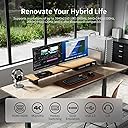
🔄 Master your multi-PC setup with flawless 4K switching — because your workflow deserves no compromises!
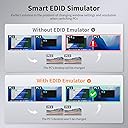
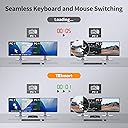
The TESmart KVM Switch enables professional users to control two computers with two 4K@60Hz HDMI monitors using a single keyboard and mouse. It supports extended and crisscross display modes, offers three switching methods (button, hotkey, IR remote), and includes a USB 2.0 hub for peripheral sharing. Compatible with major OS platforms and featuring EDID emulators, HDCP 2.2, HDR10, and Dolby Vision, it ensures seamless, high-quality video and audio performance. The package comes complete with all necessary cables and offers lifetime technical support and a 1-year warranty.


| ASIN | B081RYZ6B4 |
| Batteries Required? | Yes |
| Batteries included? | No |
| Best Sellers Rank | 47,254 in Computers & Accessories ( See Top 100 in Computers & Accessories ) 162 in KVM Switches |
| Colour | USB2.0 KVM |
| Customer Reviews | 4.0 4.0 out of 5 stars (90) |
| Date First Available | 18 Mar. 2019 |
| Included components | KVM Switch, KVM Cables,HDMI Cables,IR Remote,User Manual,DC 12V Adapter |
| Item Package Quantity | 1 |
| Item Weight | 600 g |
| Item model number | HKS202-E23 |
| Manufacturer | TESmart |
| Part number | HKS0402A1U-UKBK |
| Plug profile | Rack Mount |
| Power source type | DC |
| Product Dimensions | 29.97 x 10.92 x 3 cm; 600 g |
| Size | HDMI port for 2 monitors + 2 computers |
| Style | USB2.0 - For 2 PCs 2 Monitors |
| Switch Type | 2-way |
| Voltage | 12 Volts |
G**Z
Works fine - except for the media keyboard
I have been using this KVM for a while now and overall, I am happy with it. My older desktop computer that has two DP outputs (with DP to HDMI converters) works like a dream. I use the USB port on the KVM to "share" the web cam (that is located on the top of my dual monitor setup) between the computers. Happy so far. My newer Lenovo C940 laptop, on the other hand, does have issues with this KVM. Firstly, I am using a USB C to Dual HDMI Adapter via one of the thunderbolt ports of the laptop, which is then fed into the KVM via HDMI cables. When I switch between the desktop and the laptop, the laptop loses the connection to the external monitors momentarily. This is enough for Windows 10 to reset the desktop completely, resize windows and think that there is only the built-in display of the laptop. Then in about two seconds later it sees the external monitors again, and the dance of resetting the windows desktop and shortcuts begin. It works after a few seconds, but some application windows end up on a different display than where they were before the switch. Secondly, there is massive keyboard lag on the laptop. The desktop computer works fine, but the laptop keeps having 'sticky keys syndrome' or not registering key strokes at all. I tried both pass through and emulation modes and in emulation mode the lag is slightly better, and therefore, I am stuck with that. BTW, I have tried other keyboards, even a hard-wired USB keyboard - the same lag can be seen on the laptop - but not on the desktop. Therefore, this second point is for information only for fellow purchasers. I don’t think it’s a fault with the KVM. It didn't count into my rating as I think it’s the laptop or the combination of the laptop and the KVM. The USB port with the shared web cam works fine on the laptop too. The most concerning problem, and which is why I rated this item with only 4 stars, is that the multimedia keyboard features do not work on either machine. I tried both pass through and emulation modes and the Logitech Unified receiver isn't recognized by either machine. (Well, the keyboard does work with both, but I am unable to use the Logitech app or any of the multimedia buttons on the keyboard. The Logitech app says no Logitech device detected, yet I am typing this review with one.) In summary, I am keeping the KVM, but it isn't 100% and I wish I could use all the keyboard features in full without a lag. Final note: as stated in the listing, the KVM does not work with a Bluetooth keyboard. I tried plugging the Bluetooth received into both the keyboard port on the KVM and on the USB port of the KVM. Both pass through and emulation modes failed to recognize the keyboard. So, I have given up and plugged in the Logitech Unified receiver - into the keyboard port of the KVM and this works as described above. *EDIT* after another month of use. I am still happy with the KVM. The multimedia features still don't work from my keyboard, however, I am happy to confirm the the input lag was entirely the fault of Lenovo. After it got worse, I ended up researching on forums, and it turns out that this problem is common. The solution was simply to turn off the Lenovo Vantage service, which launches a bunch of bloat-ware; one of which causes the input lag. I hope this helps a fellow C940 owner. *EDIT 2* I reached out to the seller regarding the multimedia keyboard key functions and they responded quickly with a simple solution. My keyboard is now 100% functioning with this device. I have changed my star rating to 5 stars. Highly recommend. Great after sales support too.
S**X
Almost perfect KVM
I've used a number of KVMs over the years, with varying degrees of success, but as screen resolution has increased and the connectivity demands of Windows have become more taxing, most of the recent ones I've tried have failed dismally, including ones several times the price of this. Not this one - it happily copes with 4 PCs into 2 x 4K monitors at full resolution, and works almost seemlessly. There are a couple of minor niggles: - I'm using a Logitech wireless keyboard/mouse set with the Logitech Unifying Receiver dongle, and the KVM will sometime lose keyboard connectivity (though not the mouse, using the same UR dongle, oddly). This is slightly annoying, but switching to another input and back resolves it - The connectivity was much worse using the ports at the back, which were marked for keyboard & mouse. Once I realised the front port worked better, this problem went away. - It could do with either more shared USB ports or a couple dedicated to each connection - I have a USB hub connected to the selected output, but it would be handy to be able to have some dedicated peripherals that only connect to a specific device. - Against that, the peripheral sharing works very well - occasionally a glitch with my cheapo USB webcam, but everything else works fine. None of those points should detract from the overall impression though - it's exactly what I needed - full, reliable control of 4 PCs and able to switch 2 4K monitors togther or independently, with keyboard mouse control going with either monitor, as required. Excellent device, well worth the money
D**N
Excellent, works exactly as described first time.
Excellent. Arrived on time and works exactly as described. It does say that you cannot use the switch with a Bluetooth mouse or keyboard but I got it to work fine with my Logitech MXKeys keyboard and mouse using the dongles that were supplied with them. The switch has 2 USB ports for using a wired mouse and keyboard and you just push the dongles into these. Job's a good 'un!
K**N
Simply didn't work
This KVM switch didn't quite perform as it should. One of my 4k screens keep losing connection (irregularly, but often enough - at least multiple times an hour) while my keyboard droped keystrokes every other sentence I type - I had to plug it to the "general" USB ports for it to work. Similarly for my wireless mouse I had to plug the dongle into a general port for it to work with some consistency. There is also no obvious way to turn off the very loud beep whenever you switch, the only ways being some keystroke combination that involves the scroll lock key, which my keyboard unfortunately doesn't have - and the only way to switch to another key combination requires the use of, again, the scroll lock key... That said, this was a minor inconvenience compared with the problems above. Additionally, the remote is not a dedicated design for the model, leaving a few buttons unspecified. It could have been compatibility issues with my display card / ports etc., but the bottom line is that it didn't work well enough, and I can't find enough information to work out why it didn't work. I bought this as an upgrade to a much cheaper KVM switch, which had its own problems. At this price (£260 when I bought it), I expected it to work smoothly out of the box. I would have returned it had I not got rid of them prematurely. This is now a very expensive paperweight!
Trustpilot
1 week ago
4 days ago