Buy anything from 5,000+ international stores. One checkout price. No surprise fees. Join 2M+ shoppers on Desertcart.
Desertcart purchases this item on your behalf and handles shipping, customs, and support to KUWAIT.
🚀 Elevate Your Gaming Experience!
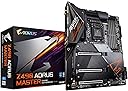
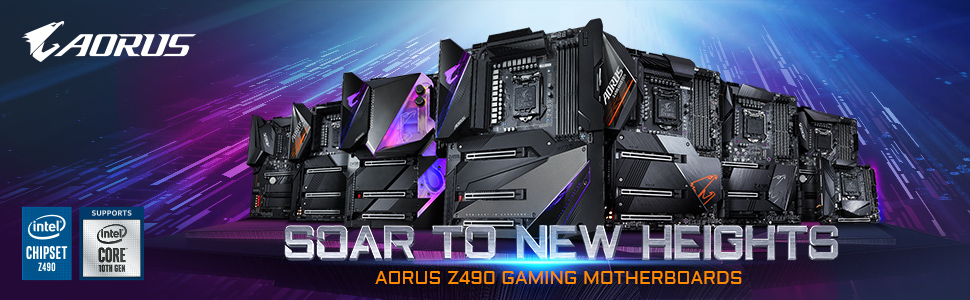
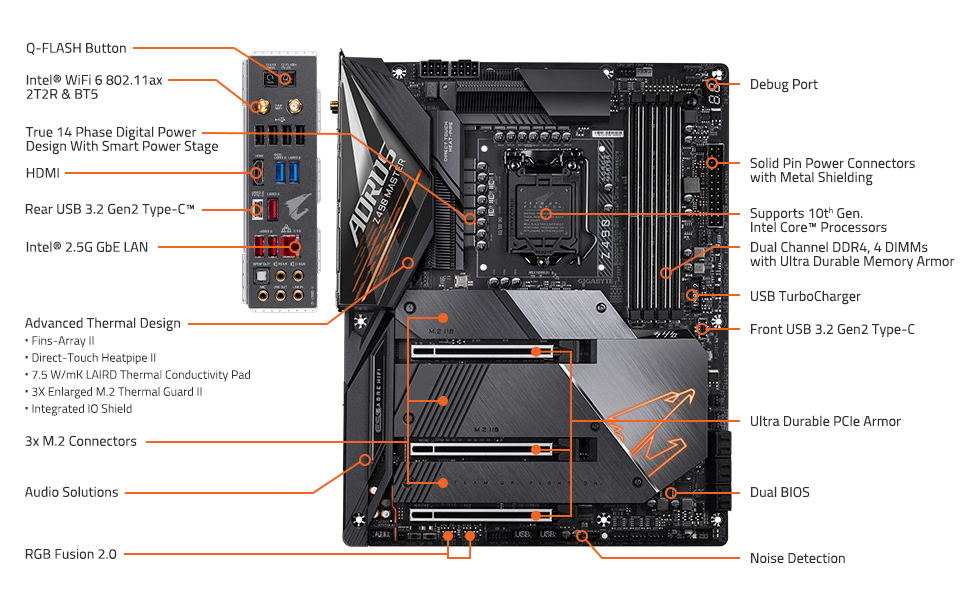
The GIGABYTE Z490 AORUS Master is a high-performance ATX motherboard designed for Intel's 10th Gen processors, featuring advanced power delivery, superior cooling solutions, and cutting-edge connectivity options, making it the ultimate choice for gaming enthusiasts and professionals alike.


| ASIN | B087GH5SK2 |
| Best Sellers Rank | #2,356 in Computer Motherboards |
| Brand | GIGABYTE |
| CPU Socket | LGA 1200 |
| Chipset Type | Intel Z490 |
| Compatible Devices | Personal Computer |
| Compatible Processors | 10th Generation Intel Core |
| Customer Reviews | 4.2 out of 5 stars 231 Reviews |
| Graphics Card Interface | PCI Express |
| Item Weight | 1830 Grams |
| Main Power Connector Type | 24-pin, 8+8 pin |
| Manufacturer | GIGABYTE |
| Memory Clock Speed | 5000 MHz |
| Memory Slots Available | 4 |
| Memory Storage Capacity | 10000 TB |
| Mfr Part Number | Z490 AORUS MASTER |
| Model Name | AORUS Master |
| Model Number | Z490 AORUS MASTER |
| Number of Ethernet Ports | 1 |
| Number of Ports | 4 |
| Platform | Windows 10, Windows 7, Windows 8 Pro, Windows 8.1 |
| Processor Socket | LGA 1200 |
| RAM Memory Technology | DDR4 |
| S/PDIF Connector Type | Optical |
| System Bus Standard Supported | SATA 3 |
| Total PCIe Ports | 1 |
| Total SATA Ports | 6 |
| Total Usb Ports | 8 |
| UPC | 889523021439 |
| USB 2.0 | 6 |
| Warranty Description | 3 |
B**L
Cannot expect more!
First things first. This motherboard is a premium quality motherboard. Initially, my son was leaning towards the ROG Strix Z490 so we bought that. I however convinced him to give Gigabyte the chance and it did not disappoint. It was his first build and went flawlessly. So lets dig into the Pros and cons. Pros: * Compatible with 10th Gen Intel processors as well as 11th Gen ones. * Awesome quality materials including the heatsinks, headers and IO shield. * PCIe4 ready. This will make a difference in storage drives moving data around at faster rates as soon as 11th Gen Intel processors are released. * Simple and awesome bios with easy setup as well as advanced options for power users. * WiFi 6 and Bluetooth 5 support. * Ample USB 2 and USB3 as well as a couple M.2 slots for your killer SSDs. Cons: * No thunderbolt built in. However, this board is Thunderbolt ready with an included Thunderbolt header on the board. You just need to purchase an add-in board if you want this. * Documentation could use a tad bit of improvement. It was a bit confusing to which 8 pin header we would connect the CPU power till we looked up a YouTube video that specifically told us to use the left one unless we had some weird cooling system needs. I believe adding such detail may help. Also, after the initial install, Bluetooth seemed flaky. Weird internet videos suggested miraculous fixes merely by unplugging the PSU and rebooting but that was not the cause. NOTE: To users running into Bluetooth not working issues, please take out the antennae included in the Aorus package and connect to your motherboard. It will fix your problems. For gigabyte, it may help if the docs had this detail in there somewhere. The final build we did had a great 1TB NVMe M.2 SK Hynix Gold SSD. Both read and write speeds were excellent. Windows installed in about 4 minutes. All systems go. A bootup takes about 10 seconds, This is not from sleep but from a powered off state. Hope you have the same experience with your build! This board rocks with Windows 10!
B**G
No Coil whine, excellent OC capabilities. The best high end z490 motherboard that doesn't cost $800
The video speak for itself. No coil whine. if you are experiencing coil whine, all you have to do is go to advanced (under tweaker) in the BIOS. then go to CPU settings and disable C-States control. (this will for sure eradicate any coil whining as for the Motherboard is concerned, this mobo has 14 phases 1 phase for GPU, 90 AMP. It has a beefy VRM and this motherboard doesn't break a sweat if you overclock it(the photos speak for itself). Unlike the MSI MEG Unify(which I had prior), the transient response and the extra heatsink due to its ARMOR made this motherboard way better when it comes to efficiency and overclocking. I highly recommend this to anyone who does NOT want to pay $800 for a high end motherboard but will still have high end features regardless (the only major difference between this and the Aorus Extreme is that the Extreme has 16 phases instead of 14 phases, every thing else is basically the same. 14 phases and 90 AMP is way overkill. The AUDIO is excellent. I no longer have to plug in my headphones at the back of the monitor(where there's a lot of electrical interference. I can plug it in the front and i still get 192,000 32 bit music, i also have access to its AMPLIFIER (front panel) which can have up to 3 levels(it's fantastic and fun, i use my sennehiser HD599 and my god, the front panel audio is excellent. It uses the ES9118 DAC which is among the better motherboard DACs out there. The internet issues were non existent. I was able to plug in my internet and it worked right away. I'm guessing in the early days of when this motherboard came out, people had problems. I got this in late september and i had no issues with the internet.
R**S
Seems to work well
Aside from it having an 03 quirk on awakening from sleep and turning one of the fans off and turning another on to 100% when it does this it seems great. I just reboot when it does this obviously, but it is annoying. I should be able to wake the computer and continue normally.
M**I
Great motherboard. I received a used one though
I did a lot of research before ordering this. I thought I was getting a brand new motherboard. I received a open box. With parts missing and the whole thing scratched up. I did get a replacement. I will update
N**S
Great motherboard bad drivers!
If you buy this motherboard and plan you install a fresh windows system on it, be aware that you need to either back up your windows update onto a USB or CD. After i wiped the system i put the CD that came with the motherboard in to install drivers. They wouldn't install due to the fact that i didn't have an updated windows installed. So i had no network driver to get internet. (No internet = no windows update) (No windows update = cant install network drivers). Even using USB to transfer drivers from Gigabyte website i had to have updated windows. The only way i could get it was to put windows creator onto USB and then put my laptop updates onto the new computer. Very long process and not very much help on the internet for help. So hopefully if anyone else runs into this issue just use Windows Creator from another computer and transfer the newest update.
E**D
Great on second try
On my second z490 Aorus Master , first board had issues with the intel i-225 onboard ethernet, no matter the driver or firmware updates it just kept going Inactive, no activity lights at all. It would go active for very short periods of time,but mostly not. So I gave up and did an exchange for another and this one was smooth sailing all the way. I haven't built a pc for at least16 years so the fact that this went together so well, including updating the bios, then setting up bios, installing components, then Windows 10 and drivers. This board is straight forward and runs great with ram xmp profile. Couldn't have been easier and I couldn't be happier with this board.
A**S
High Price, Mixed Bag Performance
Its $600 so yes I had lofty expectations. Pros: Build quality, aesthetics, features, redundant bios setups, IO for days Cons: RGB FUSION, it is horrible and needed to control lighting on the mobo and the included aio cooler. Its temperamental, does not save settings after reboot, overrides other non-related RGB settings. Also IT SPINS UP HARD DRIVES repeatedly and does something with the driveheads on startup. Look this up online, it's a known issue and why the heck is RGB software spinning up and powering down hardrives? Beyond this plugging in or unplugging any usb devices causes RAM RGB to go to full brightness red for 6 seconds. I could go on but will stop there. Beyond this, I get a super high pitched whine from the mobo behind the CPU, all the time, at load or idle doesnt matter. Overall, I still like Gigabyte as this will be my 3rd build with a Gigabyte mobo. But for what it is, its overpriced, and the main feature is hobbled by horrible RGB software.
W**L
Couldn’t be happier
Did so much research looking for the right MB for my build and without a doubt in my mind, I made the right choice. This thing is loaded AF! First one came used/damaged but contacted support and received a new on the next day. I was bummed for a couple hrs but ish happens and mistakes are made. How the company handled it is what matters in the end. Will buy here for my upcoming 2 builds. Highly recommend
D**B
Overall Amazing, Network sub par but usable
This board is an absolute gem. There is one very bad aspect which is the 2.5gb Intel network adapter. The fix is to use driver 1.0.1.4 and then it's non issue, but this is a hardware problem and supposed to be fixed with newer versions of the board. That is a fault of Intel, not a deal breaker to me, as it can work with above driver, and a NIC could be added if you like. Now aside from that, my only gripe is gigabytes BIOS. It's not Asus pretty and easy, it's not as nice to navigate, and it's really aesthetic only. Functionally it's very powerful and every setting I ever want and more is there. Hardware wise this thing is gorgeous, it's over built and the power delivery while overclocking is just smooth and very controllable. Expansion and io leaves nothing to be desired. At this the price, you won't be disappointed. You also won't think "hey I got a sweet deal" because you are definitely paying for a mid-top end board, but you are getting one of the better z490 boards around. Don't run stock voltages, unless you update to F20a BIOS which really toned down the over voltage a lot. But still if you are running stock then there is probably better cheaper options for you than this. I would happily buy this for another build if I needed z490 again
A**A
Hermosa y poderosa, rgb problemático antes de updates de windows.
Buena mobo, ninguna falla hasya ahora, amplia garantía
M**R
Quality and price
I like the RGB and the VRM cooler which is so powerful and you can over cloak the i7-10700k to 5.1 ghz all cores
A**R
The Master of Gaming, Indeed, but with a few sortable Issues
Bow 🙇 down to the Master! This thing is an absolute Beast! The top of the line Gaming motherboard from Aorus which beats everything hands down. The only better Aorus motherboard I could find was the Extreme Waterforce which is liquid cooled and 2x the price. Very happy with the performance except for a slight scare which is described as follows. This motherboard comes with a single 2.5 Gbe Intel Lan which can be a problem. There have been known issues with this Lan and Intel + Gigabyte have been releasing patches for it since early January 2020. After 15-20 days of use, one day my lan suddenly stopped getting detected. Tried everything, installed Gigabyte / Intel driver but nothing helped. The Lan was not deteein BIOS and the Mac Address was showing as N/A. I was planning to do an RMA but contacted Gigabyte Support first and they asked me to pull the CMOS battery out, short the Clr CMOS header and boom the lan was magically back. I have updated my BIOS to F7a and there have been bo issues since then. F5 and F6 BIOS are buggy and I was not even able to boot into BIOS with F5 so had no option but to update it. It was a big scare but glad that Gigabyte support help me sort out the issues. If and only if Gigabyte added an extra 1Gbe Lan port to this board, it would undoubtedly be the best Z490 board in the market. Boards like Vision D which are cheaper, come with mutiple LANs and that's unfortunate. However, apart from this there haven't been any issues. Been using this flawlessly and over-clocking my i9 10900k. Didn't have issues running my Trident GSkill RAM at 3600mhz as well. My configuration: Z490 Aorus Master running i9 10900K 32gb Gskill Trident Z Neo 3600Mhz Ram RTX 3080 Aorus Master CM ML 240R AIO Samsung 970 Evo Plus Nvme M.2 1 TB 3 Corsair LL 120 fans (front) 1 Corsair QL 120 fan (rear) 2 CM AIO fans (top) 1 Corsair SP 120 stock fan (bottom) Hope this helps people make a decision. The LAN issue isn't a deal breaker and will go away with more stable BIOS and drivers in the future. Overall this board is a killer.
J**R
Recomendado
Pagas por la calidad del producto.
Trustpilot
2 weeks ago
1 week ago