Desertcart purchases this item on your behalf and handles shipping, customs, and support to KUWAIT.
🎥 Elevate your video presence—because your image deserves the spotlight!
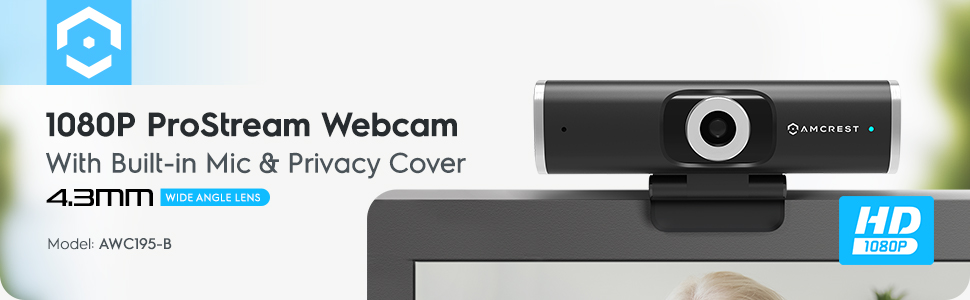
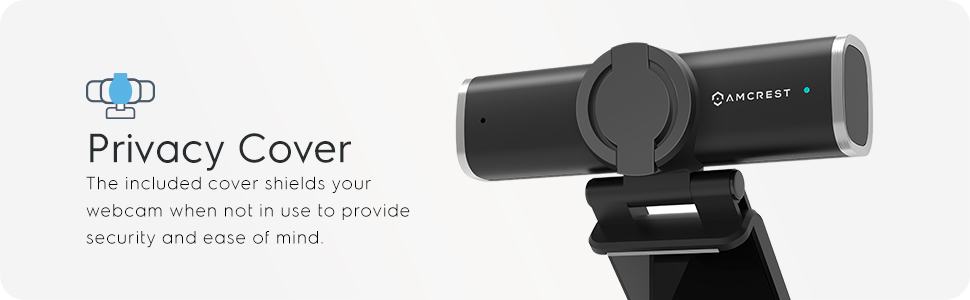
The Amcrest 1080P Webcam (AWC195-B) delivers crisp Full HD 1080p video at 30fps with a wide 90° lens and superior low-light performance. Featuring a built-in noise-reducing microphone and a physical privacy cover, it ensures clear communication and security. Compatible with major OS and streaming platforms, it offers versatile mounting options for desktop or tripod use, making it the ideal choice for professionals seeking reliable, high-quality video conferencing and streaming.


| Antenna Location | Video conferencing, streaming, online meetings, and general computer use |
| Asin | B087Y7SMMW |
| Best Sellers Rank | #537 in Webcams |
| Brand | Amcrest |
| Built In Media | Privacy Cover |
| Camcorder Type | Video Camera |
| Color | Black |
| Compatible Devices | Laptop, Personal Computer, Smartphone, Tablet |
| Connectivity Technology | USB |
| Customer Reviews | 4.2 4.2 out of 5 stars (3,590) 4.2 out of 5 stars |
| Digital Zoom | 4 x |
| Display Resolution Maximum | FHD |
| Effective Still Resolution | 2 mp |
| Effective Video Resolution | 1080 pixels |
| Exposure Control Type | Automatic |
| File Format | MP4 |
| Flash Memory Type | CompactFlash |
| Focus Type | Auto Focus |
| Form Factor | Compact |
| Global Trade Identification Number | 00850011990704 |
| Image Aspect Ratio | 16:9 |
| Image Capture Speed | 30 frames_per_second |
| Image Stabilization | Optical |
| Item Weight | 0.14 kg |
| Lens Type | Wide Angle |
| Manufacturer | Amcrest |
| Maximum Aperture | 2.8 f_stop |
| Maximum Focal Length | 4.3 millimeters |
| Minimum Focal Length | 4.3 millimeters |
| Model Name | AWC195-B |
| Model Number | AWC195-B |
| Screen Size | 9 inches |
| Sensor Type | CMOS |
| Shooting Modes | Low Light |
| Special Feature | Low Light |
| Style Name | Modern |
| Supported Audio Format | MP3 |
| Supported Image Format | JPEG |
| Unit Count | 1 Count |
| Upc | 850011990704 |
| Video Capture Format | MP4 |
| Video Resolution | 1080p |
| Viewing Angle | 90 degrees |
| Warranty Description | 1 Year Warranty |
| Water Resistance Level | Not Water Resistant |
| White Balance Settings | Auto |
| Zoom | Digital |
User
Wonderful camera for the price
Do you have to sit in meetings, and play games online and need a webcam, just wanna video chat with friends?This camera is definitely great for both of those things without -any issue-. You get a good clear picture, and an actual 90 degree frame (I ticked off the distance it saw, and measured -- it is right there in the 90 degree mark). It is 1080p so it is high quality and has a great picture if you have the bandwidth. The mic picks up well in the room, and while it will not replace a dedicated mic that I use for streaming it still works extremely well. It has good advanced controls for when you use keylights in your home studio so for the streamer or home youtube producer with a budget it is an excellent choice. Side by side to the Logitech 920 or 922 I see no reason to spend the extra 40 dollars for the logitech brand. This does all of it and costs significantly less.I had read the other complaints that were out about this camera through the review system here on Amazon, and most of them are... user error (Noise issues in picture - no light in the photo either.. it is pretty obvious they were looking for issues). Out of the box I fixed these issues with about 10 minutes of playing with settings for my keylights (which were hand built with LEDs so I have a good dimmer) and it worked excellently. I don't see why people would want to waste almost the price of this camera again buying the more expensive 920/922, but some people I guess like to waste money. Personally not a fan.I only have one minor complaints about it, but for the money? This isn't really a complaint.The privacy cover does not stay very well on the camera easily, and breaks apart some times. You can just snap it back on and back together, but it is, again, a minor complaint.
User
Extremely good value for your dollar
TL;DR: This is orders of magnitude better than just about every built-in webcam and a solid alternative to more expensive brands.I picked this up because I needed a second camera at home for our WFH setups. Both my wife and I have home PCs and now needed to add our work machines. This was a great add for us. It works well with the USB 3.0 switch so we could use before and after work. When we started going into the office part time I took it with and it is now the camera I use for meetings while in the office also.The audio on this camera is probably the biggest weakness. It has not been an issue for me as I have always had (and prefer to use) a separate headset and/or microphone (streaming, etc). It is probably slightly better than the built in microphone in most laptops but they are fairly close so don't expect a huge upgrade there.Video quality is very good, it does struggle a little in lower light but that is to be expected.It really was a plug it in and go. It has worked very well with the USB switch (keyboard, mouse, and web cam get shared between two PCs).One issue that I ran into is that some laptop docks, seem to have a bandwidth limitation, and occasionally would see some visual glitching. This issue immediately went away when the camera was plugged into the laptop directly. To be clear this is NOT the cameras fault -- but since we have a lot of hybrid work scenarios out there I wanted to call that out -- it is NOT a camera problem.I have been using this for a year at this stage and am very happy with it.For context; when I purchased it the mid and high end Logitech cameras had been sold out or were otherwise unavailable for months. A Logitech camera I purchased a year prior for $80 was selling used for almost $300. this was $40 at the highest that I saw. So it was 50% less than what I paid for a higher end "game streaming" camera the previous year. Is it as good as the Logitech? No, it isn't. Is it 50% "less good"? Absolutely not. There is a lot of really solid value here. For 80% of users I would expect this to be more than you would need so save your coin unless you REALLY need one of the higher end cameras.This is especially true given the price at the time of this review (a year after original purchase) is $29 and the price of the current revision of the Logitech camera is $90-100.
User
Great Camera for the Money
Setup:Setting this camera up was a breeze. I tried it on 4 different computers, 3 windows 10 environments and one Linux machine. The setup on the two laptops was very easy and automatically found the correct driver and became the default camera. Though through Zoom and Google Meets you could easily switch between the two different cameras with ease. The desktop windows 10 environment has some additional security settings that I have setup and I had to give the camera additional permissions. This is to mimic the end user desktops that we support. This worked out as I would expect with any camera or peripheral device. The Linux install was also surprisingly easy. Sometimes with devices that aren't directly supported I have to find the right content and download it but Ubuntu had the correct driver and it was almost as seamless as the other systems.Use:Compared to my old camera (very old Logitech) it is amazing but that's not surprising. The real part that surprised me is the quality of both my laptops. One laptop is a personal Lenovo that is about 7 years old that was top of the line. The other is a brand new Dell Precision. This camera's quality is so far above and beyond these two in picture quality I was really surprised. The other portion that was amazing to me was the sound quality. The sound quality picks up anything that is within a couple feet of the microphone but then cancels out most other noises. It is not quite as good as a really high quality par of headphones but it is the first time I've felt like I don't need headphones for a Zoom meeting. I have been using this as the only camera while working from home and have received comments about the better picture especially when I have the lights in my office off and it seems to be able to pick up the monitor light on my face well enough to make me look brighter than I am. I have maybe 4 to 6 zoom/google meetings a day with a couple chime and webex meetings here and there. I have been testing this also with some of my video capture for my teaching and I have been impressed so far. I even through this on a USB hub with four computers and was able to seamlessly switch between computers with this device being used adhoc between them. This was most impressive.Issues:The mount doesn't hold well on the top of a monitor when trying to adjust the camera to either side. Not a big problem but it would be nice to be able to lock it in place a little better.The camera when mount on the monitor has no ability to turn/angle to the side. For those of us in multiple monitor environments this means we can't have it on the secondary monitor to the side that we do much of of our non-critical work on. This typically means it goes on the monitor with the main tasks. Again not a huge issue but I would have like to have it on the other monitor with the ability to angle about 15 degrees.Biggest issues I have run into is the little door that covers the camera itself (swings up to expose the camera) starts to ride out of it's fitting on one side. When you open it a little too far it pops off. This also typically moves the camera around and sometimes if you are moving too fast while closing it, it will send the camera off the monitor or at least move it around. While with some careful movement you can fix this, it does appear that the little plastic cover will eventually wear off and will not be able to hold.Overall Impression:Overall I really like this product. I have always been loyal to Logitech from their gaming keyboards and mice to their camera devices. But for the price I really feel like this is a great product. I am tempted to buy another one for my wife. It is rare that I like something so quickly. This has become a standard tool for me that I use daily. I didn't have high expectations as these cameras have never worked well for me in the past but this one make me think that they technology has gotten better. I would recommend this product to others and appreciate the chance to review it. I have looked at Amcrest products in the past and moved on because I was not familiar with the brand but definitely take your products more seriously now.
User
Premium Quality Webcam
During this work from home time where everybody needs a webcam for video conference, it was hard finding popular brand webcams, so I decided to try other brands. I was surprised to see a familiar brand, Amcrest. My security cameras are Amcrest, so I decided to try this webcam as well expecting the same quality. I’ve been using this webcam for 4 days already and I am impressed.The packaging is small, which includes the webcam, the privacy cover, and user manual. I didn’t even need to read the manual, as soon as I plugged the webcam to my computer (see my video) it was automatically detected. I like my room dimly lit, so it was a little dark on the webcam, but once I adjusted the exposure on the Windows app that I was using, everything is crisp and clear. For majority of users who have good lighting, this camera is just right, and no adjustments needed. I am surprised at the low light performance of this webcam, some other cheap webcams will show a lot of grain in my type of lighting, but this webcam performs exceptionally well almost comparable to the $120 webcam I was using for game streaming. The privacy cover is also a big plus. In these times of cyber spying, adding a physical security to your webcam is a necessity. I also love the tripod mount on this webcam (see my video) as it adds more versatility for placement to have a better viewing angle. I also have an elaborate home office setup, and the USB cable of this camera is long enough so that I can position it wherever I want.Overall, I am loving this webcam. The picture is crisp and clear (after some manual adjustments). The versatility and physical security are great. If you are looking for a webcam, this webcam is an outstanding alternative to those expensive popular brand names. Highly recommended.
User
Chose over others due to prior Amcrest experience....not disappointed!
So... with the change in how we are all doing business and meetings, the webcam has become a necessity to do so. Although my iPhone X can handle the meetings, screen sharing has become a larger part and being able to see what someone else has while on my phone...just not working.I set out to find a good webcam. For me I have a number of Amcrest security cameras and they have all worked as they should, so this was one of my first choices. I did look around at others, and for the few extra bucks it cost--- it was and still is my first choice. It was received in good order and of course I had to try it right away. Usually I build my systems, but in this case it is a store bought Asus PC tower and once connected.... it found it and was all setup in no time. To test, I setup a call over Microsoft Teams and video was great, but no sound. Went digging through my system settings and for whatever reason, the microphone was turned off. Huh. So after turning it back on, ending and restarting my Teams session-- video and audio both worked fine. The person that did the testing with me was happy with the sound as it didn't sound muffled like others we have heard on calls. Camera resolution is good and works in both well lit and not so well lit scenarios. I will have to install a dimmer on my lights as without it in my office, two are directly above me and give me a bit of white glow--- as soon as I turned them off the picture was great minus being a bit too dark (but I expected that!).Overall, I am happy with the unit. I do like the privacy shutter and especially the visual confirmation that the unit is off/ on with a red and green light on the front. My only issue (it is all in my setup) is my monitors are on post that have them close to 10" off of the desktop. This sets the camera too high and it always has the "looking down" feel when in use. I need to come up with a magnet setup or stand to set it at the right height at about mid height of the monitors, but be able to move it out of the way when not in use. Nothing wrong with the unit, but is just my setup that hurts it.Otherwise, sound is solid, video is solid, and setup was normal. Smaller than I thought, but in this case it is a good thing.
User
Good WebCam for the price
I used this webcamera for zoom conferenceing & also facetime video chat from my 2017 MBP, the quality was better than i expected, it adjusted to compensate for the changes in surrounding light/brightness and the contrast was very distinctive no matter what color clothing i was wearing. The microphone audio sound quality was pretty good as well. It appears to have adjusted as i moved closer or farther away from the mic and sounded almost as good as a clip on lapel mic that i have, just a little bit lower on the volume. Compared to the webcamera that comes on my 2017 MBP this one is a little darker than the built in one no matter the brightness, but the images appear to look smoother and also a bit softer that what i see from my MBP cam. The angle is about the same as by built in camera and it easily sits on top of my laptop with the folding brace to keep it balanced.No software is needed, just plug and play and it came up in every program that i used no questions asked. Overall for the price, this is a very good camera which is easy to use and even easier to setup. The privacy cover is also a very nice added touch since it attaches almost to easy to camera and is closed with a flip of the top. I am very happy with this camera.
User
For the money, a really nice webcam
Full disclosure, I was reimbursed the full purchase price of this webcam. Amcrest was seeking feedback, and I suppose this is a method of making sure people are dedicated to doing so.Whatever the case, I purchased this camera as I had been in the market for a webcam for awhile. I recently built a new computer, and unlike the laptop I'd been using, most desktop PCs don't have components which feature onboard video input. Since I play a lot of online games with friends, we often will stream ourselves in discord. Since I was the only one without a cam, I got to feeling left out.I originally was considering Logitech's line of streamer focused cams, as my friends use them (mostly) and they look great. However, given I'd just dropped a fair amount on the new box, I was a little hesitant to throw money at a streamers camera. I'm not trying to be the next big twitch star or anything. So, seeing this little opportunity on Facebook, I leapt.In the past few weeks I've used the camera a handful of times. In terms of video quality, it's pretty close to what my friends with the high end stream cams get. It suffers a bit in low light, and honestly the lighting in my office isn't that great to begin with. When you're well lit, it's a beauty. Fantastic detail, little to no noise, and I've never once had it stutter or artifact on me (a problem I'd previously had on the laptop. Low light, you will get a bit of shadowy blocks creeping in, but nothing that is intolerable. I kind of wish I'd gotten a cam with a slightly narrower angle on the lens, but that's mostly because I'm a big guy and it makes me seem a little bit wider than I really am. That, and it gets a pretty wide view of the room behind me, so I've had to really be aware of clutter lest I be judged.The stand is pretty neat, and it includes a spot for a threaded post. Which means rather than dead center on top of my monitor, I can choose to put this on a tripod and have an offset view. The built in stand is good too, as it pivots to better rest atop monitors of differing frame sizes. My primary is an older model, and isn't as sexy slim as my secondary (but still better for games). I've swapped it from one to the other, and with a quick pinch the camera is as steady on one as the other.My one "gripe", if you can call it that.... the onboard microphone is pretty blah. It's there, and it works, but it makes you sound like a skype call from a movie. It's the plainest version of your voice you can get. Tinny, flat, but there. It picks you up pretty well, and doesn't have a whole lot of background noise bleeding in. But the quality isn't great, audio wise. I use a headset for comms most of the time anyway, so I don't really care about that. If it's your only source of audio into your machine, you might.All in all, had the rebate offer been a scam (it wasn't, so you know they're an honest company too) this would still be money well spent. I might not have some of the higher end features like background deletion, or a built in ring light. But I'm not a twitch streamer. I'm a dude who wants to talk to his friends online during a pandemic. And I look good doing it. Partly because I'm pretty, and partly because this is a solid webcam for most people.Mostly because I'm pretty.
User
Great buy for the price!
Disclosure: I received this product for free. I am not, however, obligated to review the product positively, or at all. My free receipt of the product does not and will not influence my opinion thereof.This camera is a solid piece of kit for the $40 price tag, and is often discounted with coupons for even lower prices. I am very impressed by its performance and it easily edges out most competing cameras in the $30-40 range. I upgraded from an old Logitech webcam that only did up to 800x600, and the improvements are vast. The picture is far more vivid and crisp. While the 1080p video quality on this camera isn't the best in class, it's quite good at what it does. If you can bump it down to 720p, most of the glaring faults of the camera are minimized and for small video windows (such as PIP for streams) I would definitely recommend going this route.I've also used this product for face-tracking via a few applications with great results, notably FaceRig and FaceRig's Live2D Module. If that is your reason for buying a camera right now, this is a brilliant option. You can't go wrong with this camera for that use, and it may save you a few dollars from getting something you don't need.Now the bad: The privacy cover is a nice inclusion. I haven't had any significant problems with it but it is quite flimsy and I'm not surprised that some other reviewers have. If that was their reason for picking this camera, I'm sure they feel a bit slighted. I'm not impressed, but it's also not the reason I wanted the camera, so I'm not disappointed either.The microphone. Oh boy... well, webcam microphones don't have a history of being fantastic, and this is no exception. If you plan to do anything more than Zoom calls or Skype with this camera, spend a few extra dollars on a headset, modmic, or USB desktop microphone. Even a cheap one will outperform this camera's integrated microphone significantly. Again, not what I wanted the camera for, but I would be let down if it was.Good uses:- Face recording for blogs/PIP streaming- Face-tracking in software that supports it- Taking photos using the Windows 10 Camera app or other applications that support it.Poor uses:- Quality audio recording. It's not happening. Sorry.- Fullscreen 1080p video recording. Quality is not fantastic, and this is where it shows the most.Thank you, Amcrest, for allowing me the opportunity to test your product. I will continue to use your brand going forward, and I hope that you will continue to improve in the webcam department... there's room to grow :) but this is by no means a weak start.
User
Happy
It was difficult to purchase since there were no reviews so went only with the specs, but I am very happy with the cam.
User
Not great. Regret buying
The picture is good when it works, which isn't often. The video intermittently flickers despite playing with frequency settings (50hz / 60Hz toggle). You have to manually configure video and picture settings from Skype which is a pain, as this camera is terrible in low light out of the box. I wish Armcrest could publish clear details on how to fix the flickering issue. I bought a Joyaccess webcam for half the price a couple months ago and it is way better in terms of out of the box performance but the video is a bit lower quality than the armcrest camera, when it actually works
Trustpilot
3 weeks ago
1 week ago