Buy anything from 5,000+ international stores. One checkout price. No surprise fees. Join 2M+ shoppers on Desertcart.
Desertcart purchases this item on your behalf and handles shipping, customs, and support to KUWAIT.
⚡ Stay connected everywhere — power your home with speed and style!
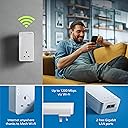
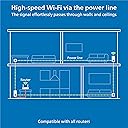
The devolo Magic 2–2400 Mesh Wi-Fi 5 Next Add-on Adapter enhances your home network by combining ultra-fast 2400 Mbps Powerline technology with seamless 1200 Mbps Mesh Wi-Fi 5. Designed for flawless 4K/8K UHD streaming and stable remote work, it features dual Gigabit LAN ports and uses the latest G.hn standard for reliable internet transmission through electrical wiring. Compatible with all devolo Magic adapters, it’s the perfect upgrade for a future-ready, high-performance home network.


| ASIN | B08916FKT8 |
| Best Sellers Rank | 2,534 in Computers & Accessories ( See Top 100 in Computers & Accessories ) 15 in Powerline Network Adapters |
| Box Contents | 1 x Magic 2 Wi-Fi NEXT Adapter, WebCam Security cover |
| Brand | devolo |
| Brand Name | devolo |
| Color | White |
| Colour | White |
| Compatible Devices | Compatible with all wi-fi routers, devolo MAGIC and G.hn adapters and wi-fi-capable devices |
| Compatible devices | Compatible with all wi-fi routers, devolo MAGIC and G.hn adapters and wi-fi-capable devices |
| Country of Origin | China |
| Customer Reviews | 4.0 out of 5 stars 1,890 Reviews |
| Data Link Protocol | WiFi 5 (802.11 ac), Gigabit Ethernet |
| Data Transfer Rate | 2400 Megabits Per Second |
| Data link protocol | WiFi 5 (802.11 ac), Gigabit Ethernet |
| Data transfer rate | 2400 Megabits Per Second |
| Hardware Interface | Ethernet |
| Hardware interface | Ethernet |
| Item Weight | 0.6 Kilograms |
| Manufacturer | Devolo |
| Manufacturer Part Number | 8723 |
| Model Number | 8723 |
| Product Warranty | 3 year manufacturer |
D**F
Superior connectivity over cable and WiFi, but setup not easy
I had been using TP Link devices, to get cable bandwidth over my mains sockets at the other end of my house to where the router is located. However, I started to get low signal strength and disconnecting, which rendered them useless. Having done some research, I decided to take the plunge, and try these powerline devices. Initial setup failed completely, so I decided to follow the manual process for pairing the devices, which worked perfectly. I did notice you must have them not all on the same circuit, especially if there are lots of other mains devices connected, as it will cause a weak signal warning over the cables. I placed the 2 Wi-Fi/LAN devices in the same sockets where my TP-Link devices were, and they both connected to the device at the router end perfectly. To configure the Wi-Fi on them, I strongly recommend you download the app 'Devolo Cockpit' onto your mobile first. It will automatically detect the Wi-Fi and allow you to configure and make changes to SSID and password, so you will not need the key from the back of the devices. It is a brilliant app, and easy to use, but sometimes you need to keep re-connecting until it recognises the devices, so be patient. I get nearly 100MB on Wi-Fi, and full bandwidth of 200MB over the cables. Expensive, but well worth the money, as you are paying for superior performance and signal quality.
J**N
Better than AV2 600
So nearly decade later and AV2 Homeplug Powerline has moved over for the ITU G.hn standard. I decided to buy the wired version (too many reviews of pain with the WiFi) and give them a go. They worked out of the box, and I had no issues during set-up. They did require a firmware update, but that was about it. To be clear, I bought a Devolo Magic2 LAN Triple. This contains ONE triple port, and ONE single port adapter. I think the box art on this is very deceptive. The triple port adapter is slightly bigger than the single port, both are bigger than AV2 and both run much hotter - for better or worse. Also, I ordered an Amazon Warehouse deal, and the first one Amazon sent didn't actually have any triple port Magic2 in the box (just two single port ones) , so I had to return and re-order. I've discovered they're happy to run in parallel to AV2 adapters without any noticeable loss, and bizarrely the Devolo Cockpit software even spots AV2 and Magic2 adapters. There's also web-page access to the adapters via their ip address, and the ability a set password if you don't trust people on your network. The iPhone Home Network app is okay - but it doesn't display any link speed information despite telling you it will. In tests at range I discovered a few surprises. AV2 is in the same location for reference, tests using iperf3: - TP-Link AV2 600 Two-Port ~16Mb/s (appears to split bandwidth across both ports rather than share it) - TP-Link AV2 600 Single-Port ~32Mb/s - Magic2 Single and Triple Port ~80Mb/s If range is reduced, speeds jump quite quickly up to 200Mb/s and then on to about 350Mb/s if distances are close. As a rule, expect 150 to 200Mb/s in a new-build four bedroom, but be prepared for slower. You'll still beat an AV2, but it might only be on range, or a factor of two. And in some cases, I suspect AV2 1300 will beat the Magic2, but not necessarily if you have older AV2 kit mixed with new stuff, which is why I was testing the Magic2. Will I keep them? Well that depends on whether they're stable. They solved my problem and increased my setup by speeds by about 7 or 8 times. I'm concerned about the temperature they run at (50C on the back, 35C on the front, 0.3A@240V = 7W), but they do have a three year warranty in case they melt down though. Note - if you're looking for adding WiFi Access Points to parts of your house, I wouldn't recommend the Magic2, simply because you'll be crippling any broadband gains you may be looking for, go for WiFi Mesh and Access Points with a dedicated third back-channel, or run Cat6 cabling (budget vs effort). The Magic2 is about easy of use, and getting the best out of something while doing very little. It does achieve this very well. Better than AV2 600 for sure, but it's not a "magic" bullet (sorry - groan now).
J**N
Good, Solid, Quick.... expensive
I bought these to replace some Netgear 1200 poweplugs that were driving me up the wall. Namely the Netgear models would occasionally drop connection and "go to sleep" now and then. An issue which I just couldn't fix as they didn't have the function to turn of this power saving feature. Anyway concerning the Devolo Magic 2-4000. What can I say... a bit like a well oiled machine they've not missed a beat in 2 months (and counting). The install software wasn't "Apple level" friendly but after a few clicks and attempts I managed to set them up to my preferences with no issue (turned off power saver mode), and once done you don't need to ever really go back. So solid stable connection.. tick! Speed wise in fairness they're not much quicker than the old Netgear 1200 models. I am getting about 140-150MB so quicker yes than the Netgear which did actually give me 120MB. However the Devolo connection is solid and stable so I'm as pleased as punch. So speed... tick! Additionally this model has three outputs on the "output" plug which is incredibly useful in this new age of home working as it means I can have multiple devises plugged in at once without having to resort to the dreaded Wi-Fi or having to purchase additional expansion units. Perfect for a small home office! So in conclusion if you are after a solid stable powerplug solution then they come really recommended, night and day compared to the old Netgear ones I had. No they probably wont give you a 240MB connection and yes they are a tad expensive but I guess you get what you pay for.
S**N
Don't buy for gaming!
I have used Powerline adapters for many years, always TP link because that is all I knew and to be fair they always worked. My house wiring is a mix of old and new and the main reason I have the Power line adapters is for my business in a seperate garage. I have never had a problem with consistency of signal with TP links and only changed from 500's to 1300's to increase band width. 5 Years on from my last upgrade to the 1300's I thought I'd look into the subject again and discovered the Devolo Magic2 2400 units and claims of fastest etc etc and the app looked practical so thought, right I'll give it a go. They install and pair very much the same as the TP Links and I did gain around 5 to 10Mbps over the 1300 TP Links in the workshop although the PING went up from around 9ms to around 12ms but ultimately no a big deal. HOWEVER, I use my connection for a online eSports where PING and consistency is far more important than band width. Whilst internet speed looked great, in an online race I started getting packet loss warnings and other network connection issues, something I've never had before! Two weeks of settings changes within the Devolo App, PC software, relocating plugs, checking Firmware, restarting and rebooting Routers and Magic 2's with no significant reliability gain followed. In the end I thought I cannot risk this again, so changed back to my old TP Link 1300's and straight away, 9ms PING and ZERO Packet loss or connection issue warnings. I contacted Devolo who passed the buck to Amazon who pass the buck to an automated system that goes no further than requesting a return but never actually allowing me to activate a return. I've chnaged every possible setting within my PC, I've checked Firmwares, Unit Pairing and Low and high power modes and the only minor improvement was returning it to low power mode where the tempuratures dropped from scarey 90 deg CPU top a still crazy 65deg CPU. The simple fact that swapping back to the TP Links after weeks of wasted time problem solving a moving goal post and the problem dispeared tells me all I need to know that the Devolo product is not as developed as it should be, latest Firmware from Devolo dated 2023 says something to! Adequate but over priced if all you do is watch TV and surf the net but do not touch if you use them for gaming. BUY TP LINKS I know they work.
D**C
Easy set up of quality poweline plugs - although expensive!
Bought to replace my failing dLan set up - had given 5+ years of service with one plug failure but was often a pain to reset/reboot when needed (too often). Debated but decided to stick with Devolo, glad I did. These were so easy to set up and add to - just plug in, add network details, and wait a few mins. All good so far, speeds up a bit but not massively, main limit is the part fibre 60 odd feed. Now have 3 wifi plus one non and all work 100% - need as internal walls have blocks with high metal content.... Expensive, almost twice that of the equivalent(ish) competition but I'm happy with both ease of set up and functioning now installed.
D**N
Great when they work...
"Magic WiFi" - it is when it works, but it's flaky. This generation is easier to set up than previous versions, but generally doesn't reset itself when the router drops the signal (rural Somerset, so not an uncommon occurence) - have to go through the whole setup procedure again each time. A pain. Adaptors also get very hot, which can't be good for them. I have a "master + 3 slave" setup to cope with a sprawling area. I bought the new set in September - but in December the master died and it took 3 attempts for Devolo's (usually excellent) tech support to diagnose the problem . The printed material doesn't have a usable trouble-shooting guide, and the online one (like having the instructions for opening the box sealed in the box!) isn't much better. Amazon, as usual were excellent & replaced the set promptly. Today (1 Feb) it went down again - tech support have again got it working but ..... When it's working the Devolo kit works seamlessly - but if I could find a reliable way of doing the same job, I'd dump the Devolo kit in a heartbeat. Edit 22 Feb 2023: Devolo tech support must be getting VERY fed up with me. They got it all working again yesterday - same issue - router dropped the signal and the 2 of the 3 slaves didn't come back on line, Although all the LEDs lit as advertised, I couldn't connect any devices to either one. Investigation of the network showed that both were broadcasting (on both 2.4 & 5 GHz bands) but hadn't picked up the password from the router. Weirdly, the default set up is for each of the extender boxes to have its own password. There's an extra set of hoops you have to go through at (re) installation to have each extender broadcasting as a clone of the router so that a wandering device seamlessly picks up whichever extender is closest. Irritating. (Note to Devolo: All the trouble-shooting instructions - such as they are - are written and illustrated for the German version (with a 2 pin Schuko socket, instead of the UK version with a UK 3 pin plug - which has to mount theother way up to the German version. that means that the diagrams that say "press button 1" - showing the left hand button - actually mean the right hand button - labelled as "Button 2". Ah - zese inscrutable Chermans! Ve haff vays of confusing you!)
K**K
Good solid connection
Good solid connection, read the instructions - if you add a powerline plug to the network be patient it might disrupt another powerline plug - in which case the disrupted one can be re-set. It's all worth it in the end. Good solid wired connection via ethernet cable, or WiFi. Both good, strong, solid connection. Well worth the money. Easy to set up
B**E
An Effective Solution Which may be the best of its type on the Market
Powerline connectors are a cause of, but also are affected by electrical noise in your home powerlines and they are unlikely to reach the stated speeds. Microwave and washers etc reportedly affect them as well as power cable length between them but my signal seems quite robust. I have five Magic 2 powerline adapters in total (Including 1 distribution unit) fitted in my home ranging from 300mb/s to around 850mb/s actual speed range throughout the house. My system is also supplemented with a WiFi mesh loop from the internet provider. It provides data signal to TVs, security cameras and computers etc. and also helps to boost the WiFi connectivity in the house. This is an expensive but ideal buy for houses that are not suited to running network cables and where WiFi has difficulty in passing through the walls. I'd also mention that when more units are added they can steal bandwidth (Speed) from each other as they use the same powerlines. I'd say four or five of these are possibly close to the working limit when also connected to WiFi in the house but for longer wiring distances a repeater may be needed to boost their data signal. This is why I fitted the Consumer Unit module which also very recently passes internet outside to a shed via a CAT-6 Cable. If you fit them and combine them with WiFi you may need some trial and error to setup the network to avoid conflicts between the networks leading to network dropouts. I'm not an IT expert hence I'm learning how to setup from YouTube/Google. In summary - Nothing beats hard wired connection with WiFi as a second options, but for a house like mine where these are not really options I'd recommend the MAGIC 2 2400mbs Powerline connectors.
A**R
تردد المنتج 50Hz لا يتوافق مع مصدر الطاقة في المملكة 60Hz
المنتج جيد لكن ترد. المنتج 50Hz لا يتوافق مع تردد مصدر الطاقة في المملكة العربية السعودية 60Hz
F**S
Junk: 3.5-25% of advertised LAN speed
Devolo claims "up to 1000Mbps LAN speed". I've tested multiple combinations of power sockets across rooms, real world speeds I got: - 35 Mbps - 58 Mbps - 98 Mbps - 115 Mbps - 237 Mbps - 289 Mbps Even when connecting both devices at neighbour outlets, the "best" it can give is ~500Mbps. This is at best, false advertisement, at worst, malice. If they were upfront saying "real life speeds between 35-250Mpbs", I'd never have bought it. Glad to have used Amazon, returning it.
J**5
Nur für den Gebrauch in UK geeignet
Achtung - Gerät ist aufgrund UK Steckdosenanschluss nur für den Gebrauch in UK geeignet - das geht nicht unmittelbar aus der (deutschen) Beschreibung auf dieser Seite hervor.. Der Irrtum kostet einen dann in der Rücksendung 30 EUR
Trustpilot
2 weeks ago
1 day ago