Desertcart purchases this item on your behalf and handles shipping, customs, and support to KUWAIT.
⌨️ Elevate your tablet game—work smarter, anywhere, anytime.
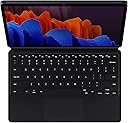
The Samsung Galaxy Tab S7+ Keyboard is a sleek, detachable Bluetooth keyboard designed for the Galaxy Tab S7+ and S8+. Featuring 78 keys, an expanded trackpad, and a magnetized back cover with adjustable angles, it offers a laptop-like typing experience. Its lightweight design protects your tablet while on the move, and the magnetic S Pen holder charges your stylus seamlessly. Optimized for Samsung DeX, it boosts productivity with dedicated function keys and shortcuts.


| ASIN | B08FSSGYSF |
| Additional Features | Bluetooth |
| Antenna Location | Office |
| Best Sellers Rank | #618 in Tablet Keyboard Cases |
| Brand | Samsung |
| Built-In Media | Keyboard, Stand, QSG |
| Button Quantity | 78 |
| Color | Black |
| Compatible Devices | Samsung Tab S7+, Tab S8+ |
| Compatible Operating System Family | Windows |
| Compatible Tablet Computer Models | Samsung Galaxy Tab S7+ 12.4" |
| Connectivity Technology | Bluetooth |
| Customer Reviews | 4.4 out of 5 stars 2,938 Reviews |
| Enclosure Material | Plastic |
| External Testing Certification | Não aplicável |
| Generation | 1st Generation |
| Hand Orientation | Ambidextrous |
| Item Dimensions L x W x H | 11.24"L x 7.54"W x 0.59"H |
| Item Type Name | Bookcover Keyborad |
| Item Weight | 1.2 pounds |
| Keyboard Description | Flexible |
| Keyboard Layout | QWERTY |
| Manufacturer | Samsung |
| Mfr Part Number | EF-DT970UBEGUJ |
| Minimum Required Operating System Version | Android 10.0 |
| Model Name | Book Cover Keyboard |
| Model Number | EF-DT970UBEGUJ |
| Number of Batteries Required | 1 |
| Number of Keys | 78 |
| Number of Sections | 1 |
| Power Source | Battery Powered |
| Processor Count | 8 |
| Recommended Uses For Product | Office |
| Special Feature | Bluetooth |
| Style Name | S7+ Keyboard |
| UPC | 887276443201 |
| Unit Count | 1 Count |
| Warranty Description | 1 year manufacturer |
M**R
Great Keyboard!-Turns the Tablet into a Laptop -Not sure why people are complaining
Bought the keyboard about a month ago. Works really well. No complaints. The keys are perfect and the special keys for the Tablet are a big help. The built in stand is great and folds open. I was concerned that with this only being magnet, that is, being held by magnets, that the case would come off easy. So far it has not. Seems to work great. As far as protection goes. I guess it depends on which way it falls. But it is sure a nicely designed case. Also keeps the Spen in the proper position for charging!!! Just open the S-pen slot and your pen is ready to go. Love that Larger S-pen. The Case was designed to hold it great. Really, if you want to use your tablet like laptop, this is the one. Also I would guess it saves battery life, as it uses no Bluetooth. Samsung products are expensive. I had to wait to purchase mine. But the quality is always there! Samsung is the "Apple" of the Android world. I prefer Android over Apple, but that is a personal choice. The touch-pad is really cool, I was looking for keys for right or left click, it is built into the touch-pad! To get the full use of the touch-pad, I suggest you google Samsung on this one. There are tips. Such as you basically just swipe the touch-pad, like you would the screen. All in all, a very good keyboard and case. If you want to go cheap, I suppose the next best, is to buy a cheap case and buy a cheap bluetooth keyboard and a bluetooth mouse. I had to do that, until I could buy this one. It is worth saving up for though, to get the Samsung Tab S7+ case. Finally, everyone forgets about Samsung "Dex" feature. Make sure you understand what it is. You swipe down from the top and turn on "Samsung Dex". Basically it mimics a Windows 10 experience. You can open multiple apps, like on Windows 10. You can tile them and many of the keyboard shortcuts work. This is the feature that makes your tablet with the Keyboard, like a True Laptop. Looks to me, that the specs of the Samsung are just as powerful or more powerful than many laptops. Samsung Dex, with the right HDMI adapter also lets you hook up the tablet to a full-sized screen . But this is a review about the keyboard. So, try out the Dex mode. For those apps that will not open full screen, there is a setting called "Samsung Labs" experimental. Which works just great. The only thing I had to do on some of them, is some apps do not want to rotate into landscape mode. But you can find apps to force that in the App store. Rotation control type apps. Anyway, I think the keyboard works great. Has a great feel to it. Get used to it, and I think you can leave your heavy laptop at home. With Word and Google Doc apps, I think the keyboard allows one to to do it all. But that is just me personally, I love the way it syncs with my Samsung S21 Ultra phone. This is the keyboard you need if you want the full experience.
R**Z
Excellent quality, much better than previous China-made keyboard
I've bought a China-made keyboard case that was meant to copy Apple's Magic Keyboard, but a few keys conked out about less than year. Comparing the two, the Samsung keyboard is much, much lighter and makes the tablet a joy to carry around. The faux leather also feels premium. No need for charging, since it connects directly to the tablet without Bluetooth connectivity. I thought the keyboard keys were good to type with, but the Samsung keyboard feels very premium provides a nicer typing experience. The trackpad doesn't compare to a laptop's trackpad, but it is quite usable. Just another caveat: It's meant to be used on flat surfaces, i.e., it isn't very lap-able and also isn't great to use while lying down face up due to the angled stand at the back. Overall, though, it's excellent!
T**E
It’s just a key board..
Good product.
J**P
A very small footprint and works flawlessly
I am quite pleased by the performance of this keyboard. It is easy to install and you can start typing right away. I'm using the keyboard to write this review. I'm not a super fast typist but a pretty good one and I get no lag on this. The keys have a good feel to them. I really like that the keyboard includes a mouse pad. This makes it easy to use, especially if you don't want fingerprints all over your screen. So why the 4-stars? The keys are not backlit. To me this is a MAJOR flaw. I don't see that having backlit keys would have changed the overall profile that much. Hopefully Samsung will fix this glaring omission for their next update. But even with this "flaw", I love the keyboard and was able to get it at a great price. It's definitely not worth the over $200 that Samsung wants for the keyboard. However, I got it here for around $130, still expensive, but worth it if you do a lot of typing on your tablet.
E**K
Works well
Works great and fits well. Works as described. Makes it really nice for my tablet.
T**U
Expensive but it's worth it
As expensive as this keyboard is, it is a genuine Samsung product which to me means that this product is supported by Samsung and I'm a big Samsung type of guy. Not like I have tried other keyboards but this one fits my S8+ and it was very hard to find a keyboard that I liked for it. A lot of the ones in the market right now seem to be... not as appealing as they seem pretty cheaply built. So far, I like the build, how you can store the pen while it gets charged, and the kick-up stand. Note that the keyboard part and the back cover are 2 separate parts so you can remove the keyboard so when you write on the tablet, it won't get in the way. The only downside is the pen compartment bulges out so when you write on the tablet vertically, it is lob-sided. Since I write from left to write, I just flip the upright tablet upside down so the compartment comes on the left side and I can write at ease. Not really a big enough con to dock a star though. Also, very last thing to take note of is, this keyboard cover definitely doesn't provide any drop protection, if anything, the keyboard will also break if you drop it so... If you tend to drop stuff a lot, this cover definitely is something you want to avoid.
B**G
The magnetic connection for the keyboard can suddenly release
I was using the keyboard on my lap when suddenly the S7+ tablet/screen fell to the ground breaking the glass. I called around looking for repairs locally and was quoted $700+. The conscientious was the glass was only available attached to the LCD which is the reason for the high quote. Needless to say I passed. In August of 2021, I tried to trade my s7+ for a new one directly from Samsung. I was told "no can do". The trade in is only good for a different model, not the same. The Samsung Customer service person was clueless as to what I could do. She did not offer the possibility of a repair. On 02/02/2022, I Googled for a solution and got a number to call Samsung Tablet repair and I was told the glass could be repaired and would cost $175. Samsung needs to provide better "bread crumbs" for repair solutions and training of their support personnel. Also, the Samsung keyboard is a unsafe and bad design. The S7+ is great, just don't buy the Samsung keyboard.
D**H
Touchpad turns on/off!
Great keyboard. It's a nice size to type on (also have a S4 with keyboard...that feels small.) I love that the case covers the pen so it doesn't get lost. If your touchpad stops working: the touchpad can turn on/off, and sometimes it doesn't turn back on when you stand the tablet up on the keyboard case. If the touchpad doesn't work press Fn + F6 at the same time and you'll see a tiny message on screen for just a second that it's on/off. (alternate key press for some people seems to be Fn + spacebar, Fn + F5.) I thought the touchpad was broken because it wouldn't turn back on, even with a restart and full charge!
Trustpilot
2 weeks ago
2 days ago