🖱️ Elevate your productivity game with precision, comfort, and wireless freedom!
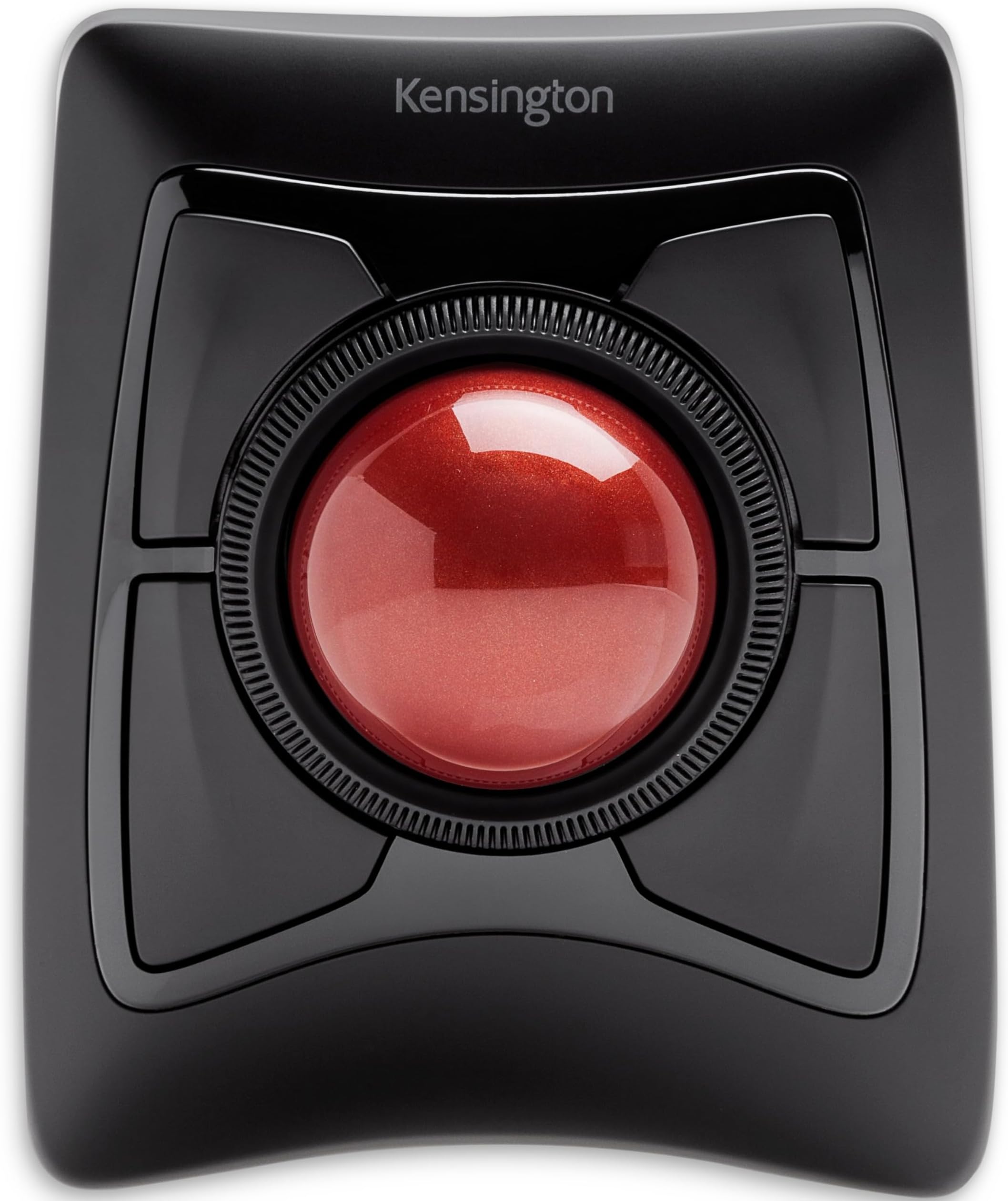
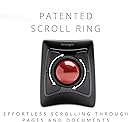
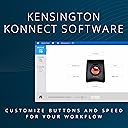
The Kensington Expert Wireless Trackball Mouse (K72359WW) combines a large 55mm optical trackball with patented scroll ring technology and ergonomic wrist support to deliver precise cursor control and all-day comfort. Featuring dual wireless connectivity (Bluetooth LE and 2.4GHz USB dongle), customizable buttons, and compatibility across Windows, macOS, and Chrome OS, it’s designed for professionals seeking efficient, strain-free navigation. Backed by 3 years of coverage and lifetime support, this trackball is a top-tier choice for multitasking millennials who demand both style and substance.


| ASIN | B01936N73I |
| Additional Features | Ergonomic Design, Touch Scroll, Wireless |
| Antenna Location | Office |
| Are Batteries Included | Yes |
| Are Batteries Required | Yes |
| Best Sellers Rank | #2 in Computer Trackballs |
| Brand | Kensington |
| Built-In Media | Trackball^Wrist Rest^Dongle^Batteries (2)^Quick Installation Guide^Warranty Insert |
| Button Quantity | 4 |
| Color | Black |
| Compatible Devices | Laptop, Personal Computer, Surface Pro 1st Edition 12" and Surface Laptop 1st Edition 13", Tablet |
| Connectivity Technology | USB |
| Customer Reviews | 4.2 out of 5 stars 5,256 Reviews |
| EU Spare Part Availability Duration | 3 Years |
| Embellishment Feature | Crystal |
| Enclosure Material | Plastic |
| Finish | Smooth Plastic |
| Global Trade Identification Number | 00085896723592, 07802880611214 |
| Hand Orientation | Ambidextrous |
| Hardware Platform | PC,MAC |
| Item Dimensions L x W | 8"L x 6.1"W |
| Item Type Name | Trackball |
| Item Weight | 1.4 Pounds |
| Manufacturer | Kensington |
| Model Name | Expert Mouse |
| Model Number | K72359WW |
| Movement Detection | Optical |
| Movement Detection Technology | Optical |
| Number of Batteries | 1 A batteries required. (included) |
| Number of Buttons | 4 |
| Operating System | Chrome, Mac, Windows |
| Power Source | Battery Powered |
| Range | feet |
| Special Feature | Ergonomic Design, Touch Scroll, Wireless |
| Style Name | Wireless |
| Theme | Computer |
| UPC | 085896723592 |
| Unit Count | 1.0 Count |
| Warranty Description | 3 years parts & labor |
T**.
The perfect mouse exists and it's this one.
I will legitimately cry when they stop making this trackball. I own two of them -- one for travel and one for my office -- and they're the only thing I'm comfortable using. The efficiency and ease of motion is incomparable for my graphic design work, especially across multiple monitors. Limiting the motion to my fingers has been a miracle for carpal tunnel that had been developing and ended up stopping the development of it altogether. Plus, I often need to work in a very confined space in a dark backstage area where bumping something could be catastrophic, and this keeps my movements minimal in such spaces. It's just perfect, and my oldest one lasted me for 6 years at this point. They're just incomparable products.
J**S
24-hour Initial Review – Early Pros & Concerns
February 04, 2024 Update: Track ball works well. Doesn't seem to have but one issue and that issue is probably my problem. The scroll ring sometimes and my fingers don't jive causing me top hit one of the corner buttons. I must further practice, do much more practice. New Thought, 31dec23: Dragging and dropping, for instance, an email in MS Outlook to a folder can be challenging. I have not figured out the best method. Am looking for any ideas... 28dec23: Overall, I like the trackball and am tentatively at about 60/40 thinking to keep the device. Has many interesting functions and possibilities. Will know more as I work to better use the device. I definitely need more practice with the trackball because my long-term use of a regular mouse allows me to be pretty fast with the mouse. Early Pro’s: 1. Bluetooth connecting is really easy. 2. Kensington Works software for the trackball is easily downloaded for the device and pretty easy to use although it is not overly intuitive. 3. Large trackball seems very good particularly located in the mid position. Is good for me with some tremors and a shaky thumb compared with a side trackball. The middle trackball is far superior, for me, to the side mounted track balls. With practice, I am sure that I can rapidly move the cursor via the trackball. 4. Left Click/lower left button works pretty well. I seem to have it pretty well figured. Using my thumb for this button. 5. Right Click/lower right button not so handy as the Left Click button. Learning. May do better with it after more practice. 6. Have not really used upper two buttons, yet. 7. Scroll ring works well. Don’t have clicking noise that other reviewers have reported. 8. Don’t know how the battery life will be; we shall see. 9. Don’t yet know how the wrist rest will be although it seems okay with this short time review. Early Concerns: 1. Will take considerable practice for me which I am willing to do to become proficient with the trackball. 2. Have already learned to be very careful not to simultaneously touch the trackball while trying to scroll. Is easy to do! Result is my inadvertent action takes me some crazy place I did not want to go!
C**A
Well made, works great, not great for carpal tunnel
It's sharp looking but made my carpal tunnel worse. I like the ball control and big buttons, but the upward angle, even with the included wrist rest, still caused more pain than a mouse was. Other than the pain, it works great. I do not use it for gaming so cannot speak to that, but the ball rolls smooth and is easy to remove and clean. I really enjoy the center ring for scrolling.
I**K
ABC.... Easy as 1,2,3... Do Re Mi .... that's how easy love can be
First I want everyone to know I have used a wireless mouse for years. Second, for most of those years, it has been a Logitech Trackball. I have been thru four of them. I work from home, and I think I just wore them out. Logitech is a great mouse. I have no regrets there. Then the other day, I left my home office for an appointment and when I returned home a few hours later, it was like my electronics went haywire. My mouse, dead. I mean dead. Not battery dead. But dead, dead. Every one of my Alexas, spontaneously disconnected from the wireless internet. Wireless Keyboard - also dead - but just the batteries - I had replaced them about a month ago, and traditionally replace them once a year on average. There was no power outage. and I have everything on surge protectors. My computer was fine. It was the peripherals that were winking out on me. It was bizarre. I thought maybe it was just time to investigate a new mouse after using my backup muse for half the day and literally wanting to huck it out the window. I read blogs and reviews. This Kensington Mouse was rated the number one choice for people in my industry, and to be clear, I was hesitant. I had been a loyal Logitech user for years. But with nothing to lose, I took the plunge, made this purchase - and KNEW I would know within minutes if I would like it or revert back. I received it less than two days later. Shipping was hyper fast. The pairing was incredibly easy. Getting it out of the package was harder than the pairing process, and it came with 2 batteries in the package. Because of my wireless habit, I always keep a healthy supply of batteries on hand, but it was nice to have them encased. Within 20 minutes of delivery I had it A.) out of the box, B.) Paired to my PC, and C.) Software downloaded and buttons custom configured. SHA-ZAM! I can absolutely tell you within minutes I am loving it. I thought the scrolling ring would be a bit tough to adjust to, but no. The scroll feature is probably one of the best things I like. No regrets. If you're on the fence - work in the tech industry, YOU WILL LOVE THIS MOUSE. I can't attest to gaming use, but then I'm not a pc gamer. Without hesitation- I know this will be my new go to. So worth the money.
A**O
UPDATED!! - Defective Upon Arrival
12/21/25 I love the wired version so much, so I decided to get the wireless version as well. However, even though my PC recognized the device and saw it pop up in the Kensington Konnect software, my PC would not register any mouse movement or clicks. I changed the battery and made sure the usb dongle was connected into a working usb port (merely replaced my other wireless mouse which was working just fine - PC doesn't support bluetooth), yet all I would get is a blinking red light which would then stop a few seconds later. Will return and get replacement. After replacement arrives, I will update this post in the hope the replacement will not be faulty. Checked online to see possible solutions, but it turns out others have received defective products as well and merely returned them. 12/23/25 Got my replacement, and it works perfectly fine! Same as the wired version haha Still gotta return the defective one, but hopefully that one doesn't just get repackaged and sent out again without getting fixed/proper testing!
J**4
Embarrassingly Poor Product and Service
It's really frustrating just how poor this product (Wireless Expert Trackball) is despite the price you're paying. I remember the red trackball used to be a cool mouse that professionals used in their studios or desks. Now I question why. Here's a quick summary of things. I was going to write out in detail everything, but here's just the points: 1) Scroll wheel doesn't work. A mouse needs to do at least, AT LEAST, two things: 1) Click on things; and 2) scroll. This mouse does only half of what is expected from it.; 2) I thought it was just software/driver issues, so I double checked everything. Apparently the manual packaged with the product is outdated and tells you to download an old version (KensingtonWorks) instead of the new version (Kensington Konnect) despite the change earlier this year. Regardless, old or new - nothing fixed my issue; 3) Upon further research, it seems that the scroll wheel being broken is a common issue due to sloppy alignment or placement of the IR transmitter/receiver; 4) I requested a replacement, completely understanding that sometimes you just get a faulty product. And if the replacement works as intended, then cool. I was approved immediately for a replacement and notified I would get a replacement next day. Sweet. 5) Next day came, no replacement. Was told that there is a delay due to supply issues and they'll let me know when I'll get a replacement. 6) I'm literally looking at the product page right now and if I pay $87 (again), I can get the product delivered tomorrow. But since they have my money after sending a broken product the first time, they're telling me to wait and see when they can send me a replacement. I'M LITERALLY LOOKING AT FREE DELIVERY FOR TOMORROW IF I JUST BUY ANOTHER ONE. I got this because I do a lot of editing - for video and photography. I also do a lot of work involving excel sheets, accounting software, creating forms and etc etc Boring computer stuff mostly. My current trackpad isn't up to snuff with how fast I tend to work anymore so I wanted an upgrade. This product is great, I won't lie. I really like it. I've been using it to at least see if a trackball does make a difference, and does it ever. The trackball tech is really great compared to standard mouse and trackpads. But how do they mess up the most common feature of all mouses? I can live with a faulty product every once in awhile. That's life.That's why there's return/replacement policies. But between this being a common issue apparently for years now, the fact that they're still sending outdated manuals and material despite new software being needed to use their product, and having my replacement cancelled from next day to "we'll see" unless I just buy a whole new product, I'm left extremely disappointed. This is the first 1-star review I've given for a product (that I can remember), and I tend to buy a bit from Amazon and am even part of the Amazon Vine program where I review things from time to time. But this experience just left me extremely disappointed.
K**G
Molasses in January
Full disclosure: I have Fibromyalgia which effects the movement of my hands. I spent more than 40 years working in IT. I am an old female online gamer (not many of us around). I used to play Star Trek on the mainframe back in the '70s. I use my computer all day long, from espresso to bedtime. Let's start with the competition. Logitech M570 Wireless Trackball - Now I will admit I have never used this device but I have used it's grandfather. This is a thumb trackball. I used to have one at the office and one at home. I loved it and used it for seven years until my thumb stopped working. I stopped using it over 15 years ago. Recently I started getting thumb pain for no apparent reason. Then I realized that even though I had quit using it I still had trackball thumb and was getting arthritis in it. It is kind of like quitting smoking and then 20 years later getting lung cancer. Use at your own risk. Logitech Trackman Marble Mouse - This is what I currently have and am trying to get away from. This is a finger ball like the Kensington Expert. We will start with the good. It has a smaller ball which I prefer. Due to the ball and the software your pointer will fly across your screen at the speed of light which I like. I have found the buttons are put in a convenient location. They take very little hand effort to press which I like and need. The bad is the universal scroll which is not so universal. For me it works in my Firefox browser and it will work with Microsoft programs and that's about it. If you want to zoom in or zoom out (which is quite common) in another program you are out of luck. So if you play MMORPG's like WOW, Rift, EVE, SW, GW2, TSW you are out of luck. If you play single player games like CIV 6, HOMM7, MOO, Endless Space, Gal Civ III, Stellaris, you are out of luck. I had to write my own code and assign it to keyboard keys so I could zoom and I don't have a programmable keyboard. It sounds like Logitech needs to hire better help. My dogs are pretty good coders and they only charge $50 an hour. This device may be usable if you only do office work. Now let's get to why we are here, the Kensington Expert Wireless Trackball. I know there have been complaints about the scroll ring but I don't know why. I love it. It is a thing of beauty. It is located in just the right place and requires just the right amount of pressure to operate. People who don't like it need to get out more. I find the ball really big making it a bit awkward for me. It takes some getting used to. It is also quite heavy. Even with the software set to the fastest speed it takes some hand effort to get the pointer across the screen. It's like watching molasses in January. This is something I don't need. After a couple of hours I end up with hand pain. I need a trackball I can use all day. I find the upper buttons awkward to use. Reaching across that big ball every time I want to do a double-click is a bit awkward. I haven't been able to double-click in 25 years. I have to have a button do it for me, so yeah, this is awkward. Having four buttons beneath the ball I think would be a better design. The good news is you don't have to be a programmer to use this device. Summary Logitech M570 Wireless Trackball - use if you are a masochist Logitech Trackman Marble Mouse - use if you are only going to do office work or you are a programmer Kensington Expert Wireless Trackball - use if you have healthy hands and are not a programmer
D**E
Trackballs are more fun
This is a fantastic, well built track ball. I could always do with fewer wires on the desk so I love that it’s wireless and I can move it around. Bluetooth also worked great for me though I prefer to use the receiver since I switch computers often. I haven’t used a trackball in a long time but I wanted to try one and I have no regrets about trying this one. I have been using it constantly for the past week and I’ve got to say, I’m very happy with it. As far as ergonomics go, I’m not sure whether it’s better than my old mouse yet. I haven’t used a track ball in 15-20 years and it uses a different set of muscles depending on how you use it which has led to some muscles getting tired the first day. Being able to use it with my pointer finger, thumb, palm, or combination of digits, however, is a huge plus for me. I can adapt my grip for comfort or accuracy easily. It has a nice pad for my hand which I do like and is comfortable but sometimes prefer not to use as I’m used to having my wrist rest on the desk by itself. I also really like that the trackball stays in place and I don’t have to keep picking up my mouse to move it around. The scroll wheel also has a nice feel and I like I can scroll with my thumb, pointer, or middle finger instead of constantly using the same one and wearing it out. After a few days, I raised the sensitivity much higher as I felt the muscle control in my fingers was adapting. It may take a bit longer before I’ve really mastered this. As a side note, I tried a mouse accuracy test online and was able to achieve a slightly lower, but nearly the same, level of accuracy on the trackball vs a regular mouse. Even though I’m not regularly clicking circles on different sides of the screen often, I believe this ball can perform just as well as a regular mouse at any task. I even tried playing some FPS games just for the heck of it and it was fine, but I think it will take some getting used to before I prefer it. The hardware itself is beautiful. I love how it looks like HAL or a robot from Portal or something. The ball is a beautiful color. The cradle is rock solid. It goes well with the rest of my black colored accessories. The only negative for me, was the KensingtonWorks software on macOS Catalina. It was a pain to install due to security settings and required multiple reboots before it would detect the trackball. Even then it didn’t seem to update settings correctly. I should mention, Kensington support was phenomenal. They were available through chat right away and helped me get the software installed and working. Unfortunately I got sick of rebooting/troubleshooting and I ended up using another piece of software called BetterTouchTool that let me really jack up the sensitivity and assign Mission Control to the top buttons, a setup I’m quite happy with. I also turned off mouse acceleration on Mac since that gave it a weird feel I didn’t like. On my Windows machine, the KensingtonWorks software installed just fine, although I have noticed I can’t jack up the sensitivity any higher in KensingtonWorks which I’ve wanted to do after developing finer muscle control in my digits. I’m sure I will find a way when I get around to it. Overall, if you want a great wireless trackball, this is an excellent choice. You won’t be disappointed.
Trustpilot
3 days ago
2 weeks ago