🚀 Elevate your DIY game with a touchscreen that just works—plug in, touch, and conquer!
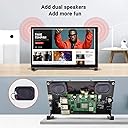
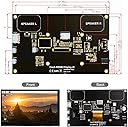
The ELECROW 7 Inch Capacitive Touch Screen combines a vibrant IPS display with 1024x600 resolution (software upscalable to 1920x1080), 5-point multi-touch responsiveness, and effortless plug-and-play connectivity via HDMI and USB. Compatible with Raspberry Pi models, PCs, and gaming consoles, it features built-in dual speakers, a durable tempered glass panel, and flexible mounting options, making it the go-to compact touchscreen for professionals and makers seeking reliable, high-quality control and display.


| ASIN | B08FMNDDSL |
| Aspect Ratio | 1.60:1 |
| Best Sellers Rank | #24,434 in Electronics ( See Top 100 in Electronics ) #644 in Computer Monitors |
| Customer Reviews | 4.4 4.4 out of 5 stars (389) |
| Date First Available | August 11, 2020 |
| Image brightness | 260 lm |
| Item Weight | 8.3 ounces |
| Item model number | RC070S |
| Manufacturer | ELECROW |
| Product Dimensions | 1 x 6.5 x 4 inches |
| Resolution | 1024 x 600 Pixels |
| Standing screen display size | 7 Inches |
| Total Usb Ports | 1 |
| Voltage | 5 Volts |
R**T
Solid Little Touchscreen That Just Works
I’ve used a lot of small Raspberry Pi screens and most are either junk or way overpriced. This one actually does what it’s supposed to do. Running it on Raspberry Pi 5 and Pi 4 for dashboards and SDR projects. Plugged it in and it worked immediately. Touch was recognized right away with no driver drama or calibration nonsense. Resolution is fine for this size and perfect for control panels, radar maps, stats, and terminal windows. Touch response is accurate and fast enough that I actually use it instead of a mouse. Build quality is better than expected. The metal frame feels solid and not toy-like. Stand is decent, and it’s easy to mount or integrate into other builds. If you want a reliable 7 inch touchscreen for a Pi without headaches, this is a good pick.
P**P
Good for raspberry pi
Had this installed in my wall 3 years ago and it’s been powered on constantly and still works great. Hasn’t burnt into display which is nice
B**S
Excellent (though not quite perfect) Pi 3 or 4 Screen
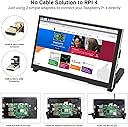
This is an excellent solution for adding an LCD to a Raspberry Pi project. The included mounts and clever 'U' shaped adapters meant that I could mount the Pi directly to the back of the screen and connect HDMI and Touch without bulky cables sticking out all over the place! This is going to drive my 3d Printer's OctoPi, but I could definitely find other uses for this design due to how low profile the kit overall is. I deducted 1 star because the screen quality was...well let's just say I'm not convinced that it's actually an IPS panel. Viewing angles leave much to be desired and the screen has that "grainy" or "speckled" look to it that LCDs of poorer quality sometimes have - thankfully it's only noticeable up close or when the background is very bright/white. Overall I wouldn't really want this to be used in a situation where display quality was a major factor such as for gaming, watching videos, etc, but for an IoT display that's more about function than display quality, it does the job. The included fan is very quiet and was a nice addition, though I'm not sure if the thermal tape provided to adhere it to the Pi is actually THERMAL tape or just double sided tape, so I'll probably replace it with proper double-sided thermal tape ASAP. I really hope to see Elecrow produce a 7" or 10" version that uses the 'U' shaped adapters (and a higher quality screen) - the simple addition of those low profile adapters passing A/V/Touch while not cluttering up the GPIO ports opens up a huge world of possible uses for Pi projects.
D**T
Excellent AIDA64 Sensor Panel monitor
This monitor makes the perfect AIDA64 Sensor Panel display. It uses an HDMI input (cable provided) along with a touch screen/power input (cable provided). The installation is no different than adding a second monitor of any other type and this part is very simple. The back of the monitor is open but this does n't cause any problems since you don't see that side anyway. The monitor does not come with any AIDA64 templates so you will have to create your own, buy one or find a free one to download. Creating your own is not easy unless you already understand how the AIDA64 Sensor Panel definition features work but it's not very difficult to learn and will give you the ability to monitor exactly what you want to see in the way you want to see it. The primary difficulty with defining a sensor panel is that each item on the display must be added individually into AIDA64 using 'x' and 'y' pixel locations which is not hard but is a bit time-consuming. The display in my photo took me at least 2 hours to define but once it's done your custom display will open automatically each time you turn on your computer. The only other issue is making sure you configure Windows for multiple monitors in "extend" mode. There are many videos available to explain the Windows configuration details. This is a highly recommended product.
T**R
Looks Great and works perfectly.
Wanted a smaller side monitor for watching videos, controlling music, displaying cpu/gpu temperatures while gaming and working. This works perfectly right out of the box. Plugged the hdmi into my Graphics card and power/touch into a USB port on the back of my pc. Went into windows and identified it as a touchpanel. The touchscreen works flawlessly. Set the monitor to 1080p 60hz in windows and the image looks great. Speakers are loud and the audio is decent, not audiophile amazing but similar to a louder phone.
A**R
Built it in my pc case for mostly aesthetic reasons. It worked right away from the get-go. Plug and play and its all good. I think u need to upgrade the firmware for the touchscreen which I didnt do since I dont care about that function. Im building my pcs since my early teens but I think anyone can do this, just be sure where u want to put it and if your screws are sufficient. Brightness, colors etc look very nice and the frame is solid enough to work with inside a pc case. I use wallpaper engine on steam to put some nice moving wallpapers on it and it looks amazing. So far its been nice for 50 bucks. I ordered some extra 1m HDMI and USB to Micro-USB cables (and extra screws too) so I can reach my GPU through the big case. I will update my review if this thing stops working.
P**S
The display can't be used for most applications as the characters are washed out, and you need to tilt the screen severely to be able to barely make out characters. Adjusting the backlight doesn't help.
R**.
Zusammenbau, inbetriebnahme klappt auf Anhieb, Qualität sehr gut. Alles funktioniert ohne jegliche Probleme. Kann ich nur empfehlen ohne weitere Worte!
A**T
Very nice screen for aida64 !
E**N
Am anfang war alles gut und es sah auch sehr schön in meinem PC aus aber nach fast 1 Monat schon kaputt, absolut nicht empfehlenswert.
Trustpilot
1 month ago
1 month ago