We remain fully operational. Our teams are working around the clock to ensure your deliveries continue safely.

DOWNLOAD THE APP


Copyright © 2025 Desertcart Holdings Limited
DOWNLOAD THE APP
Buy anything from 5,000+ international stores. One checkout price. No surprise fees. Join 2M+ shoppers on Desertcart.
Desertcart purchases this item on your behalf and handles shipping, customs, and support to KUWAIT.
🎯 Master your workspace with precision and style.
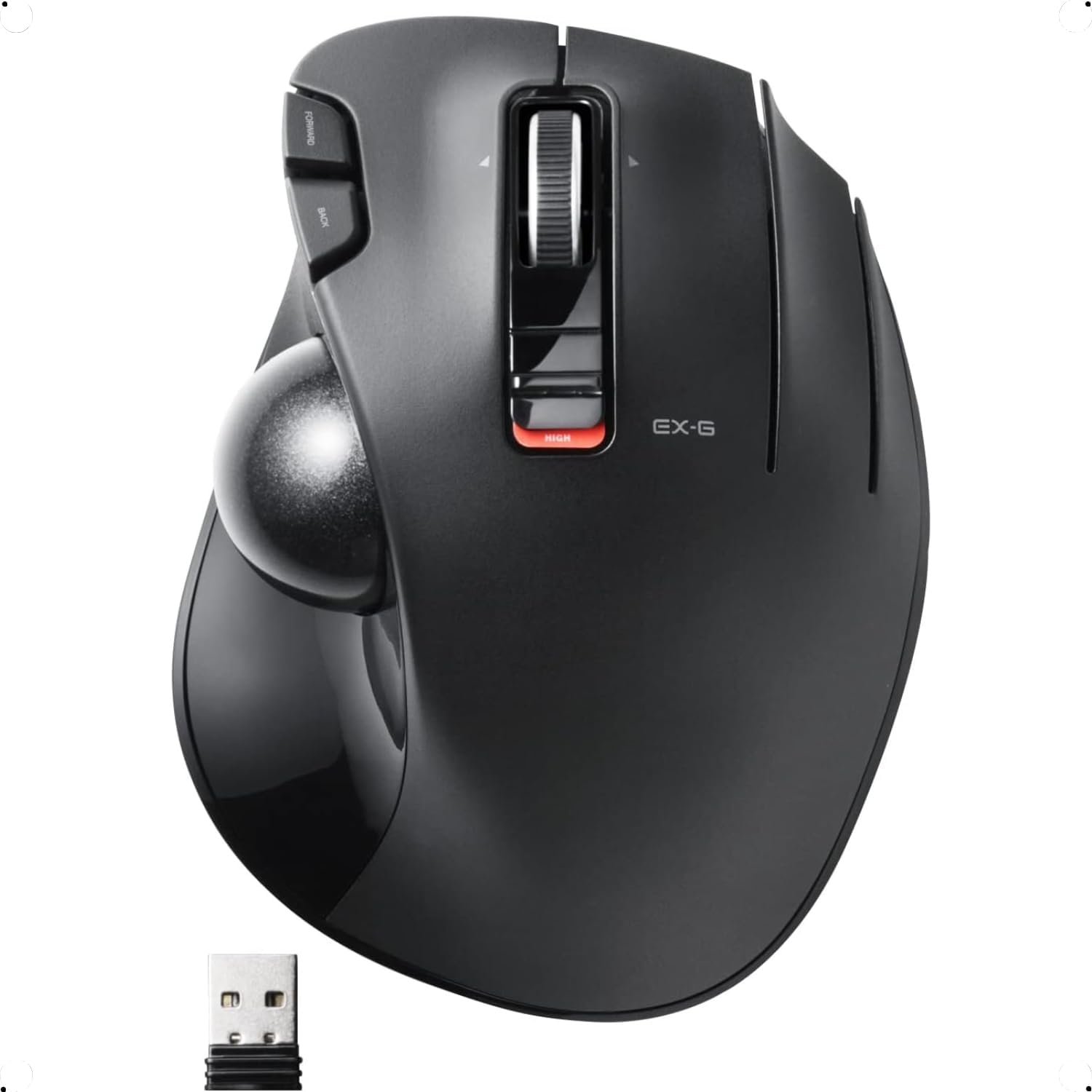
The ELECOM EX-G Trackball Mouse combines advanced optical tracking with six programmable buttons and tilt scroll functionality, delivering precise, customizable control. Its ergonomic design and durable ruby ball bearings ensure comfort and smooth operation, while adjustable DPI and wireless connectivity make it a versatile tool for Windows and Mac professionals seeking efficiency and style.


| ASIN | B016QCPNUW |
| Additional Features | 4 Way Scrolling, Ergonomic Design, Programmable Buttons, Wireless |
| Antenna Location | Creative Software, Home, Office, School, Video/Photo Editing, Work |
| Are Batteries Included | No |
| Are Batteries Required | Yes |
| Best Sellers Rank | #17 in Computer Trackballs |
| Brand | ELECOM |
| Built-In Media | English manual, Japanese manual, Receiver, Trackball mouse |
| Button Quantity | 6 |
| Color | Right Handed |
| Compatible Devices | Laptop, Personal Computer |
| Connectivity Technology | USB |
| Customer Reviews | 4.2 4.2 out of 5 stars (9,415) |
| Enclosure Material | Plastic |
| Finish | Matte |
| Global Trade Identification Number | 04953103473683 |
| Hand Orientation | Right |
| Hardware Platform | Laptop, PC |
| Item Dimensions L x W | 4.9"L x 3.7"W |
| Item Type Name | ELECOM 2.4GHz Wireless Thumb-operated Trackball Mouse, 6-Button Function with Smooth Tracking, Precision Optical Gaming Sensor (M-XT3DRBK) |
| Item Weight | 7.04 ounces |
| Manufacturer | ELECOM |
| Model Name | EX-G |
| Model Number | M-XT3DRBK |
| Mouse Maximum Sensitivity | 1500 Dots per Inch |
| Movement Detection | Optical |
| Number of Batteries | 1 AAA batteries required. |
| Operating System | Windows 10, Windows 7, Windows 8.1, Windows Vista |
| Power Source | Battery Powered |
| Range | 10.0 meters |
| Style Name | Wireless_BlackBall |
| Theme | Versatile |
| Warranty Description | 1 year manufacturer |
M**S
Great and Configurable!
This is comfortable, wireless, and configurable! I actually wore out the Right and Left click buttons on my old one... but just reconfigured the Forward and Back buttons (to the left of the left button) to be Right and Left Click, and limped along for another year or two.
S**H
Works with Mac OS 10.13
To start with, I bought this after returning a Logitech M575 which doesn't work with my older Mac OS. Logitech can't be bothered to support Mac OS 10.13. Once I downloaded the software for this, the buttons can all be programmed easily. This replaces a Logitech M570, which I loved and used for many years until it finally started to fail. I was pleasantly surprised that the Elecom EX-G fit my hand even more comfortably than the M570 ( I am a male with fairly large hands). There was an initial problem when the trackball wouldn't work at all, but this was due to the battery that came with it being completely flat. I can't remember ever testing a battery before that had 0 volts on the multimeter. I debated whether to subtract a star for this, but decided not to because of its superior functionality and ergonomics. It has only been one day so far, but hopefully it will last a long time, because I really like this trackball.
A**X
Ok mouse, flimsy construction and build quality. Lasts a surprisingly long time.
The buttons have a break in period where they hang and stick, eventually they wear in and work correctly. The button design is not comfortable and way to easy to accidentally click for the left and right buttons, and the left and right scroll. and is not ergonomic or designed for the human hand to use easily. It is a usable but kinda unpleasant device to use, you have to learn how to use it rather than it feeling natural. It is cheaply made and poorly designed. I will likely be keeping it as it works acceptably after a short break in period and the function keys work well for gaming, but I won't be buying another as I am not impressed with the build quality or feel of the device.. It gets the job done, but is not great at it. Unfortunately I have not seen a better gaming trackball yet. Which is disappointing. It's build quality makes the Logitech M750 seem well designed and robust. (The M750 repeatedly failed for me 6-9 months after purchase like clockwork) Hopefully this one holds up better. But I kinda hope it doesn't so I have an excuse to buy a different brand. It really is a mediocre device. Update 5/18/2022 After a break in period, the mouse buttons work more reliably, but accidental clicks are still an issue, but the scroll wheel stopped working, it occasionally reverses direction while scrolling making it unusable... Two months after purchase. Update 10/15/2024 Amazingly the trackball is still working, The main mouse buttons all work correctly, but the middle mouse-wheel button is worn out and rarely works, it often double clicks when it does, I found a way to remap the input on the mouse-wheel so that scroll works properly on Linux, for some reason the mouse wheel was throwing out multiple button codes for each scroll event. It still doesn't work right on windows. Extra buttons can be reprogrammed on Linux using a program called Input Remapper The main issue I have found with this device is that the wireless receiver randomly loses connection and loses range over time. For the longest time I thought my computer freezing issues were due to running Firefox in snap on Ubuntu Linux, until I had two mice connected to the same computer and found that it was the wireless signal hanging instead. I found that I had to unplug the receiver and power-cycle the mouse to get it working again. Also the receiver initially worked up to 30 feet from the computer, but now it barely works when it is 5 feet away and needs direct line of sight to the plug. The gradual and random failures made me think my computer was having ram or storage issues. I want to hate this device, not because it is bad but because it could be so much better, Even with all its many issues it is much much longer lasting than the Logitech equivalent and has better features (when they work). Reluctantly changed rating from 1 star to 4 Due to longevity and reliability of main buttons. It Isn't great, but it blows Logitech out of the water in longevity and reliability. Which is a scathing condemnation of Logitech. I will probably be buying the next step up from Elcom (the EX-G Pro (M-XPT1MRXBK)) because the extra buttons and response rate are great for gaming, it also supports Bluetooth and wired connections so the crappy receiver won't be an issue. I would prefer to buy Logitech, but they keep phoning it in on features and using shoddy switches that break way too fast. Elecom is an acceptable substitute that makes me hate the fact that I love trackballs. Computer trackballs should not induce Stockholm Syndrome.
Z**S
This has become my daily driver
This mouse is cheap and it works very well. I have been using it for about two months now everday on the H setting, which drains the battery faster, but the supplied battery hasn't given out yet. The bearings take a little bit to break in though and I have to wipe out grime and gunk on occasion. I used dry lock lube to initially get it rolling smooth but now I'll clean out the gunk and it gets rolling again. Sometimes I use the oil on my nose to lube the ball, it's a little gross and does cause a bit more gunk build up but it is free and effective. The third mouse button isn't mapped to anything, but I heard an old hardware revision of the trackball came with it mapped as a "sniper button", meaning that the mouse speed is reduced when the button is held. I haven't downloaded their driver utility to map a it to a function since I'm running linux. For gaming it works, but due to years of using a standard mouse I'm not as good at using the trackball as I am using a standard mouse. I'm still practicing and getting better every game. I play casually and I'm already bad at games so no one really notices anyway ;) I would recommend this to any one who is looking for a thumb trackball.
A**B
كل شي جميل وبتصميم انيق واستخدمه سلس ، حيث استخدمت جميع اجهاز لوجتك M النوعين وهم ممتازين جدا
P**N
Viniendo de dos Logitech M570 seguidos, con sus habituales fallos en los botones, el cambio ha sido muy facil, Es ligerisimamente mas corto que el M570 pero muy comodo y manejable. Practicamente no hay diferencia en la postura de la mano respecto al Logitech. Muy utiles los botones adicionales. La precision es mejorable. En ese sentido daria un 10 al M570 y un 8 al Elecom P.d.: añado que le he puesto la bola del Logitech y la precision es ahora absoluta. Parece que el dibujo de la trama de la bola Logitech funciona mejor
K**H
Hi giving this a one as this is the second Elecom trackball I purchased that has failed inside of 6 months. Thought to save some money but with two units going down, I should spent the cash upfront for the Logitech instead
P**S
I've been using this trackball for a while now. I absolutely love it. It's nice: heavy and sturdy. Beautiful really! Just what I expected from Japanese technology.
S**R
For too long the only real option for a good thumb track ball mouse has been available from logitech and even they reduced their range over time, leaving just the wireless m570 as the only one. What is unfortunate is they also cheaped out on some of the components used too (probably due to lack of competition) which often causes them to develop a fault with the buttons/switches (often registering double clicks or not at all). It seems like a very common problem and more than just annoying! It makes them unusable! This is what happened to mine of course and repairing/fixing the issue meant having to replace the switches (too much hassle) or purchasing another, which again was likely to get the same fault after an unacceptable amount of time considering the price. For a long time I searched for alternatives but many seemed to suffer from poor design and other annoyances/lack of features. Finally I stumbled across this Elecom EX-G M-XT3DRBK (Careful of the stupid naming scheme, there are a few variants!) so order it, but thinking again, its likely it would not be what I had hoped. Thankfully I was totally wrong, its been excellent so far. Not only is it a good replacement from the m570, its better in just about every way. It has more buttons and functions and has not developed any fault even after continuous abuse. It also has a nicer feel than the m570, especially the finish quality and shape as well as the button clicks (specifically the back/forward). It makes the m570 feel cheap in comparison IMO. It has 3 buttons + scroller + scroller tilt clicks left/right/center as well as the normally back forward buttons, it also has a high and low speed switch (I use mostly high). All the functions work using the default plug and play drivers, except for 1 of the 3 main buttons, but using Elecoms own driver/software can over come this and also has the added benefit of assigning anything to any of the above functions, including gesture options! The only thing is misses is the precision option, but that can be selected in windows mouse option and you are good to go. Just search for ELECOM Mouse Assistant (global) to find the download. The only slight annoyance (cant call it a fault) I could find was the smoothness when new, but this seems to have improved with use and now feels much smoother than the m570 ever did. The name of the product is also a bit stupid, Elecom really need to sort out their naming scheme as its just confusing, still it does not take much away from the product itself, which I would not hesitate to highly recommend to any looking for good thumb tracker ball. I believe this to be the best thumb tracker ball currently available on the market.
Trustpilot
2 weeks ago
2 months ago