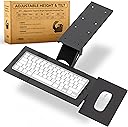
⌨️ Elevate your desk game — comfort and style that moves with you!
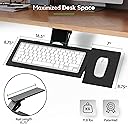
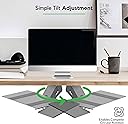
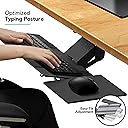
The KT1 Ergonomic Keyboard Tray is a versatile under-desk solution designed to enhance typing posture with adjustable height, tilt, and 360° swivel. Featuring a sturdy steel and bakelite build, it includes an adjustable mouse pad for improved shoulder alignment and a clutter-free workspace. Ideal for professionals seeking ergonomic comfort and seamless desk integration.


| ASIN | B01BRKH090 |
| Best Sellers Rank | #109,948 in Office Products ( See Top 100 in Office Products ) #155 in Keyboard Drawers & Keyboard Platforms |
| Brand | Uncaged Ergonomics |
| Color | Black |
| Customer Reviews | 3.8 3.8 out of 5 stars (1,228) |
| Date First Available | February 14, 2016 |
| Is Discontinued By Manufacturer | No |
| Item Weight | 10.12 pounds |
| Item model number | KT1-b |
| Manufacturer | Uncaged Ergonomics |
| Manufacturer Part Number | KT1-b |
| Material Type | Steel & bakelite |
| Number of Items | 1 |
| Product Dimensions | 19 x 5 x 10 inches |
| Size | 18.5 (L) x 8.75 (W |
N**R
EXACTLY the kind of thing I was looking for!
Wow, this keyboard tray is awesome! If you need a keyboard tray, especially for a desk that has a metal support rail set about 2 inches back from the edge on the bottom making it tough to find something that can both clear that and still be used at a comfortable ergonomic height when extended and in use. This fit the application extremely well! Observations when assembling/installing: The mouse mounting bracket did *seem* to be crossthreading when I put the screws in, but with the proper size Phillips screw driver its more of a built in lock washer effect when screwed completely in, just without the washer. I actually ended up using the washers on another project since it doesn't seem like they are needed for either the KB/mouse trays or the fasteners that screw in to the desk. Ill be shocked if any of them get loose as it IS a keyboard tray and not a jungle gym. Final impressions: Super solid construction provided you don't mount it on a 50 year old folding card table! I didn't think I would use the mouse tray, but I went ahead and put it on to check it out and its definitely staying. The single adjustment 'bike seat' lever makes it easy to move it down far enough to slide it under the desk when its not being used and is just as easy to slide back out and up to the height of my chair arms. This makes it super comfortable to rest your forearms on the chair while using both the keyboard and mouse. As an unexpected bonus they even included a mouse pad in the box cut to size, a nice addition to include as my washable fabric razor gaming mat is a bit too big for the area. ------------------------------------------------------------------------------------------------------------------------ My thoughts on other reviewers and their insane ramblings start here: I was kinda wondering if I had made the right purchase here after scanning through some of the reviews. Then I looked a bit closer and saw titles like "Dssign needs improvement" I had to do a double take based on nothing but the spelling alone. This particular reviewer went on to say the following: "Someone has to crawl under the desk and drill holes in the underside after holding the entire thing up to position it. Once you figure out where to position the plate that attaches to the desk, you have to disconnect the plate from the keyboard platform in order to screw it into the desk." Yeah dude, that's how these things get done.... what exactly did you expect? Did you really expect it to jump out of the box and magically mount itself while you fit in your afternoon nap? I assembled and installed it in less than 10 minutes with no help, and using nothing more than a hand screwdriver and a pair of pliers to hold the nuts on the bottom of the KB tray while tightening the screws. Then I held it up where I wanted it and marked one of the screw holes in the middle of the slide with a marker, then set the assembly down while I took my hand screw driver and put one screw in on the sharpie mark I had made. After that it was easy to just remove that screw, hold it up with one hand, and replace the screw which easily held it up while I was finishing the 7 others. I'm thinking some of these reviewers are JUST MENTALLY SLOW, because that was actually easier than I had anticipated! Before receiving and inspecting it I was sure it would need to be disassembled before mounting, but nope! This mental midget of a product connoisseur/reviewer goes on: "I don't know what other reviewers mean by 'easy installation.' It's NOT." LOL! They keep going on and on about how pathetically weak and clumsy they are, then proceed to speculate on what will happen when the rubber material 'wears off' (rips off because they are clumsy and whatever the opposite of intelligent is...): "the adjustment levers are tight and difficult to adjust." "And there is no lip around the mouse platform to keep the mouse from sliding off, which it does on a regular basis." "there is no lip on the keyboard tray either so it may slide off once the rubberized strips get worn down." LMAO!!! I can't even. Some people amirite? Talk about a total deficit of practical knowledge and skill. Too bad it seems to be more common lately... I wonder what happens when this individual gets a flat tire and no one is around to sing a soothing tune while changing it for them. I'd guess someone finds them in the fetal position in the back seat of their vehicle a couple days later muttering something about lug nuts and too tight... HAHA
F**6
A very good choice!
I purchased this as an open box. In spite of it stating it may be missing parts, it had them all. Very happy about that. The install was quick and easy. Tools used: 10mm wrench and a 10mm socket and ratchet, or cordless drill, a Phillips head screwdriver, a small 1/8th inch drill bit to make pilot holes for the screws, and lastly double-sided tape. To start, I removed two of the screws from the main body on one end. This allowed me to remove the sliding section and support mechanism. The reason for that is to make installing it more accessible. Next, I disassembled the sliding mechanism to make the task of attaching the support to the keyboard tray easier, too. I then reassembled the sliding tray and adjusting the mechanism with the attached keyboard tray. Be sure not to lose any of the clear washers. There are six of them in all. After carefully putting all the parts back together, I tested it to be sure I had it set up correctly. Note: I screwed up and had to undo and reattach it. I failed to get the two slotted arms in place. The next thing I did was to attach the mouse tray attachment to the keyboard tray. You may have noticed in other reviews that the holes are not properly aligned. This is true. I had to use a small file to give me the necessary room to get the screw to fit properly. It didn't take much work. I took out less than a millimeter of material. Once that was done, I inserted both screws and tightened them down starting with the one in the hole I did not modify. This ensured that one of them would fully seat itself. The other one I tightened as much as possible and it is rock steady. To mount the body under my desk, I used the two-sided tape to hold it in place. Then, I drilled the pilot holes. Once the pilot holes were drilled (they only need to be a couple of mm deep), I firmly attached it with all eight screws. This baby is not coming off! The next part was the most difficult. The sliding mechanism is made up of two pieces of purpose formed plastic attached to each side of the main mechanism. It is a tight fit and took a bit of effort to get it in place. Once that was done, I took the two short bolts and the plastic pieces that I initially removed, and put them back in place. Lastly, I attached the mouse tray. There is one knob-wheel to adjust the left and right position of the mouse tray. This one works just fine. The one on the tray itself to hold it from rocking back and forth, once you have it where you want is a joke. It holds but not really well. I'm going to see about adding a lever to it for better torque. The images are there to show the parts and the position of various items and where they belong. The video is to show the whole once it was installed. I am very happy with this product, in spite of the two little issues of needing to expand the mounting hole and the inability of the mouse tray to be more firmly tightened. I would highly suggest this to anyone looking for one of these. The price is good and it is solid enough. Of course, it helps if the person installing it is handy with tools and making minor modifications.
J**R
Better than I expected
I had my doubts with this product but because I'm a disabled individual and spend most my day in a recliner in front of my computer, this has given me the extra read needed to pull out and put away my keyboard. It's very sturdy. Nothing is completely perfect.. So here are my gripes. The underside of the keyboard arm is rigid vertical slats instead of a smooth horizonal surface. This makes it dig into the lap when trying to bring the keyboard all the way down to lap level. I have resorted to leaving it just above the lap in mid air, but the bulky underside still hits my knees when pushing back under the desk. The mouse arm is a bit too heavy. This causes the keyboard to tilt toward the mouse when your hand is resting on the mouse. It's a slight tilt, but noticeable. There needs to be a counter weight on the opposite side that offsets the weight of the mouse and hand. There are mounting holes on both sides so it can be used by either handed individuals. So it would be a simple matter to attach a counter wait on the opposite side to offset the tilt. The keyboard mount point is also fixed in place and doesn't rotate itself. The product only rotates on the back end of the armature, which very useful. However, adding support for turning the keyboard at the keyboard mount point would go along way to making this item near perfect for my needs. All in all, a very satisfied customer and I have recommended it to others.
S**I
I ordered this for a specific setup that I had, and it's exactly as described in measurements and the pictures. no disappointment at all this fits my requirement and need. needs little oiling for the joints to move and pull in and out but everything else works perfectly. the tray could be tilted to the right, or left and also upwards and down. while I work I change my posture alot I lean back sometimes and or I sit straight, this is really perfect to how I planned to setup my desk.
P**E
I'm building a custom desk and wanted to include a large custom adjustable keyboard/mouse tray and the hardware from this kit was just what I needed to make this work. The included hardware and surface works great for most uses and keeps wobble to a minimum but I'm a fan of having a large surface (my current mouse pad is 17"x15") so I removed the included surface and currently use a single 36"x16" piece of 3/4" maple plywood instead and it still works. Although I do plan on cutting it down a bit to make it easier to adjust. Keep in mind that the hardware allows for about 9" of sliding back under the desk, which is fine for the included surface, but obviously not for my huge one. The good news is you can get a 2nd set of rails, remove the bumpers and align them to allow for more sliding range. All in all I'm very satisfied with the kits, the quality is there and if it can hold my 16"x36" piece of plywood I can assure you it's sturdy enough to hold a more typical setup.
A**E
Installation assez rapide, le produit semble très solide. je cherchait une tablette pour clavier ergonomique à hauteur variable pour une position de travail optimisée, le produit y répond, pivote ou coulisse pour pouvoir le ranger. Les fixations sont solides, tout peut s'adapter à volonté : hauteur profondeur inclinaison - bon matériel. Un peu cher mais la qualité est bonne et semble justifier le prix.
C**N
Por 90€ es un cajón abatible que hace lo que dice. Al contrario que el comentario de 1 estrella, a mí me vino sin marcas ni golpes, completamente nuevo, no es de segunda mano. Eso sí, es un metal bastante sucio, pero con un paño mojado se limpia fácilmente. Bueno: - Fácil montaje. Los raíles no sufren del peso alejado con el teclado. - No se tambalea al teclar. - La cantidad de movimientos disponibles: sacar/meter, subir/bajar, girar, etc. - Se puede ajustar la dureza de las resistencias/bloqueos en las artículaciones. Al principio pensaba que la palanca para bloquear la elevación de la bandeja era demasiado blanda, pero girándola se aumenta o disminuye la tensión ejercida. Malo: - La bandeja del ratón provoca mayor peso en uno de los dos lados de la bandeja del teclado, por lo que está ligeramente inclinado. Poco perceptible, pero está ahí.
J**.
Needed a keyboard tray that fitted under the dimensions of my desk but also had the ability to rise, tilt, and swivel. As this was the only one I could find that met my requirements and wasn’t massive I ordered it. Being a UK customer it took a while to arrive from New York but when it came I was very impressed with the solid build quality of the product, a lot heavier than I expected. Does everything I would like it to do, and the fact the mouse holder is an optional extra is another bonus. The only negative I must point out is that some moving parts where a bit stiff when they arrived but a quick spray with some WD 40 fixed these.
Trustpilot
1 day ago
3 weeks ago