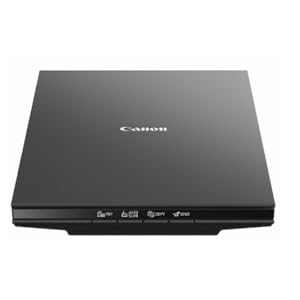
📄 Scan smarter, not harder—your desk’s new MVP!
The Canon CanoScan Lide 300 is a compact, lightweight flatbed scanner designed for professionals who demand speed and precision. With ultra-high 2400 x 2400 dpi resolution, 10-second fast scanning, and intuitive 4 EZ buttons including auto scan and PDF creation, it streamlines digitizing documents and photos. Compatible with Mac and Windows, it’s perfect for quick, high-quality scans that keep your workflow seamless and your digital archive flawless.

| ASIN | B07G5XZVLQ |
| Are Batteries Included | No |
| Best Sellers Rank | 18,824 in Computers & Accessories ( See Top 100 in Computers & Accessories ) 1 in Flatbed Scanners 27 in Document Scanners |
| Brand | Canon |
| Customer Reviews | 4.2 4.2 out of 5 stars (6,607) |
| Date First Available | 7 Aug. 2018 |
| Guaranteed software updates until | unknown |
| Item Weight | 1.63 kg |
| Item model number | 2995C002 |
| Manufacturer | Canon USA Inc. |
| Operating System | Mac, Windows |
| Product Dimensions | 36.83 x 25.15 x 4.32 cm; 1.63 kg |
| Series | CanoScan |
| Wattage | 4.5 watts |
P**L
Cannon scanner
Perfect for A4 or smaller docs and photos etc. Did not need to use drivers as windows 11 installed automatically. Scanner comes with driver disk for older windows if needed. This scanner is ideal for quick scans, image copy and upload and emailing or sending scanned docs instead of printing which seems to be less and less needed now. Recommend and good value.
W**.
great scanner
Great product that Scans well and can be adjusted for resolution, in black and white or colour
P**N
Good kit but Windows 11 HATES it
Good quality scanner, no problem but WIndows 11 insists on unloading the drivers all the time. I hace had problems with Windows talking to Epson scanners for many years and they still haven't got their act together.
M**N
Help when setting up Canon CanoScan Lide 300
Anybody out there having trouble getting setup to complete or getting the error message about not being able to connect to the scanner when trying to scan try this it worked for me. I am running windows 11 so right click on the start button and go to device manager locate the entry for the scanner its imaging devices on mine click the little arrow next to it. Choose the bottom entry which says CanoScan Lide 300 right click and choose the top option which is update driver and choose the option to search automatically this should fix it as it adds an extra part to device manager which does not seem to get added in setup and reads as Canon Lide 300 HTTP
E**X
Will not print
I have used Canon flat bed scanners for many years, up dating as necessary as Window OS update, all worked well without problem. This year I decided to change over to Apple iMac and iPad and needed a replacement scanner. Following satisfactory performance experience, I purchased, this week, a new Canon Line 300. The only software provided was a CD rom for Windows (how last century?) so set about searching for suitable drivers, only to be advised that my iMac did not need additional drivers. I plugged the scanner in and after rummaging in settings and printers & scanners I put a page of text in the scanner and, with more than a little trepidation, pressed 'copy' button, nothing happened, some hours passed without progress back to the printers & scanners, nothing helpful to be seen I pressed the box overview option (why not scan button?) which brought the scanner to life and a copy of the document appeared on my screen. Yippee, excitement soon relapsed as nothing appeared from my trusty Brother Laser Printer. There it remains, nothing further action allowed it seems not. even a chance to move the screen image to be stored in the iMac's memory. I could buy another printer on the off chance that my Brother printer is at fault, but in the face of all the very bad reviews of the Cannon Line 300 sacaner I feel that would be an expensive experiment doomed to failure, easier, I think, to simply to put the Lide 300 back in it's freshly opened box and send it back to Amazon.
J**H
Nice
Works as it should
P**N
EXCELLENT PRODUCTS.
EXCELLENT JUST WHAT i NEEDED.
A**D
Won't work on my PC with Windows 10 (64 bit)
I've had many Canon scanners...all worked well. This one refuses to work with my PC running Windows 10 (64 bit). Spent a whole day trying to find a driver that would install, without success. Extra frustrating....I've just missed the return window! Quick look at Amazon and various forums suggests that this is a common problem. Editing my review later. Canon Technical Support online have been very helpful and spent an hour trying to solve the problem. It looks as though the problem is with my PC. I'm grateful to Canon for suggesting possible solutions.
R**X
Après plus d'un mois d'utilisation, ce scanner répond très bien à mes besoins relativement limités.
A**O
Scaner de excelente qualidade e de digitalização muito rápida
ع**ر
ممتاز وسهل الاستخدام
I**B
Scanning paperwork, extremely happy with it portability
V**U
Very simple to use. Quite sturdy too. I recommend this for all scanning needs at home
Trustpilot
2 months ago
3 weeks ago