We remain fully operational. Our teams are working around the clock to ensure your deliveries continue safely.

DOWNLOAD THE APP


Copyright © 2025 Desertcart Holdings Limited
DOWNLOAD THE APP








Buy anything from 5,000+ international stores. One checkout price. No surprise fees. Join 2M+ shoppers on Desertcart.
Desertcart purchases this item on your behalf and handles shipping, customs, and support to KUWAIT.
⚡ Upgrade your speed, own the future.
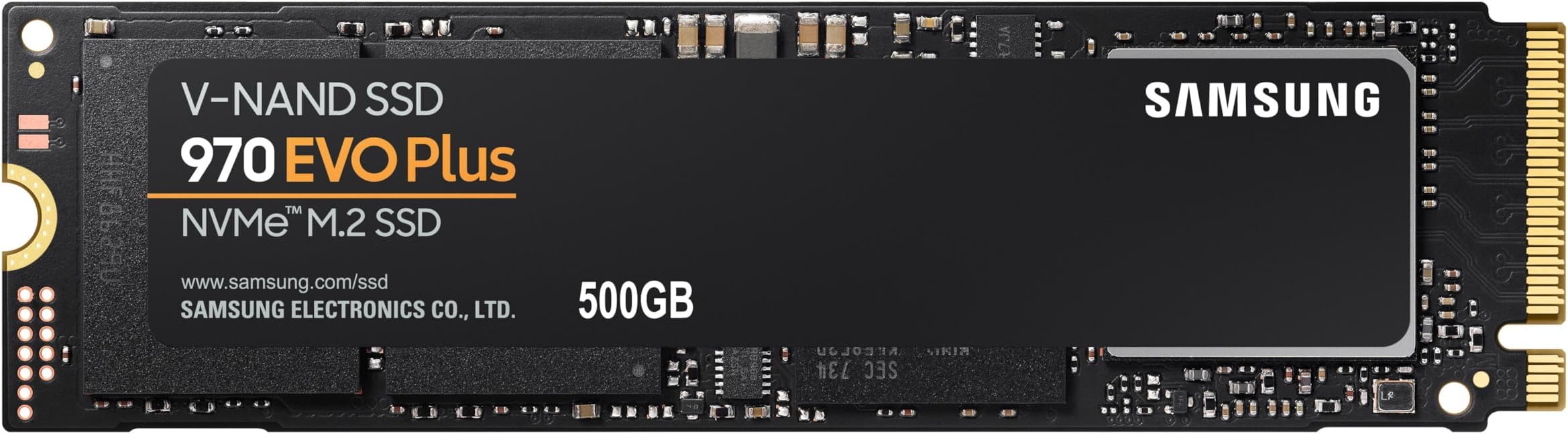
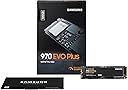
The SAMSUNG 970 EVO PLUS NVMe M.2 500GB SSD delivers top-tier Gen3 performance with blazing 3500 MB/s read and 3300 MB/s write speeds. Its compact black design fits seamlessly into modern PCs and gaming rigs, backed by a stellar 4.7-star user rating and trusted reliability. Perfect for professionals and gamers craving fast, dependable storage that keeps pace with their ambitions.


| ASIN | B07MFBLN7K |
| Additional Features | Backward Compatible |
| Best Sellers Rank | #16,076 in Computers ( See Top 100 in Computers ) #159 in Internal Solid State Drives |
| Brand | Samsung |
| Built-In Media | ssd & manual |
| Cache Memory Installed Size | 512 |
| Color | Black |
| Compatible Devices | Laptop |
| Connectivity Technology | PCIe Gen 3.0 x 4, NVMe 1.3 |
| Customer Package Type | FFP |
| Customer Reviews | 4.8 4.8 out of 5 stars (16,097) |
| Data Transfer Rate | 48 Gigabits Per Second |
| Digital Storage Capacity | 500 GB |
| Enclosure Material | V-NAND |
| Form Factor | 2.5-inch |
| Global Trade Identification Number | 08801643628116 |
| Hard Disk Description | Solid State Drive |
| Hard Disk Form Factor | 2.5 Inches |
| Hard Disk Interface | Solid State |
| Hard-Drive Size | 500 GB |
| Hardware Connectivity | PCI Express 3.0 |
| Hardware Platform | PlayStation 5 |
| Installation Type | Internal Hard Drive |
| Item Dimensions L x W x Thickness | 8.2L x 2.2W x 0.2Th centimeters |
| Item Type Name | Samsung 970 EVO Plus NVME M.2 Internal Solid State Drive, 500GB, Black |
| Item Weight | 8 Grams |
| Manufacturer | CRUCIAL |
| Media Speed | 3300 |
| Mfr Part Number | MZ-V7S500BW |
| Model Name | 970 EVO PLUS NVME M.2 500 GB |
| Model Number | MZ-V7S500BW |
| Number of Items | 1 |
| Read Speed | 3500 Megabytes Per Second |
| Specific Uses For Product | Business, Multimedia, Personal, Gaming |
| UPC | 767531889572 887276302546 887276729114 |
| Unit Count | 1 Count |
| Warranty Description | 5 years limited warranty |
M**R
Configuration and usage
Excellent product..no issues.
S**E
100% Genuine Product
works well and performance is great
H**E
Worth buying for…
Amazing!!!⭐️⭐️⭐️⭐️⭐️
O**R
Thanks Amazon
Working perfactly too fast and also M key supported as in description not described. Great fast speed, Excellent performance
B**.
The speed should be faster than what i had .
After huge effort i ended up with speed 1200MB/1500MB .
C**N
Excellent
Works as expected. 5 star
O**R
WOW
I purchased this product along with an M.2 (NVMe) to USB adapter so I can clone my original WD SSD into this Samsung SSD, and to upgrade my laptop. It worked perfectly and without issues. The speed of this SSD is at least 3-4 times the one that I had, which became my external SSD. Packaged well in its original packet. Loved it!
W**R
Extremely Fast SSD
Truly a reliable brand, it's the best in SSD and a must have in your PC, benchmark even surpassed other NVMe's in the market, an investment that will last almost forever....
F**K
Got it for quite few years. Works fine. 60TB load on 500GB drive. Quite impressive. 98% life as reported by drive. Real or not. Time will tell. Full speeds as advertised. However. On the RIGHT drivers. Windows 7 heavily affected by driver quality/ source. Full speed constant 3000+ reads. Writes varies around NOT CONSANT 2000. HOWEVER. Drive's real (write) speeds are ONLY present, when it is been written at least ONCE, and with capacity reached. And overheating. No cooling - forget about any speeds. Reminder. Cooling applies to physical DRIVER chip of the drive, NOT the NVME modules. Driver on the drive wants cool. NVME wants the hot in operation. Hot driver chip will bring down drive to zero stop. ZERO. For several seconds/ minutes. This should be clear in every description. So. Testing must be done on ALL drive, written at least once, and with majority of capacity used. Love - as usually - when people do 0.01% drive size test, as any indication. And on fresh drive. Many of the drives CHEAT. Means. First portion of drive, which is tested is ultra fast, either physically or buffer. Mostly sd cards/ usb drives/ etc. But. Got Crucial nvme first, and it does exactly the same. 10GB ultra fast, then drops down to 1000 for the REST of the drive. As oppose most SSDs will perform 100% all drive day and out. So. Once you REALLY use the drive. Means written, not once, but several times, and used more capacity, drives starts to show REAL LIFE speeds. If you delete a file. Windows MUST physically delete a lot of drive. Not just entry in File allocation table. It will not do it in an instant, but on buffer. Try to switch off computer after deleting/ copying big files, and you wait for several minutes. Try to do massive files deletion, beyond treshold and windows has to do it here and now. For ages. Normally you won't notice, because it's all in background. On long switch on systems, absolutely not noticable. Try to copy serious data on maxed out drive, and you are for a big surprise on real speeds. Because majority of people get massive drives, to what they use, they won't notice. Paying several times for what they use. On Windows 7, due drivers and structure, massive bottle necks on writes. It's much more complicated than just 'test' or 'use', or capacity, or deletion. There is massive bottle necks on pcie resource allocation. If you have fast graphic card in use, your nvme drive is heavily bottlenecked. Only very expensive motherboards have this semi sorted. For majority of people, none of this would matter, they won't notice. But. For those who REALLY get NVMEs for the purpose, it does. Ah yes. Final word for all that lovely misinformation about defraging ssd/ nvme. It does indeed decrease drive's life, by zero point nothing. It does however increase the performance. For regular person, by zero point nothing. For serious use, servers, high capacity data storing, professional high speeds copying, for which all these drives are meant to exist, it does completely. Drives ssd/ nvmes have 'lost capacity', not shown on the tag, exactly for the purpose of internal 'defrag', on idle mode. Use the drive heavy in short bursts and speeds are dropping down. To zero. As drive has to operate on 'loss of power mode'. So. Hard lesson. With power loss or forced resets. Lots of data 'lost', because drive couldn't write it physically on time. As it takes a long while to zero data blocks, and then write tons of data from buffer. So. Defrag of ssds/ nvmes. You can defrag your drive as much as you please. And it will be zero point nothing of drive use. Windows uses drive endlessly and massively and constantly. Reads are not hurting. Writes are where drive's life is. And any windows writes trillions of times. I'm light user of pc. And my 500gb drive has 60'000gb of reads and writes (half half). Majority of which is Windows. Not me. So. If you are doing defrag, whenever you please, you will allocate for zero point nothing of drive's use. 99.9% of drives killing is done by windows. And hm.... Afer quite few years of using drive, and 60'000gb it's still 98% of life, as reported by drive. Real or not. Time will tell. Means you can use drive for 20 years before it will be dead. Majority of people will change drive a lot earlier than that (hdd 3-6 years, ssd 5 years at best, nvme first generation probably few years). In other words, defrag has completely no meaning to drive's life. Zero. It does have serious meaning to performance for serious - designed for - use. And for regular user. Exactly the bottleneck of capacity used and non defraged system, where drive will bottleneck in zeroing data and writing new one. Reading my own words, only high level IT people will understand. Thou - every user is affected, but is not aware. When copied tons of data, deleted tons of data, etc, thinking it's done, when bar is 100%. Reality, windows can still clear the data, hours after instruction, same with copying. Only exception is read only data in big files. Like movies. But then. How many users have data stored in adequate partitions. Read/ write/ rare/ often/ movies/ system/ etc.
M**A
Se ve bien por dentro pero la caja y esas etiquetas me hacen dudar, ya qué hay muchos productos chinos que simulan ser originales y me ha tocado que hasta las antenas ubiquiti son chinas y se parecen bastante a las originales, ya el tiempo dirá si es original o no
A**I
A reliable and affordable product. I would definitely buy it again.
U**K
Very good product
N**A
like the performance of the ssd, quick boot and very responsive operation, I/O is limited by windows but overall speed is great, this was a second purchase as have been using 970 Evo earlier
Trustpilot
2 weeks ago
1 month ago