Buy anything from 5,000+ international stores. One checkout price. No surprise fees. Join 2M+ shoppers on Desertcart.
Desertcart purchases this item on your behalf and handles shipping, customs, and support to KUWAIT.
🚀 Elevate your network game with rock-solid multi-WAN VPN power!
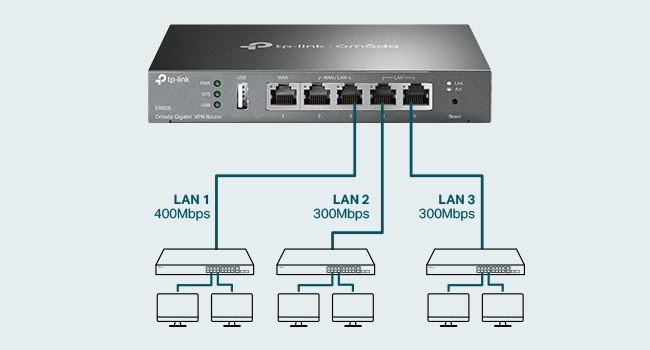
The TP-Link ER605 V2 is a wired gigabit VPN router designed for SMBs and advanced home networks, featuring up to 3 WAN Ethernet ports plus a USB WAN for 4G/3G backup. It integrates seamlessly with Omada SDN for centralized management, supports advanced security protocols including SPI firewall and multiple VPN connections, and offers smart load balancing and lightning protection. With a compact design and 5-year warranty, it’s built for reliable, scalable, and secure network performance.


| ASIN | B08QTXNWZ1 |
| Antenna Location | Home |
| Best Sellers Rank | #218 in Computers & Accessories ( See Top 100 in Computers & Accessories ) #22 in Computer Routers |
| Brand | TP-Link |
| Built-In Media | Gigabti VPN Router ER605, Power Adapter, Quick Installation Guide, RJ45 Ethernet Cable |
| Color | silver |
| Compatible Devices | Personal Computer |
| Connectivity Protocol | Ethernet |
| Connectivity Technology | Ethernet |
| Control Method | Remote |
| Controller Type | Switch |
| Coverage | Multi-WAN and VPN supported connectivity |
| Customer Reviews | 4.4 out of 5 stars 4,787 Reviews |
| Data Transfer Rate | 1 Gigabits Per Second |
| Frequency | 5 GHz |
| Frequency Band Class | Tri-Band |
| Global Trade Identification Number | 00845973089597 |
| Has Internet Connectivity | Yes |
| Is Modem Compatible | Yes |
| Item Dimensions L x W x H | 6.22"L x 3.98"W x 0.98"H |
| Item Weight | 0.79 Pounds |
| LAN Port Bandwidth | 10/100/1000 Mbps |
| Manufacturer | TP-Link |
| Maximum Upstream Data Transfer Rate | 4000 Megabits Per Second |
| Mfr Part Number | TL-R605 |
| Model Name | ER605 |
| Model Number | ER605 |
| Number of Ports | 1 |
| Operating System | Windows |
| Other Special Features of the Product | WPS |
| Router Firewall Security Level | Advanced |
| Router Network Type | wired |
| Smart Home Compatibility | Not Smart Home Compatible |
| Special Feature | WPS |
| UPC | 840460604635 845973089597 |
| Unit Count | 1.0 Count |
| Voltage | 240 Volts |
| Warranty Description | 5 Year Manufacturer |
| Wi-Fi Generation | Wi-Fi 6 |
| Wireless Communication Standard | 802.11ax |
| Wireless Compability | 802.11ax |
C**S
Rock solid Omada router with seamless failover
TP-Link ER605 V2 Wired Gigabit VPN Router – Multi-WAN (Up to 3 WAN Ethernet Ports + 1 USB WAN) This router has been running in my network for over a year now and has been completely trouble-free. I use it as the gateway for my TP-Link Omada network, which supports a fairly large smart home setup. Between smart lighting, switches, cameras, and other connected devices, the network handles a lot of traffic, and the ER605 has managed it without any issues. One of the features I rely on most is the automatic failover. My primary connection is fiber, with a cellular connection set up as backup. The router automatically switches over if the primary connection drops, and it has worked exactly as intended. The ER605 also offers far more customization and configuration options than most home users will probably ever need. It integrates seamlessly with the Omada controller and allows centralized management alongside the rest of the network equipment. Overall, it’s been stable, reliable, and a great foundation for a larger smart home network. If you’re running an Omada system or planning a network with multiple access points and lots of connected devices, this router is a solid choice.
A**N
Router Installation
I made purchase of this item because my mikrotic got damage in a lightning storm. I could not get any LAN from however i had store this item in cart for a long time and have been watching itso finally it was baught. I had no doubt about if or not it would work having experience with TP-Link i felt 100% confident in their products. I have been using one of their access point in organization for a couple years now it works perfectly fine. This router is solid from the company going with their switch i baught last year. I was amaze with their soft ware even my cousin was taken back becaus he loves another brand but he loved the set up inside. It can take in up to two ISP it wasn't hard to set up quick and easy to log in create new password and in the quick set up to get internet set up. I didn't have to read the manual for that. Once your all set you will experience a new smooth service right off the bat, there few things to keep in mind it is a home and business router so it has high end set up inside so it is capable of handling DHCP, VPN, 2WAN and other smart set up. In some cases may need someone experience to set it up properly depending your desire. NOTE it is not a POE router meaning it cannot send that extra power for cameras that may need POE I would recommend it at anytime for small set up like mind because i have multiple tv, cable box, access points, routers and printer so its a for a home set up which handles alot of load at time. So i have a dedicated switch for that too which is a TP-LINK. Because of that this router can handle that load and also has lighting protection. You can also down load the app and control it from cloud so you don't really need to be physically around to login and make adjustment. There are videos on you tube that can help with that set up. Make sure the device is on a good ups for protection read through notes before buying make sure the setup you are doing is the correct set up for this router and then if it is an know your going to enjoy your purchase.
J**O
The TP-Link ER605 V2 is not your average home router
TP-Link ER605 V2 Review: An Unbeatable Prosumer and Small Business Workhorse** The TP-Link ER605 V2 is not your average home router; it's a dedicated wired VPN router that occupies a unique and valuable niche. For its remarkably low price, it delivers a feature set and reliability that far surpasses any consumer-grade all-in-one unit, making it an absolute essential for tech-savvy users, prosumers, and small businesses. **Designed for Performance and Reliability** Right out of the box, the ER605 V2 feels like a serious piece of hardware. Its all-metal casing aids in heat dissipation, ensuring stable performance during continuous operation. With five Gigabit Ethernet ports, its core functionality is incredibly flexible: you can configure up to three WAN (Internet) ports for load balancing or failover, and use the remaining LAN ports for your internal network. The inclusion of a USB port that can function as an additional WAN for a 4G/5G modem is a brilliant touch, providing a crucial backup internet connection for critical operations. **The VPN Powerhouse** This is where the ER605 truly shines. It supports a wide array of VPN protocols, including OpenVPN, L2TP/IPsec, PPTP, and notably, WireGuard®—a modern protocol renowned for its high speed and security. Setting up a secure remote access VPN for your home network is straightforward through the Omada controller software. You can securely access your network files, security cameras, or NAS from anywhere in the world as if you were locally connected. For a small business, it can easily handle dozens of simultaneous VPN tunnels for remote employees. The hardware-accelerated VPN performance ensures that you don't suffer a massive speed penalty, a common issue with cheaper routers trying to handle encryption. **The Omada Ecosystem: A Key Consideration** It's crucial to understand that the ER605 is designed to be managed. While it has a basic standalone web interface, its full potential is unlocked when adopted by a TP-Link Omada Software Controller (a free application you install on a PC or server) or a dedicated Omada Hardware Controller. This centralized management is a game-changer, allowing for seamless control of multiple Omada access points, switches, and routers from a single pane of glass. This makes network-wide settings like VLANs, firewall rules, and guest policies incredibly easy to manage. **Who Is This For?** * **The Advanced Home User:** Someone with a home lab, a NAS, IP cameras, or a desire for robust network segmentation and a reliable site-to-site or remote access VPN. * **The Small Business/Startup:** Needs a cost-effective, rock-solid gateway with multi-WAN failover to ensure uptime and VPN capabilities for a remote workforce. * **The Tech Enthusiast:** Anyone looking to step up from consumer "gamer" or "mesh" routers to a more professional, stable, and feature-rich networking setup. **Final Verdict** The TP-Link ER605 V2 is a no-frills, high-value champion. It forgoes the flashing lights and simplified apps of consumer gear to deliver what truly matters: unwavering stability, powerful VPN functionality, and flexible internet redundancy. The requirement for a separate controller might be a small hurdle for some, but it's a small price to pay for the enterprise-grade features and control you gain. If you need a reliable, secure, and scalable network foundation, the ER605 V2 is, without a doubt, one of the smartest and most rewarding networking purchases you can make.
S**S
I like - Relatively easy to set up and deploy - 4 Stars because appeared to be an open box item
I purchased this router to have more control over my home and office networks and so remove the bottleneck imposed by the Eero device that my ISP foisted on me. So I now have a real router between the ISP's modem and the Eero unit. LANS and VLANS are easy to set up and configure hardly needing any reference to the manuals at all for even the novice. Now I can be assured that my WiFi devices cannot access anything that I don't want them to and my home and office networks are now truly separate (that annoying Eero device is now acting purely as an AP, as it should be - nothing against Mesh routers etc, in general, but they are overkill for the size of my apartment). I may update this later with my experiences setting up VPN connections etc if I determine a need. but so far so good and I am impressed with the features Vs. price point for this unit. The only true gripe I have is that the firewall configuration option and some routing functions are not as fine as I would prefer, so I have to resort to more circuitous methods to achieve the same or similar fine control at this time (I have not read all the downloadable documents on this device yet so may have missed something that would alleviate this approach). The GUI is fairly intuitive and only requires familiarization with it to setup what you need with relatively few hunt and peck moments. The only bad point is that this appeared to be a previously open box item (no plastic sealing the box and twist tie not on the power cable). Hence only 4 stars. But I did a factory reset and ensured that only the original software was in place and the unit appears to be working perfectly.
C**C
TP-Link Makes Quality Products
I absolutely could not believe this could be had for anything like sixty bucks! If it didn't have all the Omada stuff (which I don't use because I don't know enough about it yet and because a lot of my network stuff is pretty old) this thing would still be an absolute steal! I have two (total) of the ports configured as WAN ports. On the one that's a fixed WAN port, I've got an LM1200 LTE modem. That's T-Mobile. On the second port, which can be configured as WAN or LAN, I've got a TP-link ADSL/VDSL modem that I already had. This router, of course does all the actual connecting once the modems are done syncing. The T-Mobile (4G LTE) on the WAN port connected immediately, in under 15 seconds and all I had to do was click <Save> on the settings it came up with. It has a NanoSIM, of course, and it doesn't even need user | pass. The DSL on the WAN/LAN port, was another story. It came up with everything (Except username and password, of course), but it just wouldn't connect. It even had me thinking the password must not be what I thought it was. Well, at >major east coast telecom provider< (starts with a "V"), there are at least 3 levels of techs between you and the guy who can actually do something with the DSLAM at the other end. Put me through the wringer all day. I finally got one of them to create a repair ticket. According to this thing's log, they tried pinging it at 12:33 while we were grocery shopping and the router called it a "ping of death" and just tossed it. Then there were a few lines above my pay grade. Then at 12:58 another "ping of death" and seconds later, it connected!! The point is, it was the other end's fault. One of the techs had told me they don't even use Username and Password on the DSL lines anymore, but I consider that a rumor. My best guess is that the DSLAM encountered a brand new router on the other end with a different MAC address and all, considered it "suspicious" or something, and refused to connect. The point is, it connected immediately when it could, without me doing anything except talking to tech support "monkeys" for hours, but that's absolutely not this router's fault! And it keeps a great log! The ports are all gigabit! My whole wired network, now, is gigabit thanks to this thing. It has MANY, MANY settings. Pretty much anything you could want. It doesn't have wireless, but that's actually kind of a plus; it makes it so you can choose your wireless AP's carefully and get good stuff. You can have up to 4 internet sources with this thing!! It has (In a pulldown menu) PPPoE, Static IP, Dynamic IP, L2TP, and PPTP. The LTE is Dynamic IP, BTW. I also have a 24 port gigabit switch (also TP-Link), so I could actually even more without running out of ports. I consider this device to be an awful lot of bang for the buck! Very intelligently engineered! As for me, specifically, I'm watching YouTube videos at either 720P or 1080P, as the wife is watching Korean "dramas" on a Roku and an Android pad all at the same time. It's just smooth. And, finally our phone line got so bad a few days ago, that one could not hear a phone call over all the snapping and crackling. The DSL tried to hang in, but eventually, the modems gave up, at least for awhile, and disconnected. You wouldn't even know unless you looked it up in the router!!! We still had good internet!! So, I can also vouch for the load balancing and the failover! I'd buy it again in an instant! In fact, if I remember right, it also gives you several choices for how to determine if a connection is up. Again, if I remember right, default is a ping. But it knew the DSL modem had disconnected and it knew when it reconnected. What's not to like?
S**A
Good product for the price.
This is a great product. It was simple enough to route my network to all my ethernet ports, it has good amount of LAN ports for my use-case.
J**N
Exceptional Performance and Reliability!
I recently purchased the TP-Link ER605 V2 Wired Gigabit VPN Router, and I must say that it has exceeded my expectations in every aspect. This router has proven to be a reliable and powerful device that has greatly enhanced my network connectivity and security. First and foremost, the performance of this router is outstanding. With its gigabit Ethernet ports, I have experienced lightning-fast internet speeds and seamless streaming of high-definition content. The router efficiently handles heavy network traffic, allowing multiple devices to connect simultaneously without any noticeable lag or interruptions. Whether it's online gaming, video conferencing, or downloading large files, the TP-Link ER605 V2 handles it all with ease. The inclusion of VPN (Virtual Private Network) functionality is a significant advantage of this router. Setting up a secure and private network connection is a breeze, and I appreciate the added layer of privacy and protection it provides. Whether I'm accessing my network remotely or simply browsing the internet, I have peace of mind knowing that my data is encrypted and my online activities are shielded from prying eyes. Moreover, the user-friendly interface and intuitive setup process make configuring the router a seamless experience. The TP-Link web interface is straightforward and provides easy access to advanced features and settings. Even for users who are not technically inclined, this router ensures a hassle-free setup process and smooth operation. In terms of build quality, the TP-Link ER605 V2 is robust and built to last. The solid construction and durable materials used inspire confidence in its longevity. The router's sleek design and compact form factor also make it easy to fit into any network setup without taking up excessive space. Another noteworthy aspect is the exceptional customer support provided by TP-Link. In case of any technical queries or issues, their support team is readily available and responsive, ensuring a smooth and pleasant customer experience. Considering the performance, security features, ease of use, and reliability, the TP-Link ER605 V2 Wired Gigabit VPN Router is an exceptional value for money. It offers advanced functionality and features typically found in higher-priced routers, making it an excellent choice for both home and small business networks. To conclude, the TP-Link ER605 V2 Wired Gigabit VPN Router has far exceeded my expectations. Its exceptional performance, robust build quality, and reliable security features make it a top-notch choice. If you're looking for a powerful and secure router that delivers on all fronts, I highly recommend the TP-Link ER605 V2.
C**S
Avoid. Missing key features and has poor performance
I spent a TON of money on this ER605 and an OC300, along with several switches (24pt and several 8pt units), a lot of WAPs and more based on the positive reviews here. Well the reviews must be padded or fabricated by the company (who apparently doesn't read and certainly doesn't respond to any of the reviews here) because this unit pretty much SUCKS. Latency is terrible, turning 14ms pings into 44-540ms on average. It regularly freezes, hiccups and otherwise requires reboots in the middle of the day, even though the logs show little to nothing in the way of problems and the ISPs attached remain in an unchanged, running state. This is truly frustration in a box… The fail-over feature is a joke; spotty at best with large lag times IF it works at all (very rare that it works at all and when it does, it takes several minutes to do so no matter the settings.) Aggregation doesn't work in any way, shape or form. And the real icing on the cake is there is NO local DNS solution provided AT ALL. This is a basic feature that even the cheapest, worst equipment brands supply, yet TP-Link seems to think isn't necessary to include. It IS NECESSARY - by very definition!!! Unless you like going back about 30 years in network capability... AND, the entire Omada promise is reduced to almost nothing without it, unless you like remembering or documenting every single device’s IP address… HUGE DISAPPOINTMENT. For the load balancing feature, if you want the unit to test all ISPs/WAN connections to suggest and implement a load balancing formula, the speed testing algorithm often gets hung and will 'spin' for hours or days if you let it. You can just enter the balancing ratio yourself (which most likely you will be forced to do because the auto-ratio speed test routine will probably just loop forever as mentioned) because even when the auto-ratio test does actually complete, the ratio it suggests is grossly inaccurate relative to known statistics. I purchased all this TP-Link equipment to replace an older Ubiquiti infrastructure because Ubiquiti's newer UniFi products have become garbage themselves, and Ubiquiti doesn't seem to care. Perhaps both companies are secretly one and the same because TP-Link's products are just as bad or even worse (i.e. no local DNS - at least UniFi gear DOES have that, as it should!) and their support is about equal - non-existent. Calls (well messages left), emails, posts on their support forums, etc. that are requests for support go unanswered. The few answers that do come offer little to no help, and a “just wait, we’ve put in a request” is the best I’ve seen in about a year’s time. So the supposed TP-Link "lifetime warranty" is basically useless. A lifetime warranty with no one to honor it is no warranty at all. As the headline says - AVOID! Unless you LIKE continuous frustration, outages and below lackluster performance... If you do, this gear is definitely for you; go for it and good luck with that! I am beyond disappointed and feel I wasted thousands of dollars in a system that I cannot trust. As much as I hate to say it (and I do), I guess I’m going back to Ubiquiti and scrapping all this TP-Link junk. Update Sept 2023: I didn’t go back to Ubiquiti, but instead purchased a Peplink Balance Two (WAY more expensive than the ER605 mind you) to replace the TP-Link ER605, and it actually WORKS. And it has expected basic functionality, like local DNS resolution, etc. I’ll be converting all my TP-Link equipment as time and budget allows since removing the ER605 dilutes the Omada management platform value proposition close to entirely. My advice: unless you just want unmanaged network equipment, stay away from TP-Link.
A**R
Good product for the price
I have been using this for more than a week, overall good product. Must but if you want to use with multiple internet connections in one network Pros: extremely easy user interface 5x gigabit ports WAN fail and load balancing Small form factor No need for omada contoller Setup and forget configurations Cons: don't use with omada contoller. Horrible placement of options. WAN connection polling time cannot be set in standalone mode Some settings require hard reboot to apply, auto soft reboot not reflecting the settings The order of WAN port number is reversed for working order, last WAN is default not the first one
J**S
Ótimo e compacto router
Ótimo router, boa quantidade de portas, ótima performance e fácil configuraçao
S**T
Easy to setup and use
Great product
A**H
I've put this unit to the maximum test
I bought this unit because I only have vdsl. I bought a second line to gain more bandwidth. I I run alot of services in my homelab. Even when I'm downloading or uploadeding large files it only sits at 60 percent. Great for people who need a backup line or load balance between 4 connections. I it has good fetures like port forwarding and all standerd networking. I works with cloudflare tunnels
A**R
Works as intended
Great vpn router, i was able to set up both openvpn and wireguard connections as well as change my DNS server for adblocking capabilities (using a raspberry pi running pi-hole) the router is indeed gigabit ethernet. Also has a really good built in firewall that clocks DOS attacks, ping of death, winNuke attacks and more. Only thing i couldnt get working was using a paid vpn service like nordvpn to work through my whole network which i was really hoping to get working. Other then that great router! Would recommend but definitely not for the tech illiterate, you must have a basic understanding of how networking works but it is also plug and play so if you just wanted to plug this in and have it work, it can do that
Trustpilot
1 month ago
2 weeks ago