

🚀 Elevate your workspace WiFi to pro-level speed and control!
The TP-Link EAP245 V3 is a high-performance AC1750 wireless access point designed for business environments. Featuring dual-band MU-MIMO technology, it delivers combined speeds up to 1750 Mbps and supports seamless roaming and mesh networking. With flexible PoE power options and cloud-based centralized management via the Omada app, it offers easy installation and remote control. Advanced security features and VLAN support ensure a secure, scalable network solution backed by a limited lifetime warranty.
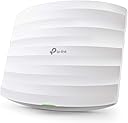


| ASIN | B07NMZR3F1 |
| Are Batteries Included | No |
| Best Sellers Rank | #4,092 in Computers ( See Top 100 in Computers ) #86 in Wireless Access Points |
| Brand | TP-Link |
| Color | White |
| Connectivity Type | Wi-Fi |
| Customer Reviews | 4.5 4.5 out of 5 stars (3,905) |
| Date First Available | 10 February 2019 |
| Item Weight | 381 g |
| Item model number | EAP245 V3 |
| Manufacturer | TP-Link |
| Operating System | RouterOS |
| Product Dimensions | 20.47 x 18.16 x 3.71 cm; 381.02 g |
| Series | EAP245 |
| Wattage | 12.3 watts |
| Wireless Type | 802.11ac |
J**.
Good product 👍🏻
Good product 👍🏻
J**G
Excellent price to features.
It is great that it can be configured and managed standalone if one wants too, it works fine that way too and it is great if you have only one or two of these APs. I have also setup the omada controller in a container and it works great. Wifi coverage is better than my previous velop and I can now easily have my IOT and guests in separate VLANs and control at the firewall what they can access. I'm very pleased so far with this product.
A**K
Very good device
Well build and fast performance for home SDN on the budget. Will be perfect solution for your large home or villa when combined with other Omada products
Z**H
Perfect/easy to operate/24/7 running
Best Hotspot ever, very very easy to operate and customizing log in pages You can control it from any where in the world Worth every single AED
M**A
Not as described .speeds locked at 100mbps
Initially it was freezing and I was trying to update it but it keeps telling me software up to date.. after connecting it with the controller oc200 I was able to update it. It was running very stable after the update which is why I gave 3 stars. But very disappointed with the speed as my network speed is +500 mbps and this product is locked at 100mbps (not as described in the photos) .. I went ahead and bought the EAP235 which changed the game for me I was able to run the EAP235 with 560mbps and it runs stable. Hope this review is helpful for some of you.
V**A
controller offline
omada controller getting offline every 6hour, not detecting auto connection of lan server. technical team not providing such useful information to reconnect, even seller of the amazon was not single reply until now for the past 10days, totally waste of money on buying tplink products.
K**S
perfect working
after ussing 6 month this controller working perfectly still no problem.. good device 10/10
F**I
Cheep compared withe other
Very good product working fine
K**M
Having used consumer grade equipment with all the bells and whistles, I found that they were unreliable. Works for awhile then one day, it doesn't work requiring a power cycle or several power cycles to get it to work again. This is a business class equipment that once installed, continues to work all the time. A POE adaptor was provided with this item so there's no need to buy one if u don't have a POE switch.
M**.
In the attached photograph, the OC200 is the device on the left. TP-Link Omada equipment is primarily marketed to business. I am using it in a home network. I am using it to control three ceiling mounted TP-Link EAP610s (fed by the red patch cables in the PoE switch on the right) and an ER605v2 router. The OC200 is powered by PoE (it can also be powered by USB) reducing power cable management needs, and once set up, it just runs and lets you administer Omada devices without the need to have a software controller running is a 24/7 powered PC or a need for cloud management. The user interface (web based) can be a little confusing to figure out, but there is a fairly detailed PDF user manual you can download. It can do much more than I am using it for, I am using it to manage three ceiling mount EAP610s in a large house. First we just installed one to see how it went, and when it worked well we ordered the other two, importing them was literally a click of a button and they were configured to integrate with the settings used for the first. The controller makes management of the wireless network a breeze and it's designed so you can automate backup to a USB key so that if the unit ever fails, you can restore to a new unit from the backup (devices under it's control will continue to work if it fails, but you won't be able to change configurations until a new one is in place and restored) It could be argued it is too powerful and complex for a home network but if you are technically inclined, with a little help from online communities and the manual, it isn't too difficult to figure out. It's a good system.
T**M
I've only used this foress than a week but so far it's been pretty solid. Had a couple issues first time connecting my omada router and switch which kept not joining But after a bit of resetting and connecting I finally got it all paired and it's been solid since. Nice to have one panel to control all my omada gear and nice to have easy to read useful info taken from all gear in and placed in one spot.
K**M
The Omada software needs to be on 24x7 for certain features to work. eg: portal authorisation, AP roaming. The challenge with PC based systems is that when PCs reboot, the software javascript can't start up easily. Furthermore the cost a PC is more than the Omada hw controller and will take up more space. Worth investing in this hardware appliance.
O**O
هذا الجهاز يسهل عملية الاعدات للاجهزة المتعددة من مجموعة "ؤمادا" بحيث لا تلجأ لعمل الاعدادت لكل جهاز على حدى ويجعل الاجهزة متوافقة مع بعض
Trustpilot
3 weeks ago
1 month ago