Buy anything from 5,000+ international stores. One checkout price. No surprise fees. Join 2M+ shoppers on Desertcart.
Desertcart purchases this item on your behalf and handles shipping, customs, and support to KUWAIT.
🖱️ Elevate your workspace: power, precision, and freedom in one sleek mouse.
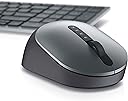
The Dell MS5320W Multi-Device Wireless Mouse in Titan Gray offers professional users seamless connectivity via Bluetooth 5.0 and 2.4GHz wireless, a robust 36-month battery life, and 1600 DPI optical precision. With 7 programmable buttons and compatibility across Windows, Mac, and Linux, it’s designed to enhance productivity and multitasking in any modern workspace.




| ASIN | B083V7FV49 |
| Additional Features | 4 Way Scrolling, Programmable Buttons |
| Antenna Location | Office |
| Are Batteries Included | Yes |
| Are Batteries Required | Yes |
| Battery Average Life | 36 months |
| Best Sellers Rank | #118 in Computer Mice |
| Brand | Dell |
| Built-In Media | Documentation, Mouse, USB Dongle |
| Button Quantity | 7 |
| Color | Titan Gray |
| Compatible Devices | Personal Computer |
| Connectivity Technology | Bluetooth |
| Customer Reviews | 4.4 out of 5 stars 111 Reviews |
| EU Spare Part Availability Duration | 3 Years |
| Enclosure Material | Plastic |
| Global Trade Identification Number | 00884116366171 |
| Hand Orientation | Right |
| Hardware Platform | PC |
| Item Weight | 0.19 Pounds |
| Manufacturer | Dell |
| Mfr Part Number | 570-ABGM |
| Model Name | MS5320W |
| Model Number | MS5320W |
| Mouse Maximum Sensitivity | 1600 Dots per Inch |
| Movement Detection | Optical |
| Movement Detection Technology | Optical |
| Number of Batteries | 1 AAA batteries required. (included) |
| Number of Buttons | 7 |
| Operating System | Linux, Mac, Windows |
| Power Source | Battery Powered |
| Range | 10.0 meters |
| Special Feature | 4 Way Scrolling , Programmable Buttons |
| Style Name | MS5320W Pro Multi Device Wireless Mouse |
| UPC | 884116366171 |
| Warranty Description | 3-year Advanced Exchange Service |
Y**A
Highly versatile
I use this mouse to work on two laptops connected via BT. The USB adapter is an option if I want to connect my tablet. Switching between devices is as simple and tapping a button.
R**Z
5-Stars
Excellent mouse. I love it!
M**G
Excellent match.
Workes very well if you enjoy a mouse and I do. Matched to Dell laptop.
J**E
Easy to use
Perfect fit for my palm - easy to connect to various computers, although it sometimes loses connection and needs to reconnect.
F**R
Operate smoothly
Fits well in hand. Looks nice too, with my 5500 Dell laptop.
R**T
Comfortable, perfect size.
Love this mouse. So many mice on the market are too small (made for a baby hand). or so large, uncomfortable and over priced I'm glad I found this, perfect size for my hand for my desktop. I use this on my iMac. I would prefer this was rechargeable battery. I use it daily and haven't had to replace the battery yet. If I have to replace the battery once a year, i'll be happy. I also find that the scrolling wheel is a little sensitive to dirt. I have had a coupe times where the wheel doesn't work, a through cleaning and it works again. I hope the next iteration takes this into consideration and better designs a "dirt resistant" center wheel.
T**Z
Perfect Replacement
Same mouse that's in Dell KM7120W bundle. Had to replace my mouse within this bundle and this was perfect. Was easy enough to pair keyboard to the new USB dongle that came with new mouse.
B**S
Item had marks and worn areas showing extensive use -- it was NOT NEW
The item that was sent to me was far from new. There were some marks on the top surface which I cleaned off, but then I noticed the bottom surface was extremely worn, the center part around the light having been worn to an irregularly shiny surface, whereas the rest of it was matte (as it should be). This mouse has been extensively used -- at least the body has been; and I bought what was supposed to be a NEW mouse!
A**R
Its a great mouse when it works.
The Dell Multi mouse uses a mechanical encoder for the wheel. A mechanical encoder uses metal contacts which get worn and dirty through use and sooner or later will start to send erratic signals to the mouses processor so you get erratic movement on your screen when you roll the wheel forward or backward. Mine started failing after one year so I opened it and cleaned and re-lubed the contacts. Its working again. Dell should have used an optical sensor.
Trustpilot
3 days ago
2 days ago