We remain fully operational. Our teams are working around the clock to ensure your deliveries continue safely.

DOWNLOAD THE APP


Copyright © 2025 Desertcart Holdings Limited
DOWNLOAD THE APP



Buy anything from 5,000+ international stores. One checkout price. No surprise fees. Join 2M+ shoppers on Desertcart.
Desertcart purchases this item on your behalf and handles shipping, customs, and support to KUWAIT.
🤖 Elevate your smart home game with precision and power!
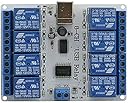
The SainSmart USB Eight Channel Relay Board is a 12V automation powerhouse featuring 8 SPDT relays capable of handling up to 120 watts. Designed with extra PCB openings for improved voltage isolation and doubled high current tracks, it ensures reliable and safe operation. Lightweight and compact, it mounts easily on PCBs and is fully supported by dedicated software, making it ideal for personal home automation projects.




| ASIN | B0093Y89DE |
| ASIN | B0093Y89DE |
| Brand Name | sainsmart |
| Coil Voltage | 12 Volts |
| Connector Type | Solder |
| Contact Current Rating | 10 Amps |
| Contact Material | Copper |
| Contact Type | spdt |
| Current Rating | 10 Amps |
| Customer Reviews | 4.2 4.2 out of 5 stars (111) |
| Customer reviews | 4.2 4.2 out of 5 stars (111) |
| Date First Available | 8 September 2013 |
| Is Discontinued By Manufacturer | No |
| Item model number | 8541582310 |
| Manufacturer | SainSmart |
| Manufacturer | SainSmart |
| Maximum Switching Current | 10 Amps |
| Maximum Switching Voltage | 12 Volts |
| Minimum Switching Voltage | 11 Volts |
| Model | 8541582310 |
| Mounting Type | PCB Mount |
| Operation Mode | Automatic |
| Part Number | 11601 |
| Product Dimensions | 12.19 x 9.4 x 3.2 cm; 118 g |
| Unit Count | 8.0 Count |
| Wattage | 120 watts |
G**S
I purchased this to switch contacts in a data acquisition setup. It works well, all relays function correctly. The 'Relay Manager' program that you can download from the link (and their website) works perfectly. I am having only one issue. I am using LabVIEW to control the board and I cannot get the given (from the download link) library files to open the board. That is, I can run the Open file and get an OK error status in return (it will return various error statuses, depending on the result) but the board will not actually open. I can get the device description, location and handle, but no communication connection. I tried a USB sniffer to check the data going over the port but couldn't seem to find what I was looking for. I contacted the company and was given all the information that I already had. They were very prompt and courteous, but no real help. I never spoke with a programmer, only a secretary or some such. The problem may be with LabVIEW but seems to be some command that I don't know since I can send other commands correctly. I am running Windows 7 and that may be an issue since the library files were written several years ago, although they have stated that they are compatible with this version of Windows and I am not having any other problems. Anyway, my solution (until I can figure out what to do) is to open the board with the 'Relay Manager' and then send commands to the board as I like using my LabVIEW program. I only have to open the board once until I restart my computer and can close the Relay Manager (the initial handshake, whatever it is, remains) and open and close LabVIEW as often as I like with no problems. Now, I had to experiment to find the commands to turn the relays on and off because I could not get their supplied commands to work. I tried and tried and might try some more later but I found what I need through trial and error so it's not an urgent issue right now. As an example, the company said to use FF 01 01 to turn on channel 1. I couldn't get that to work and use 11 instead. So, since the problem seems to be with my programming (although the given D2XX commands don't list anything to cover how to get an initial handshake and I have installed all of the necessary .net files and various drivers) I know that the board works (since their program works well) and I have found the commands to do what I want... I will give it five stars. The board is capable of allowing interface with external switches and will be very useful once I figure out how to get full control over it. edit: For those that are interested, I found the commands for this board (chip). I got a little time and decided to make a program like the one that is provided by the company. I was (once again) trying in vain to get their commands to work and finally just decided to try everything. Well, it turns out that it's pretty simple. After various combinations I found that the on/off state of the switches (relays) are simply represented by binary code from 0 to 255. That is, 00000001 (1 decimal, 01 hex) gives relay #1 on (rest off); 11111111 (255 decimal, FF hex) gives all relays on; 00101101 (45 decimal, 2D hex) gives relays 1, 3, 4, 6 on and the rest off; etc. Also, the communication problem was likewise easily fixed with a little attention to detail. Have fun.
V**E
Purchased for use with a virtual pinball cabinet. This is the 8 relay usb board that is recognized by the DOF software. The board comes with no manual, so you will need to go to Sainsmart’s website to get the driver and manual (the driver is in the same zip file as the manual). Everything worked perfect upon the driver install in windows10, and now i have 8 channels to plug in force feedback devices. Don’t forget to wire in diodes to any solenoids or contactors you hook up to this board or you will get flyback voltage which will cause usb disconnects.
E**G
set this up for dof with my virtual pinball table. works easily. if you have issues with it disconnecting check the solenoids you are working.
C**E
As described
S**N
Board is not very thick and mounting holes are too close to the site terminals so it's very difficult to secure. More importantly, they don't include a USB cable and make no mention of this in the description! Feels misleading when I need to spend another $20cad
Trustpilot
1 week ago
1 month ago