Buy anything from 5,000+ international stores. One checkout price. No surprise fees. Join 2M+ shoppers on Desertcart.
Desertcart purchases this item on your behalf and handles shipping, customs, and support to KUWAIT.
⌨️ Elevate your typing game—comfort and control in every keystroke!
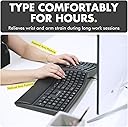
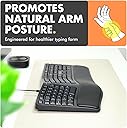
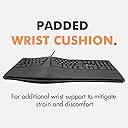
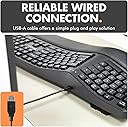
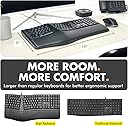
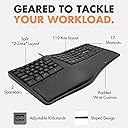
The X9 Wired Ergonomic Keyboard features a 110-key split design with a cushioned wrist rest, engineered to promote natural hand positioning and reduce fatigue. Its 5-foot USB cable ensures reliable plug-and-play connectivity across PCs, laptops, and Chromebooks. With mechanical switches delivering quiet, tactile feedback and an adjustable kickstand for personalized ergonomics, this keyboard is built for professionals who demand comfort and productivity during long hours at the desk.


| ASIN | B08FMMGMPN |
| Additional Features | Ergonomic, Integrated Stand, Split Keyset Design, Wrist Rest, wave keyboard for pc and external laptop |
| Antenna Location | Business, Education, Everyday Use, Home, Office, Personal |
| Best Sellers Rank | #179 in Computer Keyboards |
| Brand | X9 Performance |
| Built-In Media | USB Cable |
| Button Quantity | 110 |
| Color | Black |
| Compatible Amazon Tablet Models | Amazon Fire HD 10 11th Generation, Amazon Fire HD 10 13th Generation, Amazon Fire HD 10 5th Generation, Amazon Fire HD 10 7th Generation, Amazon Fire HD 10 9th Generation, Amazon Fire HD 10 Kids 11th Generation, Amazon Fire HD 10 Kids 13th Generation, Amazon Fire HD 10 Kids 7th Generation, Amazon Fire HD 10 Kids 9th Generation, Amazon Fire HD 10 Kids Pro 11th Generation, Amazon Fire HD 10 Kids Pro… |
| Compatible Devices | Laptop, Lenovo, Dell, Linux, HP, Microsof Surface, Acer, Asus, Samsung, Chromebook, Alienware, Razer, LG, PC Compatible Devices Laptop, Lenovo, Dell, Linux, HP, Microsof Surface, Acer, Asus, Samsung, Chromebook, Alienware, Razer, LG, PC See more |
| Compatible Operating System Family | ChromeOS, Windows |
| Connectivity Technology | USB-A , Wired |
| Customer Reviews | 4.3 out of 5 stars 1,682 Reviews |
| EU Spare Part Availability Duration | 2 Years |
| Enclosure Material | Plastic |
| Generation | Wired Ergonomic Keyboard |
| Hand Orientation | Ambidextrous |
| Item Dimensions L x W x H | 19"L x 9.85"W x 1.5"H |
| Keyboard Description | Ergonomic Split Keyboard |
| Keyboard Layout | QWERTY |
| Manufacturer | X9 Performance |
| Mfr Part Number | X9ERGOKEY |
| Minimum Required Operating System Version | ChromeOS 137, ChromeOs 134 |
| Model Name | X9ERGOKEY |
| Model Number | X9ERGOKEY |
| Number of Keys | 110 |
| Number of Sections | 2 |
| Power Source | USB |
| Recommended Uses For Product | Business, Education, Everyday Use, Home, Office, Personal |
| Special Feature | Ergonomic, Integrated Stand, Split Keyset Design, Wrist Rest, wave keyboard for pc and external laptop Special Feature Ergonomic, Integrated Stand, Split Keyset Design, Wrist Rest, wave keyboard for pc and external laptop See more |
| Style Name | Contemporary |
| Switch Type | Mechanical |
| Theme | Ergonomic Keyboard |
| UPC | 701107499505 |
| Unit Count | 1.0 Count |
Н**Й
So far, a very solid and quiet keyboard suitable for big chested humans
08/25/23 - Update - Very happy with this keyboard. I wear hearing aids and my old (and abused) keyboard made a tremendous racket. I quickly adapted to this specific layout and other than missing my center keys on the 4000, this has been a very good purchase with a convention layout. No weird keys in strange places. With a great deal of regret, I was forced to replace my 9 year old MS 4000 Natural Keyboard, which Microsoft discontinued years ago. They are still available, but sellers are asking $800 !!! for NEW models. I simply won't play that game. Used ones are always a gamble My own keyboard had millions upon millions of keystrokes and was falling to pieces. It also was deafening when I was doing high speed typing. With a hearing aid, the racket was insufferable. So, after giving up my pursuit of a new MS 4000, I stumbled across this very inexpensive similar style keyboard. This model has a split space bar which takes a minute to get used to, but after a couple days I'm back up to my usual speeds. The key touch is very soft which my cracked finger tips love. Even under a full on ten fingers of doom assault, this keyboard remains amazingly quiet. Perfect if you share a room with others. The cord connector is standard 5' long USB. I did not find a wireless model which I would have preferred. The palm wrest pad feels very high quality and hopefully will hold up for a very long time. The overall footprint is about the same length as the MS 4000, but the width is about 20% smaller, which on my TIny Desk (tm) frees up some much needed room. The layout itself is bog standard, so you have a middle group that handles the nav keys and a right group that is a standard keypad. No funky, weird layouts. Standard complement of 12 F keys that do double duty. Status lights are very small and discrete, and nicely located at the top of the keyboard. They are not obnoxiously bright like other keyboards, and the placement makes it a snap to see key status. The keys are a comfortable size with a tactile feel. Travel length is good. All in all, I am really liking this keyboard. So much so that I may want to buy another one for when I inevitably kill this new one. You can also raise the back of the keyboard, which makes it easier to type on. As a person with a very big rib cage, I simply cannot use any other style of keyboard. I look forward to years of use with this pup. Definitely a five star rating. Does anyone want to buy my small wireless MS Keyboard + Mouse????
G**C
Simple, Functional, Quiet & Comfortable for those who value the feel of older MS natural keyboards
--X9: I am very pleased with this X9 Ergonomic Performance Wired Keyboard. It is a less known brand and there are not many online video reviews, but it exceeded my expectations! The build quality is good enough, but of course not on the level of some mechanical keyboards. The keys are quiet when you type, which I prefer. The layout is close enough to the old MS Natural Keyboards from the 1990s, to make adjustment easy, and I like how the keys close to the center (like T-G-H-N) are wider. It has the little notches on the F and J keys which are a must for me, as I do not need to look at the keyboard when typing. It has some texture on the key surfaces, so your fingers do not easily slip off. Pressing the FN+ESC, lets you access operating system functions like Volume Mute on F11, which is quite useful; and a Windows Calculator toggle above the numpad. --Adesso: I also have a comparably priced, Adesso Ergonomic Wired Keyboard, which I also like, but when I first bought it, the Backspace Key would sometimes not respond; it has a smoother key surface (therefore not as firm of a finger hold), and noisier when you type. The build quality is also a little lower than the X9, but it gets the job done. The hands placement is more squished in and angled than the X9. --X9: Overall, I would highly recommend this affordable keyboard for daily: office use, internet browsing and casual gaming. Thank you X9 Company for making this simple, functional, affordable, responsive, comfortable and satisfying: wired ergonomic keyboard!
J**E
95% perfect - comfy, durable, productive; function keys could use improvement
The Good: almost-perfect replacement for the venerable Microsoft Ergonomic 9000 Keyboard, for a fraction of the price. Slightly clicky keys, the perfect balance between feedback and not annoying everyone in earshot. Nice integrated wrist rest. Good key spacing and bright lettering. Durability is good too - it's been dropped a couple of times, I've taken it on road trips (working in hotels / on-site), it's been months and it's still functioning perfectly. The Bad: the function keys + media functions being integrated in the same key row, with a 2-button key press required to switch between them, is EXTREMELY annoying. You have to press Function+Escape to switch modes, and short of a tiny green dot light, there is no indicator of which mode you're in. So for example, if you're listening to music and have it in Media Functions mode, and need to rename a file, pressing F2 is NOT going to get you to Rename, it's going to open the E-mail client. So you have to curse, look for the 2 keys to switch modes, press them, close the E-mail client, go back to the file folder, and only THEN be able to rename the file. Totally breaks the concentration flow. Please, X-Performance, make a keyboard with a SEPARATE, PHYSICALLY DIFFERENT row of media keys, just like Microsoft 9000 has. You've made a beautiful replacement, and F'ed up the last 5% of it. Please don't fall for the "lowest common denominator" mentality that replaces everything with the smallest & dumbest options. People who WORK on computers, WANT multiple keys. There are keyboards with 100+ keys out there, and believe me, people WANT them. I'm not asking for a 178-key Hyper7, but FFS make the volume controls a separate row so they don't mess up productivity. Other than that, literally a perfect ergonomic keyboard for the price. 4.8 stars.
E**T
Comfortable to use, fits my hands!
I work from home 4 days a week and go into the office 1 day a week. I had a keyboard from work to use while in office, but hated it. Even though it is "ergonomic", it is very cramped and feels more like trying to type on my laptop keyboard. I am a touch typist, and have used ergo keyboards for decades now (MS Naturals was a fave). This X9 keyboard reminds me of a lot of what I loved from my old MS Naturals. The touch is soft and very comfortable and the key layout works perfectly for my touch typing. Definitely give it 5 stars. It really is a great keyboard at a very good price.
A**C
Ergo keyboard with an actual 101 key layout and low activation force.
To avoid "product switching" scams, this review is for: X9 Ergonomic Keyboard Wired with Cushioned Wrist Rest - Type Naturally and Comfortably Longer - USB Wired Keyboard for Laptop with 110 Keys & 5ft Cable - Split Keyboard for PC, Computer Ergo Keyboard I'm very happy with this keyboard. It's nearly identical to a standard 104 key keyboard. The only change is the fn key on the right, which isn't an issue at all. The keys are actually low activation force which is fantastic. Quite frankly, I really don't understand why so many "ergonomic" keyboards require pressing so "hard". It's inexpensive and very much worth the price. I'm comparing this keyboard to the other keyboards I own: MS Sculpt wireless: Low profile keys are annoying. Non standard layout and detached numpad (which can slide around on use). Wireless can be a security issue for some environments. MS 4000 series (v1) [discontinued]: High activation force. MS Ergo (v1878): Non standard layout. Easy to hit the wrong key due to how it is laid out. I physically removed some of the keycaps to stop this. Kinessis Freestyle 2: Non standard layout. No numpad. Good keys. Great for people with really big backs though. Several mechanic keyboards, but none of them are split. All of them have great key feel. I don't recall the names of the keyboards I have returned. There were three of them I think.
R**S
Decent Keyboard, but Quality Issues with Wobbly Feet
This is my first time writing a review on Amazon, but since this is a product that is important to my daily life, I thought it would be worth sharing my experience with others. The first keyboard I received came with a key that was partially broken, and the keyboard itself wobbles and is unbalanced on the feet at the bottom. I asked for a replacement (X9's service) was very fast, but in the end they decided that it was best to ask Amazon for a replacement. I received a new keyboard, and I discovered that it also wobbles. It seems that the imbalance between the feet simply makes for a low-quality product, although the keyboard and keys themselves are comfortable to use, and as others have said, is very reminiscent of the Microsoft keyboard experience. It takes a few days to get used to, but if your previous keyboard has died, then this keyboard provides a worthy replacement, but you have to remember what to expect. I doubt this keyboard will last as long as Microsoft's.
P**H
Good keyboard. Nice feel.
I am surprisingly happy with this ergonomic keyboard. The touch of "feel" of the keys is quite nice. The padded wrist pad is also good. Overall, my expectations were low, but I am glad I ordered this. Incidentally, after two conflicting emails on arrival date, it came sooner than predicted.
F**K
Will Not Lay Flat On A Desk Top - Rocks Back And
This keyboard works well enough, but it will not lay flat on my fine furniture desk top. I've had to add folded printer paper to one side of the fold-down tilt supports just to stop it from rocking back and forth which is very annoying. So, only 4-stars. It's also a bit tight for my hands, and my hands aren't particularly big. But I won't deduct for that since I will get used to this. But it's not nearly as nice a my old MS Ergonomic keyboard. They are now way too expensive. For the price, this is 4-stars.
J***
nice keyboard!
am using it for several months already. good quality and keys also are soft
P**R
Good product
I like it a lot, keeps your hands in a natural position
P**X
Still holding up after years of use
Three years since my purchase, I'm still using this keyboard daily without issues. I find the spacing very ergonomic and comfortable, and the palm rest is well-angled and better quality than many other keyboards I have used. The key layout is logical and intuitive, and includes extensive functional keys, including volume, calculator and backlighting. Best keyboard I have ever owned. Five stars.
C**S
me encanto salvo que no esta en español y eso a veces me.confunde
Hasta el momento muy buena calidad, sólo falta que me acostumbré a la forma, y que realmente me ayude a mitigar el daño por túnel carpiano, por cierto no me fijé y viene teclado en inglés así que no trae la ñ, es lo único que deben checar.
A**A
Muy comodo
Excelente teclado por la parte de ser cómodo, incluso para jugar ha sido excelente. Lastima que no venga una versión en español pero no le resta punto, lo compraría nuevamente
Trustpilot
3 weeks ago
2 months ago