📺 Take back control—because missing remotes are so last season!
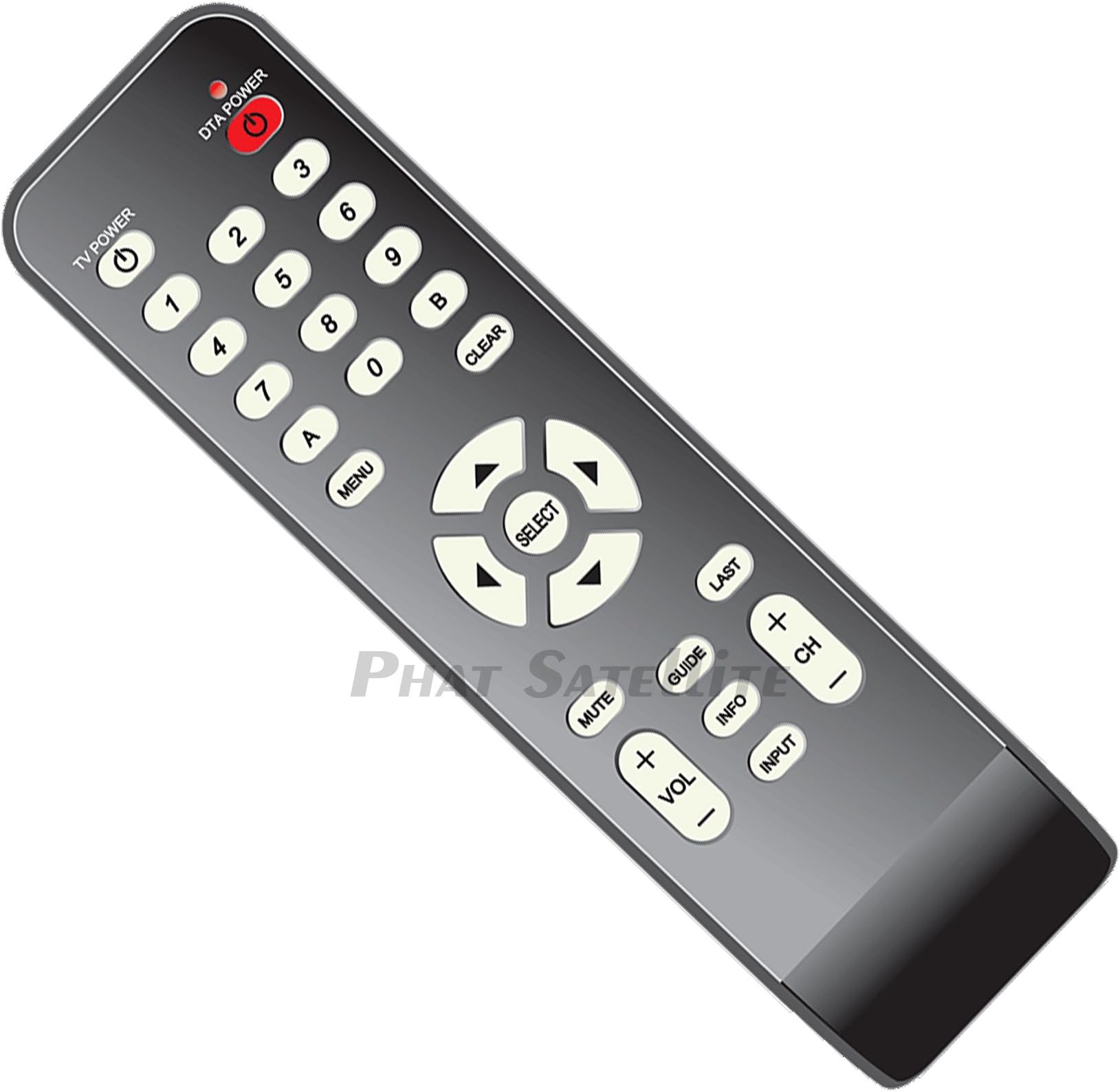
The PHAT SATELLITE TWC Time Warner Cable Box Technicolor DTA Remote Control RC2843004 is a budget-friendly, infrared remote designed specifically for Time Warner Cable boxes. It supports programming for up to two devices, features an ergonomic button layout, and offers a straightforward pairing process to replace lost or malfunctioning remotes quickly. Batteries not included.
| Best Sellers Rank | #460,431 in Electronics ( See Top 100 in Electronics ) #40,444 in Remote Controls (Electronics) |
| Brand | TWC |
| Compatible Devices | Television |
| Connectivity Technology | Infrared |
| Controller Type | Button Control |
| Customer Reviews | 4.4 out of 5 stars 50 Reviews |
| Max Number of Supported Devices | 2 |
| Special Feature | Ergonomic |
N**Y
Paired Quickly and Works Great!
Somehow, my TW remote walked away 3 weeks ago and is still MIA. Very happy to find the same remote here, so I bought two, just in case! Thankfully, I still had my old TW pairing instructions. Paired up like a charm last night and is working great. For those who do not have pairing instructions... Setup Remote to Control the Digital Adapter Step 1 Turn on your TV. Make sure power is connected to the Digital Adapter and it is plugged into the TV. Note: Your TV must always be set to the proper channel (Ch 3 or Ch4) or HDMI Input to match the output channel on the back of your Digital Adapter. Step 2 Install the batteries in your new remote control. Step 3 N/A Step 4 Press and hold both DTA POWER and SELECT keys at the same time. Once the red light on the remote turns on, then release both keys. Wait 10 seconds, a 3 digit validation code will display on the TV. Step 5 Enter the 3 digit code using the Digital Adapter remote. When remote is successfully paired with the Digital Adapter, the remote's red light will blink twice. Proceed to... Setup Remote to Control the Television Step 6 Press and hold both Digit 1 and Digit 3 keys together until the red light turns on. Release both keys. Keep your eyes on the Remote so you can watch the red light. Step 7 Point the new remote at the TV. Press and hold the TV POWER key. The remote will start searching for the right code while you are holding this key. When the TV turns off, release the key within 2 seconds to lock in the code. Step 8 Point the new remote at the TV. Press TV POWER on your Remote to turn on your TV. if your TV responds (turns on) then you have successfully programmed your remote. The setup of the Remote is now complete.
M**S
Exact replacement for my Mediacom HD box.
Great exact replacement for my Mediacom HD box remote. A couple of the buttons on my original remote quit working and Mediacom doesn't offer that box any longer. What they do offer costs more per month. (Surprise!) I bought one of these for just over 4 bucks and it worked perfect after pairing it to my TV and HD box. In fact I bought two more for my other two Mediacom boxes in case they go bad. Highly recommend!!
M**E
EXCELLENT....
Worked Perfect & was an Excellent Value...... mvc
P**R
Works perfectly
Satellite TV receiver stuck on one channel, and unable to be changed to another one? That was my father-in-law's dilemma the other day, when he accidentally threw away (don't ask) his remote control. With football playoff games imminent, and the channel needing to be changed to watch them, what to do? This replacement remote control saved the day, and then some. We ordered this two-pack so dad-in-law could have one, and we'll keep another one here at our house -- just in case his goes missing again. These remotes work perfectly. They arrived with clear printed instructions, including how to program the remotes to your TV set. They even came with batteries. So those football playoff games didn't end up the way we wanted, but father-in-law's TV is back in business. And that's all that matters.
S**N
Works great and costs less
Works great and costs less than if I'd bought it through the provider. Glad I ordered it for my beach condo rental.
D**E
Good quality, but can't get to program...
Instructions with the device list codes, but no instructions on how to put device into programming mode. Found these instructions online: http://www.timewarnercable.com/content/dam/residential/pdfs/support/pyr/technicolor_digital_adapter_remote-programming_instructions.pdf But still not able to get it working with my TV...
D**R
Great remotes, user friendly.
Works great, great value for the money. I bought 3 remotes as spares. Easy to pair to my TVs.
S**5
Worked right out of the box
So happy to finally have a remote again (apparently the other one joined the socks and other things of lost with no return). It worked with our Spectrum (previously TWC) box right away, even included 2 batteries. Great deal!
Trustpilot
1 week ago
1 month ago