
Desertcart purchases this item on your behalf and handles shipping, customs, and support to KUWAIT.
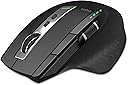
🖱️ Elevate your workspace—connect, control, and conquer with Rapoo’s ultimate multi-device mouse!
The Rapoo MT750S Bluetooth Wireless Mouse combines cutting-edge laser tracking with 4 adjustable DPI settings and an ergonomic design tailored for right-handed professionals. Featuring seamless multi-device connectivity (3 Bluetooth + USB), an 800mAh rechargeable battery lasting up to 30 days per charge, and 8 fully programmable buttons, it’s engineered to boost productivity across laptops, desktops, and tablets. Ideal for multitasking millennials craving precision, comfort, and efficiency in one sleek matte black package.


| ASIN | B08RZ2NLSK |
| Additional Features | 4 Adjustable DPI, 8 Programmable Buttons, Connect Up to 4 Devices, Ergonomic Design, Rechargeable |
| Antenna Location | Office |
| Battery Average Life | 3 months |
| Best Sellers Rank | #1,277 in Computer Mice |
| Brand | Rapoo |
| Button Quantity | 8 |
| Color | Matte Black |
| Compatible Devices | Personal Computer |
| Connectivity Technology | Radio Frequency , USB |
| Customer Reviews | 4.0 out of 5 stars 959 Reviews |
| Enclosure Material | Glass |
| Hand Orientation | Right |
| Hardware Platform | Linux, Mac, PC |
| Included Components | Rechargeable battery, USB-B cable, Nano USB Receiver |
| Item Dimensions L x W | 4.8"L x 3.35"W |
| Item Type Name | Computer Mice |
| Item Weight | 116 g |
| Manufacturer | Shenzhen Rapoo Technology Co., Ltd. |
| Mfr Part Number | Mice |
| Model Name | MT750S |
| Model Number | MT750S |
| Mouse Maximum Sensitivity | 3200 dots_per_inch |
| Movement Detection | Laser |
| Movement Detection Technology | Laser |
| Number of Batteries | 1 Lithium Ion batteries required. (included) |
| Number of Buttons | 8 |
| Operating System | Windows |
| Power Source | Battery Powered |
| Range | 10 meters |
| Special Feature | 4 Adjustable DPI, 8 Programmable Buttons, Connect Up to 4 Devices, Ergonomic Design, Rechargeable |
| Style Name | MT750S |
| Theme | office |
| Unit Count | 1 Count |
| Warranty Description | 1 year Warranty |
C**Y
My Favorite Mouse
This is an excellent Bluetooth mouse that is rechargeable. The charge lasted so long that I was trying to find the battery compartment because I forgot it was rechargeable. IMO the best thing about it is that it easily connects to my HP laptop, iPad, and Windows based desktop with just a click of a button. I haven’t used a mouse with an ipad before but it comes in pretty handy sometimes. The shape is very comfortable and it has a little more height than most which I like. It has a thumb roller to scroll with or you can use the roller on the top. I would buy again but it has been built to last.
E**I
Good replacement for the LG G602 mouse
i have had about 5 LG G602s over the past few years.. how ever long they have been making them. loved that mouse but they would eventually just die on me in some way. well i didn't have a back up one and they were not on sale at the time and i needed a new mouse and i didn't want to spend 100 bucks on one. ran across this lil guy and its a darn good replacement for the LG G602. its about the same size and fit (for my hand) the only thing its missing is the extra thumb buttons that i do not use any more anyways. this is a great lil wireless mouse. the only thing im not too certain on is the rechargeable battery, we will have to wait and see how long it lasts before not charging any more. the only gripe i have about this mouse is its charging port, the spot where you plug in the charging cord. i wish it wasn't pushed in so far and was more flush with the end of the mouse. the reason for this is because i cant use my magnetic connector on it, its indented just enough to where the magnetic plug cant fit in because it goes in too far. it would also be nice if it were USB type C just because it never goes in correctly first 3 times so you have to keep flipping it over until it decides ok ill go in now.
G**N
Great Mouse, horizontal scroll wheel is awesome, clicks are loud
The mouse is comfortable, the inclusion of a horizontal scroll wheel is fantastic. That's so much easier, faster, and more comfortable than tilting the vertical scroll wheel left and right, at least for me. The Bluetooth works for me on this mouse, where it did not on an older Rapoo mouse with the horizontal wheel -- on that, it would disconnect after several minutes and had to re-pair to restore connection. They seem to have fixed those issues with this iteration. Movement is precise and worked on every surface I tried. Battery life seems great, but I confess I've not tried to run it to dead. I grabbed a Gen 10 magnetic USB charger and generally have it recharging whenever I'm not using it. Love that it's rechargeable. I hate replacing batteries. Negatives: I use this as a travel mouse. I need those to be quiet so they don't wake my spouse when we travel together. This mouse clicks loudly. For those who don't care about that, ignore this as a negative. It's not much worse than mice, maybe a little louder than a typical Logitech mouse. But if you wanted a quiet mouse, this is definitely not it. Price relative to number of buttons seems too high. For what you get with this mouse, it would be a better buy at $30 - $45. At the $52 I paid, I think it's too expensive for what you get. At that price, I'd expect a couple of extra buttons or programmable keys. But it's not hugely expensive, so this is a minor complaint.
D**X
great for looking at prints
I work in the construction trade and I am always having to go over prints. I absolutely hate looking at prints on the computer due to the fact I have to jump around with a mouse it takes forever. up until this mouse i have always ordered my prints in full size costing me between 80 and 400 a job. when I got this mouse it solved all my issues I absolutely love it! looking at prints now is super easy and fast! and to make it even better this mouse is hooked up to both my computers. I have 3 screens on one computer and 4 screens on the 2nd and I can hop back and forth between computers with a click of a button. best investment to my computer set up since the 2nd computer!!
L**N
Not comfortable and did pair with two of my phones
I bought this item because according to the item review the item suppose to be compatible with iphone and android phones but I could not get this mouse connected to none of them. First, tried to connect it to my iphone mini which runs OS 16 and it would not pair then I thought maybe was because it is an iphone and a lot of items are not compatible with iphones. Then, I tried connecting it with my Samsung 10e and it won't connect either. I tried connecting with all the channels but none would connect. I did connect it to my pc which was the only thing I could connected to. The second issue is that the mouse it is slightly tilted to a right angle this to me causes me more hand fatigue than regular mouses. I have two other brands that are slightly tilted to the right side and they also cause me hand fatigue. I do not think that the slightly tilted to the right ergonomic actually helps everyone or maybe it helps some people with less chronic issues. I have carpal tunnel syndrome and elbow tendonitis on both elbows and hands and been having issues since 2016. I have bought a number of mouses and they all come tilted to the right side which for does not feel very comfortable after continue usage. The last issue is that it comes with a software that only allows you to customize the main buttons if you select bluetooth I did not even bothered to use the receiver option to see if it allowed for more options. The customization for me was quite confusing and did not worked well for me either. To not make this overaly negative, on the positive side, the item comes as stated in a box with a receiver. The manual was not very helpful so I ended up looking for information on how to use it on Youtube. The price is reasonable if you get it to work with your phones. The item worked nicely on my pc with no issues. If I recommend it? Maybe if you want to try it but I won't swear that it reliefs hand fatigue or helps with carpal tunnel or elbow issues. It is not comfortable and you can only use it with your right hand because it made to be used for one hand only. Anyways, the item is below ok. Returned it and back to searching for other options. Sadly, I ended up returning it.
T**L
Worked flawlessly for about 6 months
I loved this mouse while it actually worked. Very precise, no noticeable lag, I'm a daily computer user and probably only charged it once. Then after 6 months it just started glitching. The mouse started dragging and I couldn't get it to move in a straight line, thinking it must be dying I plugged it in but it didn't help at all. I checked all the drivers, everything is fine and up to date, it just stopped working correctly. Its a shame because its a really nice mouse but not worth repurchasing if its only going to last a few months.
T**S
If you can pick it up for $40, do it!
It is very similar to the original MX Master, with better placement of the forwar>><<backwards buttons. I just can't justify $100 mouse, i'm sorry, It's silly! I can buy an 8 core/16 thread Mini PC for $400 and a mouse for a quarter of the price? This mouse fits my rather large hands with no problem, tracks smooth and straight and the buttons have enough resistance to sense that they were pressed. Scroll wheel feels good and is precise, does not have the infinite scrolling as in the MX mouse, FYI. Only draw back is the micro USB instead of USB C. Might buy another one before mouse prices jump to $200 with the optional right button for additional $50.00...
R**D
Frustrating scrolling, even after cleaning
tl;dr: erratic scrolling even after cleaning, Sigh. With good reviews, a large size for a Bluetooth mouse, side-to-side scroll, a chargeable battery, and no weird add-on software, I thought the Rapoo 4 would be a decent mouse for ordinary Web browsing , word processing, and the like. Unfortunately, after light use for a few months, it's turning out to be ... annoying. Problem #1: The big issue: scrolling up and down is *very* inconsistent. Even though my finger speed might be consistent, I never know what speed to expect from the mouse. A few scroll wheel detents up at any speed faster than a snail's pace, and sometimes a Web page will jump down several lines, sometimes it'll jump down one line, sometimes it'll jump up, and sometimes it won't move at all. Usually, this means the battery is weak, there's radio interference, or the internals are dirty. Even after charging, taking the mouse apart (also frustrating, because four of the six tiny bottom screws are hidden behind the mouse feet or glides), spraying the scroll wheel internals with canned air, reassembling, and connecting via wireless USB instead of Bluetooth, the problem didn't go away. The erratic scrolling speed makes the mouse unusable for me, even as a backup. Problem #2: When connecting through Bluetooth, whether I'm on a Mac or PC, the battery charge is *always* 85%. It never changes. Problem #3: Cheap ABS plastic. For me, the left mouse button developed a shine after about a week of light use. Really, the same kind of wear and shine that I'd get on the spacebar of a cheap ABS keyboard after about six months. Problem #4: the markings on the little DPI and Bluetooth buttons are very difficult to see. The pros: It's large and comfortable. The click and scroll wheel action at least feels nice, even though scrolling consistency is pretty much nonexistent. (Kailh switches, for what it's worth.). Anyhow, a mouse that's US$39 or $49 or whatever shouldn't work and wear down like a cheap $2 wired mouse. You can buy a good Logitech mouse for about the same price as the Rapoo, if not a little bit more.
B**9
Worth the price.
I have both this and the more expensive competitor mouse. Pros: Cost, feels comfortable,has almost all the features as it's 2 or 3 times more expensive competitor. Battery life is fantastic. Con: no software for customization If you just need a solid wireless mouse with side scrolling for excel, I am impressed and a big advocate of this mouse. I purchased the more costly competitor for the wife and bought this one for me. It is just as good.
S**.
جيد لكن الشاحن ليس Type-C
بشكل عام جيد وثقيل والشحن بيقعد فترة طويلة وكل الزراير شغالة كويس بس كنت أتمنى لو بيشحن Type C في الفئة السعرية دي بدل الشاحن ال USB-B اللي فيه. لكن غير الشاحن ممتاز والشحن بيقعد شهر استخدام متواصل ولا تقلق منه
P**O
PC台を切り替えが出来てお安い・・・GooD
2024.01.13追記 MSのPowerToysの境のないマウス機能と協調させると、すごく便利になりますね、違うPC同士からコピペができるという、クリップボードが共有できる点です。当然ですが、境がないので、違うPC間をシームレスに移動出来ますし、このときマウスのPC切り替えボタンを操作する必要がありません。 また、この機能はPCが完全に立ち上がった状態で機能しますので、PINコードや暗証番号を入力する画面では機能しませんが、このマウスの物理ボタンでPCが選択できる点がとても便利です。 そして、4台PCありますが、起動しているPCの数に関係なく起動しているPCをマウスのPCの切り替えボタンで選択するれば、問題なくPoweToysの機能を使える点がよいですね。 PC4台を切り替えたく、ロジクール製マウス(PC3台切り替え)から入れ替えしました。 PC切り替えボタンがセンター位置にあるととても便利ですね、ロジクール製は裏返ししえ切り替えだったので、とても使い勝手が良くなりました。確かに、ロジクール製はPC切り替えをマウスを動かすことでも切り替え可能なんですが、これが意外と使い勝手が悪く、カーソル位置を見失い今、どのPCに繋がっているのか分からいことが多く、また、意図しないのに勝手にPCが切り変わっていたという、ストレス溜まりまくりだったので、このマウスでこれらの問題が解決で、とてもハッピーになりましたね、でも、ロジクール製も使い方次第では、すごく便利で良いマウスです、個人的な使い方が合わなかっただけです。 マウスのボタン配置がこれまでの配置が少々違ったおり、進む・戻るのボタン位置が、左クリックの隣に来ており、進むと左クリックを一緒に押してしまいます、この点だけが慣れるまで修行ですね、それ以外は全く問題なしですね。 価格がだいぶ熟れたか、3000円台で購入出来たので、コスパ最高でした。この価格ならお勧めなアイテムです。
S**R
Amazing battery life and connectivity
I purchased this on 22 January 2024. Today, 12 October 2024 is when it finally discharged. Did not even once need to even connect the charger. It has been working smooth and without any issues whatsoever. Have connected multiple devices and it switches seamlessly between the devices. Even after going to sleep after not being used, it connects back to the devices instantly. You won't even feel that it was in sleep mode, the connection back to the laptop is so fast and seamless. I have used many options available in the market, however the ergonomics on the Rapoo is far better than the competition in the market. The MX Master is the leading product, however Rapoo seems a better choice considering the competitive price and basically the same features and ergonomics. Best option in the market if you can't afford Mx Master.
ア**助
名より実を取るコスパのよい選択肢
長年使ったLogicoolのMX Master2Sが分解修理しても不安定になったので、仮に耐久性半分でも半額なら合理的な選択だろうと考えてこちらを選択。 マウスポインターの精度は違和感ないレベルでしたため期待を上回りました、お値段以上です。一方で縦横スクロールホイールはかなり荒い動きでチャタリング?のような挙動を示すことが多くてこちらは値段相応という印象。また高速スクロール切り替え機能が無いことに慣れるのには1年以上がかかりました。バッテリーも持ちが体感3割増しでよいことと、MX Masterより一台多い4台のPCを切り替えて使えるのは期待を上回る価値がありました。操作性に関してはMX Master代替としては割り切りが必要と思いますが、大筋で必要十分だったというのが購入二年後の総評です。 あと、一年半程度で左クリックにチャタリングが症状が出始めて、二年を前にして許容できないレベルに悪化したために、分解して接点復活材をジャブジャブと塗ったところ、気持ちよく復活しました。値段が安いので思い切りよく試すことができたのが功を奏しました。自分でメンテできる余地があったので★加点です。
Trustpilot
3 days ago
1 month ago