Desertcart purchases this item on your behalf and handles shipping, customs, and support to KUWAIT.
🎯 Upgrade your ride, keep your control — no compromises, just pure convenience!
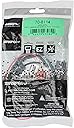
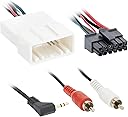
The Metra 70-8114 Steering Wheel Control Wire Harness is a precision-engineered adapter for 2003 and newer Toyota, Scion, and Lexus vehicles with 20-pin connectors. It enables seamless retention of factory steering wheel controls and the original 3.5mm aux input when installing aftermarket radios with AUX-In capability. This harness eliminates the need for splicing, ensuring a clean, professional installation backed by dedicated tech support.

| ASIN | B0064J4LOM |
| Best Sellers Rank | #83,655 in Automotive ( See Top 100 in Automotive ) #207 in Car Electrical Wiring Harnesses |
| Brand | Metra |
| Brand Name | Metra |
| Cable Type | Auxiliary |
| Connector Type | RCA |
| Connector type | RCA |
| Country Of Origin | China |
| Customer Reviews | 4.2 out of 5 stars 1,170 Reviews |
| Global Trade Identification Number | 00086429230822 |
| Included Components | Metra Swc Add-On Harness With Aux-In For Toyota |
| Item Dimensions | 20.3 x 11.4 x 1.3 centimeters |
| Item Type Name | Metra 70-8114 Steering Wheel Control Wire Harness with RCA for 2003-Up Select Toyota/Scion/Lexus Vehicles |
| Item Weight | 0.03 Pounds |
| Item dimensions L x W x H | 20.3 x 11.4 x 1.3 centimeters |
| Item weight | 0.03 Pounds |
| Manufacturer | Metra Electronics Corp |
| Material | METRA 70-8114 Toyota(R) 20-Pin Steering Wheel Control Add-On Harness with RCA |
| Material Type | METRA 70-8114 Toyota(R) 20-Pin Steering Wheel Control Add-On Harness with RCA |
| Model | 70-8114 |
| Number of Items | 1 |
| Part Number | 70-8114 |
| UPC | 086429230822 |
| Unit Count | 1 Count |
C**Z
2004-2010 CE / LE. Stereo replacement. This is the plug you are searching for.
Do you have a basic Toyota Sienna Radio (non-JBL), steering wheel controls (SWC) and a 3.5mm Aux input. Are you upgrading the Stereo and want to keep your SWC and Aux input working? This is the harness adapter you need. On my install I did not use the Metra Steering Wheel Interface (SWI) with this harness. I instead purchased the PAC SWI-RC. I cut off the black Metra plug from this harness and soldered on the correct wires from the PAC interface With the PAC you can change the function of your SWC buttons to perform other tasks. My van only has 3 buttons on the steering wheel, some have 7. For example when programming the SWI I made the mode button control, voice activation. For Apple CarPlay this is Key! One touch Siri from the steering wheel. The other part of this harness is the Aux input, connect the RCA's directly onto your new Stereo, another adapter my be required, and Boom there you go. Seamless install with everything still working.
L**F
Well made
Well made, didn't fit my car....everything is off normalcy in my car.
M**Y
Steering Wheel Control for Lexus GX470 No Axxess Box needed, No complicated programming.
My wife has a Lexus GX470 Non Nav / Non Mark Levinson Sound system. I replaced the factory head unit (Pioneer) with the Binize 10.1 inch Android HU. I got the Metra TYTO-01 kit to connect the new HU to the factory wiring harness, but the steering wheel controls for the GX470 (and likely the Toyota 4-Runner) are on a separate 20 pin plug that goes to the factory HU. Thanks to another user's review here, I was able to connect the Android (which has a SW1 and SW2 Wire) to the factory harness. Here's an excerpt of how to do it from the other user's review: For the 6 wires on the white connector, 3 are of interest. Black wire = GND (connect to GND wire of the new headunit - this is steering wheel controls GND not the main GND - you still need to connect the main ground of the HU). Green/yellow = SW1 / KEY1, green/black = SW2 / KEY2. With this, was able to get the steering wheel controls working with a new Android HU, easy as can be. (End Review) From the Binize Android Head Unit, you go to the settings page and there is a button (scroll down) on the left side that says steering wheel settings. Go in there and you will see various settings (eg. Volume Up, Volume Down, FFWD, RWD, GPS, etc.). Select the desired function onscreen and then press the steering wheel control button that you want to perform that function. I programmed Vol + Vol- Next track, Previous Track, and for the mode button I selected GPS (for which I have Waze set as my default GPS Navigator). The steering wheel controls work great and my wife is thrilled!
R**.
Worked perfectly.
Was the perfect fit. Plugged right into the interface and into the vehicle harness.
T**R
Very simple solution for AUX.
I tried wiring the AUX with a separate cable and there was always a delay. With this adapter, it allowed me to use the stock AUX port which seems to provide better quality as well as no delay.
Trustpilot
1 week ago
2 weeks ago