Buy anything from 5,000+ international stores. One checkout price. No surprise fees. Join 2M+ shoppers on Desertcart.
Desertcart purchases this item on your behalf and handles shipping, customs, and support to KUWAIT.
🖱️ Grip like a pro, game like a legend!
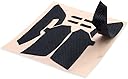
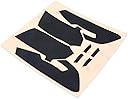
This anti-slip grip tape set is precision-cut at 0.6mm thickness to perfectly fit Razer Viper and Viper Ultimate gaming mice. It enhances control by preventing sweat and slippage while protecting the mouse’s paint from wear. The set includes top and side grip tapes plus alcohol wipes for easy, residue-free application, delivering a seamless, ergonomic upgrade that keeps your mouse looking and feeling fresh.
| ASIN | B08YF52RF3 |
| Additional Features | Improved non-slip grip |
| Antenna Location | Gaming |
| Are Batteries Included | No |
| Are Batteries Required | No |
| Best Sellers Rank | #10,311 in Video Games ( See Top 100 in Video Games ) #439 in PC Gaming Mice #2,013 in Mouse Pads |
| Brand | HUYUN |
| Built-In Media | 1 set Mouse Anti-slip Tape, 1pcs Alcohol Wipes |
| Button Quantity | 2 |
| Color | For Viper Grip tape |
| Compatible Devices | Razer Viper, Razer Viper Ultimate |
| Connectivity Technology | USB |
| Customer Reviews | 4.5 out of 5 stars 233 Reviews |
| Embellishment Feature | Button |
| Enclosure Material | Polyurethane |
| Finish | Matte |
| Hand Orientation | Ambidextrous |
| Hardware Platform | PC |
| Manufacturer | HUYUN |
| Mfr Part Number | HY-20200920 |
| Model Name | Viper Mini |
| Model Number | Razer Viper Mini |
| Movement Detection | Optical, Laser |
| Movement Detection Technology | Optical , Laser |
| Number of Buttons | 2 |
| Operating System | Windows |
| Power Source | Wired |
| Range | 1.0 meters |
| Special Feature | Improved non-slip grip |
| Style Name | Modern |
| Theme | gaming |
| Unit Count | 1.0 Count |
| Warranty Description | 90 days |
J**T
Perfect fit and feel
This works very well. The fit is very precise, with very tight tolerances (be slow and careful when applying them to the mouse to ensure a good alignment) The stock grip has a variable thickness, while this product has a uniform thickness. However, this product's thickness is PERFECT for the edges of the grip where it meets the body of the mouse, making for a seamless transition from grip to plastic with no ridge or groove. However, the uniform thickness means that areas where the stock grip was thicker become slightly dented feeling with this product, as it doesn't fill those deeper voids in the plastic quite as well as the stock grip. The most notable spot where I can feel a dent is right where my thumb sits though, so it's actually quite comfortable and a non-issue. Maybe even more ergonomic! I found that the stock grip was quite easy to remove by just picking the front corner up with a fingernail, and pulling the grip off the mouse. No heat was needed. I suppose if you have particularly weak hand grip strength, using heat might make it easier, but I had no trouble. Once the stock grip is peeled off, there is a thin foam-like residue left over that must be scraped off before applying this product. I recommend using a plastic spudger or other sharp plastic tool to avoid scarring the mouse plastic (a metal tool would damage the plastic). If you don't have a plastic spudger, add one to your order; they're super cheap, and worth the saved effort for scraping the residue off. When the residue has been mostly cleaned off, use isopropyl alcohol and paper towel to get any remaining bits, and clean off any oils that may be stuck on the plastic. When the surface is prepped, carefully (and slowly) line up the new grip with the back bottom corner of the mouse first, to ensure a seamless fit in that most critical and frequently touched area. For the click buttons, line up the little tab section in the middle first, and make sure you keep it straight as it goes on. Work along an edge, then move inwards to ensure good alignment. I skipped the thumb buttons, as other reviewers had mentioned it wears off quite fast; The stock mouse does not have grip there, and the thumb buttons endure constant sideways force as you lift the mouse during daily use, so it's a terrible place to put tape, as it will come right off. My mouse now looks absolutely fantastic and is so easy to lift compared to before with my worn grip. If I have any issues with peeling later, I'll come back and edit this review. So far so good!
C**.
Fits the Razer Viper Ultimate perfectly. As good or better than the originals.
So, I spilled a drink near my mouse, it still worked fine, but I found that one of the side buttons was sticking, so I needed to be able to open the mouse up and give it a deep clean. To do that, I needed to remove the stock feet. This set worked perfectly as a replacement. They have a precise fit, weren't too difficult to apply, and feel just as good, if not better than the originals (which admittedly were wearing a bit thin after 2+ years of use). It allowed me to resolve my sticky button issue, and even lube up the posts on the left and right mouse buttons to help alleviate the infamous "squeak". My mouse feels as good as new again and it saved me from needing to buy a whole new mouse. To anyone complaining about these not fitting, you need to read the description a little more carefully next time. This is for the Razer Viper ULTIMATE (the wireless version of the razer viper). Do NOT buy these for the wired Razer Viper or the Viper Mini - those are different products. To the person who thinks the feet feel like sandpaper on your mousepad - you need to remove the white protective stickers on each after you've applied them. I get that the instructions aren't very clear on the packaging, but it's pretty straight forward. NOTE: You WILL want to carefully examine the orientation of the foot in the middle that sits around the mouse sensor. At first glance it looks like you should be able to apply it either direction, but that's not the case. One end has more highly defined rounded corners - that end needs to be facing downwards, beneath the sensor.
K**E
Excellent upgrade!
These grips help my mouse feel more premium and provide grip during long gaming durations.
N**N
Great grip, no gripes
I got this to replace the worn out grip on my mouse. Could probably have just stuck it right over the old grip, but it'd been worn down so bad that the new tape just conformed to all the divots and looked terrible. I dug out the old grips and just put these new ones on the bare plastic and it's worked great for ... 9 months so far? The only thing that didn't work as well as I would have liked was the thumb buttons. Just because it's a small contact spot and the surface is curved, the thumb button tape came off after a while, but the main grip has held up very well!
A**S
10/10
I had to replace the original grips that came witht the razer viper ultimate. I bought these and they turned out great better the orignal grip. Easy instiliation. I love it so much, I perform better while playing video games
C**A
My old Razer mouse is new again, but take your time installing this tape
I bought this replacement grip tape for my Razer Viper mouse, model RZ01-0255 / Product No. RZ01-02550100. I've had the mouse for years and it has been a great one, but the original grip tape on the sides was badly worn down in several spots. It felt worn out and made the mouse look dirty and a little gross. I was considering buying a new mouse, but decided to try replacing the grip tape first. I'm glad I did. This ended up making the mouse feel almost new again. Removing the old tape took some patience. First, I unplugged the mouse, then used a heat gun from about 4–6 inches away, keeping it moving and focusing on one side at a time. I probably heated each side for around 30 seconds using sweeping motions. I used the dull back edge of a box cutter to carefully lift and coax the old tape off. Some areas needed a second round of heat because the old tape ripped where it had been worn down. After removal, I cleaned the mouse thoroughly. I gently cleaned between the buttons using the blunt edge of the box cutter, then used 91% isopropyl alcohol on a soft disposable monitor-cleaning towelette to remove residue from the bare plastic. The towel became black pretty quickly, so I kept switching to clean areas of the towel. Once the plastic was clean, I tried not to touch it with my fingers so I wouldn't leave oils behind. Installation also requires patience. Go slow, use plenty of light, and make sure you can see the edges clearly. For the side grips, I aligned the notch over the button first, then carefully worked the tape into place without pressing too hard right away. There were a few small bubbles at first, but they mostly disappeared after I pressed them down and gently coaxed the tape into position. I applied the side grips first, then the main mouse button grips, and finally the side navigation button grips. The side button pieces took a little extra attention because each button has its own contour, so you need to make sure the correct piece is going in the correct place. The fit is very good overall. On the main mouse buttons, there is a small front area where the surface curves downward that is not covered, but it is not very visible and seems intentional. The tape does not feel exactly like the worn-in original grip, since the old tape had basically molded to my hand over time, but this definitely gives the mouse a fresh and clean feel. I'm still undecided on whether I'll keep the tape on the main mouse buttons, but that's personal preference and I can remove those pieces later if I want. The side grips are the main reason I bought this, and those made a big difference. Overall, I'm very happy with the result. The mouse looks better, feels cleaner, and I feel like I got a "new" mouse for a fraction of the cost which is a great value. I would buy this again (and I may). Check my pictures for the end result.
D**S
Greatest Option for Long Term Solution
Fits perfectly on the Razer Viper Ultimate! I highly recommend it as a solution to the well-known Razer finger grip issue, especially for those whose skin tends to wear down the rubber material on older models. This tape provides a strong, firm grip while covering and protecting the original material on the mouse. It’s an excellent choice for gamers who want to maintain their trusty mouse in great condition. Totally worth it!
D**O
It's works fine and is sticky
I use it for my razer mouse and it grips around the mouse just fine. You have to be extra careful because there is no tolerance at all for the sizing of the grips. You have to be able to match the exact edges of the grip to the mouse or else it looks weird. Which is fine by me because I do that anyway for most things but keep that mind if you want to be lazy about doing it. It's very grippy and definitely helps with my gaming sessions and such.
L**U
Top
Change la vie
M**O
convient à la description
suite à l'ouverture de ma souris pour fixer un problème de click latéraux ces patins font le job je n'ai pas remaqué de différence notable avec ceux d'origine
J**Y
Ottimi
Hanno ridato vita al mio mouse tutto usato unica diffetto potrebberro esserci dei mm di differenza del taglio
E**Z
Fit perfecto!!
Tenia tiempo que un ratón no me duraba tanto (razer viper ultimate) por lo mismo las gomas laterales ya estaban desvanecidas hasta el plástico. Gracias a estos pads ha vuelto a la vida!! tamaño perfecto, buen grip.
C**S
Buen Producto
Muy buenos agarres, se los puse cuando los compre, después de un tiempo, siguen agarrando bien, compre otro más para cuando estos acaben desgastandose poner los nuevos.
Trustpilot
1 month ago
3 days ago