We remain fully operational. Our teams are working around the clock to ensure your deliveries continue safely.

DOWNLOAD THE APP


Copyright © 2025 Desertcart Holdings Limited
DOWNLOAD THE APP
Buy anything from 5,000+ international stores. One checkout price. No surprise fees. Join 2M+ shoppers on Desertcart.
Desertcart purchases this item on your behalf and handles shipping, customs, and support to KUWAIT.
🚀 Elevate your home network to pro-level speed and security — because buffering is so last decade.
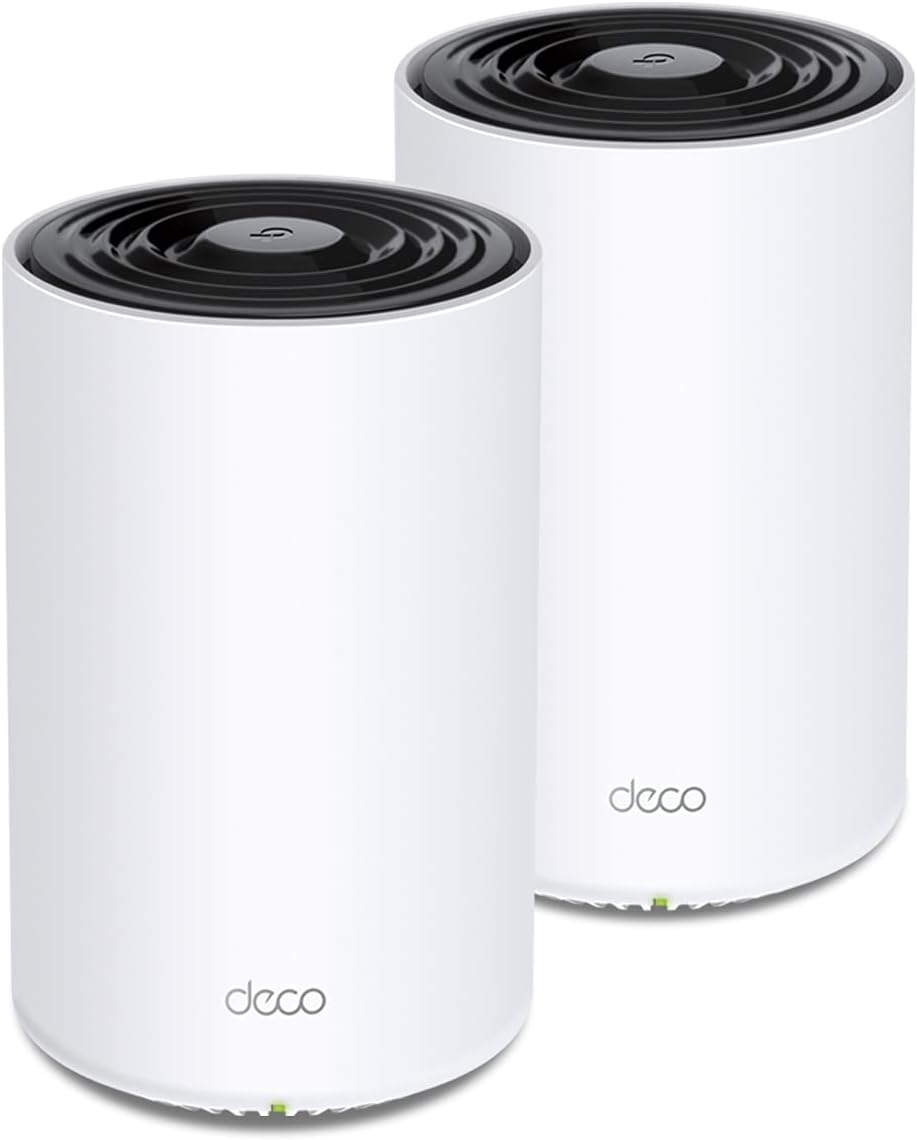
The TP-Link Deco X68 is a powerful tri-band WiFi 6 mesh system designed to deliver seamless, ultra-fast coverage up to 5500 sq.ft. With support for 150 devices, AI-driven mesh optimization, and advanced HomeShield security, it replaces traditional routers and extenders to future-proof your smart home network with easy app management and robust parental controls.


| ASIN | B08Z492RK9 |
| Antenna Location | Gaming |
| Antenna Type | Internal |
| Best Sellers Rank | #70,233 in Electronics ( See Top 100 in Electronics ) #264 in Whole Home & Mesh Wi-Fi Systems |
| Brand | TP-Link |
| Built-In Media | 1 Quick Installation Guide, 1 RJ45 Ethernet Cable, 2 Power Adapters, 2 x Deco X68 Units |
| Color | white |
| Compatible Devices | Gaming Console, Personal Computer, Printer, Security Camera, Smart Television, Smartphone, Tablet |
| Connectivity Protocol | wi-fi |
| Connectivity Range | 5500 Square Feet |
| Connectivity Technology | Ethernet, Wi-Fi |
| Control Method | App |
| Controller Type | vera |
| Coverage | 5500 square feet |
| Customer Reviews | 4.4 out of 5 stars 1,356 Reviews |
| Data Transfer Rate | 3577 Megabits Per Second |
| Frequency | 5 GHz |
| Frequency Band Class | Tri-Band |
| Has Internet Connectivity | Yes |
| Has Security Updates | Yes |
| Is Modem Compatible | Yes |
| Item Dimensions L x W x H | 4.13"L x 4.13"W x 6.65"H |
| LAN Port Bandwidth | 10/100/1000 |
| Manufacturer | TP-Link |
| Maximum Upstream Data Transfer Rate | 500 Megabits Per Second |
| Mfr Part Number | Deco X68(2-pack) |
| Model Name | Deco X68(2-pack) |
| Model Number | Deco X68(2-pack) |
| Number of Antennas | 10 |
| Number of Ports | 2 |
| Operating System | ZyNOS |
| Other Special Features of the Product | WPS |
| Router Firewall Security Level | Basic |
| Router Network Type | router |
| Security Protocol | WPA, WPA2, WPA3 |
| Smart Home Compatibility | Smart Home Compatible |
| Special Feature | WPS |
| UPC | 840030701399 |
| Unit Count | 2.0 Count |
| Voltage | 100240 Volts |
| Warranty Description | 2 year manufacturer |
| Wi-Fi Generation | Wi-Fi 6 |
| Wireless Communication Standard | 802.11ac, 802.11ax, 802.11b, 802.11g, 802.11n |
| Wireless Compability | 802.11ac, 802.11ax, 802.11b, 802.11g, 802.11n |
C**I
Recommend!
This is the best Mesh for the money. I have one upstairs, one downstairs, no more wifi issue. For a typical house 2 to 3 will cover the entire area without any issue at all. Set up is easy and the connection is robust enough that most issues can be easily resolved. I recommend it.
B**T
Strong WiFi in the whole house.
Upgraded to X68 from the deco M5 and what a difference. The X68 runs much cooler the the M5. Please follow the instructions on disconnecting the modem power for 5mins or longer. I didn't and the X68 failed to connect to the modem. I've read on the deco forum that the 5mins flushes the modem cache. Once I did that problems solved. I'm annoyed the deco charges for Web protection. There is a work around for this by using a DNS server with malware filtering. Please search for a DNS server the offers this. I like the App it's easy to use and does not allow a lot of changes which doesn't bother me I need ease of use over tons options, I'm not a power user or gamer. The App allows basic changes which is good IMHO. This is a good option over the latest and greatest. I'ld rather pay less for a 2 year old product than top dollar for the latest and greatest. The WiFi is just as fast as my wired iMac and the is fantastic.
R**I
A very surprising performance boost to my home!
I was very surprised with the performance of this item. My previous setup consisted of a Netgear WiFi router/switch on the 2nd floor where my cable modem and computer is, and a Netgear range extender and switch on the first floor. My old house has tin ceilings and very dense walls, and my WiFi performance was sluggish. On the patio with my laptop, my download speeds was often less than 1mb/s and I'd often use my phone as a hotspot to get better performance. My liviing room equipment (TV, streaming device, PS5) were all plugged into the range extender, and they'd get a couple Mb/s speed, taking forever to download updates on my PS5. My upstairs bedroom with my gaming and streaming device would likewise be very slow. I needed to purchase additional switches for the Deco units since each Deco unit only has two ethernet ports on it (one for the WAN/Cable Modem connection and one for a device or a switch), but good gigabit switches are under $30, so that wasn't a problem. First I hooked up the 1st Deco unit to my cable modem and then plugged the switch into the 2nd ethernet port. I plugged all my devices (computer, printer, NAS, etc.) into the switch and then went into the Deco app on my android phone. I used the app to connect to the Deco and configure it, giving it the same network name and password as my old Wifi system, and then let it do its thing. I had to go through it twice, I'm not sure why it didn't quite work the first time. But it worked the second time and I pretty quickly had the 1st unit set up. I went downstairs, plugged the 2nd unit into the power supply, plugged the switch into it and all of my entertainment devices into the switch, and then used trhe app one more time to acknowledge the 2nd unit and add it to my network. It worked flawlessly then. Before I go on and extoll the good points, I'll point out the negatives. I'm not sure it's possible to configure the devices without an Android or iPhone. I logged in with my web browser on my PC, but it's just more or less a status screen showing the network and clients and doesn't seem to have anything in the way of configuring the devices. I knocked one star off of User Interface because of that. I know almost everyone has mobile phones now, but I don't like that they're absolutely required to configure a network that may not even have one as a client. Also, my previous devices had some high-level configuration options. A lot of this mesh networking is automatically handled by the devices. I like more user-controlled options. The good points? Signal strength throughout my house is dramatically better! On the patio, my download speeds increased from less than 1mb/s to about 50mb/s. My living room where there was some sluggishness and the speed was just a couple megabytes per second increased to about 250mb/s. My bedroom likewise saw a huge speed boost. I no longer have to wait long amounts of time for updates and downloads. All devices that connected to my previous network connected to this one with no problem, and every single device saw a huge performance boost. This was a wonderful upgrade to my home network!
K**H
Great replacement for Netgear RBK50
I had the Netgear RBK50 with two satellite s and have two home offices and a teenager gaming all the time. After years of the RBK50 it was periodically rebooting and taking forever to come online so I figured let me try an upgrade. My home is about 2500 sqft with 3 floors (finished basement). I installed the base unit on the first floor and hard wired my LG C2 OLED tv to it and put the satellite in the basement, hard wiring my work computer. Upstairs is my wife's office and an Alienware gaming computer. We also have 3 Nest cameras streaming HD 24/7, thermostats, smoke detectors, three August doorlocks, Sense power monitoring and 3 iPhones, lots of traffic. I had no problem with my 2G devices coming online as other reported. I did have them all connect prior to updating the software. I work IT for my company so I need reliable remote connections and have VPN's running to 3 remote computers all day, video conferencing, etc. I have 500Mbps download service with Spectrum. Immediately my speed test jumped from 320Mbps with the Netgear system to 475MBps with the main router and 420MBps on the remote satellite . Speed jumps around between 320 and 400+ depending on how Spectrum throttles the connection. So far I have not seen a problem and are very happy. I didn't think only one sattelite would work but it did. Only problem I will warn you about is placement of the satellite is critical. I originally had it in the basement under my work table and the speed was 220 Mbps direct connect which bummed me out a bit. I simply move the router 3 feet to the top of the table so the signal was not blocked and it jumped to 420Mbps. So if you see slow speeds at the satelite play around with its location and it should improve speed. Been using it for a week now and no reboots and complete connectivity with all the computers and devices running. Since I do IT for a living I do hate their app as it is too simple and the web interface is a joke compared to the iPhone app's. The advanced feature just are not there for someone who knows what they are doing but the price is right and when I need my son to get offline I can easily toss him on the deny list and his gaming computer is offline. Don't need their subscription plan for that. I do wish they would spend some time and expose more settings to the user. Do know it took less than 15 minutes to have both units online and everything running, very simple and automated install. I am not using the Wifi 6 features, just 2G and 5G devices.
A**X
Fast and easy.
My initial impressions are positive for this unit. I've been waiting for a fast, affordable Wifi 6 mesh router and this unit finally fit the budget. I wish there was a 3 pack option, but I get great coverage with the 2 units. I have gigabit internet, and saw 2ms ping times and 3-400 Mbps speeds on most wireless devices (wired got 900-1k as expected) everywhere in my house. I did not see any measurably reduced performance when using the remote node thanks to the dedicated wireless backhaul, but the option to wire it is nice if needed. This was a big improvement over my previous (high end) router which failed to cover my house with strong 5ghz. The app was easy to use and set up, although I do not like that it sends lots of notifications by default and tried to market a subscription to some service. But I do like how easy it is to see what devices are online and how much data they're using. My only other complaint is that they only have 2 Ethernet ports each, (some of which will be used to connect WAN and potentially backhaul, meaning you will need extra hardware to connect more than 1-3 wired devices.
A**.
Excellent system for the average user
Subscribe to gig speed cable internet service. Previous WiFi router was Apple AirPort Extreme. Kept getting dropped connectivity on a random basis for months. Internet provider replaced modem twice but same outcome. Just before Thanksgiving lost internet connection while my wife was updating the iOS on her iPhone and totally bricked the phone. That was the final straw and purchased this model on Black Friday deal. Amazon delivered it next day and it setup in about an hour including connecting all devices. The setup is simple for those of us with limited IT skills, just follow the painfully easy instructions step by step without getting ahead of yourself. Main unit is downstairs and satellite is upstairs in a 2700sf two story home. Signal strength is strong to medium throughout the home including the garage which is farthest away. Download speeds at the weakest/farthest signal in the garage are 308Mbps with upload at 7.2Mbps. Overall very happy with the X68 system. Contrary to other posts that claim you can’t assign devices to specific units, the software may have been updated as I can assign specific units and frequency bands to each device. The free software without subscription is adequate for the average consumer.
A**F
No longer works well
I originally gave this system a very good review (see below). However after a firmware update, the performance of this mesh system has dramatically worsened. Instead of 700 Mbps down/ 24 Mbps up (wired my internet can do 900/24) I now get 250/10 for any of my hardware purchased before 2020, i.e. my my 2019 iPad at best do 10 Mbps upload; my 2020 iPhone and 2022 Apple TV get about 650/24, or nearly as well as they performed previously. This was the result of a Firmware "upgrade". I will change my review and rating back when the firmware is fixed. \\ These work extraordinarily well. I had thought the house would require a mesh, because of its size and layout and also because our previous router had trouble providing a good signal throughout. However, one of these gives an incredibly strong and fast wifi throughout the house (over 600 mbps over nearly all the house; one distant corner gets 300+). Because of layout of the house and the location where the cable enters the house, using the second unit anywhere but at the far ends of the house actually reduced throughput. So the second unit now mainly insures that there is great wifi in the backyard, which is fine when it is patio weather. However, to get the full security package that goes with this system you need to pay $5.00 per month. Considering that many routers don't charge for this service, this is pricey. It explains why the units themselves are relatively inexpensive when comparing hardware costs vs performance.
M**L
For set up instruction app to function, it must be installed on a direct network device.
The “easy setup” would have been much easier if there was a note or notice at the start to indicate that the app must be downloaded and installed in a device that is connected to a network other than your current WI-FI which of course has to be shut down during the setup operation.. being the first time ever using this app, I did not see any note of the aforementioned requirement and downloaded the app to my MacBook thinking that it must run offline once I disconnected the modem never expecting it to have a step in the process where the app tried to locate the new DECO WI-FI. Well, silly me, after watching the app trying to locate for quite some time while I tried to figure it out, I gave in a contacted support. Once connected with support I was fortunate to have a very good natured and extremely knowledgeable person named Nelsie Barron on the phone whom immediately recognized the problem and proceeded to advise me to download and install the app to my phone in order to set up the Deco hardware. I have never used my phone to set up any hardware device before but , times have changed, lesson learned. I am extremely pleased with the way Nelsie Barron handled my frustration with the app and patiently waited as I fumbled through my passwords and other “fat-finger” mistakes along the way as she graciously walked me through the entire setup until my Wi-Fi was up and running. I would be willing to give her more than five stars, because she made an easy setup much more pleasant, thank you Nelsie.
Trustpilot
1 month ago
2 weeks ago