Buy anything from 5,000+ international stores. One checkout price. No surprise fees. Join 2M+ shoppers on Desertcart.
Desertcart purchases this item on your behalf and handles shipping, customs, and support to KUWAIT.
🔌 Power your smart lifestyle with effortless control and compact design!
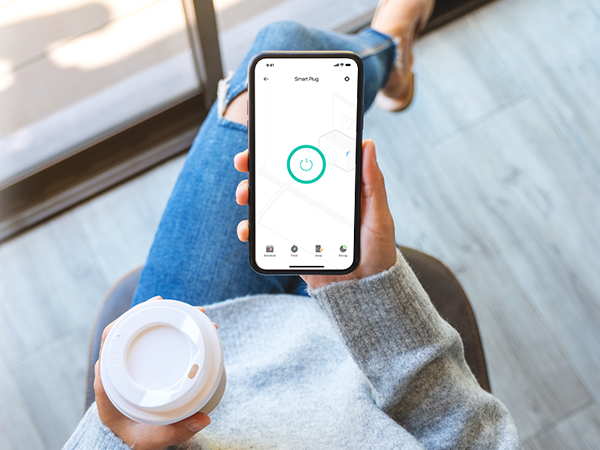
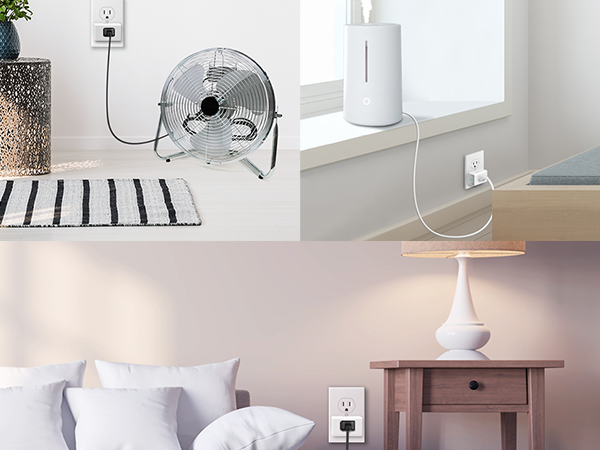
The Kasa Smart Plug Ultra Mini EP10 delivers 15A power capacity in a space-saving design that keeps your outlets fully accessible. Compatible with Alexa, Google Home, and IFTTT, it offers voice control and remote management via 2.4GHz Wi-Fi without requiring a hub. Features like customizable schedules, timers, and Away Mode enhance energy efficiency and home security. UL certified and trusted by millions, it’s a reliable, easy-to-install smart home essential for modern professionals.


| ASIN | B091699Z3W |
| Actuator Type | Push Button |
| Best Sellers Rank | #170 in Tools & Home Improvement ( See Top 100 in Tools & Home Improvement ) #1 in Electrical Outlet Switches |
| Brand | Kasa Smart |
| Brand Name | Kasa Smart |
| Circuit Type | 1-way |
| Color | White |
| Compatible Devices | Amazon Alexa, Google Assistant, SmartPhone |
| Connectivity Protocol | Wi-Fi |
| Connector Type | Plug In |
| Contact Material | Copper |
| Contact Type | Normally Open |
| Control Method | Voice |
| Control Type | Full |
| Controller Type | Amazon Alexa, Google Assistant, IFTTT, vera |
| Current Rating | 15 Amps |
| Customer Reviews | 4.5 out of 5 stars 39,974 Reviews |
| Included Components | 1x Kasa Smart Plug Mini |
| International Protection Rating | IP00 |
| Item Dimensions | 2.36 x 2.03 x 1.5 inches |
| Item Type Name | Smart Plug |
| Item Weight | 2.13 ounces |
| Lower Temperature Rating | 32 Degrees Fahrenheit |
| Manufacturer | TP-Link |
| Material Type | Copper |
| Model | EP10 |
| Mounting Type | Plug-In Mount |
| Number of Items | 1 |
| Number of Positions | 1 |
| Operating Voltage | 120 Volts (AC) |
| Operation Mode | automatic |
| Part Number | EP10 |
| Smart Home Compatibility | Smart Home Compatible |
| Switch Type | Push Button |
| Terminal | Virtual |
| UPC | 840030702648 |
| Unit Count | 1.0 Count |
| Upper Temperature Rating | 104 Degrees Fahrenheit |
| Warranty Description | 2 Year Manufacturer |
| Wattage | 1800 watts |
R**M
Not Working as Advertised
Loved these guys when I first set. Them up. Nothing but trouble now. Will post a follow up when I find out more. Love was justified. I had screwed them up when I tried to replace my lagging spectrum router. Funny part was I tried a tp link mesh system and it would not recognize the tp link Kasa plugs. Short story is follow the instruction sequence. Be sure to remove them from the system and then reset the plugs. In effect you are starting over. Also, their algorithm maintains some residency on your phone, so even though you have factory reset them, the system may ask you for a reset. Do that. Also helped I think to reset my phone before I started. Finished and reassigned seven plugs in probably 20 minutes once I resigned myself to removing them before setting up again. Using on o/s house and tree lighting, I\s house lighting and my favorite, as an interface between outlet and power cord of devices that may need occasional rebooting, such as modem or Dish receiver. Ideal for that application. These plugs are simple and work great. Matter plugs seem even more adaptable but cost twice as much. I have two, but wound up with the minis b\c my little system doesn’t seem to need the Matter version. Kasa app is very robust and versatile, reliable and very easy to use. Great product.
R**S
Simple Smart Plug That Accidentally Solved a Very Annoying Problem
I originally bought this as a basic smart plug, but it ended up solving a really frustrating problem with our NordicTrack treadmill. The treadmill’s iFit system has a habit of locking up or acting weird almost every day, and manually unplugging and rebooting it constantly was getting old fast. The solution ended up being surprisingly simple: we connected the treadmill through this smart plug and scheduled it to automatically power cycle every morning around 6 AM. Ever since doing that, the treadmill has been far more reliable because it basically gets a fresh reboot before anyone uses it. It honestly feels like the smart plug solved a problem the treadmill manufacturer should have fixed themselves. Setup was straightforward through the Kasa app, and the connection has stayed stable on our Wi-Fi without randomly disconnecting. The scheduling features are easy to use, and the plug itself is compact enough that it doesn’t awkwardly block the other outlet. One thing I especially like is that it turns “dumb fixes” into automatic solutions. Instead of remembering to reboot equipment manually, it just quietly handles it in the background. Overall, this turned out to be way more useful than expected and became one of those little smart-home devices that quietly fixes an everyday annoyance without needing constant attention.
P**L
KASA Smart Olug Indoor (15A, 1800W)
Easy to setup and connect via the Kasa App. Great connectivity reach on 2.5GHz wifi. Indoor use only however there are outdoor Kasa smartt plugs that I also deployed. The app is really good for scheduling and turning things on/off remotely. If you have multiple units you can group them together for scheduling. I would recommend these devices for greater control via scheduling. The rated output is good but the heaviest load I have one of them on is 500W. They nicely replaced battery operated plugs I had and they are more reliable. If the wifi goes down the unit has the schedule downloaded so it will still operate its schedule w/o wifi connectivity. But if the power goes out along with WiFi then the unit must connect again to sync the clock and download its schedule again. I am not sure how long the unit can hold it's schedule if the power goes down or there is a brown out. But I have had only my wifi go down for a long period of time and they kept their schedule and operated properly.
T**Y
Easy, fast setup. Works well.
Pros: Super easy and fast to set up Works well Works with Alexa, Google Home, IFTTT Cons: No Apple Homekit A bit more difficult to set up Google Home than other devices This Kasa smart switch by TP-Link was a pleasure to set up. I had it set up literally in less than 5 minutes, and about as long to link to Alexa and Google Home. The set up instructions are really nothing more than a card telling you to download the Kasa app on your smartphone and adding the switch to the app. The set up is easy. As with most WiFi controlled devices, the device goes into AP mode for configuration and then into device mode for operation. Unlike other devices, and seemingly any that support HomeKit, it simply has you connect to that access point on the phone, then go back to the app. The app connects to the device and scans WiFi. You select the WiFi SSID (network name) you want, enter the password, and done. At this point the switch can be controlled from the app. To add Alexa you select the Works with Kasa option in the app, select Alexa. Then enable in Alexa, and done. Google home is a bit less direct, and a bit more clumsy than other devices, but still pretty easy. You need to go into the Google home app, add a device, search for Kasa, then log into Kasa, then configure. A few more steps, but overall not that bad. It also supports IFTTT, and Samsung Smart home that I didn't set up. It does not support Apple HomeKit. That is probably why it was easy to set up. I really would like to be able to use HomeKit, but almost nothing works well with HomeKit. The whole set up with the code mostly doesn't work, and if it does it then gets disconnected. This brings me to why I bought the Kasa in the first place. I had a WeMo (Belkin) smart switch, the equivalent product to this. I couldn't get it to connect after multiple attempts. I called WeMo support (surprisingly a human on a phone). After well over an hour I was finally able to get the WeMo to connect, then get it to connect to HomeKit, Alexa, and Google home. Great. I had the switch in an easy to access socket to set up. I unplugged it to move to where it needed to be and the WeMo stopped connecting to WiFi. After factory resetting the WeMo I was able to get it to connect back to WiFi, but as soon as it was unplugged and plugged back in, it wouldn't connect again. At this point I just gave up and ordered the Kasa based on other reviews. It was night and day to set up. Similar to the WeMo, I used an easy to access socket to set up, then unplugged it and moved it to the location where the light to be controlled is. With the Kasa, no problem. This is the same location, and the same WiFi network. The Kasa works. The WeMo doesn't. Part of the problem is HomeKit. HomeKit compatible devices use the HomeKit set up on iOS devices. Some devices sort of let you bypass this, with the WeMo being one of those devices. This is how I initially got it to connect with customer service, by connecting directly to the switch. If it fails though HomeKit recognizes the WiFi AP as a connected device for at least 15 minutes. You need to wait 15 minutes to try again. The whole thing is a mess. I really like Apple devices, but HomeKit is just way more trouble than its worth. Ironically, the only device that I've found that works with HomeKit is a Sony Android TV! That TV now controls the light plugged into the Kasa switch with Google Home. Again, the setup on the Kasa was really easy, the way it should be. The competing WeMo was hours of frustration with no results. This was the second WeMo (it was part of a 2-pack like the Kasa), and the first one was also difficult and unreliable. Unless you absolutely can't live without HomeKit, buy this Kasa. The Kasa just works.
B**C
Compact and reliable, but had trouble connecting to Alexa
I’ve been using this smart plug for a little while now, mainly for a lamp, and overall it’s been solid with one main issue. Setup through the Kasa Smart app was pretty straightforward. It connected to Wi-Fi without much trouble, and I was able to control the plug from my phone right away. Turning things on and off remotely and setting simple schedules both work as expected. The size is a big plus. It’s small enough that it doesn’t block the second outlet, which is something I’ve run into with bulkier smart plugs. Where I ran into problems was trying to connect it to Amazon Alexa app. I wasn’t able to get it to link properly, even after trying a couple times. Not a dealbreaker for me since the Kasa app works fine, but it’s something to be aware of if voice control is important to you. Aside from that, performance has been consistent. No random disconnects so far, and it responds quickly when using the app. Overall, it works well as a basic smart plug, especially if you’re okay using the Kasa app. Just keep in mind that Alexa integration might take some extra effort or troubleshooting.
R**O
Great product and low price
Nice smart plug at a very low price. It worked great and was easy to setup. I use it to turn my speaker on and off from my phone.
M**S
Easy setup, works just fine
My Wemo smart switches suddenly became not so smart when Belkin scrapped the line. They not only stopped working with the Wemo app, they stopped working with Google Home. So I was reduced to actually switching the lights on and off. Manually. With my hands. Jeezopete. So I sprung for this pack and it works really well. I didn’t need four of the things, but I find I always find another place I could use them. These particular ones are only really suitable for lamps and other low-wattage devices, and I did have to move some furniture, like my desk, to get the plugs in place but all is good. BTW, talking about plugs in place: it’s best to set these up (plug into the wall, setup the WiFi, name the device and its final location) in a place that’s easy to access. The switch saves all the settings when unplugged so you don’t need to set it up in its final location (like behind my desk).
J**.
Easy Setup, Reliable Performance, Great for automations
I use these smart plugs all the time, especially during the holidays. They’re perfect for setting up outdoor lights like reindeer, Christmas trees, or garland and having everything turn on and off automatically. I’ve got Alexa routines set up for things like when I leave or get home, and at sunset, and they’ve been super reliable. Setup was quick and easy, and they just work without any hassle. Plus, they look good and don’t stick out like some other plugs. Overall, really solid and convenient—definitely recommend.
L**A
Facil de instalar y configurar con Alexa
Un buen producto que cumple con su funcionamiento, fue muy facil de instalar y de conectar con Alexa, enciende muy rapido y no tiene delay.
L**R
So easy to setup!
Great little Smart Plug. Not expensive and small enough to allow you to use the second outlet. Download the Kasa Smart app from the App Store or Google Play, plug the Smart Plug into the outlet and follow the step by step instructions. Easy to follow and understand. No codes to enter and no holding your phone up to the Smart Plug. No tech knowledge needed. Using the app to connect the plug to my wifi was super simple, and setting up an automated on/off schedule in the app was a breeze. Even adding the two smart plug devices I purchased to my Google Home to enable voice commands took two minutes. I was using an iHome Smart Plug before getting this one, but it was always disconnecting from my wifi and reconnecting it was a nightmare. I got so fed up with it that I almost threw it out the window. Very happy with this purchase!
A**O
Simplemente Efectivos y confiables
Integración con Kasa muy efectiva, la única parte que encontré confusa es que una vez que se abre la aplicación y se añade el dispositivo (este debe estar conectado y parpadeando en azul/naranja) hay que momentáneamente SALIR de la aplicación KASA e ir a configuración para desde ahí buscar el dispositivo en la lista de redes WiFi (aparece como TP_LINK y algún código numérico fácilmente distinguible) y manualmente conectarse a él (desconectándose de la red principal del lugar), una vez hecho esto, de manera automática la aplicación termina el enlace y queda establecido ya sin complicación alguna. Son facilísimos de configurar con la aplicación de manera intuitiva, muy versátiles y hasta ahora, extremadamente confiables, los manipulo desde la casa o cuando estoy fuera de la ciudad sin ningún problema.
R**E
Calidad
Muy buenos, funcionales.
J**R
Great
Easiest connection ever. Plugged in socket, used app and all set up. Can control with echo speakers, phone and watch. The convenience factor will hit you.
Trustpilot
2 weeks ago
4 days ago