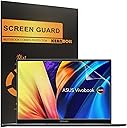
🖥️ Shield your screen, sharpen your focus, and stay glare-free in style!
This 3-pack of matte anti-glare screen protectors is custom-designed for 14.5" ASUS Vivobook and Zenbook Pro OLED laptops. Featuring 5H hardness for scratch resistance, an oleophobic coating to repel fingerprints, and advanced matte technology to reduce glare, these protectors maintain true touch sensitivity and ensure a bubble-free, residue-free installation. Ideal for professionals seeking eye comfort and pristine displays in bright environments.


| ASIN | B08MCTW8TJ |
| Best Sellers Rank | #16,714 in Computers & Accessories ( See Top 100 in Computers & Accessories ) #277 in Laptop Screen Protectors |
| Brand | KEANBOLL |
| Brand Name | KEANBOLL |
| Clarity | 10 |
| Compatible Devices | 14.5"ASUS Vivobook S 14X OLED Business 14.5" Laptop, Laptop |
| Compatible Phone Models | ASUS Vivobook S 14X OLED 14.5" Business Laptop, ASUS ZenBook 14X OLED 14.5" Laptop |
| Customer Reviews | 3.6 out of 5 stars 37 Reviews |
| Finish Type | Matte |
| Item Dimensions L x W | 12.3"L x 7.7"W |
| Item Hardness | 5H |
| Manufacturer | KEANBOLL |
| Material | Plastic |
| Model Name | ASUS Vivobook S 14X 14.5" |
| Model Number | ASUS Vivobook S 14X |
| Number of Items | 3 |
| Product Dimensions | 12.3"L x 7.7"W |
| Screen Size | 14.5 Inches |
| Screen Surface Description | Matte |
| Special Features | Anti Glare, Anti-Fingerprint, Scratch Resistant |
| Unit Count | 3.0 Count |
| Water Resistance Level | Waterproof |
S**E
This is absolutely great!
I don't know what the others are talking about. The quality is great, packaging was protected. The glare from my Zenbook 14x oled is completely gone. It does blur the screen a little, so I agree with that. It took me less than 10mins to set it all up, and I am no expert. Fits my Zenbook 14x oled screen perfectly, like perfectly! The cameras are above the protector, so there's no need for cutouts
A**R
Doesn’t fit zenbook at all
Doesn’t fit at all!! Do not buy
K**P
Glare = Gone
Night and day difference. Removing the glare reduced the headaches I get while coding on my asus zenbook 14 pro duo.
P**.
Read before you proceed
5 stars for anti-glare, 2 stars for product fit and application instructions. The product is slightly larger than the screen so unfortunately, you'll have to cut it to size. A big paper cutter is best for the job, since it is the easiest way to ensure that the cutting lines are crisp. Scissors aren't recommended, as they will ever-so-slightly curve the edges and will create an air pocket once you apply it. Application needs a ton of time and patience. Fortunately, they provide 3 sheets, so you have 2 to spare for practice. However, even with the best tools, it will leave some imperfections. All in all, the product works; just wish the manufacturing had better tolerances.
M**R
Is anti-glare.
This is certainly anti-glare screen protector. I installed on my 14.4inch infotainment system on my truck. The size was correct for my screen. The installation was about how you expect a screen protector to go on, but there was position stickers provided so it wasn't to difficult, about a 30 min install. My main issue was with the shipping. 2 of the 3 protectors were damaged in shipping with a crease in them. I was fortunate that the third one was not damaged. Its a good value for 3 anti glare if all were not damaged.
J**O
Recomendada
Muy buena y fácil de instalar
F**K
terrible
The quality is very poor. Installation is very difficult. The packaging is not protected and there are already folding marks when received.
T**2
Challenging way to spend a couple of hours
Firstly, they do cut glare and they do allow touch screens to work and they don't blur the screen too much, although that latter claim may be a matter of opinion. Secondly, the films shipped to me had a dent in them, as if a screwdriver had been jabbed against their cardboard packaging. No amount of finesse will get this ding out, leaving a persistent bubble at that spot. Another reviewer mentioned the ding in theirs, so maybe this is a bad batch or bad treatment of a lot of them? These things attract dust like crazy, so unless you're working in a clean room, you'll get dust on the sticky side of these. Yes, they tell you to clean your screen, which I did, but dust gets pulled out of the air and clings to the film itself. On the whole, though, budget yourself 2 to 3 hours to install these and get all the bubbles out. Have a stack of 3x3 Post-It notes (or similar) handy. As you let the film down on to the screen, you'll see the dust bubbles. They have a tiny speck inside the bubble. Peel the film back (a Post-It note stuck to the underside corner of the film will help lift the film away from the screen) and slide another post-it note under the film with sticky side toward the film, and use that to pull the speck of dust off the film. Maybe some of the dust will stick to the screen instead (for me it was about 90% dust on film, 10% dust on screen) so just slide the Post-It note in with sticky side toward the screen. Then you can pull the dust out along with the Post-It note, ease the film back down on to the screen, and then you repeat the process with the next speck of dust. Bubbles without a dust particle in them can smoothed out using cardboard squeegee tool they give you. Bubbles with a dust particle in them can't be smoothed out. Wah-lah! The result I got is a suitably non-glare screen, slightly askew because getting the alignment perfect ain't easy, but it covers all of the pixels (I have extra space between the pixels and the bezel, so I got the next size larger so alignment didn't need to be perfect) and I have only the one bubble that's there because of the dent in the original material.
Trustpilot
1 month ago
1 month ago