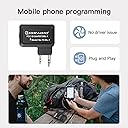
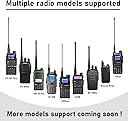
š” Cut the cords, not your connection ā wireless programming for the modern radio pro!
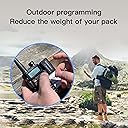
The TIDRADIO Ham Radio Wireless Programmer Adapter revolutionizes Baofeng UV-5R and compatible radios by enabling wireless Bluetooth programming via the Odmaster app and web platform. It eliminates the need for cumbersome cables and drivers, supports seamless syncing between PC and mobile devices, and offers one-click import of local repeater data for expanded range. Lightweight and rechargeable with USB-C, itās designed for professionals and enthusiasts who demand on-the-move flexibility and reliable performance across multiple radio models and operating systems.


| ASIN | B098SM9FVL |
| Batteries | 1 Lithium Polymer batteries required. (included) |
| Best Sellers Rank | #37 in Portable FRS Two-Way Radios |
| Customer Reviews | 4.2 4.2 out of 5 stars (3,438) |
| Date First Available | July 7, 2021 |
| Display Type | No |
| Item Weight | 1.76 ounces |
| Item model number | TD-BL-1 |
| Product Dimensions | 0.3 x 0.2 x 0.5 inches |
| Warranty | 6 |
Y**H
Programming on-the-move, Reliable Wireless Sync, Compact.
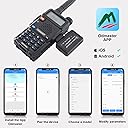
My Scenario - I've a programming cable that connects the radio (via the K1 plug) with the desktop (via the usb port). This cable works great with the open-source CHIRP software (essentially a spreadsheet interface with all available channels attributes) for programming channels in bulk. Great but I cannot bring this programming method along when I'm venturing outside! When I'm out offroading with a group of friends, there are times whereby we need to program a channel (not already programmed as one of our preset channels) and I won't have my desktop with me. While I can program a channel within the radio itself, it is a cumbersome and frustrating experience doing that on a number keypad - it's just plain unproductive! Here is where this Bluetooth Wireless Programmer Adapter comes to my rescue. Solved - All I need is this TIDRADIO Wireless Programmer Adapter, my Baofeng radio, my mobile phone, and the Odmaster App (it's free via Google Play Store). Now, I can easily program in the wild without my computer and the programming cable! From my uploaded pictures, the first image shows the sequence of the programming and I'll share some troubleshooting steps too. 1. Select 'Connect Bluetooth' > this prompts the software (Odmaster App) to discover this wireless adapter. Choose the 'TIDRADIO KIT' when it appears and slide the radio button to the right to select it. Now if you don't see any device displayed on this screen, there are couple of things that can help troubleshoot. - Ensure the adapter is snugly plugged into the radio, you should not see any visible part of the 2 connecting pins. - Ensure both the radio and adapter is switched ON. The adapter should have a blue light when it's ON. - On your phone, ensure 'TIDRADIO KIT' is displayed under 'Available devices'. DO NOT pair via your phone bluetooth screen. If it is showing up under 'Paired devices', you'll want to unpair it. - If all the above are correct and yet you don't see it showing up in Odmaster App, turn ON 'Airplane mode' on your phone. This will disconnect all communication interface on your phone and help resolve any software conflict. Then turn ON 'Airplane mode' again. Resetting your phone will work too. 2. 'Select Model' for your radio > simply choose your radio's brand and its model number. If you have UV-82HP, just choose UV-82. The programming attributes are the same. 3. Next select the 'Read' > this will import all your programming configurations from your radio to your phone. 4. The second picture shows how a downloaded channel looks like (under Channel) and some limited radio settings (under Function). This Odmaster App is not a full featured substitute of the CHIRP desktop software, but it is adequate to get you going when outside. 5. When you're done programming, simply select the 'Write' button to upload everything back to your radio. Wish List - The Odmaster App is written against older versions of google code. This causes security alerts on my phone; flagging the App can be used to overwrite system settings and compromise my phone. As such, I uninstalled the App after each use. Last I checked, they are working (with google) to update the outdated code. Note: - The claimed battery life is 1 day standby. Not an issue since the supplied USB-C (becoming ubiquitous) cable is easily charged in the car. I've not been able to drain the battery flat yet even after several reads and writes. - I've wasted almost an hour trying to troubleshoot why the wireless adapter was not discoverable in the app (related to the above troubleshooting step). I can only suspect it is related to the outdated app code in the Odmaster App. Regardless of the flaws for the App, this Bluetooth Wireless Programmer Adapter is worthy of 5 stars for solving my outdoor programming headaches. Once connected, the configurations sync flawlessly between the radio and phone.
K**H
Very Useful for Traveling
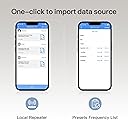
UPDATE: 30 Jun 2022 - The Odmaster app repeater function works and returns repeaters based on the distance filter you set. When I scrolled thru the list, the app pauses slightly and I thought I reached the end of the list. Had I continued swiping, the list of repeaters would have continued to scroll. TIDRadio Wireless Bluetooth Programmer (New Version) For full disclosure, TIDRadio provided me this device. My review is my honest opinion of the Programmer. The TIDRadio Wireless Programmer Adapter allows you to program their supported HT without using a PC. The New Version Programmer that Iām reviewing comes with a USB-C cable charging to connect to the deviceās USB-C charging port. I already own the Original version and it has a mini USB port instead of a USB-C port. The New version has a blue LED and the Original version has a green LED. Other than these differences, I canāt tell if there are any functional differences. The rest of the review is about the New Version Programmer and the Odmaster app. Pairing between the New Version Programmer and my iPhone was seamless. Make sure bluetooth is activated on your smartphone. Start the Odmaster app and connect the Programmer to your phone. Press the power button on the Programmer. You wonāt need to touch the Programmer again until you have completed the programming process. At that point, just remove the Programmer from your HT. This device is most useful when you are traveling and want to program a repeater in your HT. You wonāt need a computer to access a list of repeaters around you. The remainder of this review is about the Odmaster app. Searching repeaters near you is very helpful with a single click. Adding a repeater is very simple by selecting a channel and assigning it to your HT. The filter of repeater does not seem to be functional since the default of 100 miles radius only returns what is in my county regardless of the distance filter setting. When I set the filter distance to 1000+ miles, I still only get the repeaters in my county. To program your HT, you have to select and program each channel one at a time. While this is useable, I think it missed the target for me. A feature that was missing that I would like to have in the Odmaster app is for it to show a complete list of channels and the associated frequencies and channel name in list form. Without this feature, I feel like Iām programming my HT half blind. In conclusion, this device is very useful to program your HT without a computer. For me, I would use this device with my HT when traveling so that I can quickly program local repeaters in my HT. Not being able to display a complete list of already programmed channels on my HT is a big miss for me but it is not a deal breaker. My purchase of the Original version was well worth the very affordable cost. The New Version provided to me by Tidradio functions equally well.
J**R
Device works fine, but highest rated Baofeng not supported by app
I bought this device because I purchased the TIDRadio H3 and already was using the Odmaster app on my phone to program it. I thought it would be great if I could use this adapter to also program some of the other Chinese radios I have. Let me be clear, my issues here are NOT with this device, they are with the program developed to work with it. This is a simple Bluetooth device, and it does its job. As for the Odmaster app (at least the Android one): It will program the Baofeng UV-82. It will not program Baofeng BF-F8HP, the most and highest rated Baofeng radio on Amazon. It will also not program the Baofeng GMRS v1. I think if they made the radios that this thing supported a bit more ubiquitous, this would be an awesome adapter. Being able to program the Chinese radios on the road / on the fly is great for traveling, emergency comms situations, and things like race support where you may need to switch frequencies on short notice.
S**B
Excellent bit of kit .plug it in load the app and program away.
M**T
Faltan algunos modelos en la aplicación. El dispositivo funciona perfectamente.
A**S
Lo practico
A**R
Easy to use
Trustpilot
2 months ago
1 week ago