Buy anything from 5,000+ international stores. One checkout price. No surprise fees. Join 2M+ shoppers on Desertcart.
Desertcart purchases this item on your behalf and handles shipping, customs, and support to KUWAIT.
🌈 Light up your world with limitless color control!
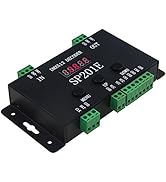
The ALITOVE Wireless Bluetooth Magic Dream Color LED Light Controller offers professional-grade control for up to 2048 individually addressable LEDs. Compatible with a wide voltage range (DC5V-24V) and nearly all major LED driver ICs, it connects seamlessly via Bluetooth 4.0+ to iOS and Android apps. With over 200 color modes and automatic memory save, it’s designed for vibrant, customizable lighting experiences perfect for modern smart homes and creative projects.


| Asin | B01LW1J10W |
| Best Sellers Rank | #596,910 in Home & Kitchen (See Top 100 in Home & Kitchen) #1,578 in Seasonal Lighting |
| Brand Name | ALITOVE |
| Color | RGB |
| Customer Reviews | 4.0 4.0 out of 5 stars (985) 4.0 out of 5 stars |
| Display Type | App |
| Included Components | SP105E Bluetooth LED controller, 3pin female JST connector, Mini screwdriver, User manual |
| Item Dimensions L X W X H | 3.35"L x 3.35"W x 0.87"H |
| Manufacturer | ALITOVE |
| Material Type | Plastic |
| Model | SP105E |
| Part Number | SP105E |
| Smart Home Compatibility | Smart Home Compatible |
| Unit Count | 1 Count |
| Upc | 735935191737 702455807905 679360620809 |
| Voltage | 24 Volts |
User
Meh. Loads of trial and error, then success, then sadness: UPDATED
I used these for an undercabinet lighting project in a very small area, directly next to my wifi router.Connecting the LED strip to the power supply and this controller was straightforward and easy. I didn't have any trouble connecting directly to the controller from the mobile app; changing the number of addressable LED's in the strip (when the strip came, only a continuous portion of the strip lit up, and some past that point did not, that was easily resolved by telling the controller how many LED's to address).The hard part came in the form of well over an hour plugging in and then unplugging the unit and attempting to get the mobile app to complete configuration of the controller. It was really just trial and error on plugging the unit back in, and entering the wifi network password and hoping it would take, eventually it did and I could control it from the mobile app while being on my home network.Now for the sadness. My use case requires the controller to be on my home network, so that I can tie IFTTT/Smartthings routines to it; so far, the controller has been unable to hold a configuration (while being powered continuously) for more than 48 hours. Somehow, it looses connectivity (despite being less than 12 inches from the wifi router) regularly; and it feels like this product is going to be a great novelty and a useless utility.I suspect I'll eventually give up and just build my own Arduino or Pi controller and cable it into the network.UPDATE: The folks at ALITOVE sent a replacement unit; after noting that it shouldn't work the way I noted in my review. The new unit DOES hold the configuration; AND DOES stay connected to the local network (though it sometimes takes a couple of "refreshes" in the app to pick it up - my router logs show a consistent connection). I'm upping this to five stars because of excellent customer service and the device working as expected.
User
Great once past installation and power
Love it. Works like a charm. Once you get passed that installation part, it’s awesome. I used this with a ws2812b matrix for my PC and it looks awesome. Responds well with music. I’m gunna include instructions that will make installation a breeze.There is specific volts and amps you need to get this to work properly. DC 5V and at least 6amp (this is important!) if you use anything like a phone charger 1.0amp or 2.1 on a universal charger, the Bluetooth will disconnect and not respond. I personally ripped up and hooked up a sata cable (positive/ground) to a male barrel connector and hooked it up to the matrix. (You can use a BTF lighting 5vdc 10amp power supply.) I connected the controller to the matrix using the data and power/ground. You can hook it up using the included barrel connector just make sure(I can’t emphasize this enough) it’s 5v DC 6am or higher. 10 amp preferred if you are using a lot of led strips or matrix’s daisy chained.Very bright does what it’s supposed to. Would buy again!
User
Great other than that it automatically turns on the LEDs (Bad for battery powered applications)
The reason I gave it 4 stars is because it always turns the LEDs on when you power up the board. It remembers which mode you were on when it is powered off, but if I turn off the lights, then turn the board off, and then turn the board on again it automatically turns the LEDs back on... Now every time I turn on my longboard during the day I have to turn off the lights in the app because it is a waste of power.. Very dissapointing. Please consider this when making the next generation of this product. Just make it remember the last setting before turning off please. Otherwise, the circuit board is small and compact, and works as advertised. Connecting to the board is immidiate, and I appreciate the simplicity of the application.
User
cool pre-programmed modes and static color selection to control a WS2812B LED strip light
I purchased an ALITOVE SP105E controller with the ALITOVE 5m WS2812B Individually Addressable LED Strip Light and ALITOVE 5V 10A AC to DC Power Supply - as a surprise for my daughter's 6th birthday. She wanted rainbow lights for her room...the first mode on the SP105E is a very nice rainbow color design that animates across the strip. The SP105E remembers the last mode it was set to (using the iPhone app) - so I set it to the rainbow mode and on her b-day she went into her room to try it for the first time - and the wall lit up with rainbow colors. She was SO excited...and everyone was impressed! She also enjoys the other patterns and static color options - changing them over time and with the holidays. And with the brightness set at 50% overnight, it also serves as her night light (and the entire strip uses about 12 watts of power at that setting).The SP105E controller includes 200 different patterns and a customizable static color mode (some examples are in the attached pictures).. With the app you can also control the speed of any modes that include animation and the brightness of the LEDs. It works over Bluetooth from your mobile device to control/configure the effects. I also now have a SP108E controller - which works over WiFi either directly with the controller or over your home network...and includes additional effects for your LED strip. Having either of these controllers makes it easy to get the most out of a digital LED light strip.ALITOVE stands behind their products - and provided excellent and responsive customer service! A few months into using the initially ordered setup, the LED lighting effects became unstable. I wrote ALITOVE and they replied quickly with an apology, some troubleshooting suggestions and then sent a replacement unit to try. After it arrived, I unhooked the original one and installed the replacement - but the unstable problem persisted. I reached out again with details and pictures - and ALITOVE continued to work to resolve the issue - suggesting additional troubleshooting and guidance to validate the power requirements for my installation. It turns out my LED strip installation is 213 LEDs (cut from the 300 LED strip I purchased) - which could draw up to 63.9 watts of power at full brightness and fully lit. The 10A (50 watt) power supply I initially purchased for this setup did not have enough power to cover all use cases. I proceeded to order the ALITOVE 15A (75 watt) power supply - and the controller works perfectly again with the 213 LED light strip.When ordering - make sure you purchase a power supply with enough amps for your requirements. For the above WS2812B light strip, multiple the number of LEDs expected in your final strip by .3 (to give you the upper limit on watts required) - then choose the next power supply larger than that. For mine, 213 * .3 = 63.9 watts - making the 15A (75 watt) power supply an ample choice for stable operation. Naturally, not having enough amps from your power supply can cause unexpected behaviors with the controller and strip.Likes: easy to use, controls each individual LED (color and brightness) in a digitally individually addressable LED strip, both the SP105E (Bluetooth) and SP108E (WiFi) have apps with features that produce nice patterns and ability to choose a single custom color for the strip, very easy to use once configured, remembers prior setting after powered off, all tools and adapters included, relatively small footprint (I have mine tucked in behind crown molding), excellent customer service and supportDislike: instructions on initial installation are better sourced online versus what is included; in static custom color mode the SP105E will not remember the prior color selected after powered off (SP108E does)
User
Such garbage, where to even start...
Pros:-theoretically, turn-key solution with decent number of built-in patterns/options-phone app actually installs and opens, which is more than I can say for a lot of these cheap controllers (still has tons of issues)-relatively cheap for what it is, with wide range of usable voltages (tested with 5V & 12V, rated for 24V also)Cons: (very long list...)-Instructions for use are not well written and hard to follow, at least there is another copy of them available in the app-Only has a 20 second period when powered on during which you can 'setup' the controller to connect to your wireless network, after which it goes back to being an access point that you have to connect to directly with your phone to use-Even if you manage to get the thing connected to your wifi network, it forgets it the next time it powers on. So if you pair it, turn off the power supply feeding it, then turn it back on, it is no longer paired-The included recommended wiring diagram is just wrong. If you are chaining lots of lights, you cannot just run one single red +V wire and splice that in and expect it to work. You have to run +V and GND to every place you want to drop in power.-The screw terminals to secure the input wires are on the bottom of the device and require a very small, thin flat head screwdriver to turn (includes a dinky 3" long one). Then because they are on the bottom, when you mount it to the wall/ceiling, you can no longer get to the terminals, so if you need to change anything, you have to unscrew it from the wall, flip it over, then unscrew the terminals on the bottom.Cons, for the app specifically, because yes, it needs it's own section:-The app requires you to have your location turned on to use. If you don't it will repeatedly spam-prompt you to turn your location on not only every time you open the app, but every time you change screens in the app, or switch apps and switch back to the app. WHY???-The intended, 'correct' way to add your controller to your existing wifi network is to have your phone connected to your wifi network, turn on the controller, then within 20 seconds of turning it on, hit 'add device' in the app, put in your wifi password (hope you type fast or it's short), and pray. Because the app will say 'configuring' with a spinning icon and sometimes it goes away and your device is there and connected, sometimes it goes away and nothing happened, sometimes it never goes away at all (10+ minutes waiting), and sometimes it just crashes the app completely. Really no rhyme or reason as to why it does one or the other. Sitting in the same spot, not moving, I got different results every time I tried for over 20 tries.-It's so inconsistent that I have switched to using the controller in access point mode instead, which has the obvious disadvantage of the controller not having Internet, so you have to disconnect from the Internet, switch over to the wifi network created by the controller, change settings and switch back.-Even in access point mode, getting the app to recognize the controller is completely hit or miss. Again, sitting in the same place, connected to the controller's wifi network, just opening the app, closing the app, repeatedly, it only shows the controller and lets me change the settings on it about 1 in 4 times I open the app.-The app makes you put in a number of LEDs and a number of segments separately (segs), without any kind of explanation as to what they mean. Let me help: LEDs means the number of LEDs you want in each repeating pattern, and number of segments means the number of times you want the pattern to repeat. The max number of LEDs is 300, and the max total LEDs (multiply the two numbers) is 2048. That said, I have mine connected to 1200 LEDs (60 LEDs x 20 segs) and it can't seem to keep up with the demand, stuttering, and 'blinking' randomly every few seconds.-If you do manage to get connected to the controller through the app, you have three pages of options: manual, pattern, and custom. Manual gives you basic things like meteor, breath, and static, and lets you pick any color and brightness settings for them. Pattern has '180 unique patterns', but in reality, it's closer to about 20 patterns that are repeated 9-14 times each for different colors or directions. You can 'favorite' patterns you like, but there is no way to cycle between just the ones you like, it's just the same dial and the ones you favorite are colored red instead of blue. Each pattern can have its speed and brightness adjusted, which is nice. Custom just shows some weird triangle-wave pattern going across a circle that you can rotate. I honestly have no clue what it's supposed to do or be used for, and there is no explanation of it anywhere that I can find.I really just cannot speak poorly enough of these no-name China LED controllers. I have yet to find a single one that works consistently, or has app support (or updates) of any kind. Do yourself a favor and get an Arduino and one of the numerous free LED libraries and just make your own controller, that you can program to do literally any patterns you want or can think of. That or shell out some serious money for a 'professional' grade controller.
User
Good price point, lots of modes and options, can control a long strip of LED
I have purchased 3 of these over the last year to control my WS2812B lighting strips. This is the best "plug-n-play" controller I have found. You will need to set it to WS2811, and then turn on solid colors to insure you have the right RGB, GBR, BGR... configuration. I have had 1 hooked up to all my strips (1650 leds) and it controlled them fine they say it can do up to 2048. However, the longer the strip the slower the sequence will be, if you have chasing or alternating lights/colors. The main issue with the controller is actually due to the WS2812 LEDs, the 5V and voltage drop along the strip. For a small strip 1m-1.5m you could use this controller to power it as well. However for anything longer you will need to power it separately, and add power every 3m or so.I have run the WS2812 along my roof line in 3 sections. I had to add power approx. every 3m, and in every jump from section to section. However the signal from the SP105 E controller is strong enough, when I ran these 3 sections all off one controller I was able to run the signal 20ft+ distances on a 22ga wire and between each section as well, with no issues. I now have each section running of an individual SP105E for more control options. I do wish there was a list of the 200 modes so I wouldn't spend 5mins going through each one to find the mode I want, it does respond fast so you can cycle through modes quite quickly when you want. The only better control I have used is OctoWS2811, since it is programmable to whatever you can do. But it also requires soldering to a separate board, and then the programming to have the lights do what you want. I am still working on expanding it to run all the lights, but the SP105E is such an easy plug-n-play solution it just works!
User
Works Decent but App is not great
Connected to a set of WS8211, Using an old Linksys power brick. Everything works*. But will not connect with the official WLED app, will only work with some unknown 3 star app from the Play Store. Connecting is not so easy, had to reinstall a few times on my phone because the app got so tripped up it would not do anything. Once it finally started working their are some nice animations and color options but hands down I will be upgrading to a Dig-Uno for this project.
User
Works great with addressable led strips WS2811b
Does not want to connect to my Note8, tried both methods of connecting it but sadly it just doesn't work. When trying first method, it always stated "Please connect to a network" even though I'm connecting directly to the sp108E_xxxx. The second method where I have to put in my wifi password for it to configure....well the configuring will be infinite loop, waiting for 20 minutes now and still saying "Being configured..." I do not recommend this wifi controller at all due to the fact that the software is already outdated to begin with (if you planning to use this for Ws2812b led strips).Edit: From 1 star to 5 stars as Seller sent a new wifi controller for replacement after my initiate review because Seller said first one was probably "defective" and IT IS.The replacement works flawlessly, pretty simple setup procedure. Plug in controller to power supply and led strips ( I'm, using WS2811B led strips), then connect it via wifi and then open the "led shop" app. You should see the wifi controller there, (if not then disable your mobile data then try again.) Select RGB and Ws2811 as setting in the app. That's it!
User
Not a good product bad
This control is very not good working not properly limited LED circuit board
User
Most supportive vendor
This thing did not worked as intended. I returned it. Same was promptly replaced with additional instructions for does and donts which are not written in manual. CreativeYadav is one of the most supportive vendor I seen till date.
User
Thanks
Thanks
User
Top
Très simple à mettre en place et à utiliser je recommande
User
Controller - klein, aber aktiv!
Auch über eine größere Entfernung ist die "Bluetooth-"Anmeldung kein Problem.Der Controller kann ohne Probleme von einem "Android-"Smartphone angesprochen und gesteuert werden - sehr zur Freude meines Enkels (10 Jahre!).
Trustpilot
3 days ago
2 months ago