Buy anything from 5,000+ international stores. One checkout price. No surprise fees. Join 2M+ shoppers on Desertcart.
Desertcart purchases this item on your behalf and handles shipping, customs, and support to KUWAIT.
🚀 Upgrade to FireCuda 530 — where speed meets endurance for unstoppable performance!
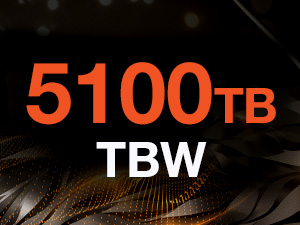
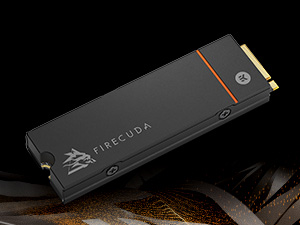
The Seagate FireCuda 530 2TB SSD is a top-tier M.2 PCIe Gen4 ×4 NVMe 1.4 drive delivering up to 7300MB/s read speeds, engineered with a custom EKWB heatsink to minimize thermal throttling. Designed for professional gamers and content creators, it offers exceptional endurance with 2550 TBW and a 5-year warranty, making it an ideal PS5 expansion solution and a powerhouse for high-demand PC setups.


| ASIN | B0977K2C74 |
| Additional Features | Internal |
| Best Sellers Rank | #266 in Internal Solid State Drives |
| Brand | Seagate |
| Built-In Media | FireCuda® 530 SSD 2TB PCIE |
| Cache Memory Installed Size | 2 |
| Color | Black |
| Compatible Devices | Desktop PC |
| Compatible Video Game Console Models | Sony PlayStation 5 |
| Connectivity Technology | PCIe |
| Customer Reviews | 4.8 out of 5 stars 9,543 Reviews |
| Data Transfer Rate | 7300 Megabits Per Second |
| Digital Storage Capacity | 2 TB |
| Enclosure Material | Information Not Available |
| Form Factor | M.2 2280 |
| Global Trade Identification Number | 00763649167564 |
| Hard Disk Description | Solid State Drive |
| Hard Disk Form Factor | 2.5 Inches |
| Hard Disk Interface | PCIE x 4 |
| Hard-Drive Size | 2 TB |
| Hardware Connectivity | PCI |
| Hardware Platform | Linux, PC |
| Installation Type | Internal Hard Drive |
| Item Dimensions L x W x Thickness | 3.16"L x 0.95"W x 0.41"Th |
| Item Type Name | Solid State Drive |
| Item Weight | 8.1 Grams |
| Manufacturer | Seagate |
| Media Speed | 6900 MB/s |
| Mfr Part Number | ZP2000GM3A023 |
| Model Name | FireCuda 530 |
| Model Number | ZP2000GM3A023 |
| Number of Items | 1 |
| Read Speed | 7.3E+3 Megabytes Per Second |
| Special Feature | Internal |
| Specific Uses For Product | Gaming |
| UPC | 763649167564 |
| Warranty Description | 5-year limited manufacturer warranty |
A**F
Perfect match for the PS5
After researching various PCIe Gen4 SSDs for the PS5 (and discovering this drive had the most votes for "best performance" across multiple review/analysis sites) I decided to give it a shot, making sure to get the one with the included heatsink (important!) I was not disappointed, like WOW... For full disclosure, I purchased the 2TB SSD with the included heatsink. # Easy to install: Sony gets points for this category as well for making it so simple to open and add/upgrade the SSD inside the PS5. We simply slid off the white cover, removed the SSD expansion door/shield, and used the already included (with the PS5) hardware to fasten the SSD into the slot. The dimensions of the SSD (including the heatsink it comes with) are a perfect match for the SSD expansion slot on the PS5. It fits like a glove (see pictures). Then it was simply a matter of closing the expansion slot, replacing the cover, and booting up the PS5! # Setup: As soon as the PS5 booted up, it recognized the new SSD and gave me the option to "format" it (required to set it up to recognize the PS5's file system). The formatting process took about 20 seconds and then it was done! It was ready to use. You must make sure you go into the PS5's 'Storage' settings to make sure you designate your new drive as the installation location for new games, or specific content (if you want to use it that way, of course). Or you can simply transfer files to and from the SSD expansion at your leisure. # Performance: While this drive claims read speeds of around 7,300MB/s your mileage may vary on the PS5. The PS5 reported around 5,700MBs - but keep in mind this is not a limitation of the SSD but the data transfer subsystem of the PS5 itself. Rest assured, it's most likely the drive is capable of up 7,300MB/s on compatible hardware, and you can sleep easy knowing that its bandwidth capabilities are well in excess of what the PS5 needs to run at peak performance. I ran a test by copying Uncharted 4: A Thief's End (57GB of data) from the PS5 local storage to the new SSD. It took around ONE MINUTE to transfer! That's insane. I then installed the new Uncharted: Legacy of Thieves collection to this storage and benchmarked the performance/load times of the game, and they were on par with the PS5's local storage, loading up an entire level in just under 2 seconds! I've read that high performance SSDs like this one can even perform a little faster than the on-board SSD that came with the PS5, but, the performance of either drive (internal or expansion) is so fast already, the differences will be too subtle to notice. Especially on PS5 optimized games that load faster than the time it probably takes to start your stopwatch and benchmark. # Final Thoughts This SSD (with the included heatsink) is clearly designed with PS5 expansion in mind. If that is why you're looking at this SSD then I can strongly recommend it. It's easy to install, fits like a glove, and performs well in excess of what the PS5 requires. It has been going strong in my PS5 for 6 weeks now and I am extremely happy with this purchase.
C**B
Great drive with decent capacity and a straightforward installation process.
While installing it, it took me about 10 minutes to realize the M.2 support screw on my motherboard was already installed instead of being in the bag, so that was a waste of time lol. But other than that, installation was straightforward (bit annoying due to how small M.2 screws are though, but that's not SeaGate's fault). Loving it so far. Didn't have to do any extra setup to get it working, just plugged it in, cloned my drive, removed the old one, and loaded up the computer again. A lot of modern games aren't optimized to take advantage of NVMe speeds, but it is still a great choice for gaming given that it's on the motherboard (so it's *slightly* faster than a SATA drive). I personally use all 2 TB (and need more now, lol), but if you don't have a ton of games installed the 500 GB or 1 TB models will be fine for you. I do recommend getting the model with a heatsink though, as gen 4 drives can get quite hot (and my M.2 slot is located just above the GPU). Oh, and make sure your motherboard supports gen 4 - mine's only gen 3, so it's underclocked right now due to that. TL;DR - Great drive with a lot of space, a straightforward installation process, and no hassle for getting it to actually work.
B**Y
You get what you pay for. Reliability > Speed.
Don't get me wrong, this thing is fast. It's just not what sets it apart compared to the competition. I got this after a WD SN850x failed in my brand-new top of the line PC one week after installing. Having a critical failure happen on your primary system drive after configuring a $4000+ PC build is a stress-inducing nightmare. I got suckered by the high speeds and low price of the WD. There is a reason it is cheap though. They take mid-tier NAND flash with a cheap controller and overclock the snot out of it, using black magic to get it just stable enough that *most* of them work. After learning from my mistake and doing some more research I discovered the Firecuda 530. At first glance, it is easy to pass over. It is significantly more expensive than competing WD and Samsung drives. Although the performance is great, it is also *slightly* behind those drives generally in terms of raw speed. Where the Firecuda truly shines is in endurance and reliability, which I have learned is the most important metric for judging storage. It is rated for literally *double* the TBW and DWPD of competing hard drives. (Terabytes written/Drive writes per day) On top of the five year warranty, they offer 3 years of free professional data recovery. That is a feature usually reserved for enterprise-class storage, and shows that they are confident in the reliability of their product. Highly recommend this product, especially if your fault tolerance is lower than the average person upgrading a PlayStation 5. One thing is that I wish I hadn't gotten the one with the heatsink. It was a PIA to install, and the heatsink that came with my motherboard is sitting in its box now. The standard one wasn't available at the time unfortunately. Other than that, my only regret is not opting for a 4tb unit. Lol.
J**N
Works as advertised.
Did exactly what it said it would and installation was a breeze.
J**D
Great SSD for the PC or PS5
Bought the heatsink version of this drive for my PS5, though I also use a non-heatsink 1TB and 4TB version in my PC as well. Drive is fast and most importantly has industry leading TBW durability. The heatsink is a nice hefty piece of aluminum made in partnership with EKB who are well known to be one of the best if not thee best in the water cooling space in the PC market. PS5 clocks the drive at 6,700 MB/s though the PS5 tool for benchmarking is known to not be very accurate so I suspect it’s much higher as this drive has no problem hitting 7,000 MB/s in my PC. As mentioned before the biggest reason to get this drive in my opinion is for the durability that 176 layered nand gives you TBW that no one else in the space seems to be offering. Though admittedly that does come with a decent premium in terms of cost. Overall this drive is great because you get the legendary quality of Seagate, the cooling from EKB and performance that is unparalleled when compared to other drives in the space.
B**L
Fast M.2 drive with plenty of storage!
The Seagate Firecuda 4TB Gen. 4 NVME drive will give you excellent performance and storage for PS5. I tested a few PS5 games, and they appear to load just as fast as they did from the system storage. This is the first NVME drive I have ever installed, and it took three tries until my PS5 recognized it. It was totally my fault as I didn’t have the spacer installed properly thereby causing the Firecuda to not be seated correctly in the PS5. Make sure you put the spacer in correctly and if the SSD drive door shuts with tension, then you may have it installed incorrectly. Total noob mistake and once I figured out the problem, it was up and running. Easy installation! :)
C**.
Seagate FireCuda 530 1TB with Heatsink Review
Defining qualities: Fast sustained writes. Runs cool. Respectable endurance. Actually available. Moderate cost. 3/4 of my FireCuda 530 with the heat sink is being used as an L2 storage cache for 4 hard drives in a large tower PC. Saving a file uses a 20 GB RAM cache until it is full then the rest is saved to the FireCuda 530 and the destination hard drive at the same time. The FireCuda and the RAM continue to save to the hard drive whatever it couldn't keep up with in the background but the file can still be opened and used before this is finished. The RAM and hard drive extend the FireCuda's life by reducing writes to it. The FireCuda extends the hard drive's life by reducing reads and writes on it. This was about the fifth fastest SSD drive in the world that I could find in April '22. The faster SSD's required a U3 interface, not NVME slots that desktops have, were vaporware or have been discontinued and they all cost a fortune. Fast can mean many things to many people. I'm talking about large sustained writes. The kind it takes to save a 200 GB Apple ProRes video and an audio track together into another one on the same hard drive. Then play it to see how it looks in a few minutes. Even external RAID can't do that. The SSD has to not slow down to barely better than RAID before most of the file is saved and not overheat to 70 degrees and throttle itself. This drive runs much cooler than my Samsung 970 Evo Plus using the MSI motherboard heat sink. Installing a large game or restoring a backup will overheat that drive in about 10 minutes despite my large E-ATX tower case. After learning this lesson, I ordered my FireCuda 530 with the heat sink. The FireCuda 530 has no overheating entries logged in SMART after 1200 hours of use despite being installed above the always warm and sometimes hot video card. The Samsung is underneath it.
M**K
Fastest, best M.2 Gen4 SSD for PC's or a PS5.
Let's face it, if you're shopping for an SSD, especially an m.2 Nvme SSD, you're looking for the best speed you can get, and it doesn't get any faster than the Seagate Firecuda. I've bought two of these now, one running on my gaming PC & one doing extra-storage duty on my PS5. Like all m.2 SSD's, it's easy to install. So there's only two things that matter: Speed & longevity. There are hundreds of SSD brands out there, but most I wouldn't trust my temp files to, least of all my pictures, game files, music & more. The Seagate Firecuda is unbeatable for speed with Seagate quality & warranty. Looking for a new m.2 SSD? Look no further.
L**E
Bom produto
Bom e rápido
R**D
Snel! Echt snel!
Vorig jaar begin november 2x 2TB gekocht voor 136 euro stuk. Ik wil er nog 1 maar niet voor de huidige prijs (prijs nu 241,07 euro per stuk).
E**I
completely transformed my gaming experience
I recently upgraded my PS5 storage to the Seagate FireCuda 530 NVMe SSD 2 TB, and it has completely transformed my gaming experience. Here's my in-depth review of this high-performance SSD: *** Pros: Blazing Fast Speeds: The FireCuda 530 sets a new standard for speed. With read and write speeds that are nothing short of impressive, it significantly reduces load times for applications, enhances system responsiveness, and provides an overall snappy computing experience. Ample Storage Capacity: The 2 TB capacity of this NVMe SSD is perfect for users who demand both speed and ample storage space. Reliability and Endurance: Seagate is well-regarded for producing reliable storage solutions, and the FireCuda 530 is no exception. The SSD comes with an excellent endurance rating, making it suitable for heavy gaming and ensuring longevity. Advanced Heat Dissipation: The SSD is equipped with a high-quality heatsink that effectively dissipates heat, preventing thermal throttling and ensuring sustained high performance over extended usage periods. This is particularly beneficial for users engaging in resource-intensive tasks. Comprehensive Software Suite: Seagate's Toolkit software provides a user-friendly interface for managing and monitoring the SSD. It allows firmware updates, performance optimization, and even provides tools for cloning existing drives, simplifying the migration process. Compatibility and Form Factor: The M.2 2280 form factor ensures compatibility with a wide range of systems, including ultrabooks and compact desktops. The PCIe Gen4 interface maximizes data transfer rates, especially on compatible motherboards. In my case, fits perfect to my PS5. *** Cons: Premium Price: The FireCuda 530's premium performance and features come at a relatively higher price point compared to standard SATA SSDs. However, the investment is justified for users seeking top-tier speed and storage capacity. Heatsink Size: (not relevant if you install on PS5) While the included heatsink is effective, its size might be a consideration for users with tight space constraints in their system build. It's advisable to ensure compatibility with the available space in your setup. In conclusion, the Seagate FireCuda 530 NVMe SSD 2 TB is a powerhouse storage solution that combines speed, reliability, and ample capacity. Whether you're a gamer, content creator, or power user, this SSD delivers on its promises. While it comes at a premium, the performance gains and comprehensive feature set make it a worthwhile investment for those who demand the best from their storage solution. Highly recommended.
A**R
FireCuda
Very good product. Perfect working.
S**.
Va como un tiro
Lo compré para instalarlo en PS5 , y va como si fuera el original , muy fácil de instalar y no se recalienta en sesiones largas de juego. Los juegos no se resienten nada por lo rápido que es. Lo recomiendo
Trustpilot
1 month ago
1 month ago