

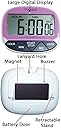
LCD Digital Kitchen Timer Cooking Large Count Down Up Lanyard Hole Clock (Purple)
Product ID: 35379369
Details
- BrandAnnser
- ColorPurple
- Item Weight2.4 Ounces
- MaterialPlastic
- Number of settings6
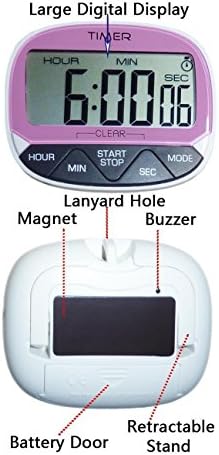
Battery Installation Open the battery door on the back-side of the unit. Inser AAA/LR03 size battry into the battry compartment,observing correct +/- polarities.Place the battery door back onto the battery compartment .Setting the Colck Enter the clock mode by pressing the MODE key. The clock icon will appear on the LCD.To set the hour, press HOUR key until the desired hour appear on the LCD.To set the minute, press MIN key until the desired minute appear on the LCD.To set the second, press SEC key until the desired second appear on the LCD. To select 12Hr or 24Hr clock mode format by pressing the START/STOP key. The PM icon will appear on the LCD for 12Hr format. Countdown TimerEnter the timer mode by pressing the MODE key as many times as necessary until the timer icon appear on the LCD.Press HOUR key to set the desired hour. Press MIN key to set the desired minute.Press SEC key to set the desired second. To start or stop/pause the time, press START/STOP key. The alarm will beep for 1 min if left idle.Press any key to stop the alarm sound. Note:the display will revert to showing the current countdown time set. Reset the countdown time back to zero by pressing and holding the MIN and SEC keys at the same time until the display shows "00:00:00". The timer needs to stop running before it can be reset. Count Up TimerUnder timer mode,press the START/STOP key to start the count up. Press the START/STOP key to pause and press again to resume the count up.The alarm will beep for 1 min when the max.Time limit "23:59:59" is reached. Reset the count up time back to zero by pressing and holding the MIN and SEC keys at the same time until the display shows "00:00:00". The timer needs to stop running before it can be reset. Review: Five Stars - no special comment but love it Review: It functions but a couple of the buttons are difficult ... - It functions but a couple of the buttons are difficult to press, so much so that my 7 year old can't work it on his own.
| ASIN | B01M99EG0Y |
| Batteries required | No |
| Brand | Annser |
| Color | Purple |
| Customer Reviews | 3.5 3.5 out of 5 stars (14) |
| Is Discontinued By Manufacturer | No |
| Item Weight | 2.4 ounces |
| Item model number | DEBN3Y |
| Manufacturer | Annser |
| Material | Plastic |
| Number of settings | 6 |
| Product Dimensions | 6 x 0.8 x 4.5 inches |
M**O
Five Stars
no special comment but love it
J**R
It functions but a couple of the buttons are difficult ...
It functions but a couple of the buttons are difficult to press, so much so that my 7 year old can't work it on his own.
J**E
Not the best
Reset button is very hard to push. Takes multiple tries to reset. Also the battery cover on the one a received falls off very easily.
S**H
Didn't work as a timer
This one didn't work! Had to return!
C**C
Four Stars
It works well but it's difficult to reset it
A**R
use good
This timers are small and easy to use.
W**L
works alright, but it's far from perfect
It's nice that it has "hours" on it, but one has to push really hard to clear the screen.
Trustpilot
4 days ago
3 weeks ago