


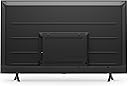


Amazon Fire TV 55" Omni Series 4K UHD smart TV, hands-free with Alexa
Product ID: 359818839
📺4K UHD resolution for stunning clarity
🔌3 HDMI ports + eARC for seamless connectivity
🎙️Hands-free Alexa voice control
Buy anything from 5,000+ international stores. One checkout price. No surprise fees. Join 2M+ shoppers on Desertcart.
Desertcart purchases this item on your behalf and handles shipping, customs, and support to KUWAIT.
🔥 Elevate your living room with Alexa-powered 4K brilliance!
The Amazon Fire TV 50" Omni Series delivers stunning 4K UHD visuals with HDR10 and HLG support, combined with hands-free Alexa voice control for effortless navigation. Featuring 3 HDMI ports including eARC, it seamlessly connects to your devices, while streaming over 1.8 million movies and shows from top platforms. Designed with privacy in mind, it includes a mic disconnect switch and continuous software updates, making it a smart, future-ready centerpiece for any modern home.
| Resolution | 3840 x 2160 |
| Display resolution | 4K UHD |
| High Dynamic Range (HDR) format | HDR 10, HLG |
| Backlight type | Direct LED |
| Refresh rate | 60 Hz |
| Screen size | 55” |
| Viewable display size | 54.6” |
| HDMI ports | 3 HDMI 2.0 + 1 HDMI 2.1 with eARC |
| Ethernet | 1 Ethernet port |
| USB | 1 USB port |
| IR device control with included Fire TV Alexa Voice Remote | The included Fire TV Alexa Voice Remote can control certain functions, such as power and volume, on a wide range of compatible IR-enabled devices, soundbars, and A/V receivers. Note: Certain functions may not be available on some IR-enabled devices. |
| Voice support | Yes, hands-free with Alexa, press and ask Alexa with the Fire TV Voice Remote or the free Fire TV app (available for download on Fire OS, Android, and iOS). |
| Audio support | Dolby Digital Plus with passthrough of Dolby-encoded audio |
| Audio power | 8W + 8W |
| OS | Fire TV OS |
| Product size without stand | 48.6” x 28.5” x 3.6” |
| Weight (without stand) | 25 (lb) |
| Bezel size (mm) | 5.7 mm |
| Front finish | Black plastic |
| SKU number | 4K55M600A |
| VESA Wall Mount Standard | 300 mm x 300 mm |
| Distance between TV legs | 39.6” |
| Accessibility features | VoiceView screen reader enables access to the vast majority of Fire TV features for users who are blind or visually impaired. Screen magnifier enables viewers to zoom in and out, and pan around the screen. Text Banner consolidates onscreen text into a compact, customizable banner that appears on the screen. Watch videos and TV shows with closed captioning displayed. Use Audio Description for verbal descriptions of what is happening on the screen, including physical actions, facial expressions and scene changes. Captions and audio descriptions are not available for all content. Fire TV 2-Series, Fire TV 4-Series, Fire TV Omni Series, and Fire TV Omni QLED Series support audio streaming for select compatible Bluetooth hearing aids and devices for a private listening experience. You can also listen to Fire TV with compatible Bluetooth headphones. Learn more about accessibility for Fire TV. Note: “Hearing aids” refers to compatible Bluetooth hearing devices such as traditional hearing aids, cochlear implants, and bone conduction hearing devices. |
| Content availability | Certain apps and services are subject to change or withdrawal at any time, may not be available in all areas and languages, and may require separate subscriptions. |
| Connectivity | Wifi or Ethernet |
| Digital Optical Audio Output | 1 Digital Optical Audio Port |
| Warranty and service | 1-year limited warranty and service included. Optional 3-Year and 4-Year Extended Warranty available for U.S. customers sold separately. Use of Fire TV is subject to the terms found here. |
| Included in the box | Fire TV Omni Series 55”, Fire TV Alexa Voice Remote, power cord, 2 AAA batteries, IR emitter cable, 4 screws, TV stand (2 legs), Quick Start Guide. |
| Software security updates | This device receives guaranteed software security updates until at least four years after the device is last available for purchase as a new unit on our websites. Learn more about these software security updates. If you already own a Fire TV, visit Manage Your Content and Devices for information specific to your device. |
| Support | Explore the User Manual to view more information about Fire TV Omni Series. |
| Size | 38.2 x 157.7 x 17.1 mm |
| Weight | 51 g (without batteries) |
| Batteries | 2 AAA required (included) |
| Technology | Bluetooth 5.0 |
| Compatibility | Compatible with Amazon Fire TV smart TVs: Fire TV 2-Series, Fire TV 4-Series, Fire TV Omni Series, Fire TV Omni QLED Series, Fire TV Cube (3rd Gen) |
J**N
Great display, but needs some upgrades
My wife sent me the listing for this TV when she received it as a special sale item and even though my current old TV was still working fine, I decided that it was a good enough deal that I would upgrade to 4K finally. I liked that it had a lot of potentially beneficial connectivity between other devices, like cameras and other smart home stuff. I already had a TV wall mount from my old TV. The only problem was the mounting holes on the back of this TV were different and I didn't have the leftovers from the mounting hardware, so I had to wait until the next morning to run to the hardware store and get what I needed. After that, it was up on the wall within minutes. Another problem: the mounting of the bracket on the back on the TV is much lower than my old one, so the TV sits about 8-10" higher than before. I will need to take down the TV and move the entire wall bracket down so it sits at the right height. Setup is pretty easy, getting through the general stuff, the WiFi connection, updates, and scanning through the TV channels...yes, I still use antenna for a couple local channels I can't get through streaming. That all went fine. I connected my existing in-wall HDMI cable to the ARC port and set my receiver to the Roku input. I had great picture and audio. I decided that I should also try using the TV with its built-in Fire TV capabilities. That's where things went off the rails. The ARC was working fine for all of a few minutes, and then after changing a couple unrelated settings and rebooting the TV, I had no more sound over ARC. I messed with settings on the TV and my receiver for 10-15 minutes before turning to the internet for help. I found an answer that said to unplug the TV for a few minutes and then it should work again. Great. Did that and I did indeed have sound over the ARC channel, but it would cut out every 5-7 seconds. I tried messing with all sorts of settings but eventually gave up and just connected an optical cable between the TV and receiver to get sound working properly. I might have to try a newer HDMI cable to see if that makes any difference. With that working, I was able to use the native Fire TV apps. I've been using the native Fire TV system now for a couple months and I have to say, it needs work. When the apps work, they work. But every once in a while, and it's happening almost daily now, I'll load an app and it won't respond. I'll have to reboot the TV and then the apps will start working most of the time. Sometimes even a reboot won't work and I just have to wait for the app to eventually load. I don't think its an internet or WiFi issue, since nothing else seems to have any problems. I just think the Fire TV environment is slow. I don't know if it's because of the hardware or the software, but the instant I started using it, I could tell how much slower it was to respond to anything compared to the Roku box I have. Needless to say, as a display, this thing works great. The picture is clear and bright, the details are amazing. I haven't played much with the picture settings, as out-of-box, it was already good. I like that it integrates the OTA TV channels right into the menu so I don't have to change the input. I also like the on-screen notifications from Alexa for specific things that I have set up. I haven't played much with the integration of the Ring doorbell and the picture-in-picture display for it. I also plugged a web camera into the USB port on the TV and it recognized it, but I haven't tried to use Zoom yet with it. I gave it 5 stars, despite the issues with ARC, as that may not necessarily be the fault of the manufacturer, but more an issue with my cable, or the setup between the TV and my receiver...maybe they just don't work well together. I've read that Yamaha's receivers all tend to be finicky with ARC, so it may just be that. I'm also not dropping any stars, despite the speed issues, as it could potentially be related to my network, or might work fine after an update. Either way, I could use it as just a display with my Roku and it would be a 5-star display at that point. But then I'd lose any capabilities with the integrated Alexa and smart features.
V**L
Absolutely amazing and smart TV
Received my 75inches Amazon fire omini TV today and my first impression is absolutely fantastic. Amazon has not shared much technical information like panel type is IPS or VA but since it supports enhanced dolby vision I assume hardware is high end and supports 12 bit depth at panel and graphics/processor level. I have watched so far SDR and HDR 4k contents and performance is absolutely amazing out of box settings. YouTube, Netflix, Amazon prime videos, Pluto tv, Peacock are my frequently used apps and all worked flawlessly. I will return to my updates after spending some more time with various types of contents, specially enhanced dolby vision. Update Oct 30th- watched squid games on Netflix in Dolby vision. When source contents are in DV mode this Tv senses the format automatically and DV logo appears on playback. I watched at night time keeping lights off in room and paid attention to all kinds of scenes that were being presented like day light, night times, indoor, outdoor etc. It scored absolutely 100% movie theater level presentation which I thought was never possible on LCD Tv. Color clarity to the extent no detail missed. Issues- yes I noticed 1 issue too in case Amazon technical team wants to know. 1. Video playback turned absolutely black occasionally with just audio sound going on. This happened while watching episodes of LOST season 2, episodes 16 to 20. It happened consistently when commercials that interrupt automatically in between and absolutely after last commercial is complete, episodes playback resumes with only audio and no video. Exiting episode and returning back to resume play manually always resolved this issue. I assume it to be a software glitch either of IMDB TV or Amazon prime. Dec 5th update: Installed Ring door bell, Amazon thermostat, Myq garage door opener and camera. All added as a device on Alexa application. Found that Tv gets integrated to Ring door bell and thermostat automatically. Nothing impressed my wife so far but the ease of announcing to Fire Tv straight from bed even when TV is powered off “Alexa set thermostat to xx temperature “ . Just this one smart feature turned out to be biggest winner. Tv continues to perform fantastic so far! Update Feb 16th,2022 - purchased Amazon studio to enhance dolby atmos sound experience and it made amazing difference. I placed it in center below my bed, found this to be best for room full of sound. Connecting to TV was a piece of cake through Alexa application. Tv continues to perform well till date and seems like Amazon is pushing automated software updates too. Happy customer!
P**Y
Worth the Buy!
I bought this TV during a sale and, truthfully, was quite nervous on the quality. I waited a few years before making this review. I have to say, this has easily been one of my best purchases! I routinely play video games and spend a lot of time staring at a screen. This TV has survived a cross-country move (wrapped only in quilts), has held up on picture quality and continues to be a sturdy staple. The setup has been easy every time and overall, I think the value has been worth it. The TV has a number of different built in apps and makes controlling for child safety in viewing very convenient! My only complaint is that sometimes the "Alexa" wake feature gets triggered overly easily. Nobody will be talking at times and it will randomly appear. It's easy enough to tell it "nevermind" and the lag-time on that is quick enough that it isn't overly disruptive. The brightness and color quality are both vivid to provide great viewing experience but not overly harsh so as to cause headaches or eye strain.
J**H
Green Screen of Death w/ no fix - Beware
Possibly the worst purchase of my life. The TV was great for 968 days (that’s just over 2.5 years) before it bricked. More on that in a minute. Initially the TV was good. We’re not videophiles so it’s lacking stats mattered very little to us. I watch a lot of YouTube and my wife mostly watches reality TV, so no need for the best blacks or outstanding contrast. Picture was fine for sports. Can’t speak to gaming. After about a year, some weird things would happen. Alexa would wake for no obvious reason and make a random search. That was annoying but we could live with it. The menus would freeze or would be slow to respond. In a world where we expect instant response, again it was annoying, but could be lived with. Maybe the most annoying part of the TV was the inability for the back of the remote to stay on. It was loose at best and we had to scotch tape it to keep from falling off. Again, annoying but could be lived with. Just this past weekend the TV froze. No menu, apps or ads on the screen. Only a profile to select/change or settings. No biggie, go to settings and restart. The TV began to restart but got stuck in a “boot loop” if you will. “Firetv” on the screen. Nothing happening. After about 30 minutes I contacted support who showed me how to get into the Android Boot menu to force a restart. Did that. Same result. Eventually forced a factory reset. This is where it gets interesting. The TV booted as new and I loaded my profile. After Netflix loaded I tried to stream a show, but all that was displayed was green static (see photos). Forced restart. Same. Factory reset again. Same. Also realized that Alexa no longer worked and none of the inputs worked. TV fully bricked, clearly to a software glitch. I thought I would be able to connect an Firetv Stick. Nope. Inputs not recognized. Even tried an Roku. Nada. Amazon support did little to assist. Because I bought the TV in July ‘22 no help was available. No partial credit. No anything. Further research showed me that the “green screen of death” is a known issue with these TV’s. I love Amazon devices. I usually enjoy Amazon as a company, but I was very disappointed in their assistance with this issue. I didn’t expect a replacement but a partial credit or even a software update to fix the TV would have been great. Customer service essentially “hung up” on me in chat. They steadfastly refused to even consider that they should support the purchase outside of the one year warranty, Be very wary before purchasing this TV.
J**L
Pretty Good
I wanted a cheaper option for a large TV that I could mount in my garage for watching football and shows while I do work. I stumbled across this Amazon Fire TV. I found that being able to do monthly payments was convenient, especially with no interest. It's Amazon's way of making you want to purchase their product, and I gotta say, it's a great selling tactic. The TV itself has pretty good visuals for the price range. Normally I stream in 1080p, however, if you're looking for an HDR option for a home theater, I'd recommend a different product. The streaming in 1080p is good with no buffering. This leads me to write why I gave the TV only 4 stars instead of 5. I find that every once in awhile the TV will freeze momentarily like its buffering, but then catch back up after a second or so. At first I did think this was lag/buffering due to my TV being in my detached garage. A close friend of mine had liked the TV as well and purchased the exact same one. 1 week after I had. His is in his living room 2 feet from his WiFi source, and yet he's experiencing the same momentarily freezing spells. So it seems to be a TV related issue. For context we both have 400 GB + speeds for our internet, so again, seems hardware related. It doesn't bother me a lot since it catches up so quick, but it'd be nicer if the TV didn't have this problem. Overall it's a good purchase and pretty decent for the price point. Would consider getting another one for my living room.
R**G
This TV is Excellent at a Great Price!
This is my 3rd Fire TV because I happen to like them! Picture is awesome! And since Fire TV's have an earphone jack to plug into, I'm able to run the sound through a nice stereo Heath and Allen Stereo board and then into 2 EV ETX 18sp subs and EV ETX 35p tops so the sound is Awesome! I have the 75" Fire TV in front of my desk and my 50" Fire tv on my left side so I can enjoy 2 NFL games at the same time. I did learn a valuable lesson though! Do NOT put your fire tv on a power strip and totally kill the power to it when you're not watching because it was causing me major software update issues! Once I plugged it into a wall socket, so it still had power I have had no more update issues! Now I am very HAPPY! with this 75" Fire TV!
J**.
(Still a) Great Smart TV
***UPDATE - 6 Months - 5/19/25: - Original Review Underneath - I've come back around for an update for my Amazon fireTV experience to say it is still a wonderful TV. The two that I purchased (about a month apart) both are. I understand in other reviews that farther down the line it seems that they might just "stop working" but so far they have been working flawlessly. I am the type of person that upgrades my TV's every 3 years or so anyway, so if they stop working around then I will just take that at as a sign to get a new one. But that's just me. I take things in stride and for a smart TV that I got on sale for less than $400, I mean, come on. If you math that out that's less than most people pay monthly on ONE streaming service. Even if you paid full price, calm down. I still have no graphical errors, the colors are strong, there is no tearing or dead pixels in either unit. They both get daily use, hours of daily use. I have a soundbar on one unit which obviously increases the sound quality. The audio on the unit without the soundbar still produces decent sound, slightly above standard TV quality, unremarkable but nothing to complain about. They get plenty loud, so that's never been an issue. I have one unit named "Alexa" and one named "Echo". You can go into the menu and change the settings to rename the voice recognition options. So I can speak to the TV's independently. Speaking of, you still have to use the remote people. Voice control only goes so far, it goes very far actually, you can do most everything by voice, but selecting things with the remote is still required on occasion. (I like setting my sleep timer by voice at night, "Alexa, set sleep timer 20 minutes", when I'm laying in bed with my Pandora/Hulu app running.) You can google Alexa commands to see what your options are. ALSO, for everyone talking about slowdowns. Every time you open an app, it stays running in the background. It's like a phone or tablet. You open Disney+ then finish what you're watching, then go to the homescreen, Disney+ is still open in the background. Then you open Paramount+, then go to the homescreen, now Disney+ and Paramount+ are running in the background and so on and so forth, to infinity and beyond. Personally, I have never experienced slowdown's to that degree yet, but I would try doing a TV restart every night/morning (takes 90 seconds). I restart my TV's about once a week just as a preventative measure anyway. I will admit there are small irritations here and there. Alexa mishearing me. Hulu freezing once a week. Paramount+ logging me out once a month ( I honestly have a hard time even blaming the TV for that, I feel like it happens around my subscription renewal, so I think it is something that is server side with Paramount). But there are ALWAYS super quick fixes to these little bummers. Don't let these things ruin your day. Don't worry, be happy. [My TV's have never just turned off on their own either, so I'm not sure what issue that may be, I'm sorry to hear that some people suffer with that.] The only caveat I cannot speak to is the customer service problem, the frustration and pure exasperation I see is real. So I empathize with everyone who has had to deal with all of their issues. My TV's have worked flawlessly since purchase so I have never needed to contact any service reps. Edit: 6/30/25 As of today I have only had to replace the batteries once, on only ONE of my 2 sets (using Amazon brand batteries). *** -ORIGINAL REVIEW- So I've been waiting a while to write this review to get a decent feel. Honest opinion, AWESOME television. Amazing value, picture quality was great. Color/contrast didn't need adjusting right out of the box (personal opinion obviously) but you can tweak to your hearts desire. Alexa listened and responded promptly. I could just step through my front door and ask her to turn the TV on and within seconds I was at the main screen. Speaking of the interface, I found it quite intuitive. Not to disparage anyone but if you have a general understanding of how computers and/or other smart devices like smart phones work you shouldn't have a problem (QR codes might be the most difficult for those with less experience). Easy to setup and connect. Easy to connect to all your subscriptions and apps. To be honest, my TV came preinstalled with someone else's amazon account loaded, but luckily there are steps involved that make it impossible for someone to just log straight in. I just removed their account and had to take a few extra steps to add mine, again, fairly straight forward. The only issues I've run into are on a rare occasion there is a very slight lag when scrolling through apps. But if you just go into settings and do a TV restart it clears right up. All in all, at the price with the quality. A must buy. Addendum: I will concede I do not connect external hard drives or any other devices as of yet but my XBOX connects flawlessly. Great TV! Edit: For those worried about Alexa listening all the time, there is a hard flip switch directly underneath the "firetv" symbol under the center of the screen. Once you flip that the only way to control the TV is through the remote and Alexa no longer responds to voice commands and "allegedly" no longer receives any input. You can still speak to the remote as you would to Alexa while holding down the blue Alexa button as usual. In fact you don't even need to use the "Alexa" prompt, you can just say "Netflix" or "Bob's Burger's". P.S. A TV so nice I bought it twice.
Q**N
Cute Tv For A Cute Cost
I bought this TV when it first came out a few years ago and scored a great deal on Prime Day! It paired perfectly with my Samsung soundbar and subwoofer (the sound isn’t great without one) and worked seamlessly with my PS4 Pro. The picture was clear, there were plenty of ports, Alexa integration was flawless, Wi-Fi connectivity was solid, and I never ran out of storage for apps. I’d still have it today if I hadn’t sold it after being gifted a 65" smart TV. While the TV or its packaging never revealed the manufacturer, I’d definitely buy another Amazon Fire TV if I needed one. Paranoid house guests sometimes mistook the IR receiver for a surveillance camera, but that’s on them.
Trustpilot
3 days ago
1 month ago