

Buy anything from 5,000+ international stores. One checkout price. No surprise fees. Join 2M+ shoppers on Desertcart.
Desertcart purchases this item on your behalf and handles shipping, customs, and support to KUWAIT.
🚀 Elevate your workspace Wi-Fi game with TP-Link EAP610 — where speed meets seamless control!
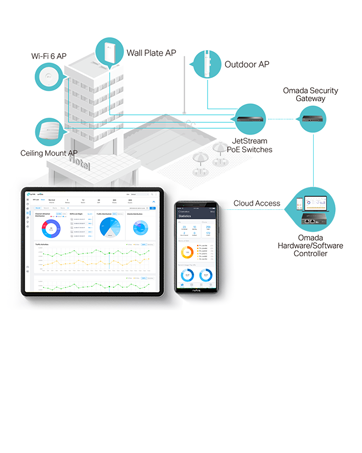
The TP-Link EAP610 is a high-performance Wi-Fi 6 AX1800 wireless access point designed for professional environments. It delivers ultra-fast dual-band speeds up to 1800 Mbps with advanced features like OFDMA, MU-MIMO, and 4 spatial streams. Integrated into the Omada SDN platform, it offers centralized cloud management via the Omada app, supports seamless mesh networking and roaming, and simplifies deployment with PoE+ power. Ideal for businesses seeking reliable, scalable, and future-ready wireless connectivity.




| ASIN | B09G5H4XS2 |
| Antenna Location | Home |
| Antenna Type | Fixed |
| Best Sellers Rank | #307 in Computers ( See Top 100 in Computers ) #1 in Wireless Access Points |
| Brand | TP-Link |
| Built-In Media | EAP610 |
| Color | White |
| Compatible Devices | Laptop, Personal Computer, Smartphone, Tablet |
| Connectivity Protocol | Ethernet, Wi-Fi 6 |
| Connectivity Technology | Ethernet |
| Control Method | App |
| Controller Type | Switch |
| Coverage | Large (Business-grade) |
| Customer Reviews | 4.4 4.4 out of 5 stars (202) |
| Data Transfer Rate | 1800 Megabits Per Second |
| Frequency Band Class | Dual-Band |
| Has Internet Connectivity | Yes |
| Is Modem Compatible | No |
| Item Dimensions L x W x H | 24.3L x 24.3W x 6.4H centimeters |
| Item Type Name | Access Point |
| Item Weight | 0.68 Kilograms |
| LAN Port Bandwidth | 1800000000 bps |
| Manufacturer | TP-Link |
| Maximum Upstream Data Transfer Rate | 1800 Megabits Per Second |
| Mfr Part Number | EAP610 |
| Model Name | EAP610 |
| Model Number | EAP610 |
| Number of Antennas | 4 |
| Operating System | Omada OS |
| Other Special Features of the Product | Access Point Mode, WPS |
| RAM Memory Installed | 128 MB |
| Router Network Type | wireless |
| Security Protocol | WPA2, WPA3 |
| UPC | 840030703614 |
| Unit Count | 1 Piece |
| Wi-Fi Generation | Wi-Fi 6 |
| Wireless Compability | 802.11ax |
A**.
Excellent WiFi 6 Access Point for Omada Setups
Fantastic if you have an Omada setup at home. It’s much better than regular consumer-grade access points. Reliable, fast, and full of useful features.
R**N
Full Gas
I did try all option like extenders etc…. But finally I installed this AP and it if running on full gas 💪
M**D
as described
good product
S**D
Bad product
My VOIP call drops when move within Mesh, Actually that should be the function available for any simple wi-fi mesh and that was my expectation when spending my money on mesh, this product is not able to provide that stable connectivity. And the TP link support team is not able to help. This product is a waste of money
H**I
منتج غير متوقع
T**S
The access point comes with wall mount easy to install supports POE {Power Over Ethernet} but does come with a power brick shortttt cable like welp better have a POE device because the cable is only long enough to be waste high i'm 6ft 2" so yeahhhhhhhhhh luckily i have a POE switch by Araknis overall power brick needs to be longer Tech Support even though the company is not US based SUPPPER NICE for me Wifi Signal has it all and oddly lol 6GHz yeah this router has 2.4GHz, 5GHz, and 6GHz wifi is strong and solid doesn't fail USER INTERFACE i'll simply laugh at that as most people doing this BETTTTTERRRR UNDERSTAND NETWORKING because if your have no clue what IPVSEC or ipv6 or vlan and much more then don't waste your money THIS IS NOT PLUG AND PLAY I'm not afraid to say this about myself ZERO NETWORKING DEGREE or knowledge before entering hell my knowledge is mostly codding and script development so when coming into this i was waaaaayyyyy over my head because not only did i buy this access point i got the tp-link switch and vpn router as well as the controller i went with the whole wham bammm welcome to networking situation All of tp links stuff can be used in "standalone" meaning you dont need everything to make one thing to work but even then it's a hassle 5 weeks i finally figured out the vpn router by tp link 1 day with the switch it's a switch give it internet and thats it (There's more to it but simply no configuration needed with switches in depth you can designate a whole side or some ports limit such and so on) 9 weeks yes 9 weeks to understand the wifi access point again me no clue what i'm doing but did this so can anyone do it yes was it EASY heck no can say and know that if i go into networking school i basically understand it all the controller controls everything! makes it easy but man oh man i do understand networking now ahhaah
Y**T
This is easy to set up provided you are comfortable in configuring it (as you would a primary router), for example you need to go into the 'router' settings and manually add a password. Being wired, this gives much better wifi coverage than a wireless connection.
Y**N
A great access point
L**Y
👍🏼
R**N
I had a deadzone in the guest bedroom in the basement. Installed this access point. I was surprised as to how strong the signal was. When used with PoE (power over ethernet), you do not need to plug it into a wall. Only hard part was phishing the cable and needed to get help with this. This solution is the most reliable and the fastest over the alternative wifi solutions.
Trustpilot
2 weeks ago
1 month ago