Buy anything from 5,000+ international stores. One checkout price. No surprise fees. Join 2M+ shoppers on Desertcart.
Desertcart purchases this item on your behalf and handles shipping, customs, and support to KUWAIT.
🎯 Own the game with precision, speed, and style!
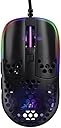
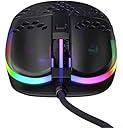
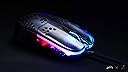
The Xtrfy MZ1 Zy’s Rail Edition is an ultra-lightweight wired gaming mouse featuring the advanced Pixart 3389 optical sensor with up to 16000 DPI sensitivity. Its ergonomic, slim-profile design supports a fingertip grip for optimal aim and comfort, while PTFE glide pads ensure smooth, effortless movement. Customizable RGB lighting and on-the-fly adjustments for CPI, polling rate, and lift-off distance empower gamers to tailor performance without software. Developed by FPS veteran Rocket Jump Ninja, this mouse is engineered for serious competitive gamers seeking precision and speed.


| ASIN | B097Q2NYRF |
| Additional Features | Ergonomic Design, LED Lights, Lightweight |
| Antenna Location | Gaming |
| Are Batteries Included | No |
| Are Batteries Required | No |
| Best Sellers Rank | #7,836 in Video Games ( See Top 100 in Video Games ) #117 in Mac Gaming Mice #339 in PC Gaming Mice #953 in Computer Mice |
| Brand | Xtrfy |
| Built-In Media | 1 product |
| Button Quantity | 4 |
| Color | Zy’s Rail Edition |
| Compatible Devices | Gaming Console, Personal Computer |
| Connectivity Technology | USB |
| Customer Reviews | 4.3 out of 5 stars 429 Reviews |
| Embellishment Feature | LED |
| Enclosure Material | Ptfe |
| Finish | Glowing |
| Global Trade Identification Number | 00842597101438, 07340086909594 |
| Hand Orientation | Ambidextrous |
| Hardware Platform | Laptop, PC |
| Item Dimensions L x W | 2.3"W |
| Item Type Name | mouse |
| Item Weight | 0.06 Kilograms |
| Manufacturer | Xtrfy |
| Mfr Part Number | MZ1-RGB-BLACK-TP |
| Model Name | MZ1-RGB-BLACK-TP |
| Model Number | MZ1-RGB-BLACK-TP |
| Mouse Maximum Sensitivity | 16000 Dots per Inch |
| Movement Detection | Optical |
| Movement Detection Technology | Optical |
| Number of Buttons | 4 |
| Operating System | Mac OSX 10.1, Windows 10, Windows 7, Windows XP |
| Power Source | Corded Electric |
| Range | 10.0 meters |
| Special Feature | Ergonomic Design, LED Lights, Lightweight |
| Style Name | Modern |
| Theme | Video Game |
| UPC | 842597101438 |
| Unit Count | 1.0 Count |
| Warranty Description | 1 year Warranty |
A**T
Absolute perfection
I have very small hands — 6.5 inches, kids-sized gloves. The best mouse I've ever had size-wise was a Logitech that was 3.8-4 inches long. Since then, I could never find a comfortable mouse for my hand and had to settle with a Razer Viper Mini, which was good but not ideal. The hump was way too steep and used to hit the top of my palm/base of my fingers. After watching a few videos on the MZ1, mainly how it was designed, I decided to get it, and there's only one word to describe it: PERFECTION. It is lightweight and as anatomical as I imagined; my hand just naturally grips the mouse without any effort or discomfort. For those who worry about the holes being uncomfortable, don't, because there's no weird texture or sharp edges. Another characteristic I love is how my fingers stay in place on the right and left click buttons. The cable is soft yet resistant and very long. The RGB colors and patterns are beautiful and very bright (you can adjust the speed and brightness to your liking, as well as a single color or rainbow). The F11, lift-off distance, and polling rate are also customizable, and they don't require any software to be changed. It's amazing. I haven't found a single negative aspect to mention about it yet. It looks and feels fantastic. Best investment ever.
K**Y
Amazing mouse.
Almost perfect for small hands. A little bit shorter would have been ideal but best feeling mouse I have used so far. Even better feeling than the Razer Orochi. The fact that it's wired is a huge plus for me since I am cutting back on EMF exposure and reducing wireless gaming device usage. (Besides, I simply hate having to worry about charging stuff!!)
S**Q
This mouse is ugly! Cheap looking transparent plastic BUT it slays! Boom Headshot!
My one sentence review - When I hold this mouse it automatically points to the enemy's head & Boom Headshot! Chill out on the hype reviewer - get your bearings on straight. Looks: Right next to my Glorious Model O Minus, it looks like it was designed in the year 2000. The lighting is non-uniform; starts half way from left mouse button and goes all the way past right mouse button. Glorious runs circles around the MZ1 with it's led implementation and lighting effects. Pulling a line from an old racing game - if this was a beauty contest the MZ1 would have already lost this race. Performance: This is where MZ1 comes in to its own in and blows way past any other fingertip grip mice. It felt like an odd shape and I couldn't figure out where my pinky needs to go. This was before I launched my fps games. My tracking seemed to have improved immediately and I didn't even pay any attention to where the heck my pinky was, and I still don't know where it goes during gaming but I don't care - boom headshot! Playing COD MW, I realized that with my Glorious Model O I was working hard on my aim and enemy tracking. I was paying less attention to my movement and overall game sense. My mind was busy allocating compute cycles to accurate aiming and didn't have the bandwidth to also pay attention to smarter gaming. Now, with MZ1 allowing me to aim and track better I have started noticing that I tend to hold down mouse button 1 for far too long. I need to burst more and prioritize the enemies better. This mouse is making me a better player as it acts an extension to my hand. Mouse buttons: I don't like the left-mouse button. If you depress it down with any force it pops back with a lot of feedback. Almost feels like it vibrates once it gets back to the top position. I only notice it when I snipe. Clicking quickly, or clicking lightly seems to eliminate this issue. I am wondering if this is QC issue and I need to get a replacement. Mouse wheel: I prefer the placement and tactile feel of the glorious mouse model O, but I don't notice that the MZ1 mouse wheel affects my gameplay negatively. It's good enough. Mouse Texture: Coming from the glorious Model O glossy black - the MZ1 feels like cheap plastic. The Model O despite the cheaper price feels like the premium mouse. Kuddos to Glorious for making such great mice. Comfort - Since this is such an odd shape. I would only use it only for gaming and not for productivity. Buyer beware. Decision time: Should you the gamer pay $80 for this non-wireless mouse? Yes, if you use fingertip grip and care only about performance. Other thoughts: I do wonder if a version 2 would be the way to go once Zy realizes that the shape is money but design and QC leaves a lot to be desired. For now this is my main. Anyone in the market for used Glorious model O minus?
W**D
Amazing!
Amazing shape for Fingertip/Claw Grip, and its grooves are made for your fingers to fit right in and adds a lot of comfort. The clicks are amazing, crisp, and fast. The holes on the shell cuts weight and there are solid parts on the mouse so that your hands don't feel uncomfortable from the holes. The side buttons are a little loose but I like it because my old mouse side buttons are stiff and hard to press. The right and left click has a little side wobble but isn't noticeable in game. The scroll wheel isn't loose or too hard too scroll and the clicks are also amazing and crisp. The cable is very light but easily bended and twisted, not much of a problem. The dpi button has many different modes and is located at the bottom separately so that you don't accidentally change it. The dpi button also has a light which tells which dpi setting you are on. The default dpi or where the usual dpi button is located, is programmable with 4 different features. 1) RGB 2) Polling rate 3) Lift off distance 4) you are able to set the button to F11 You can also change the debounce by pressing the side buttons and mouse buttons all at the same time and wait 4 seconds until the rgb changes to a different color, and that color will be the debounce setting on the manual.
T**N
Fantastic shape
I've been mouse hopping for the whole month. I've tried the Microsoft Intellimouse Pro, Logitech MX Master 3, and Logitech superlight wireless. This thing beats them all. The only one that comes close is the superlight, but this is more comfortable. Pros: - Sensor is the flawless PMW 3389. - Cable is essentially a light shoe-string. Doesn't get in the way or rub on the desk. It is quite long. - Clicks are the best I've ever felt. It's like if Pringles made a mouse. M1 and M2 feel and sound the same which pleases my OCD. - Side buttons are better than any Logitech I've tried. - Shape is strangely comfortable for my fingertip/claw grip. The way the front buttons slope down feels very natural. And I have large hands. It's pencil precision, best way I can describe it. I think it has something to do with being so close to the mousepad. - Weight is light. There's never a flick where I'm like "Oh, the weight was too heavy so that's why I missed". No, that's never an issue with this mouse. I think this mouse is best with a hard mouse pad. It's all about sensory, the more your nerves can feel the surface you play on the more precision. - Balance is great. Cons: - Scroll wheel is average. The steps are a little bit mushy. - The LEDs are stupid. All they do is add weight and do nothing for performance. I keep them off. I mean that's about it.
G**Y
Quality Control Issues (2026)
Had sensor issues within 3 months of use. I believe whenever there was a discount on this item; It decreased the usual quality and production of the product making it frustrating to deal with. I am not going to purchase an xtrfy mouse from amazon or their main website anytime soon. - guy
T**N
Shape is King
After years of watching RJN reviews, we finally have it. Shape is king with this mouse. As all the previous reviews said, if you're claw/fingertip this mouse is hard not to try. If your palm, this mouse might convert you to a new grip. I've never felt such a perfect fit in my hand. Of course the measurement of your hand plays a role here, but Zy knocked it out of the park. I had just received my Superlight a week before this, and I haven't touched that potato since. The cord is good, the skates are great, the color and RGB are wonderful. Now for the bad. Sometimes, in the heat of the moment when I press and hold Mouse 1 hard (spray and pray moments) the gun will shoot, and then it'll just stop registering me holding down mouse one. This happens about five times a week. It's super hard to replicate, and I'm thinking MAYBE I am pressing down very hard and then slightly easing off, but just enough that I still think I'm pressing down, but it's not registering it? I don't know, but I've lost a few rounds because of it. This has never happened in a previous mouse of mine. Either way, I put in a ticket to Xtrfy, just explaining my issue and asking if they had any recommendations on how to troubleshoot (debounce? common issue? something?). They wanted me to submit a video of the issue, and I had recordings of me shooting mid spray in Valorant and the gun just stopping. That wasn't enough. They wanted to see a video recording game AND mouse at the same time. Wow, that's just hard to accomplish. In the end, to setup such a system and replicate the issue was too much work so I let the ticket expire. It does give me pause on future customer support. This mouse is still my daily driver, and I can't wait to see what else Zy comes out with. I mainly got this to support the project and encourage these kind of collaborations. I didn't think it would replace my 1 week old Superlight. It's a shame this mouse isn't slightly cheaper, it would be a more accessible and a no brainer, pushing the standard and narrative that when it comes to aim, shape is king.
T**D
Absolutely worth getting used to.
I love this mouse, but I think before buying it, you have to know what you're getting into. I've played thousands of hours of competitive shooters, but in recent years I've not been playing as consistently. When getting back into CS:GO 9 months ago, I decided to get this mouse after watching Zy's videos on it, and doing a little research. Basically I knew I would have to radically change my grip to a fingertip grip, and would likely have some discomfort as I got used to it. For the first week I had difficulty with accidentally defaulting to my old grip type, and some strain as I tried to really burn the mouse in. However, once I got used to the mouse, all my scores in measurable aim trainers (Aim Lab and Yprac) increased compared to my previous mouse and grip style. I've daily driven this mouse since that point, and am surprised to say that I find the mouse perfectly comfortable, which is surprising as I have slightly larger hands, and have spent the last 10 years using a palm grip far back on the mouse (which is like, the complete opposite of the grip this mouse forms your hand to). I did have a minor problem with the mouse at one point, and Kristie from XTRFY's Amazon support team was extremely helpful and took care of everything! My tips to those of you who want to try this mouse out: -Force your fingertips to the front tip of the mouse. This was hard to get used to, and I had to force myself to keep adjusting for a little bit until I got used to it, but this is like, the whole point of the mouse shape and how it is contoured. -Embrace the shape, don't try to force your old grip. -However, everyone's hands are a bit different, and where my hand naturally wanted to lay on the mouse, and the positions of my fingers are somewhat different from the grip that Zy represents in his videos of the mouse. I did try to force my hand/fingers to be positioned exactly how he has displayed, but found a lot more comfort and improvement in aim once I found my own grip for it, and got consistent and comfortable with it. -I haven't used Zy's mousepad but I think it's a really slow pad. That sort of makes sense since the mouse is so light however, Zy uses much much higher sensitivity than I do in games like CS:GO. For lower sensitivity gamers, I highly recommend trying out a low friction 'fast' mouse pad like the Odin Infinity or any of the many other alternatives. I bet even XTRFY has a low friction pad of some sort. If it sounds like too much work, maybe this mouse isn't for you. But, if you're up for the initial challenge, even for intermediate gamers I feel it has been well worth it! Thank's Zy and XTRFY!
A**R
Good Mouse
A good gaming mouse that smells weird.
C**G
Love it!
Perfect for my hand
C**N
Eccezionale per Counter Strike
Per il mio stile di gioco, per la mia mano è un mouse eccezionale per counter strike a cui gioco da una vita. Il migliore mai provato rispetto a Razer, Logitech e Zowie. l'Xtrfy MZ1 (che è poco conosciuto rispetto ai mouse dei marchi sopracitati, praticamenti li ho provati tutti) consente una reattività impressionante sia per il riposizionamento dello shoot rispetto al bersaglio cioè sbaglio il primo colpo ma immediatamente dopo faccio "centro", sia nell ineguimento del bersaglio in rapido movimento consentendo di colpirlo con precisione. E' però un mouse per CS e simili dove la reattività è esiziale, un po come i monitor di zowie costruiti specificatamente per giochi come Counter Strike o Valorant.
A**U
Rápido y preciso
La verdad es que si tienes un agarre de garra como yo este ratón es una maravilla, te hace ser super preciso a la hora de jugar RTS o FPS. La única pega que le veo es que se te puede cansar un poco la mano si usas el PC muchas horas.
D**L
Sehr gut Maus, nachdem man sich umgewöhnt hat
Nachdem ich die letzten 2 Jahrzehnte treuer Anhänger von Logitech Mäusen war und meine G403 vor kurzem das Zeitliche gesegnet hat, habe ich beschlossen mal etwas ganz Anderes auszuprobieren. Meine Wahl ist auf die Xtrfy MZ1 gefallen weil ich schauen wollte, ob ein anderer Mausgriff mit einer entsprechend geformten Maus für mich funktioniert. Da ich von einem relativ entspannten Palm-Grip bei der G403 komme, war die Umstellung erwartungsgemäß schwierig und ein halbwegs zur Maus passender Fingertip-Grip zu Anfang sehr verkrampft. Nach ein paar Wochen muss ich jedoch sagen, dass die Maus toll in der Hand liegt und meine Geschwindigkeit und Präzision deutlich zugenommen haben. Für mich hat sich das Experiment gelohnt, jedoch ist die besondere Form sicherlich nicht für Jeden geeignet. Pro: + Extravagante Form, die sich mit dem richtigen Griff sehr natürlich anfühlt + Tolle Kailh Switches mit sehr sattem Klick + Halbdurchsichtige schwarze Kunststoffschale die in Kombination mit der RGB Beleuchtung eine sehr edle Optik erzeugt + Sehr flexibles Kabel mit Gewebemantel, dass mit einem Maus-Bungee überhaupt nicht stört. + Programmierung und Einstellung komplett ohne Software + Sehr gut PTFE Füße Contra: - Das Mausrad hat weniger definierte Rastpunkte, ist dafür aber komplett lautlos - Die Form bietet sich für Palm-Grip kaum an und ist daher für langen produktiven Einsatz weniger geeignet. - Die Perforation zur Gewichtsreduzierung ist an den Stellen an denen mutmaßlich die Finger liegen ausgesetzt, sodass man glatte Griffflächen hat. Sollte man die Maus jedoch nicht genauso halten (können) wie vorgesehen, liegen die Finger auf dem perforierten Bereich auf was auf Dauer unangenehm sein kann.
Trustpilot
2 months ago
3 days ago