We remain fully operational. Our teams are working around the clock to ensure your deliveries continue safely.

DOWNLOAD THE APP


Copyright © 2025 Desertcart Holdings Limited
DOWNLOAD THE APP


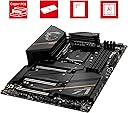


🔥 Power, speed, and style — the ultimate Ryzen motherboard experience!
The MSI MEG X570S ACE MAX is a premium ATX motherboard designed for AMD Ryzen 2000 to 5000 series processors. Featuring a robust 16+2+1 power phase design with 90A Smart Power Stages, it supports DDR4 memory up to 5300MHz (OC) and offers four PCIe 4.0 M.2 slots for blazing-fast NVMe storage. With integrated Wi-Fi 6E and 2.5Gbps LAN, it delivers cutting-edge connectivity. Its advanced thermal solutions ensure stable performance under heavy loads, making it ideal for demanding gamers and professionals seeking top-tier reliability and speed.


| ASIN | B09BYY2NDV |
| Batteries | 1 AA batteries required. (included) |
| Best Sellers Rank | #2,718 in Computer Motherboards |
| Brand | msi |
| Customer Reviews | 4.4 4.4 out of 5 stars (200) |
| Date First Available | September 17, 2021 |
| Item Dimensions LxWxH | 12 x 9.6 x 2.5 inches |
| Item Weight | 2.64 pounds |
| Item model number | 7D50-001 |
| Language | English, English, English |
| Manufacturer | MSI |
| Memory Speed | 3200 GHz |
| Number of Processors | 1 |
| Number of USB 2.0 Ports | 2 |
| Processor | ryzen_5 |
| Product Dimensions | 12 x 9.6 x 2.5 inches |
| RAM | DDR4 |
| Series | MSI MEG X570S ACE MAX |
| Wireless Type | Bluetooth |
J**B
Great motherboard and it is amd 5000 ready no need for bios flash
I love this motherboard but I paid a hefty price for it but it is well worth it. My x570 tomahawk motherboard failed on me after a year so I ended up purchasing this one. I can fit a lot of nvme storage here there is like 4 m2 slots And for some reason has 3 x16 pcie 4.0 slots and 1 pcie 4.0 x1 slot. The wireless 6e snd bluetooth 5.w and so is the audio in this motherboard it's great. Lots of USB ports and has a 16 plus 2 power design with 90a smart power. Memory supports up to 5300mhz plus overclocked with dual channel. Don't see a reason to get ddr5 yet. Especially since it's so expensive. And there is no amd board for it yet. Otherwise great motherboard and easy install didn't come with motherboard screws to put in the case so might wanna buy some when you purchase this wish it. The problem with the m2 slots is that one of them is literally under where one of the gpus is so you might need to change slots with your gpu. Which ain't a problem because you have 3 x16 slots lol gives you room. Can't imagine running sli and all your nvme slots are blocked... plus the m.2 slots shields are annoying to unscrew and put it back in might remove them as they are quite annoying. Anyways I love this motherboard and strongly recommend it especially since it is cpu amd 5000 supported out of the box so glad I didn't have to bio flash it..
S**O
Beautiful and Silent!
Built a gaming pc for my 8-year old son. Our first build, ever! Love this motherboard! It was super easy to install everything. Fit and finish was perfect on everything. Looking at builds it seems most folks just throw RGB fans wherever a fan can be placed. I wanted something different, but still wanted some RGB for bling. This motherboard didn't disappoint, I love the MSI dragon logo at the top left of the motherboard. When combined with the RGB on my memory, graphics card, and AIO cooler it was just enough. Setup after build was super easy also. Everything fired right up the first try and it took about an hour max to install all drivers, windows 10, etc. It been used daily for 2-3 weeks now and not one problem. It works flawlessly! Not sure how to compare this to others since this was my first build and only individual motherboard purchase. That said, I couldn't be happier with the ease of installation, build quality, performance, and overall appearance. Highly recommend MSI and this motherboard!
K**.
Great Product
Pros: Has alot of Features wifi 6E is really nice how intgrated into the board very well design it has 4M.2 slots which is really nice it has 2RGB header which is very simple hook up acording to the location on the board its a wonderful motherboard and the best one out there have seen its comes with alot of accessories very impressed big vram 2 8 pin esp connector for cpu usb type c connector Cons: Memory Clock Speed 3200 GHz increase it to 5300 GHZ or higher Overall Review: yes would recommand it undecided due to memory clock speed would add 4 RAINBOW RGB connector would add 2 JUSB1 one of them where is it and one at the bottom of board get rid of ]CORSAIR1 and add a JRAINBOW in its place 2 more ush connectors total of 4
T**D
LOVE this mobo!
I got this as a replacement for my x570 Taichi, which is a comparable board. I've had the ACE MAX x570S for a few months now and I absolutely love it. The chipset is passively cooled which makes it quite quiet yet it stays at comfortably low temps. This board has 4 m.2 slots and comes with MSI's eXpander, a PCIe adapter for an additional 2 m.2 drives. It also has a BIOS which is SUCH an improvement over the Asrock Taichi's BIOS. Yes, I know; this is a previous generation mobo. Still, if you're not ready for DDR5 and all the other next gen parts, this is an awesome board. It makes a great home for my 5900x, my 4 m.2 drives and all the other premium parts I stuff into my case. I highly recommend this motherboard.
E**D
Great choice for m.2 storage space
Great motherboard plenty of m.2 storage space was a little exspensive
J**N
Make sure you update your bios for windows 11
Definitely a step up from my B550 with more NVM slots...This did thr job and more! -Setup Definitely takes patience when swapping out motherboards from a previous build! Used stickers to label cables that were hooked up to my previous MB. Mainly fan cables but it really doesn't matter as they will be picked up when booting. Be sure to install RAM, CPU, and SSDs before putting into case. Everything else was pretty simple as far as fans, USB, sensors, etc. Only needed to move my AIO radiator out the way to put the new MB in and boot up. I have 4 SSDs for each slot and one hooked up to the SATA port. Already had windows 11 installed so it booted up fine. The drivers are a small pain but between msi's website and dragon center...everything installed fine. One of my SSDs wasn't being picked up by thr BIOS but after an update from dragon center, it works fine. -Use As I am a gamer and composer...this was a noticeable upgrade from the B550 pro. The passive cooling on thr chips etc keeps everything cool and running 9 fans helps with airflow. The wifi is great but I disabled it from the BIOS for the 1X slot to run my aftermarket sound card. I went with an external wifi adapter which when plugged into the USB 3.2 worked even better than before. So far this has worked like a dream and with the extra NVM slots...I don't have to worry about space or using a SSD hooked up to a SATA port -Pros Easy install 4 NVM slots USB 3.2 A and C...plenty of slots...didn't need my hub anymore Reads my corsair accessories better (light bars, mouse, keyboard, etc -Cons Setting up drivers can be a hassle Fan pins are a little further away
B**K
Ürün tam olarak üst düzey ve premium kaliteye sahip. Daha kutuyu açar açmaz oldukça klas bir biçimde hazırlanmış MEG logosu sizi karşılıyor. Kutunun içinden sürücülerin olduğu usb bellek, toz fırçası, msi logolu 2 adet tornavida ve m2 genişleme kartı çıkıyor. çıkan tüm parçalar incelikle işlenmiş, her tarafından üst düzey olduğunu belli eden işçilikler mevcut. ürünün ses kalitesi muazzam, nahimic 3 ile geliyor, windows 10 ve 11 ile tam uyumlu olan bu kart oc performansı olarak 5300MHZ ram'a kadar destekliyor. pasif chipset soğutması sayesinde uzun yıllar kullanabileceğiniz ve sağlam bir anakart yapmış MSI.
M**R
TLDR: I would highly recommend looking at the MSI MEG X570S Ace Max if you’re in need and looking for an X570 solution at this point in the game. If you’re not in “need”, just wait for the next gen Ryzen 7000 series and the AM5 socket, or the 13000 series from Intel, they just aren’t that far away anymore. Whatever you decide, make sure you’re looking in the direction of MSI. Background: When I first built my new Ryzen rig a few years back, I went with the Gigabyte X570 Aorus Master for my motherboard of choice. It had great reviews, I’ve always been a bit of a Gigabyte fan, I wanted a full featured X570 board, it has 3x NVMe slots, and its plethora of USB ports helped push me in its direction. It paired well with my 3900X and overall, I was happy with my decision. Just over a year ago I decided to upgrade to a Ryzen 9 5900X and that’s when my happiness started to turn to frustration. Instability ensued; CPU temperatures were outrageously high, it required under-volting just to keep things reasonable, and eventually that board failed outside of its warranty period. Being extremely disappointed in the death of my Gigabyte board and having owned several MSI boards over the years (most recently the B450 Tomahawk, which is an amazing value board, not to mention durable. My dog literally chewed one of the PCI-E slots off mine and it’s still going strong.) I decided to return to MSI. So, enter the MSI MEG X570S Ace Max, and yep, that’s a mouthful. I was a bit sour after my Gigabyte board had an untimely demise, and I wasn’t thrilled about having to replace it so close to a new socket being released. I also really wanted a board that didn’t have active cooling, but there were several reasons why I didn’t go with a B550 board which would seem like the obvious choice. Although I was very tempted to, I just couldn’t find one that dotted all the I's and crossed all the T’s for me that wasn’t in the same price range as the X570 equipped boards. In the end, I was able to get the MSI MEG X570S Ace Max on sale for a price that just made it too hard to ignore, and giving it was the X570S, it didn’t require active cooling and was therefore silent. It’s a decision that turned out to be a great one, and I couldn’t be happier with the board. Pros: - X570S chipset means there’s no active cooling and therefore the board is silent - Looks. It’s an exceptionally clean looking board with some nice ARGB zones. - 2.5 gigabit ethernet. - onboard Wi-Fi 6 - 12x USB ports - 4x USB 2 Type A - 4x USB 3.2 Gen 1 Type A @ 5Gbps - 3x USB 3.2 Gen 2 Type A @ 10Gbps - 1x USB 3.2 Gen 2 Type C @ 20Gbps - Support for 6 NVMe M.2 Solid State Drives - 4x NVMe slots native to the motherboard - 2x NVME Gen 4 on a PCI-E gen 4 NVMe expansion card - My 5900X never performed so well while staying so cool - Mystic Light is way better than RGB Fusion - The box comes loaded with accessories Cons: - Price, even on sale it wasn’t inexpensive - MSI Mystic Light is good, but Aura Effects is better Not really Cons: - NOTE 1: The bottom PCI-E 16x slot (#3) is shared with onboard NVME - NOTE 2: Using the second PCI-E 16x Slot limits the top slot to 8x Gen 4 Bottom Line: First, I’ll mention the elephant in the room, the one problem the MSI MEG X570X Ace Max faces. I can’t recommend building a system right now. We’re just a few months away from all the new goodies hitting the market, so honestly, wait for that. If nothing else, you should get better deals on these things once the new stuff hits the market. It really comes down to this, as much as I like this board, I wouldn’t have bought it if my old one didn’t let me down. That said, when I do upgrade again in the future, I’ll be looking MSI’s way without a doubt. Now to my thoughts on the board itself. I'm now a couple of months in to owning my MSI MEG and overall, it is a GREAT board. Plenty of connectivity, a lot of NVMe slots, while still providing 4x SATA ports. Setup was a breeze, it posted right away, and after a quick trip into the BIOS to setup XMP on my RAM I went straight to Windows. Benchmarks were solid, easily within margin of error compared to my Aorus Master, but without the ridiculously hot temperatures my 5900X had in the Gigabyte board (15c lower in fact!!!). So, it really comes down to one question, would I recommend the MSI MAG X570S Ace Max? The answer to that is a resounding YES, absolutely! If you’re in the market for a new high-end X570S motherboard that is feature laden and silent, this board should check all your boxes.
N**C
Habe das Mainboard MSI MEG X570S ACE MAX seid über 1 Woche im Betrieb und bis jetzt habe keine Probleme oder was zu melden, die Anschlüsse am Board mehr als ausreichend für mein System, die leisten beim zocken hat sich auch gewaltig gesteigerte... Also auf jedenfall eine Empfehlung, wenn Mann über denn Preis weg sehen kann.
M**L
Es ist einfach die Oberliga - auch preislich gesehen. Aber allein der lüfterlose X570 Chipsatz und die Optik sind es mehr als wert. Die Verarbeitung ist ebenfalls erste Klasse.
D**W
Great board tons of expansion for nvme drives. One problem , windows 11 22h2 won’t install on latest bios, causes crashes galore on 21h2 so do not update to latest bios if you want a smooth experience. I back dated to early 2022 bios and works fine now.
Trustpilot
1 month ago
2 weeks ago