Buy anything from 5,000+ international stores. One checkout price. No surprise fees. Join 2M+ shoppers on Desertcart.
Desertcart purchases this item on your behalf and handles shipping, customs, and support to KUWAIT.
🌦️ Own your microclimate — be the neighborhood weather guru everyone trusts!
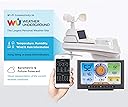
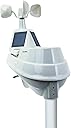
The AcuRite Weather Station delivers real-time, hyperlocal weather data with wireless sensors measuring temperature, humidity, wind, barometric pressure, and rainfall. Featuring a large color LCD display and WiFi connectivity, it syncs with Weather Underground for global data sharing and remote monitoring. Easy to set up and mount, this award-winning station offers over 25 detailed weather metrics, empowering professionals to stay ahead of changing conditions with trusted accuracy and style.


| ASIN | B07D9D6CXW |
| Are batteries included? | No |
| Best Sellers Rank | 583,058 in Garden ( See Top 100 in Garden ) 1,450 in Weather Stations |
| Brand | AcuRite |
| Colour | Black |
| Connectivity Technology | Wi-Fi, 433 MHz |
| Customer Reviews | 4.1 4.1 out of 5 stars (3,419) |
| Display Type | LCD |
| Finish Type | Matte |
| Global Trade Identification Number | 50072397015405 |
| Included Components | Main Unit, Wireless Probe, User Manual |
| Item Dimensions D x W x H | 1.5D x 19.3W x 14H centimetres |
| Item Shape | Rectangular |
| Item Type Name | Weather Station |
| Item Weight | 0.01 Ounces |
| Lower Temperature Rating | 32 Degrees Fahrenheit |
| Manufacturer | AcuRite |
| Manufacturer Part Number | 01540M |
| Material | Plastic |
| Model Number | 01540M |
| Power Source | Battery Powered |
| Recommended Uses For Product | Home |
| Sensor Technology | Wireless |
| Special Features | Wireless connectivity, indoor/outdoor temperature & humidity monitoring, weather resistance, compact design |
| Specific Uses For Product | Heat Index |
| Style Name | Modern and minimalist |
| Temperature Accuracy | 1 °C |
| Temperature Reading Accuracy | plus_minus_1_degree_celsius |
| Unit Count | 1.0 count |
| Upper Temperature Rating | 122 Degrees Fahrenheit |
K**R
Solid product with many mounting options. The only thing I would have liked to have seen is rechargeable batteries in the unit (using the solar panels to keep it charged). Wi-Fi connectivity is fiddly but it works.
R**A
It appears a lot of people are having difficulty connecting the Display unit to their WiFi. Just follow these instructions and it should work for you. Setting up this weather station is not that difficult. Just READ THE DIRECTIONS! Connecting to the WiFi just requires a gathering some information before you start the WiFi setup. First go to Wunderground.com and either login or create a new account. Go to 'My Profile' you will see a Tab labeled 'MY DEVICES', click on that Tab. Then click on the 'Add New Device' Button. Select 'AcuRite 5-in-1 Weather Station with WiFi' from the drop-down list. Then click on the 'Next' button. The next screen will display your Station ID and Station Key. Copy down this information, you will need this information BEFORE you start your WiFi setup Use these two values for the Wunderground Station ID and Wunderground Key when you have connected to the AcuRite WiFi. WiFi Setup Press the Gear button on the display. This will turn on the AcuRite Wifi for a few minutes. The instructions state it will be on for 30 minutes, but actually it's a much shorter time. Connect to that WiFi, go to a browser and enter in the IP Address 192.168.4.1 A webpage will display, enter in your WiFi name and password. Then below that enter in the Wunderground Station ID and Wunderground Key that was generated from Wunderground.com Now on the same page, near the bottom, click on the 'Save' button. The screen will change with a message stating to wait a few minutes. After a short time, the screen will change stating you have successfully connected to your WiFi. At any time you need to start the AcuRite WiFi, just press the 'Gear' button on the display. Don't forget to reconnect to your WiFi once you have completed the above. AcuRite App From the menu go to Setting, Manage Devices. Click on the 'Add Device' button. Enter the name for this device (i.e. Home). Enter the Device ID. The Device ID is found on a white label in the battery compartment when you remove the battery cover on the Display unit. Select your Country and add your Zip Code. Now follow the 'Next' button a few more times to setup that device. Your done. ************************************************************************************************************************ Update: I've had this PWS for a month. It's performance has been flawless. The connection to my WiFi has been rock solid. The only time it was not sending data was when my internet provider performed service on our connection. We were without internet a few hours. As soon as the our internet connection was reestablished this unit reconnect to our WiFi and begin transmitting data again. Within a few days of installing this, Weather Underground attached a Gold Star to the account for consistent reporting and consistent data. We've already had high winds here. The unit has set me numerous high wind warnings to me. I have the high wind warning set to 25 mph. So far our highest recorded wind speed has been 32 mph. I'm very pleased with the performance of this unit.
A**Z
Es sumamente sencillo de instalar y usar, lo utilizo a bordo y en casa para lo q fué creado.
J**E
Funciona bien
B**Y
Adjusting the wind direction "vane" involves lots of force, luckily i didnt break it. Wifipasword lengh is limited to 31 characters by setup program to configure monitor to send info to WU.
Trustpilot
3 weeks ago
1 month ago